A Complete Creative
Technology Lab
In Any Browser

One platform, 53 professional tools. Students design games, produce music, animate stories, model in 3D, build circuits, program robots, and write code. Then they discover the math and science behind everything they make.

Get Started Free Try a Tool I'm an Educator

Free for individual students. No credit card required. No pressure. Classroom plans start at $149/year.
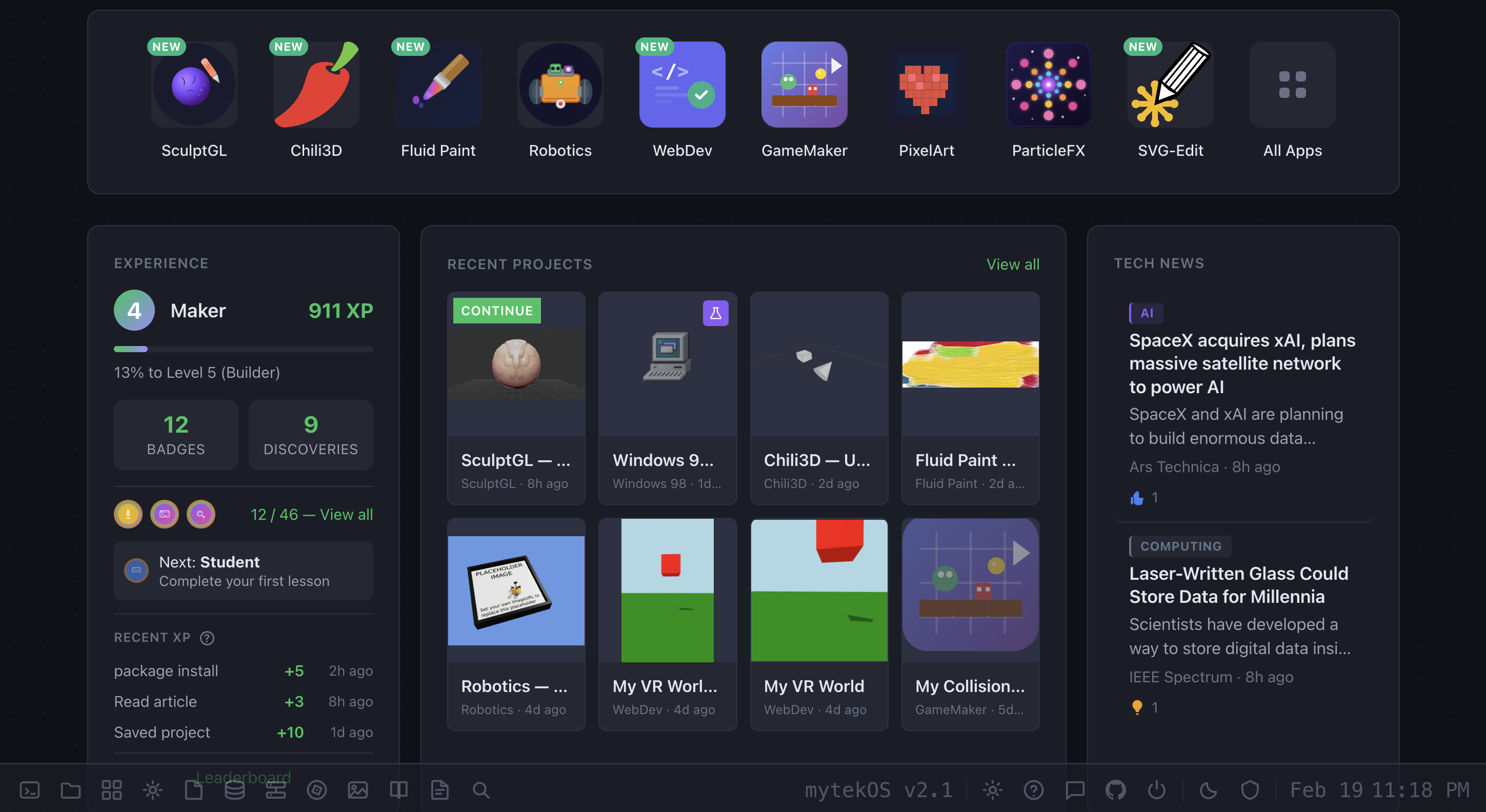
Platform Dashboard
53 Creative Tools
86+ Guided Discoveries
0 Software Installs

Everything a Young Creator Needs. One Platform.

Most programs teach one thing. We give students a complete technology studio with the same categories of tools that professionals use, made accessible for learners ages 8 and up.

Game Design
Music Production
Animation
Digital Art
3D Modeling
Electronics
Robotics
Code
Networking
Sound Design
Visual Effects
System Design
Create View: Building a Project

Professional Tools, Student-Friendly

Every tool on the platform uses the same kinds of interfaces that professionals work with: timelines, layers, node editors, sequencers, and code editors. Students learn real workflows, not simplified toy versions. And everything runs in the browser with nothing to install.

Try Before You Sign Up

Jump into any tool right now. No account, no setup. Your work saves in the browser tab so you can experiment freely.

Every Student Gets a Professional Portfolio

Students don't just create projects. They curate and present them. Every account includes a customizable public portfolio where students showcase their best work across every tool on the platform.

Custom Themes and Layouts Choose theme presets, accent colors, fonts, and grid or list layouts
One-Click Publishing Add any project with a single click. Changes go live instantly
Shareable Link A clean, public URL to share with family, teachers, or admissions
Project Notes Document thinking, decisions, and lessons learned on each project
Safe by Default Private until the student or parent makes them public
Everything in One Place Games, music, animations, 3D models, websites, and circuits, all in one portfolio

They Don't Just Create.
They Understand.

Most platforms let kids make things. We go further. Our library of 86+ interactive discoveries teaches students how and why things work: the math behind the music, the physics in the animation, the logic inside the circuit.

Collisions: 0
How does a game know when you hit something? A discovery on collision detection, coordinate systems, and geometry. Students learn the math behind every jump, hit, and pickup in every game they've ever played.
What makes animation look smooth? A discovery on easing curves and interpolation. Hit "Race!" to see how different mathematical functions make the same motion feel completely different.
Why does that melody sound sad? A discovery on rhythm, patterns, and the mathematics of music. Click cells to build a beat, then hit Play to hear it.
Avoiding 0
How do robots avoid obstacles? A discovery on sensors, feedback loops, and decision trees. Watch the robot cast sensor beams to detect walls and obstacles, then decide in real-time which way to turn. The same logic used in self-driving cars and autonomous drones.

Students develop real technology literacy: not just how to use tools, but how to think about how things are built. That understanding stays with them far longer than any worksheet.

A Real Terminal. In the Browser.

Most kids' platforms hide the command line. We built one in. Students get a real terminal with a filesystem, text editors, web hosting, and server logs. The same tools professionals use every day.

terminal
$ whoami
CosmicPanda_847
Level 5 - Builder | Creator Score: 1,247

$ ls
projects/    files/    shared/

$ nano index.html
  [opens built-in text editor]

$ link index.html
https://mytekdev.com/public/CosmicPanda_847/index.html

$ grep "404" /var/log/access.log | wc -l
12

$ cowsay "I love coding!"
 ________________
< I love coding! >
 ----------------
        \   ^__^
         \  (oo)\_______
            (__)\       )\/\
                ||----w |
                ||     ||

Real Filesystem

ls, cd, mkdir, rm, cp, mv. The same commands used on every Linux server and macOS laptop. Students learn to navigate, organize, and manage files the way developers actually do.

Text Editors in the Browser

nano and vim run right in the terminal with real keybindings. Students edit code, write HTML, and save files without a GUI.

Host Live Web Pages

Write HTML in the terminal, run one command, and get a public URL. Students see their code live on the internet in seconds.

Analyze Server Logs

grep, head, tail, and wc on real Apache-format access logs. Students learn to find patterns in data using the same tools sysadmins use.

Every command they learn here works on every server in the world. These aren't toy skills. They're transferable, professional, real.

Built for Classrooms, Homeschools, and Everywhere Kids Learn

Whether you're a district technology teacher, a homeschool parent, or running a microschool out of a community center, this is the technology education platform you've been looking for.

Teacher Classroom Dashboard

Schools & Districts

Give your entire school access to a real technology lab without buying a single piece of hardware. Every student gets the same tools whether they're on a brand new laptop or a five-year-old Chromebook.

  • Teacher dashboard with classroom management
  • Create student accounts in bulk via CSV import
  • Students join with a simple class code, no email required
  • Per-student controls for sharing, social features, and visibility
  • Monitor student projects and progress from one place
  • Works alongside existing curricula or as a standalone program

Homeschool Families

Stop cobbling together free trials of six different programs. One platform covers game design, music, animation, art, 3D modeling, electronics, robotics, coding, and more, with guided learning built in.

  • Self-directed: students explore at their own pace
  • 86+ guided discoveries serve as ready-made lessons
  • Parent dashboard to see what your kids are building
  • Full parent controls over sharing and social features
  • No ads, no data selling, no surprise content
  • Free tier is genuinely usable. Upgrade when you're ready

Microschools & Learning Pods

Small programs have small budgets. One classroom subscription covers up to 150 students across all your groups, with every tool included. No per-seat licensing, no module add-ons.

  • $149/year covers your entire program: every student, every tool
  • Create multiple classrooms under one account
  • Flexible enough for mixed-age and self-paced learning
  • Students build portfolios of real work to show their growth
  • No IT department needed, runs in any browser
  • Perfect for maker spaces, after-school programs, and summer camps

Funding & Scholarships

We accept education savings accounts (ESAs) and scholarship funds from most US states, making it easy for families to use existing education dollars. Many state scholarship programs, micro-grant programs, and homeschool stipends cover platforms like ours. If your state offers education choice funding, there's a good chance it works here.

Think about what students actually do with most technology in school: they type documents, make slideshows, and watch videos. That's consumption, not creation. This platform puts real creative tools in their hands: the same kinds of tools that professionals use to build the games they play, the music they listen to, and the apps they use every day.

Finally: Chromebooks That Do Real Work

Schools invested in Chromebooks for good reasons: they're affordable, manageable, and secure. But they can't run creative software. Until now. Every tool on this platform runs entirely in the browser. No installs, no extensions, no IT tickets.

Nothing to Install

No software downloads, no Chrome extensions, no app store approvals. Open a browser, log in, and every tool is ready. Works on managed Chromebooks without any IT changes.

Nothing to Maintain

Updates happen automatically on our end. No version conflicts, no broken installs, no "it worked yesterday." Every student always has the latest version.

Works on Anything

Chromebooks, Windows, Mac, and tablets with a keyboard and mouse. Students can start a project at school and pick it up at home on a completely different device.

Same Experience for Every Student

It doesn't matter who has a new laptop and who has a hand-me-down. Every student gets the same tools, the same performance, the same opportunity.

If it has a browser, it's a complete creative studio.

Built for Kids. Designed for Trust.

Online safety isn't a feature we added later. It's how this platform was built from day one. Every design decision starts with the question: is this safe for a 9-year-old?

COPPA Compliant Children under 13 never need an email. Age-appropriate access levels, parental consent for public sharing.
Moderated Community Profanity filtering, report tools, and human review. Content from younger students gets additional scrutiny.
No Direct Messaging No private messages. Period. Students interact only through public, moderated project comments and gallery likes.
Parent Controls Toggle social features, leaderboard visibility, and public sharing. A parent dashboard shows everything.
Teacher Controls Control sharing and social features per student, per classroom. No email or personal info needed.
No Ads. No Data Sales. Ever. No advertising, no behavioral tracking. Funded by subscriptions, not by monetizing children.

Designed to meet COPPA and FERPA requirements. We collect only the minimum data necessary, give schools and parents full control, and never use student information for anything other than running the platform.

How Students Learn

Curiosity first, then creation, then structured instruction. Each step builds on the last.

Discover

86+ interactive discoveries reveal the science, math, and engineering behind technology. Students don't read about how things work. They see it, interact with it, and understand it.

Explorable from the home screen, no account needed

Create

53 professional tools where students build real projects: games, music, animations, 3D models, circuits, code. Everything auto-saves. Self-directed, at their own pace.

Free tier includes all tools with 100 MB of storage

Learn

Guided video lessons walk students through creating specific projects step by step within each application. From game design fundamentals to animation techniques, with structured instruction when they're ready to go deeper.

Coming soon: browse all courses

Getting started takes about 60 seconds. Just a username and password.

This Was Never a Coding Platform.

The conversation around CS education has narrowed to a single question: will AI replace programmers? That question misses the point. This platform teaches students to design games, produce music, animate stories, model in 3D, build circuits, and simulate robots. Coding is one tool among many. The students who understand how technology works will be the ones who shape what gets built next, regardless of how it gets built.

Built by the makers of

MYTEK Lab

MYTEK Lab is a technology education organization that teaches students in grades 3–12 through live, instructor-led online classes. Courses range from introductory computer technology to college-prep computer science and Cisco cybersecurity certification, serving homeschoolers, charter schools, and learning programs across 24 countries.

This platform is the creative studio at the heart of that teaching. The same tools that MYTEK Lab students use in class are available here for any student, any school, and any family, whether you enroll in a course or explore on your own.

Visit myteklab.com

Give Students Access to Real Technology Education

Sign up in 60 seconds. No credit card, no commitment. Free for individual students. $149/year for an entire classroom of up to 150 students.