Dig Block
The dig kit from the museum shop, in the browser: a block on a workbench, a pick, a brush, and something buried inside. Rush with the pick and a brittle crystal cracks. Then students hide a 3D model they made in a block of their own for a classmate to dig out.
Using this with a class? Make a free class and add your students yourself: each gets a username and password, with no email or Google account needed. Or give them one join code. Using Google Classroom? Post the link there; with a free class, the link also puts each student in your class, so you see their work. mytekDev is also available from the Google Workspace Marketplace, so your school's Google admin can install it for everyone.A first lesson: One period: dig the plaster brick and split the geode, talk about why the crystal cracked and the shell did not, then everyone hides a model they made in another 3D app and trades blocks.
Set up a free class Share to Google ClassroomWhat a student actually does
A block sits on a workbench under a lamp: a plaster brick, a rough lump of layered rock, or a geode. Something is buried inside, and the card only says what can be told from outside, like "Something brittle is inside". The student taps the block to chip it. Every tap knocks bits off with dust and a sound, and dragging the space around the block turns it.
Two tools come in the box: a pick, fast and rough, and a brush, slow and safe. Every bit dug away is dust, and dust buys better tools: a fine pick, a spray bottle that softens plaster and clay so each tap takes a bigger bite (warm water for ice, which it melts), a mallet and chisel, and glue that holds a showing part of the find together. A ring under the pointer turns red when the tool in hand could crack something close by. The first hard hit right next to a brittle find is a near miss with a warning; after that, it cracks, and the crack stays on the find.
When most of the find shows, Lift it out sets it free and it goes on the student's shelf, with its cracks counted. A geode works differently: its outside is too hard to chip, so the student taps all the way around its middle until it splits in two.
Hide one of your own turns it around. The student picks a 3D model they made in another app from their files, chooses the outside, how deep it sits, how it breaks and the pace, and seals it. Whoever opens a copy of the shared project digs it out, starting with no dust and no tools of their own.
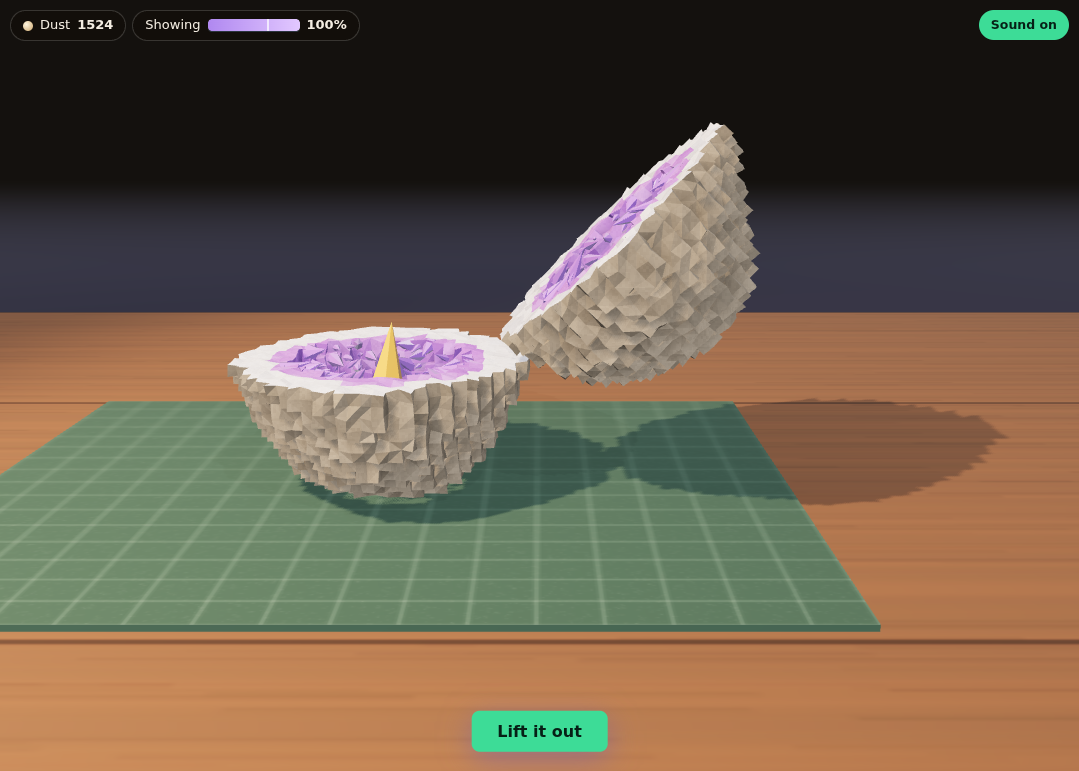
A geode is not chipped open. Students tap around its widest part, turning it as they go, until it splits, the way a real one is opened. Inside: a hollow lined with crystals, and a golden calcite in the bottom half.
What they are learning while they work
Nothing here is presented as a lesson. This is what the activity is made of.
| What the student does | What it is |
|---|---|
| Switches from the pick to the brush when the ring turns red | Choosing a tool by the material. A rough tool is fine for the plaster and wrong right next to a brittle crystal. The same job needs different tools at different distances from the find. |
| Cracks the amethyst but not the fossil coin they buried | Hard is not the same as tough. Quartz is hard to scratch but brittle: a sharp knock can crack it. The Mohs scale ranks scratching, not breaking, and the help says so. |
| Sprays the clay, and each pick tap takes a far bigger bite | Properties change with conditions. Dry clay is hard and dense; wet, it goes soft. Plaster softens with water too. Ice is not hard at all, but it splinters, so warm water melts a way through instead. |
| Taps around the geode's middle instead of chipping it | How a real geode is opened. A geode's outer shell is chalcedony, about as hard as quartz, so it is split, not chipped. Inside is a hollow lined with crystals. |
| Picks Brittle or Tough for the model they hide | Describing a material by how it behaves. The maker decides how their find breaks and what it is buried in, and has to think about how long a friend will dig. |
How to tell whether it landed
Ask, and let them show you. A student who has understood it can answer these without help.
- Quartz is very hard. Why did the crystal crack anyway?
- Why use a pick at the start and a brush near the end?
- What did the spray bottle change about the clay, and where did you see it?
- Why do you split a geode instead of chipping it?
- You hid a model in a block for a friend. What did you choose for the outside, and why?
Use it in your subject
Not a technology class? Then the app is how students show what they learned in your unit. More projects for every subject.
Elementary physical science
2-PS1-1 and 5-PS1-3 list hardness among the properties in their clarifications, and every outside and every find here has one you can feel. 2-PS1-2 fits the maker choosing a material for a purpose: how long should my friend dig?
Earth science, lightly
An amethyst cluster, an ammonite fossil and a geode with calcite inside, each with a true sentence about it. It is a taste, not a unit: identifying minerals and fossils is not what the app teaches.
Art and 3D design
A reason to finish a model in another 3D app: something they made is buried, sealed and dug out by someone else.
Practical notes
- AgesAges 8 to 14. The words are plain enough for a third grader, and the choices in Hide one of your own give older students something to plan.
- TimeThe plaster brick takes a careful student about two minutes and the geode about two. One period covers digging, the talk about cracks, and hiding a model for a partner.
- EquipmentA computer or Chromebook with a modern browser. Nothing to install. The Quick block is the lightest to run; the large Long haul block asks more of an older machine. Hiding your own model needs a free account and a 3D model in your files.
- CostFree. The app has no paid tier and nothing to buy: dust is earned by digging and spent only on tools.
- PrepDig the plaster brick once yourself, about two minutes, and crack the crystal on purpose with the pick. Then split the geode. That is the whole demo.
- In a groupEach student hides a model in a block of their own, saves and shares the project, and trades with a partner. The partner's copy starts fresh, so nobody sees inside until they dig.
For co-ops, microschools, and classrooms
Ask students to make a model first in any of the 3D apps, then bury it here and trade. A Quick block fits one period. A few days or Long haul blocks have a helper brush that works while the student is away, up to eight hours, but it never gets near the find, so the last part is always the student's.
Common questions
Is it free?
Yes. Dig Block has no paid tier, and it can be tried right on this page without an account. Dust is earned by digging and spent on tools; nothing costs money.
Is it an idle game?
A light one, and only if the maker chooses. On the A few days and Long haul paces a helper brush works while the digger is away, counted once when they come back and capped at eight hours. It never comes near the find. There are no notifications, no streaks, no timers and nothing to buy.
Why does the crystal crack when quartz is so hard?
Because hard and tough are different things. The Mohs scale ranks minerals by which one scratches which. Quartz is high on it and still brittle: a sharp knock can crack it. A find that is tough, like a metal coin, only cracks under the mallet.
Does it replace a real dig kit?
No, and it is not trying to. It is the same idea with things a kit cannot do: a geode split open, a find that can crack, and a block a student makes for someone else.
Can students hide anything?
Only a 3D model from their own files, made in the platform's 3D apps. There is no upload in the app. Files in the platform are moderated, and the hint and names on a block go through the same word filter as the rest of the platform.
What does the app simplify?
The block is made of small cells, so it chips in little chunks. The tools are game tools with game numbers: their order matches real life (the brush is gentlest, the mallet roughest), but the amounts are tuned to fit a class period. Ice is slow to chip in the app because it splinters, not because it is hard.
Still have a question? Ask us, and a person will write back.
Where to go next
Start with Dig Block
Trying it costs nothing and takes about five minutes. An account is what makes the work last.
Dig Block is one of the making apps on the platform. The science lines in it were checked by an independent review against sources, and the review's corrections are in the app.
Page last reviewed November 2026.
Google, Google Classroom and Chromebook are trademarks of Google LLC.