LawnBot
A robot lawn mower does only what its program tells it. In LawnBot the student writes that program. Eleven short missions each ask for one new idea: drive, stop before the edge, turn around, remember which way it was going, leave the flowers alone, and get home before the battery runs out. The last two ask which positioning sensor the mower really needs, and what it costs. The mower follows the program on a small lawn in 3D, and a panel beside the lawn shows what it senses on every tick.
Using this with a class? Make a free class and add your students yourself: each gets a username and password, with no email or Google account needed. Or give them one join code. Using Google Classroom? Post the link there; with a free class, the link also puts each student in your class, so you see their work.A first lesson: Everyone starts mission 1, where one line of code makes the mower drive down a lane, and works up to mission 5, where the same mower fills in a whole lawn. Then the class compares programs: who needed the fewest lines, and why does turning when the grass ahead is already cut finish the lawn?
Set up a free class Share to Google ClassroomWhat a student actually does
They open mission 1 and find a function with nothing in it. They type one line, press Test in Run, and the mower drives down a lane and cuts it. That is the whole first mission, and it takes about two minutes.
Each mission after that gives the mower a new problem and the student one new idea to solve it with. The mower hits the end of the lawn again and again, so they learn to ask a sensor first. It has to go around a lawn, so it needs a variable to remember which way it is going. The battery is too small for the lawn, so the program has to check it before anything else.
They watch the program run. The lawn is in 3D, cut grass turns bright green, and a yellow line shows where the mower has been. A panel shows what the mower senses on every tick and the value of every variable the student made. The Step button moves the mower one tick at a time, so a student can find the exact moment a program goes wrong.
The program can be written as JavaScript or as blocks, and a student can switch between them. When the missions are done there is free mow: they build their own mower, paint their own yard or trace it from a photo, and see how much of it their program can cut.
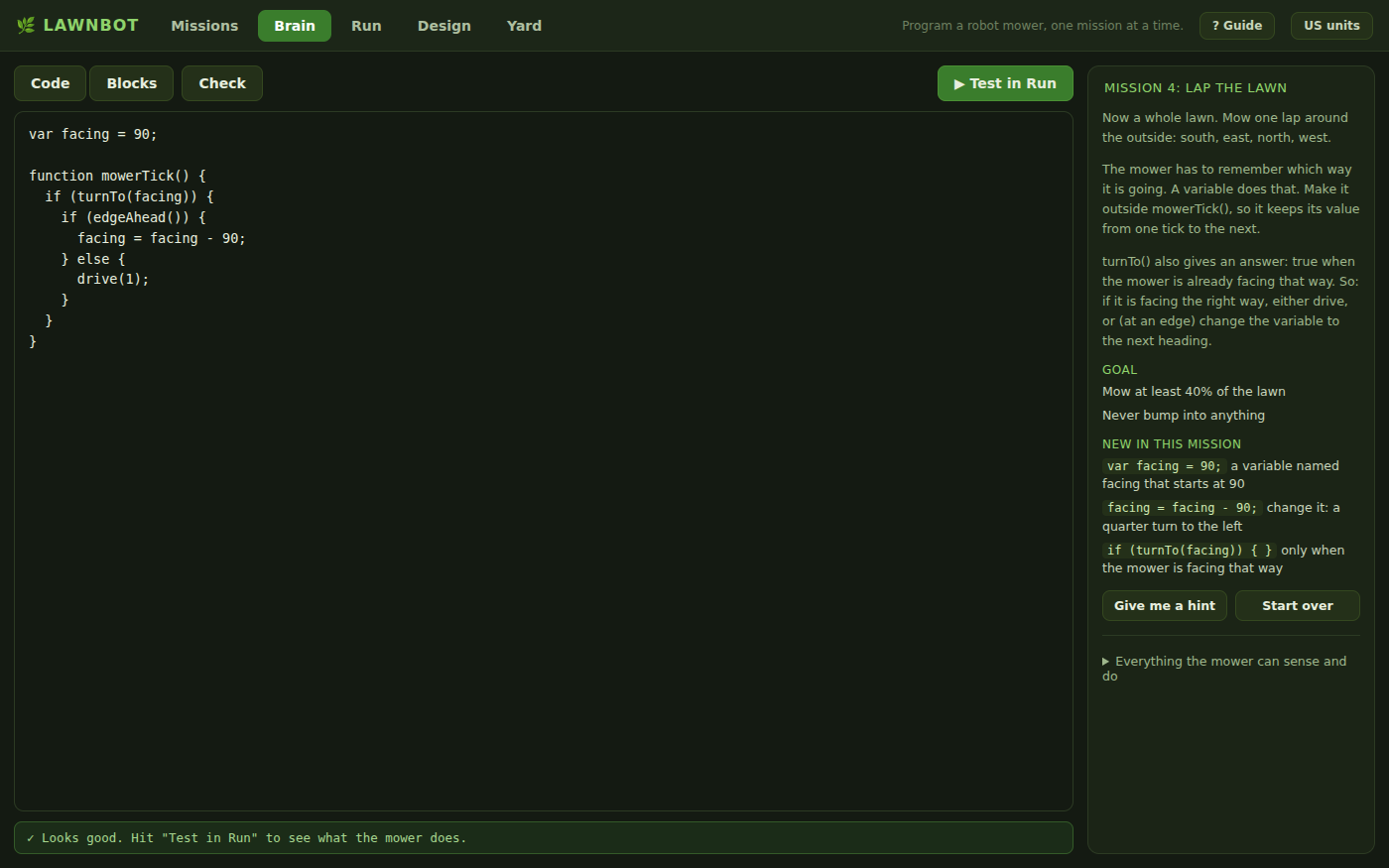
The Brain tab on mission 4. The brief on the right says what the mower has to do and lists only what is new. Hints come one at a time, and only when asked for.
What they are learning while they play
Each mission is built so that the program from the mission before it does not pass. This is what each one adds.
| What the student does | What it is |
|---|---|
| Types drive(1) inside a function and watches the mower move | A program is instructions that repeat. The mower runs the same function about ten times a second. What is inside it is what the mower does. |
| Stops the mower before the edge of the lawn, with no bump | Sensors and conditionals. A sensor answers a question, true or false. if and else choose what to do with the answer. |
| Sends the mower around a lawn, turning at each corner | Variables and state. A variable keeps a value from one tick to the next, so the mower can remember which way it was going. |
| Fills in the whole lawn by turning when the grass ahead is already cut | Compound conditions. Two conditions joined with or. One small change to the rule turns a lap into a spiral that covers everything. |
| Brings the mower home to charge before the battery is empty | Order of decisions. A program checks the most important thing first, and return stops the rest of the tick. |
| Has the mower remember where it stopped and drive back there after a charge | Storing data, and modes. A variable can hold a place. Another can switch the mower between two jobs: travelling and mowing. |
| Fits a cheaper positioning sensor and finds out which programs still work | Engineering tradeoffs. A sensor that drifts is fine for a short move and useless for finding a place again. The right part depends on what the program asks of it. |
| Runs a program, watches where it goes wrong, changes one line and runs it again | Testing and debugging. The path, the panel and the Step button show what the program really did, which is often not what its author meant. |
How to tell whether it landed
Ask, and let them show you. A student who has understood it can answer these without help.
- The mower runs your function ten times a second. Why does it not need a loop to keep driving?
- Why does the variable facing have to be made outside mowerTick()? What happens if it is made inside?
- Your mower went around the lawn once and then kept going around the same path. What one thing did it need to know to do better?
- Why does the program check the battery before it decides anything else?
- A real robot mower cannot feel a flower bed when it drives over one. How does yours avoid it?
Use it in your subject
Not a technology class? Then the app is how students show what they learned in your unit. More projects for every subject.
Computer science
Variables, conditionals and compound conditions, state, and testing a program against a goal (CSTA 2-AP-11, 2-AP-12, 2-AP-13, 2-AP-17). Sensors as the data a program acts on (2-CS-02).
Robotics
Sense, decide, act, many times a second. How a robot covers an area, why it needs to know its heading, and what a battery does to a plan.
Engineering
Test a design against criteria, see where it fails and improve it (NGSS MS-ETS1-3, MS-ETS1-4). The last two missions weigh the price of a positioning sensor against what the program needs, and in free mow the whole mower is a design against a budget.
Math
Headings in degrees, coordinates in meters, percentages, and comparing numbers with less than and at least.
Practical notes
- AgesAges 11 through high school. No coding experience is needed: the first mission is one line. Students who already program can skip ahead to any mission.
- TimeTwo minutes to a mower that moves. The first three missions fit in one lesson. All eleven take about five lessons of forty-five minutes.
- EquipmentA computer or Chromebook with a modern browser and a keyboard. Nothing to install and no robot needed.
- CostFree. The app has no paid tier.
- PrepNone to try it. The teaching notes take about twenty minutes to read, and include the finished program for every mission.
- In a groupEvery student gets the same lawn and the same mower in each mission, so programs can be compared line by line.
For co-ops, microschools, and classrooms
Because every mission uses the same lawn and the same mower, a class can put two programs side by side and ask why one mows more than the other. With a free account each student's progress and the program for every mission are saved, and a project can be shared with a link.
Common questions
Is LawnBot free?
Yes. It runs in your browser and there is no paid tier. A free account adds saving and sharing, but nothing on this page is behind a paywall.
Does my child need an account to try it?
No. The demo on this page is the complete app, with every mission. Make a free account and the work comes with you as your first project.
Do students need to know how to code?
No. Mission 1 asks for one line, and each mission after it adds one idea. A student who has never programmed can finish the first three in a lesson.
Blocks or text?
Both. The program can be written as JavaScript in a text editor or built from blocks, and a student can switch between the two at any time. The blocks show the same program.
What ages is it for?
Ages 11 through high school. Younger students do well with the first five missions. The last ones, where the mower remembers a place and mows in lanes, suit students of 13 and up.
Does it install anything, and will it work on a Chromebook?
It installs nothing and runs in any modern browser, Chromebooks included. The lawn is drawn in 3D, so a very old machine will draw it less smoothly, but the mower follows the program the same way.
Is this how real robot mowers work?
In outline, yes. A real mower senses, decides and acts many times a second, has to cover a lawn without missing strips, and has to get home before its battery is empty. The sensors here are simpler than real ones, and they always tell the truth, which real sensors do not.
What subject can I log this as?
Most families and schools log it as computer science. It also fits a robotics or engineering unit.
Still have a question? Ask us, and a person will write back.
Where to go next
Start with LawnBot
Trying it costs nothing and takes about five minutes. An account is what makes the work last.
LawnBot is one of the making apps on the platform. It teaches programming with a simulated mower. It is not a guide to choosing or setting up a real robot mower, and a real mower should only be used the way its maker says.
Page last reviewed October 2026.