Microscope Lab
A class shares six microscopes for forty minutes, and most homeschool families have none. Microscope Lab gives every student the scope for as long as they want, and it is the real thing in every way that matters: the field shrinks and dims as the power goes up, depth of field collapses, the image is upside down and backwards, an unstained onion peel is a ghost until the iris comes in, and a coarse knob on the 40x drives the lens into the glass. The slides are drawn from the biology, not photographed, so a red cell is seven micrometers at every power and the pond is alive: a Paramecium crosses a 400x field in under a second, which is why students lose it.
Using this with a class? Make a free class and add your students yourself: each gets a username and password, with no email or Google account needed. Or give them one join code. Using Google Classroom? Post the link there; with a free class, the link also puts each student in your class, so you see their work. mytekDev is also available from the Google Workspace Marketplace, so your school's Google admin can install it for everyone.A first lesson: Everyone starts on the letter e and does the first minute: focus at 4x, push the slide and watch the e go the wrong way, go to 10x with the fine knob only. Then pond water: find something moving at 4x, center it, go to 10x, and draw it with one label. Finish by asking who crashed the 40x into the slide. The ones who did will never do it on a real scope.
Set up a free class Share to Google ClassroomWhat a student actually does
They focus. The coarse knob brings the letter e up from a blur at 4x, and from the 10x on the fine knob does everything, two micrometers a division. They push the slide and the image goes the other way, because the microscope turns everything over. They turn the turret and the field shrinks ten times between the 4x and the 40x, which is why biologists center first. The lamp goes up with the power and the iris comes in for contrast, and both of those are things a student discovers by getting them wrong: a lamp left high on the way back down washes the 4x out, an iris wide open on an unstained peel shows nothing.
They look at ten slides, each drawn in micrometers. The letter e for orientation. Onion skin and leaf skin with a stain toggle, so the nucleus and the guard cells appear when the iodine goes on. Cheek cells with methylene blue and bacteria between them at 400x. An Elodea leaf two cells thick, where focusing down finds the second layer and at 400x the chloroplasts stream along the walls. A blood smear for the 100x oil lens. Salt cubes and a hair, where a cube or a cylinder is deep enough that its top and bottom cannot both be sharp. Pond water with Paramecium, Euglena, Amoeba, Volvox, Spirogyra and diatoms, each at its own depth. A Daphnia held under the coverslip with its heart racing.
They make the slide. Make this slide shows what the slide looks like after each step: a drop, the specimen, the coverslip lowered at an angle the student sets, a stain drop at the edge. Lowered from one edge, the water pushes the air out; dropped flat, there are bubbles everywhere, and the app shows what a bubble looks like so nobody draws one as a cell. The sharp and wet parts are never shown as instructions: at school a prepared slide comes from the teacher.
They draw what they see. A round pad over the eyepiece with a pencil, an eraser and labels, and a stamp the app fills in: the slide, the total magnification, and a scale bar whose length comes from the real field of view at that power. Keep puts the drawing in the slide box, and clicking it later puts the scope back on that exact view. Scientist mode adds the Scope numbers card, an eyepiece reticle and a Measure tool, so the field-of-view method for estimating a cell's size is done in the open. And on pond water, Program a creature: a few lines of JavaScript decide how a creature of the student's own swims, and it joins the drop.
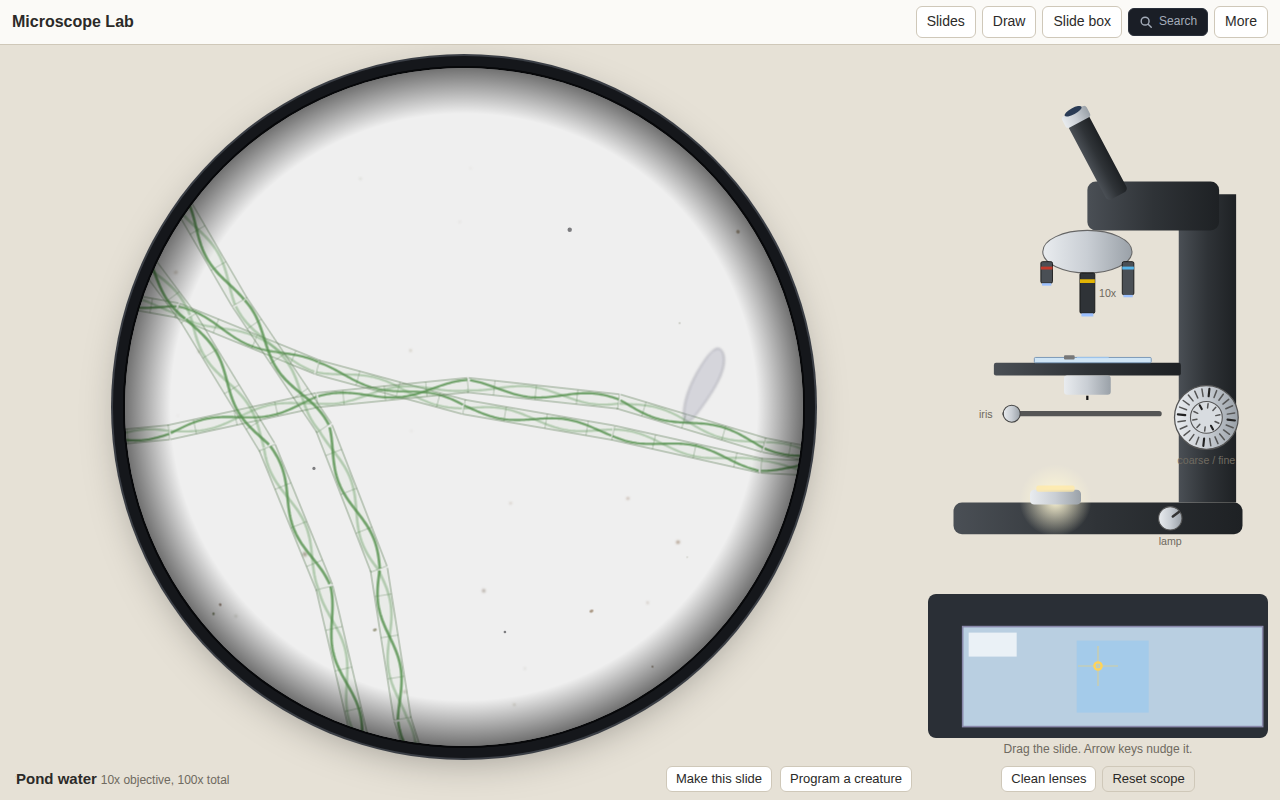
Pond water is a population, not a picture. Each organism has its own depth in the drop, so it goes soft as it swims down and comes back as it rises; the filament stays where it is. A student who programs a creature of their own puts it into this same drop, and can hunt for it.
What they are learning while they play
Nothing here is presented as a lesson. This is what the activity is made of.
| What the student does | What it is |
|---|---|
| Focuses at 4x first, then only touches the fine knob | The microscope routine. Coarse focus on low power, fine focus after, center before changing objectives. The app lets the 40x hit the slide once so the rule has a reason. |
| Pushes the slide left and watches the image go right | Image inversion. A compound microscope's image is rotated 180 degrees. The letter e, upside down and backwards, is the classic first slide for exactly this. |
| Counts how many cells fit across the field and divides | Field of view and estimation. The field diameter is the eyepiece field number over the objective's power: 4.5 mm at 4x, 0.45 mm at 40x. Cells across the field gives cell size, and the reticle checks it. |
| Focuses down through an Elodea leaf and finds a second layer | Depth of field. At 400x the depth of field is under a micrometer. A leaf, a cube of salt or a hair is thicker than that, so focusing is a way of seeing in three dimensions. |
| Puts iodine on the onion and the nucleus appears | Stains and contrast. Living cells are nearly transparent. A stain is taken up more by some parts than others, and closing the iris trades resolution for contrast. Both are controls the student works. |
| Finds a Paramecium at 4x, centers it, goes to 10x | Observation of living things. The pond is sparse on purpose and everything moves at its real speed. Finding, centering and following are the skills, and the drawing is the record. |
How to tell whether it landed
Ask, and let them show you. A student who has understood it can answer these without help.
- You pushed the slide to the left. Which way did the picture go, and why?
- You are on the 40x and the picture is blurry. Which knob, and which way do you never turn it?
- The field is 0.45 mm across and four cells fit side by side. About how big is one cell?
- The onion walls were sharp, then you focused down and they were sharp again. What did you just see?
- Something round with a thick black ring and a bright middle: a cell, or a bubble? How do you know?
Use it in your subject
Not a technology class? Then the app is how students show what they learned in your unit. More projects for every subject.
Life science
Plant and animal cells side by side (onion, leaf skin, cheek), the parts a stain shows, chloroplasts streaming, blood cells by kind, a living drop of pond water and the organisms in it, a Daphnia's heartbeat.
Physical science
Magnification, field of view, resolution and depth of field as numbers a student can read off the Scope numbers card and check with the reticle. Why the 100x wants oil.
Computer science
Program a creature: a think(me, world) function returns how to swim, and the creature joins the drop. Sensing light and neighbors, turning at the edge, keeping state between ticks.
Practical notes
- AgesGrades 3 to 5 use Little mode: the 4x and 10x only, nothing can break, big knobs. Grades 5 to 9 take Student mode with the whole scope, the stains and the drawing pad. Scientist mode, with the numbers, the reticle, Measure and oil by hand, suits middle school and high school biology.
- TimeThe first minute takes five. A slide drawn and labeled takes ten to fifteen. A pond hunt can go as long as you let it.
- EquipmentA computer, Chromebook or iPad with a modern browser. Nothing to install. A mouse or a finger on the knobs; arrow keys nudge the slide and the number keys change objectives.
- CostFree. The app has no paid tier.
- PrepNone. If the class has real microscopes, run the sim the day before: the crash card does the safety talk for you.
- In a groupEveryone does the first minute on the letter e, then picks a slide. The best session ends with the slide box: each student shows one drawing and names what the label points at.
For co-ops, microschools, and classrooms
A microscope for every student, with the bench routine built in. One period: the first minute on the letter e, a slide of their choice drawn and labeled, and a pond hunt. The drawings are the grade.
- Ten slides drawn at true size with real depth, and a pond that is never the same twice.
- Three modes: Little cannot break anything, Student has the whole scope, Scientist opens the numbers.
- Make this slide shows what a wet mount looks like after each step, without the sharp or wet how-to.
- A free teacher account covers up to 50 students, and student work is private by default.
Common questions
Is Microscope Lab free?
Yes. It runs in your browser and there is no paid tier. A free account adds saving and sharing, but nothing on this page is behind a paywall.
Does my child need an account to try it?
No. The demo on this page is the complete app with the letter e on the stage. Make a free account and the slide box comes with you as your first project.
Are these real photographs of slides?
No, and that is on purpose. Every slide is generated from its biology in micrometers, which is what lets it have real depth, real size at every power and real motion. The numbers the app states come from published sources listed in its spec, and the ones that are typical rather than measured say so.
Can it break?
Only the way a real one does. Coarse focus upward on the 40x or the 100x drives the lens into the slide: the glass cracks, the lens is smeared until it is cleaned, and a card says the one rule. The 4x and the 10x can never touch the slide, and in Little mode nothing can.
What ages is it for?
Ages 8 to 16. Little mode for the youngest, Student mode for middle school, Scientist mode for anyone doing the field-of-view method or oil immersion for real.
Does it work on an iPad?
Yes. The knobs turn by dragging around them, the slide moves by dragging in the eyepiece or on the stage map, and the drawing pad takes a finger.
Still have a question? Ask us, and a person will write back.
Where to go next
Start with Microscope Lab
Trying it costs nothing and takes about five minutes. An account is what makes the work last.
Microscope Lab is one of the making apps on the platform. It is at its best the day before the real microscopes come out, and the day after, when a student wants to see the Paramecium again.
Page last reviewed October 2026.
Google, Google Classroom and Chromebook are trademarks of Google LLC.