SceneMaker
Interactive 3D on the web usually means code. SceneMaker gives students the same result with rules instead: when this is clicked, pressed or pointed at, change to that. It opens on a scene with a big red button, a floating gem and a bouncy ball, each already reacting to you. Press Play and poke at it, then open the gem and give it a new behavior. Free, in the browser, no account needed to try it.
Using this with a class? Make a free class and add your students yourself: each gets a username and password, with no email or Google account needed. Or give them one join code.A first lesson: Everyone builds a three-object scene where each object reacts to a different thing, a click, a hover and a key, and a partner has to find all three without being told.
Set up a free classWhat a student actually does
They press Play and start poking: the red button pushes down when they click it and swells when they point at it, the gem glows under the cursor, and Space makes the ball jump. Then they stop, select the gem, and see that each of those reactions is a single line with a slider. They add Watch the cursor, press Play again, and the gem turns to follow their mouse.
From there it is a scene designer. Seven shapes, 3D models by link or from their files, finishes from clay and candy to chrome and glass, and studio, sunset, meadow and night lighting. Behaviors include press like a button, grow or glow on hover, spin, bob, jump on a key, and watch or follow the cursor. A finished scene can be shared as a live page that anyone can play with.
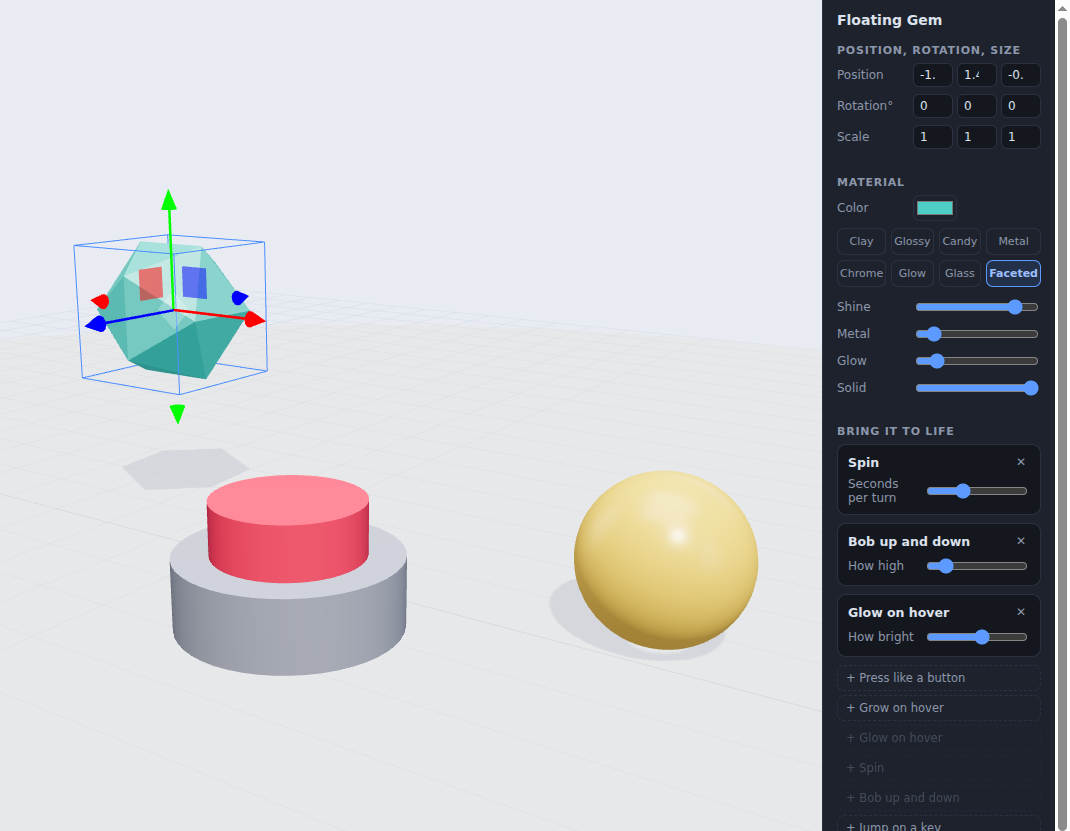
The gem's whole program, and there is no code in it. Three rules under Bring it to life: spin, bob up and down, glow on hover, each with one slider. Every interactive thing in the scene is built this way, a trigger and a change, which is the same idea as an event handler in real web code.
What they are learning while they play
Nothing here is presented as a lesson. This is what the activity is made of.
| What the student does | What it is |
|---|---|
| Clicks the button and it presses | Events. Interactive software waits for something to happen, a click, a hover or a key, and responds to it. |
| Adds Glow on hover | Event handlers. A rule that pairs a trigger with a response. Every web page button works this way underneath. |
| Watches the button go down and back up | States. An object has a few looks it can be in, and rules move it between them. Designers call these states. |
| Moves, rotates and scales a shape | 3D transforms. Position, rotation and size in three directions, X, Y and Z, are how every 3D program places things. |
| Switches a finish from Clay to Chrome | Materials. Shine, metalness and glow change how light bounces off a surface, which is most of what makes 3D look real. |
| Changes Studio to Night | Lighting. The same scene tells a different story under different light. Environment lighting colors every surface at once. |
| Adds Watch the cursor | Following a target. The gem turns to face the pointer every frame, the same trick games use for characters and cameras. |
| Shares the scene as a page | Publishing. A finished scene runs live for anyone with the link, the way interactive product pages and portfolios do. |
How to tell whether it landed
Ask, and let them show you. A student who has understood it can answer these without help.
- What makes the button go down? Point to the rule.
- What is the difference between Grow on hover and Spin?
- Build something that only reacts when you press a key.
- Could you make the button change the ball instead of itself? What would you need?
- Where have you seen things react like this on real websites?
Practical notes
- AgesAges 9 through high school. Younger students place shapes and add behaviors; older ones design scenes that someone else has to explore.
- TimeUnder a minute to the first reaction. A small scene takes twenty to forty minutes.
- EquipmentA computer or Chromebook with a modern browser and 3D graphics (WebGL). A mouse helps. Nothing to install.
- CostFree. The app has no paid tier.
- PrepNone. Open the page and go. Reading this page first takes about three minutes.
- In a groupEveryone can build a scene with hidden reactions and swap with a partner to find them.
For co-ops, microschools, and classrooms
Ask each student to build a scene with three hidden reactions, then trade seats and find them. It turns events and states, the backbone of interactive software, into a puzzle game, and nobody has to type code to do it.
- Seven shapes plus 3D models from links or a student's own files.
- Behaviors for click, hover, keys and the cursor.
- Finished scenes share as live pages anyone can play with.
- No install, no per-seat license. Student work is private by default.
Common questions
Is SceneMaker free?
Yes. It runs in your browser and there is no paid tier. A free account adds saving and sharing, but nothing on this page is behind a paywall.
Does my child need an account to try it?
No. The demo on this page is the complete designer with a starter scene. Make a free account and the scene you changed comes with you as your first project.
Does it involve coding?
No. Behaviors are rules picked from a list and adjusted with sliders. The ideas underneath, events and states, are the same ones real interactive code is built on.
What ages is it for?
Ages 9 through high school. Adding behaviors works for anyone; designing a scene someone else explores suits older students.
Can they share what they make?
Yes, with a free account. A scene can be shared as a live page that runs in any browser, so friends and family can click and play with it.
What subject can I log this as?
Most families log it as computer science or digital design. Events and states are computing, and shapes, materials and lighting are 3D design. The table above lists specifically what is covered, so you can pick the label your records need and point at the evidence.
Where to go next
Start with SceneMaker
Trying it costs nothing and takes about five minutes. An account is what makes the work last.
SceneMaker is one of the making apps on the platform. It is a place to make things, not a course, and it is not a substitute for a teacher: it is at its best when an adult asks the questions above and takes the answers seriously.
Page last reviewed September 2026.