BlocksVR
A student builds a 3D world and then walks around inside it. It opens on Gem Hunt, a small forest with five crystals to find: press Play, walk in with the keyboard, and collect them. Then stop, click a crystal, and see the short program that makes it spin, bob and vanish. Free, in the browser, no account needed to try it.
What a student actually does
They start inside a world that already works. They press Play and walk into a small forest to find five crystals; each one they reach adds a point and disappears, and finding all five wins. Then they stop, click a crystal, and see that it is just a shape with settings and a short program: spin, bob, and when the player is near, score and vanish.
From there the world is theirs. They add shapes, lights, pictures, sounds and 3D models, drag them into place, and give things behaviors: chase the player, change color when clicked, open when you get close. Behaviors can be written as plain rules, as blocks, or as code. Kits add physics, whole landscapes and VR controls, and the finished world can be walked around in a VR headset or taken anywhere as ordinary web code.
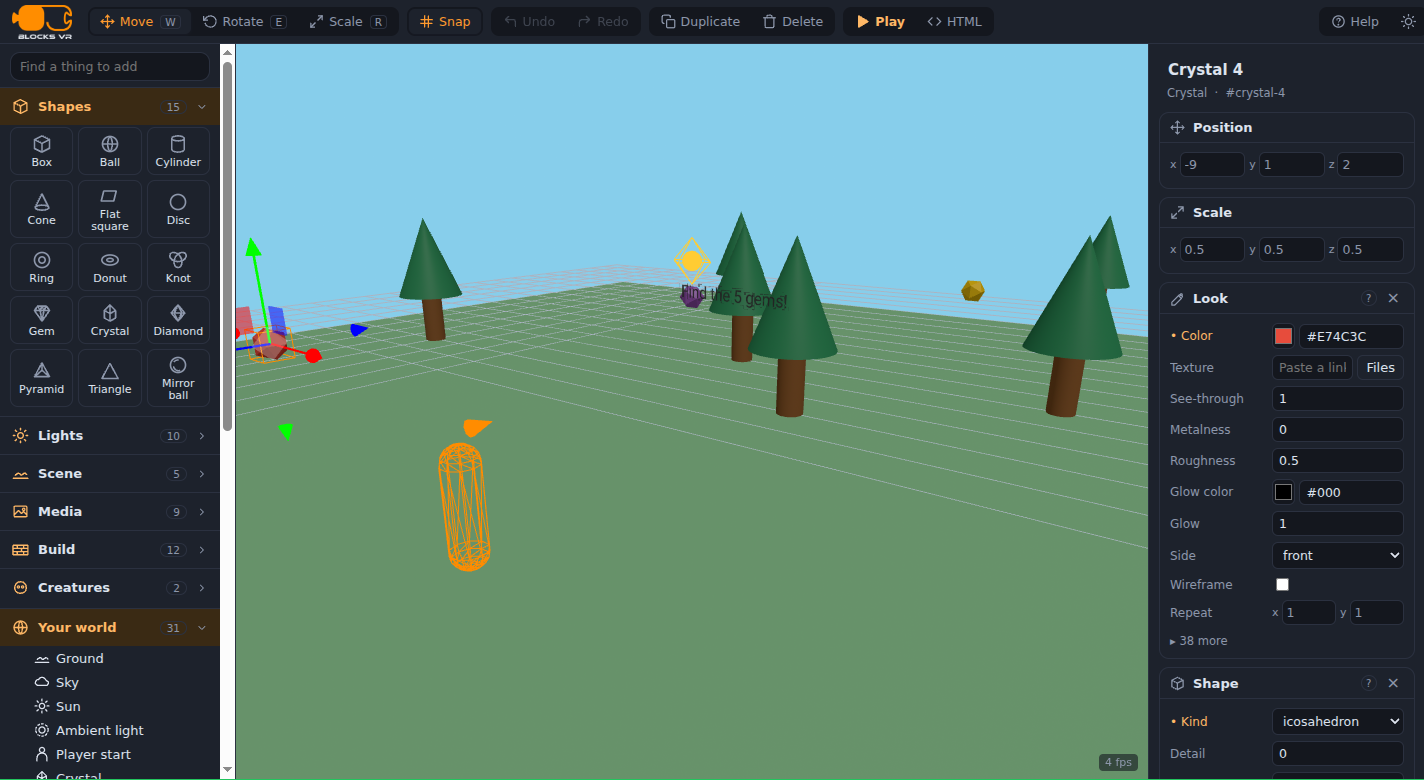
Every thing in the world is a list of settings you can see and change: where it is, how big, what color, what shape, and what it does. The crystals all share one behavior program, written as rules, blocks or code, and the world is real A-Frame, the web's own format for 3D and VR.
What they are learning while they play
Nothing here is presented as a lesson. This is what the activity is made of.
| What the student does | What it is |
|---|---|
| Drags a crystal and watches three numbers change | 3D coordinates. Every thing has an x, y and z. Moving it is changing those numbers. |
| Makes a tree from a cylinder and a cone | Building from primitives. Complex things are simple shapes put together, which is how most 3D starts. |
| Reads the crystal's program | Events and conditions. Every moment, check: is the player close? If so, add a point and vanish. |
| Gives five crystals the same behavior | Reuse. One program, many things running it. Change it once and every crystal changes. |
| Changes 1.6 to 4 | Parameters. A single number decides how close is close enough. Changing it changes how the game feels. |
| Keeps score and sets a win at five | Game state. A number the whole world shares, and a rule that watches it. |
| Moves from rules to blocks to code | Text programming. The same behavior three ways. Code is just the most precise of them. |
| Presses HTML and sees the world as code | The web is made of text. The world is ordinary A-Frame markup that runs in any browser. |
How to tell whether it landed
Ask, and let them show you. A student who has understood it can answer these without help.
- What does a crystal check, over and over, while you play?
- Why do all five crystals behave the same way?
- Change one number so crystals are collected from farther away. Which number?
- Build something new from two shapes. Which settings did you change?
- Before you play your changed world, say what will be different. Were you right?
Practical notes
- AgesAges 9 through high school. Younger students build worlds and use rules; older ones write behaviors in code and add physics.
- TimeA minute to the first walk-through. A satisfying session is thirty to forty-five minutes of building and playing.
- EquipmentAny computer or Chromebook with a modern browser and a keyboard. A VR headset is optional.
- CostFree. The app has no paid tier.
- PrepNone. Open the page and go. Reading this page first takes about four minutes.
- In a groupStudents can play each other's worlds, which turns every change into something to test on a real player.
For co-ops, microschools, and classrooms
Everyone starts in the same Gem Hunt, then changes one thing, the crystals, the forest, the rules, and swaps worlds with a partner. The best questions come from watching someone else play what you made.
- Three starting worlds: Gem Hunt, Forest Chase and Playground.
- Behaviors as rules, blocks or code, with kits for physics, landscapes, VR and game controllers.
- No install, no per-seat license. Chromebooks are fine, and a VR headset is optional.
- A free teacher account covers up to 50 students, and student work is private by default.
Common questions
Is BlocksVR free?
Yes. It runs in your browser and there is no paid tier. A free account adds saving and sharing, but nothing on this page is behind a paywall.
Does my child need an account to try it?
No. The demo on this page is the complete app with a starter world. Make a free account and the world you changed comes with you as your first project.
Do we need a VR headset?
No. Worlds are built and played on an ordinary screen with a keyboard and mouse. A headset is an extra: the same world can be walked around in VR.
Blocks or code?
Both, and plain rules too. A behavior can be written as rules that read like sentences, as blocks, or as code, and a student can switch as they get more confident.
What ages is it for?
Ages 9 through high school. Younger students build and use rules; older ones write code and use physics.
Does it install anything, and will it work on a Chromebook?
It installs nothing and runs in any modern browser, Chromebooks included. 3D worlds with many things in them run more smoothly on newer machines.
What subject can I log this as?
Most families log it as computer science or digital art. Coordinates are math, behaviors are programming, and building worlds is 3D design. The table above lists specifically what is covered, so you can pick the label your records need and point at the evidence.
Where to go next
Start with BlocksVR
Trying it costs nothing and takes about five minutes. An account is what makes the work last.
BlocksVR is one of the making apps on the platform, built on A-Frame, the open web framework for 3D and VR. It is a place to make things, not a course, and it is not a substitute for a teacher: it is at its best when an adult asks the questions above and takes the answers seriously.
Page last reviewed September 2026.