GameBuilder
A student builds a real video game: a level to run through, coins to grab, enemies to stomp, a goal to reach. It opens on a finished level, so the first thing they do is play, and the second thing is change it. Free, in the browser, no account needed to try it.
What a student actually does
They start inside a working game. Press Play and it runs: arrow keys to move, Space to jump, coins, a mushroom, a star at the end. Then they change it. Drop in another enemy, raise the jump, dig a wider pit, press Play again and find out what they did. The first change takes about a minute.
From there it becomes their game. They paint the level from tiles, place coins, hazards, springs, moving platforms, checkpoints and doors, pick characters and sounds from a library of thousands, or draw their own tiles pixel by pixel. Every setting is a number they can see and change, and the Code Preview panel shows the code behind whatever they are editing. The game is never finished in a way that stops them: press Play, see what happened, change one thing.
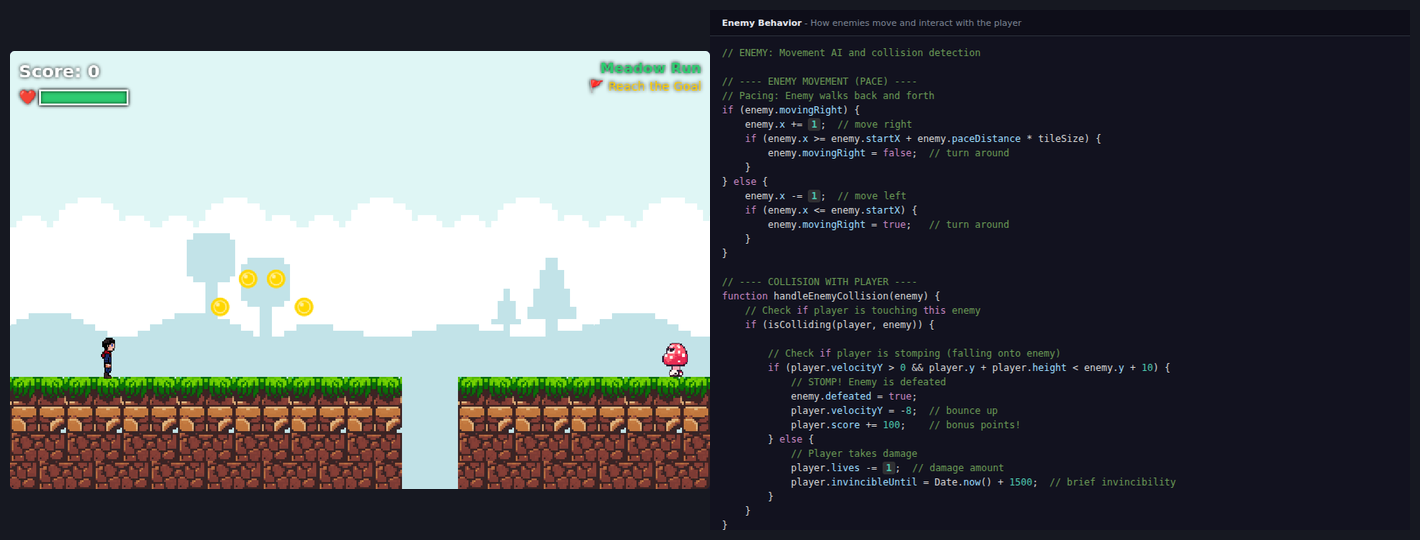
The level, and the code behind the mushroom. The Code Preview panel follows whatever the student is editing, so picking an enemy shows how enemies pace and how a stomp is told apart from getting hurt.
What they are learning while they play
Nothing here is presented as a lesson. This is what the activity is made of.
| What the student does | What it is |
|---|---|
| Paints the level from tiles and places objects on it | Coordinates on a grid. Every tile and every coin has an x and a y. The level is a grid, and so is the screen. |
| Raises the jump, changes gravity, speeds up the player | Variables. Named numbers the whole game reads from. Change one and everything that uses it changes. |
| Finds that a platform is just out of reach, then fixes it | Physics as arithmetic. Jump power and gravity decide how high the player can go. Students work it out by testing, then start predicting it. |
| Makes a mushroom pace back and forth | Loops and conditionals. Move a step; if you have gone far enough, turn around. The Code Preview shows exactly that. |
| Stomps an enemy instead of running into it | Collision detection. Two rectangles overlap, and which way the player was moving decides what happens next. |
| Counts coins, loses a life, reaches the goal | Game state. Score, lives, and whether the level is won are values the game keeps and updates every frame. |
| Presses Play, sees something wrong, changes one thing, presses Play again | Testing and debugging. The loop every programmer works in, at a speed where it is fun. |
| Downloads the finished game as a web page | Reading real code. The export is a single HTML file that runs anywhere. With learning mode on, the code in it is commented for reading. |
How to tell whether it landed
Ask, and let them show you. A student who has understood it can answer these without help.
- Why can you reach that platform but not that one? What would you change to reach it?
- What do you think happens if you double the gravity? Say it first, then try it.
- Show me, in Code Preview, the part that decides whether you stomp the mushroom or get hurt.
- Which part of your level is hardest? How would you make it a little easier without making it boring?
- Watch someone else play your level without helping them. Where did they get stuck?
Practical notes
- AgesAges 8 through high school. Younger students change the starter level and build short levels of their own; older ones build multi-level games and read the code.
- TimeAbout a minute to a first change. A first game of their own takes a session or two, and good ones grow for weeks.
- EquipmentA computer or Chromebook with a keyboard, in any modern browser. Nothing to install. Finished games also play on phones and tablets with on-screen controls.
- CostFree. The app has no paid tier.
- PrepNone. Open the page and go. Reading this page first takes about four minutes and is worth doing before handing it to a student.
- In a groupStudents can build the same game together, live, each from their own computer, and play each other's games from a share link.
For co-ops, microschools, and classrooms
Games are made to be played by someone else, which is what makes this work in a room. Students build, trade share links, and play each other's levels, and the feedback arrives immediately: someone falls in the same pit four times and the designer groans and fixes it.
- Two or more students can build one game together, at the same time, from their own computers.
- No install, no lab setup, no per-seat license. Chromebooks are fine.
- A free teacher account covers up to 50 students.
- Student work is private by default. Sharing anything publicly is a separate, deliberate action.
Common questions
Is GameBuilder free?
Yes. The app runs in your browser and there is no paid tier of it. A free account adds saving and sharing, but nothing on this page is behind a paywall.
Does my child need an account to try it?
No. The demo on this page is the complete app with a starter level, and it keeps your changes inside the browser tab. Make a free account and the level you changed comes with you as your first project.
What ages is GameBuilder for?
Ages 8 through high school. Younger students change the starter level and make short levels of their own. Older ones build games with several levels, tune the physics, and read the code in the Code Preview panel and in the exported game.
Is this real coding, or just dragging things around?
Building is visual, so nobody is stuck on syntax on day one. The code is never hidden, though: the Code Preview panel shows the code behind whatever is being edited, and the finished game downloads as a single web page whose code can be read, with comments if learning mode is on.
Does it install anything, and will it work on a Chromebook?
It installs nothing and runs in any modern browser, Chromebooks included. Building a game needs a keyboard and mouse or trackpad. Finished games also play on phones and tablets, with on-screen buttons.
What subject can I log this as?
Most families log it as computer science. The level grid and object positions are coordinate geometry, the physics settings are arithmetic with variables, and designing a level other people can finish is design. The table above lists specifically what is covered, so you can pick the label your records need and point at the evidence.
Can my child share a game?
Yes, when they choose to. A game can be shared by link so friends and family can play it, and publishing it to the public gallery is a separate step. Projects are private by default, and public listings mask the display names of younger students.
Where to go next
Start with GameBuilder
Trying it costs nothing and takes about five minutes. An account is what makes the work last.
GameBuilder is one of the making apps on the platform. It is a place to make things, not a course, and it is not a substitute for a teacher: it is at its best when an adult asks the questions above and takes the answers seriously.
Page last reviewed September 2026.