BeatMaker
A student builds a beat by clicking squares on a grid, presses Play, and hears it loop. It opens on a finished groove, so the first click makes music and the second one changes it. Free, in the browser, no account needed to try it.
What a student actually does
They press Play and a beat starts looping. Each row is a drum, each lit square is a hit, and clicking a square turns it on or off while the beat keeps playing. A first change takes a few seconds. Nothing is scored and nothing breaks: a square that sounds wrong is one click from gone.
Then they start building on purpose. They mute the hi-hats to hear what they were doing, solo the kick, drag the tempo from a slow sway to a sprint, try the genre presets from rock to reggae to see how each one is put together, and export the finished loop as a WAV, MP3 or OGG file. Every drum sound is made by the browser from waves and noise while it plays, not played back from a recording.
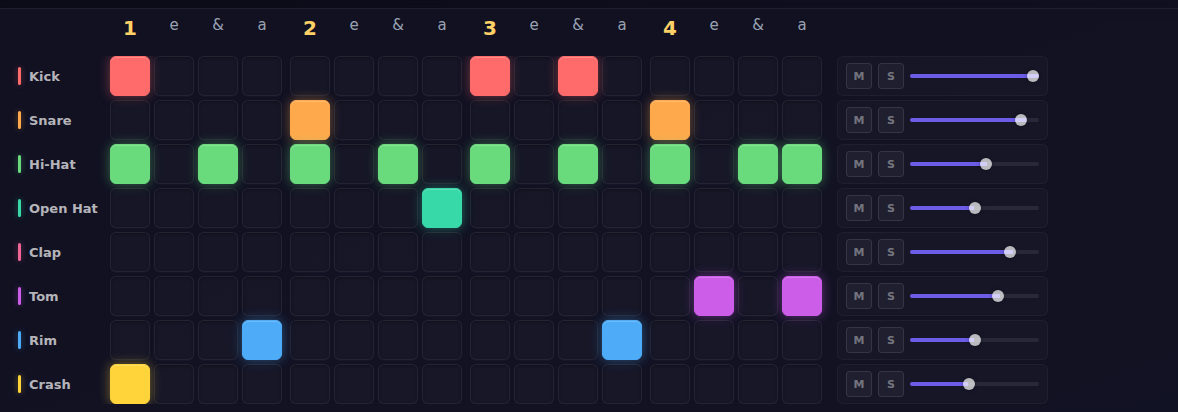
The grid is one bar of music. Sixteen columns are four beats of four steps each, counted the way drummers count them. The snare lands on 2 and 4, which is the backbeat under most of the music on the radio.
What they are learning while they play
Nothing here is presented as a lesson. This is what the activity is made of.
| What the student does | What it is |
|---|---|
| Clicks squares across sixteen columns | Fractions of a bar. Sixteen steps make one bar of four beats, so each step is a quarter of a beat: a sixteenth note. |
| Counts along, 1 e & a, 2 e & a | Meter and the backbeat. Where a hit falls in the count changes how the beat feels. Snare on 2 and 4 is the backbeat. |
| Drags the tempo slider | Rate. BPM is beats per minute. At 92 BPM one beat lasts about 0.65 seconds, and one square about 0.16. |
| Mutes and solos rows | Breaking a whole into parts. A beat that sounds like one thing is several simple patterns stacked, and each one can be heard alone. |
| Moves a hit one square early or late | Syncopation. Landing between the beats instead of on them, which is most of what makes a rhythm interesting. |
| Adds a tom fill at the end of the loop | Pattern and variation. A loop that repeats exactly gets dull. Changing one small part at the end tells the ear a new bar is coming. |
| Picks apart a genre preset | Reading structure. House puts the kick on every beat; hip-hop leaves gaps. The grid makes the difference visible. |
| Listens to a kick and then a hi-hat | Sound as waves. The browser builds each drum from waves and noise. Low and round versus high and hissy is frequency. |
How to tell whether it landed
Ask, and let them show you. A student who has understood it can answer these without help.
- Count your beat out loud, 1 e & a. Which counts does the snare land on?
- Move the snare one square later. What happens to the feel?
- Mute everything except the kick and the snare. Is it still a beat?
- At 120 BPM, how long is one beat? How long is one square?
- Make your beat feel busier without touching the tempo. How did you do it?
Practical notes
- AgesAges 7 through high school. Younger students click and listen; older ones build in a genre on purpose and can explain the math of the grid.
- TimeSeconds to a first change. A satisfying session is fifteen to thirty minutes.
- EquipmentAny computer or Chromebook with a browser. Nothing to install. Headphones in a shared room.
- CostFree. The app has no paid tier.
- PrepNone. Open the page and go. Reading this page first takes about three minutes.
- In a groupStudents can build a beat together, live, each from their own computer, and play each other's beats from a share link.
For co-ops, microschools, and classrooms
Everyone can hear the result at once, which makes it easy to run as a group. Put one beat on the speaker, have the room count it, then let each student change one thing and play theirs back. The differences are obvious to the ear before anyone can name them, and naming them is the lesson.
- Two or more students can build one beat together, at the same time, from their own computers.
- No install, no lab setup, no per-seat license. Chromebooks are fine; headphones help.
- A free teacher account covers up to 50 students.
- Student work is private by default. Sharing anything publicly is a separate, deliberate action.
Common questions
Is BeatMaker free?
Yes. The app runs in your browser and there is no paid tier of it. A free account adds saving and sharing, but nothing on this page is behind a paywall.
Does my child need an account to try it?
No. The demo on this page is the complete app with a starter beat, and it keeps your changes inside the browser tab. Make a free account and the beat you changed comes with you as your first project.
Does my child need to know anything about music?
No. Clicking a square and hearing what it does is the whole starting point. The counting, the backbeat and the tempo math come from playing, and the questions above are there for an adult who wants to draw them out.
What ages is BeatMaker for?
Ages 7 through high school. Younger students click and listen. Older ones build beats in a genre on purpose, pick apart the presets, and can work out the timing of the grid.
Does it install anything, and will it work on a Chromebook?
It installs nothing and runs in any modern browser, Chromebooks included. It needs sound, so bring headphones to a shared room.
Can we keep the beat?
Yes. The finished loop exports as a WAV, MP3 or OGG file, repeated one to eight times, to use in a video, a game or a song. A free account also keeps the project itself so it can be changed later.
What subject can I log this as?
Most families log it as music, and many also count it toward math. The grid is fractions of a bar, the tempo is a rate, and the counting is meter. The table above lists specifically what is covered, so you can pick the label your records need and point at the evidence.
Is my child's work public?
No. Projects are private by default. Publishing to the public gallery is a separate action a student has to take, and public listings mask the display names of younger students.
Where to go next
Start with BeatMaker
Trying it costs nothing and takes about five minutes. An account is what makes the work last.
BeatMaker is one of the making apps on the platform. It is a place to make things, not a course, and it is not a substitute for a teacher: it is at its best when an adult asks the questions above and takes the answers seriously.
Page last reviewed September 2026.