Chime Lab
Balls bounce around a ring of pegs, and every peg they hit plays a note. The whole ring stays in one key and scale, so whatever bounces out sounds like music. It opens on a music box: press Play, drop in another ball, then switch the scale from major to minor and hear the same bounces change mood. Free, in the browser, no account needed to try it.
What a student actually does
They press Play and a music box starts: three balls bouncing around a ring of colored pegs, each hit a note, the whole thing in G major. They click inside the ring and a fourth ball drops in. Then they open Music and change the scale to minor. The balls bounce exactly as before, but two of the notes on the ring drop by a half step, and the music box turns melancholy. That is what a scale is, heard rather than explained.
From there it is an instrument. The ring can be a square, a star or a hexagon; it can spin; gravity and bounciness change the rhythm. Pegs can split balls, open and close, carry them through portals, or play whole chords. Each ball can have its own sound, notes can snap to a beat, and a take can be recorded and kept as a sound file or as MIDI to open in other music software. The Stats tab shows exactly which pegs got hit and which notes sounded.
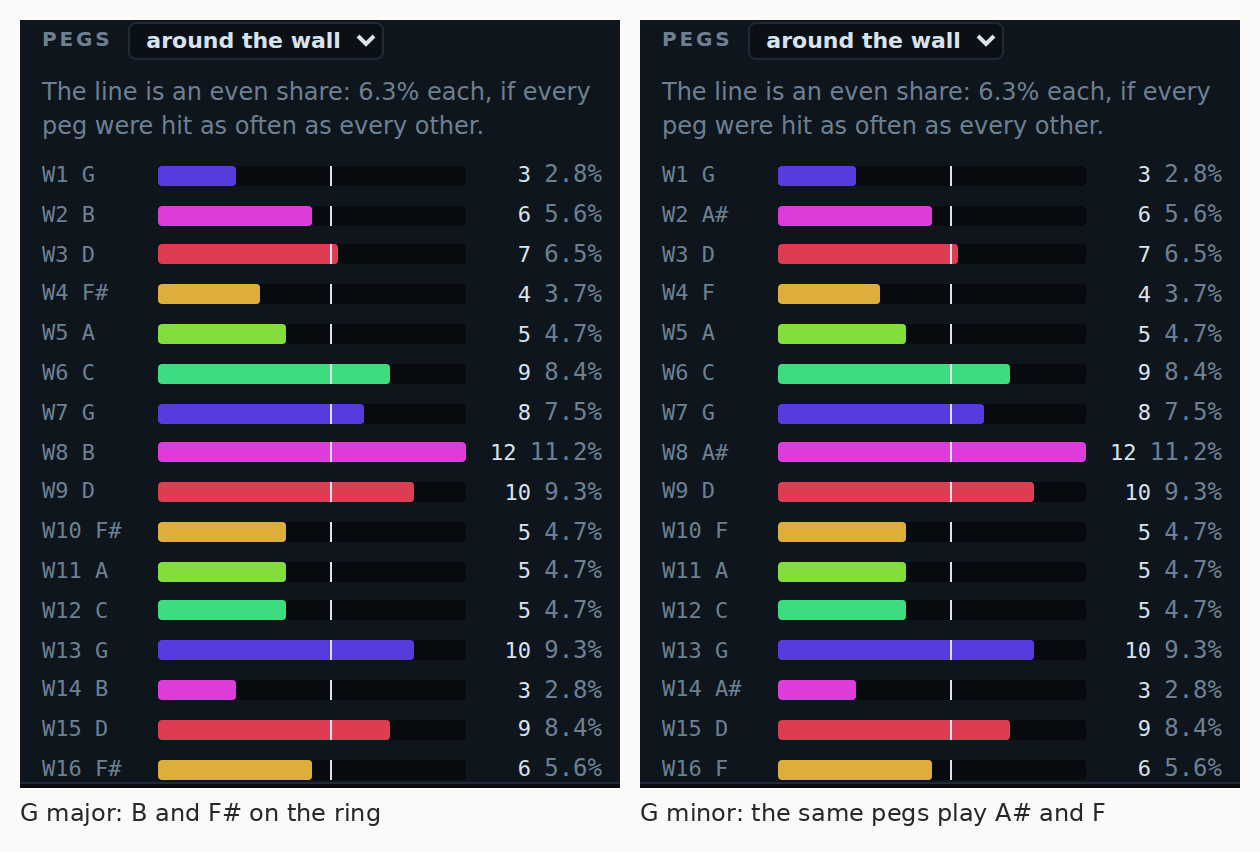
Same bounces, different notes. Both runs hit every peg exactly as often, because the physics did not change. Switching G major to G minor moved two notes on the ring down a half step, B to A sharp and F sharp to F, and that alone turns a music box into something sadder. That is all a scale is.
What they are learning while they play
Nothing here is presented as a lesson. This is what the activity is made of.
| What the student does | What it is |
|---|---|
| Switches from major to minor | Scales. A scale is the set of notes a piece uses. Change two of them and the same melody sounds sad instead of bright. |
| Picks a key | Keys. The key is the home note. Every peg moves together when it changes, so the tune moves but keeps its shape. |
| Tries blues, dorian and hirajoshi | Music across cultures. Different traditions pick different sets of notes. Each scale gives the same ring a different accent. |
| Turns gravity up and down | Physics makes rhythm. Heavier gravity means faster falls and quicker hits. The rhythm comes out of the motion. |
| Snaps notes to a beat | Tempo and quantizing. Each hit waits for the next slot on the beat grid, which is how drum machines keep time. |
| Adds a fourth ball and it gets busier | Density. More balls, more notes a minute. Part of composing is deciding how much is too much. |
| Reads which pegs got hit most | Data from a system. The Stats tab counts every hit, so a student can check whether the ring really plays every note evenly. |
| Records a take and saves it as MIDI | How music is stored. A sound file keeps what you heard; MIDI keeps which notes played and when, so another program can play them on any instrument. |
How to tell whether it landed
Ask, and let them show you. A student who has understood it can answer these without help.
- You changed the scale and the balls bounced the same way. What changed?
- Why does every note still sound like it fits, however the balls bounce?
- Which notes on the ring moved when you went from major to minor?
- Make it faster without touching the tempo. How did you do it?
- Before you change the scale again, say how it will feel. Were you right?
Practical notes
- AgesAges 6 through high school. Younger students drop balls and play with shapes and scales; older ones compose with pegs, beats and recorded takes.
- TimeA few seconds to the first sound. A satisfying session is twenty to forty minutes of changing and listening.
- EquipmentAny computer or Chromebook with a modern browser and sound. Headphones help in a classroom. Nothing to install.
- CostFree. The app has no paid tier.
- PrepNone. Open the page and go. Reading this page first takes about three minutes.
- In a groupEveryone can play the same ring in different scales, so the room hears how much one change does.
For co-ops, microschools, and classrooms
Play the same ring for the room in major, then minor, then blues, and ask what changed. Nobody has to read music, and the answers get precise quickly once students find the Stats tab and can name the notes that moved.
- Nine scales, from major and minor to blues, dorian, hirajoshi and whole tone.
- Seven starting rings, from a music box to a drum circle, a star burst and a tunnel.
- Takes save as sound files or MIDI straight to a student's files.
- No install, no per-seat license. Chromebooks are fine, and student work is private by default.
Common questions
Is Chime Lab free?
Yes. It runs in your browser and there is no paid tier. A free account adds saving and keeping recordings, but nothing on this page is behind a paywall.
Does my child need an account to try it?
No. The demo on this page is the complete app with a starter ring. Make a free account and the ring you changed comes with you as your first project.
Does my child need to know music?
No. The ring keeps every note in the scale, so there are no wrong notes. Terms like key and scale are learned by hearing what they do.
What ages is it for?
Ages 6 through high school. It works as a toy for young children and as a composing tool for older ones.
Can they keep what they make?
Yes. Record a take and save it as a sound file to play anywhere, or as MIDI to open in music software and put on any instrument.
Does it install anything, and will it work on a Chromebook?
It installs nothing and runs in any modern browser. Sound has to be on, and headphones help when a whole room is playing.
What subject can I log this as?
Most families log it as music. Scales, keys and tempo are music theory, the bouncing is physics, and the stats are data. The table above lists specifically what is covered, so you can pick the label your records need and point at the evidence.
Where to go next
Start with Chime Lab
Trying it costs nothing and takes about five minutes. An account is what makes the work last.
Chime Lab is one of the making apps on the platform. It is a place to make things, not a course, and it is not a substitute for a teacher: it is at its best when an adult asks the questions above and takes the answers seriously.
Page last reviewed September 2026.