Neural Network
Students use AI every day, and most of them think it works by magic or by someone typing in the answers. This shows what actually happens. A small neural network looks at blue and orange dots and learns to tell them apart, and students watch it do it: the weights on every connection change, the background fills in with its guesses, and the error drops. Then they give it a harder pattern, watch it fail, and fix it by making the network bigger and giving it better inputs. No code, in the browser, and no account needed to try it.
Using this with a class? Make a free class and add your students yourself: each gets a username and password, with no email or Google account needed. Or give them one join code.A first lesson: Everyone trains the same small network on the spiral and writes down the test loss it gets stuck at. Then each student changes one thing, more neurons, another layer, a different feature or learning rate, and the class puts the results on the board to find out what actually helped.
Set up a free classWhat a student actually does
They press Play and a network of a few neurons starts guessing which dots are blue and which are orange. The epoch counter climbs, the lines between neurons get thicker or thinner as the weights change, and the background of the output fills in with the network's answer. In a few seconds the test loss, its error on dots it was not trained on, falls close to zero. It has learned the circle.
Then they pick the spiral. The same network trains and trains and the loss stays high, because it is too small for a pattern that complicated. So they press the + above a layer to add neurons, or the + next to Hidden Layers to add a layer, and train again. From there they change the learning rate, the activation function, the amount of noise and the share of data held back for testing, turn on extra features like sin(X1), and switch the problem from sorting dots into two groups to predicting a number.
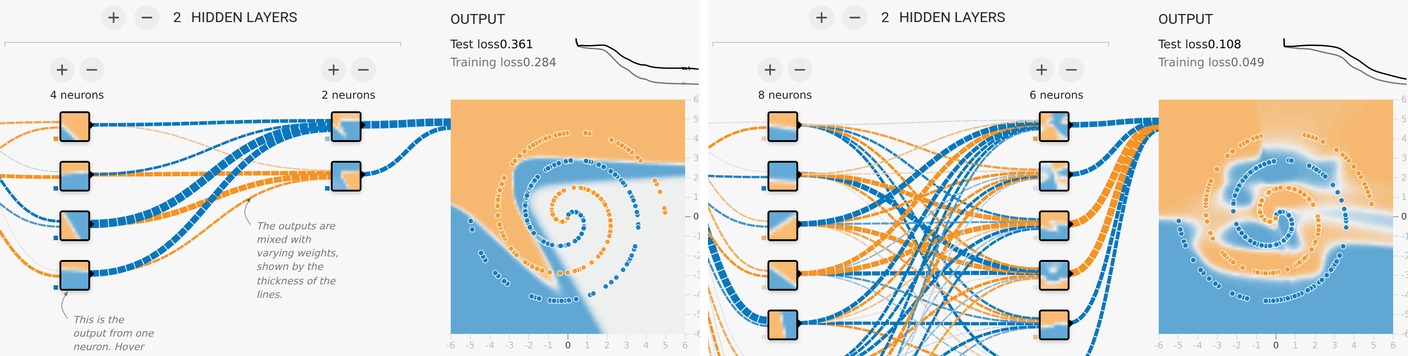
The same data, the same training, two network sizes. The small one on the left trained for over 1,600 steps and still cuts straight across the spiral. The bigger one on the right has more neurons, so more weights to adjust, and bends its answer around the arms. The difference is the lesson: a model can only learn a pattern it has room to represent.
What they are learning while they play
Nothing here is presented as a lesson. This is what the activity is made of.
| What the student does | What it is |
|---|---|
| Presses Play and watches the epoch counter climb | Training. The network is not told the rule. It sees examples over and over and adjusts itself a little after each batch. |
| Watches the lines get thicker, thinner and change color | Weights. Every connection has a number that says how much one neuron counts for the next. Training is the search for good numbers. |
| Watches the test loss fall | Loss. A single number for how wrong the network is. Lower is better, and it is what training tries to reduce. |
| Compares test loss with training loss | Generalization and overfitting. Doing well on the examples it studied is easy. Doing well on examples it never saw is what counts. |
| Watches a small network fail on the spiral | Model capacity. A network can only learn a pattern it has enough neurons and layers to represent. |
| Adds neurons and hidden layers | Deep networks. Each layer builds on the one before, so later neurons can respond to shapes made out of simpler shapes. |
| Changes the learning rate | Learning rate. How big a step each adjustment takes. Too small and training crawls, too big and it overshoots. |
| Switches the activation to Linear | Activation functions. Without a bend in each neuron, any number of layers still adds up to one straight line. |
| Turns on sin(X1) and sin(X2) | Features. What the network is given to look at matters as much as its size. Better inputs can make a hard pattern easy. |
| Turns up the noise | Messy data. Real data has mistakes in it. A network that learns every mistake has learned the wrong thing. |
How to tell whether it landed
Ask, and let them show you. A student who has understood it can answer these without help.
- Nobody typed in the rule for the circle. How did the network learn it?
- What does the test loss measure, and why is it tested on dots the network did not train on?
- Why did the small network get stuck on the spiral, and what did you change to fix it?
- Your training loss is very low and your test loss is high. What has happened?
- The AI tools you use are much larger networks trained the same basic way. What could go wrong if their training data had mistakes in it?
Use it in your subject
Not a technology class? Then the app is how students show what they learned in your unit. More projects for every subject.
Math
Switch every neuron to Linear and train on the four squares. Students explain, with a drawing, why no single straight line can put the blue dots on one side and the orange on the other.
Digital citizenship
Hold back most of the data for testing and turn up the noise. Students write a paragraph on what that means for an AI that decides things about people, based on what they saw the network get wrong.
Practical notes
- AgesAges 12 through high school, and intro AI and machine learning courses. Younger students train, break and fix networks; older ones compare learning rates, activations, regularization and overfitting.
- TimeA minute to watch it learn the circle. A class period to run the spiral experiment and discuss what worked.
- EquipmentAny computer or Chromebook with a modern browser. Nothing to install, and no code.
- CostFree. The app has no paid tier.
- PrepNone. Open the page and go. Reading this page first takes about four minutes.
- In a groupEveryone starts from the same network, each student changes one thing, and the class compares results.
For co-ops, microschools, and classrooms
Run it as an experiment. The whole class trains the same small network on the spiral and records where the loss stops. Then each student is allowed to change one setting, and the results go on the board. Within a period the class has found out for itself what size, layers, features and learning rate do, which is how people who build these systems actually work.
- Four data sets for sorting dots and two for predicting a number.
- Up to six hidden layers of up to eight neurons, with four activation functions.
- Learning rate, regularization, noise, batch size and a test split to explore.
- No code, no install, no per-seat license. Student work is private by default.
Common questions
Is the Neural Network simulator free?
Yes. It runs in your browser and there is no paid tier. A free account adds saving, but nothing on this page is behind a paywall.
Do students need to know how to code?
No. Everything is buttons, sliders and menus. Students change the network by pressing + and -, and see the result as a picture and a number.
Is this the TensorFlow Playground?
Yes. It is the open-source TensorFlow Playground, made at Google by Daniel Smilkov and Shan Carter. Here it also saves a student's setup, the data, features, layers and settings, into their free account, next to everything else they make on the platform.
How does this connect to ChatGPT and the AI students use?
The AI tools students use are also neural networks, much larger ones trained on text and images instead of dots. The basic idea is the same one on this screen: neurons connected by weights, trained on examples, judged by how wrong they are on examples they have not seen.
Will it run on our school Chromebooks?
Yes. It installs nothing and runs in any modern browser, Chromebooks included.
Does my child need an account to try it?
No. The demo on this page is the complete simulator. Make a free account and the network they set up comes with them as their first project.
What ages is it for?
Ages 12 and up. Watching a network learn works for anyone; comparing learning rates, activations and overfitting suits high school and intro college courses.
What subject can I log this as?
Most families log it as computer science. Training, loss and overfitting are machine learning, and the discussion of what AI gets wrong is digital citizenship. The table above lists specifically what is covered, so you can pick the label your records need and point at the evidence.
Still have a question? Ask us, and a person will write back.
Where to go next
Start with Neural Network
Trying it costs nothing and takes about five minutes. An account is what makes the work last.
The Neural Network simulator is one of the tools on the platform. It is a place to make things, not a course, and it is not a substitute for a teacher: it is at its best when an adult asks the questions above and takes the answers seriously.
Based on the TensorFlow Playground by Daniel Smilkov and Shan Carter, used under the Apache 2.0 license. Source.
Page last reviewed September 2026.