Obby Maker
Kids who play obstacle course games usually want to make one. Obby Maker lets them build a 3D course one stage at a time, press Play and run it, then fix what was too hard. Nothing in it is magic: the lava is a platform with one line of program, a spinner is a platform told to spin at 60 degrees a second, and both can be opened and changed. It opens on a short stage with three platforms between the start and the finish.
Using this with a class? Make a free class and add your students yourself: each gets a username and password, with no email or Google account needed. Or give them one join code.A first lesson: Everyone builds one stage that a classmate can finish on the third try but not the first. Then they trade, play each other's stage, and the builder explains which jump they made hard on purpose.
Set up a free classWhat a student actually does
They press Play and run the starter stage: three platforms, a start pad and a finish. It takes a few seconds. So they start changing it, and the first thing almost everyone does is pull a platform further away to make the jump harder.
The builder answers in a sentence. In the First Jumps stage, drag one ledge a block too far and it says: "Nothing reaches the platform. From the platform it is 5 across. A running jump clears 4 across, or 2 up." The rule is exact, so a student can plan a jump instead of guessing at it.
Then they open a piece. The lava's whole program is one sentence: when the runner touches me, send the runner back. A spinner's is: forever, spin at 60 degrees a second. They click the number and make it 170, or make a platform vanish for 3 seconds when it is stood on. Watch shows each step light up as the program runs.
Older students go further. A stage rule makes the lava rise after ten seconds, or opens a door at three coins. The Builder places pieces with code: the Builder's Spiral stage is thirty stairs from a loop of five lines, and finding the 30 in it changes the whole tower. A course can have up to twelve stages, and friends can play it from a share link.
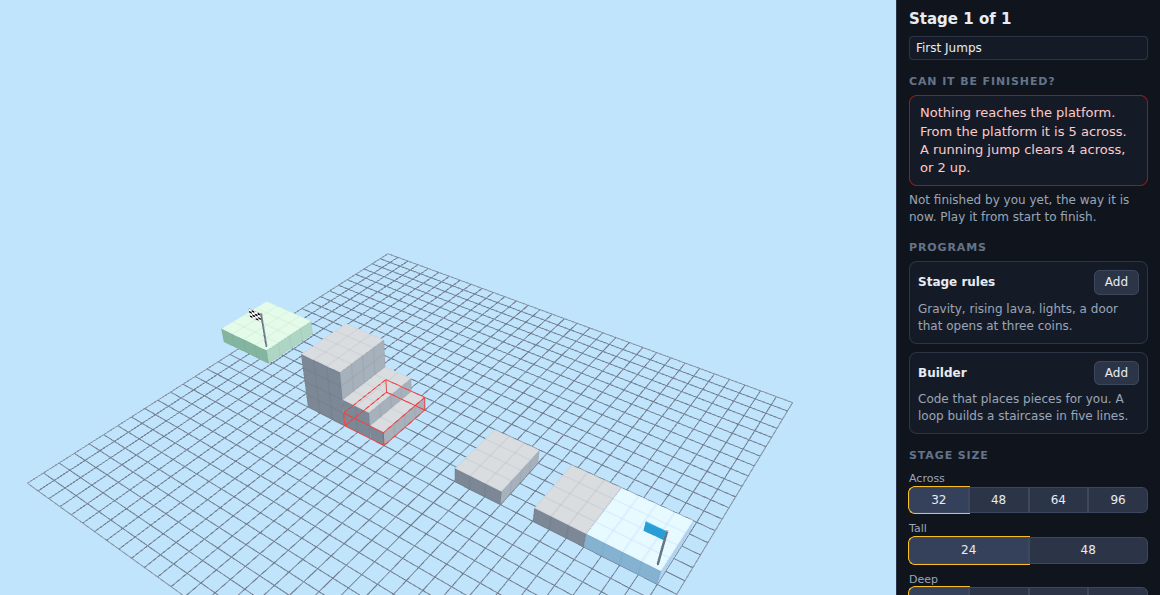
First Jumps with one ledge pulled a block too far. The builder outlines the platform nobody can reach and says why in blocks: the gap is 5 and a running jump clears 4. Turn on the double jump for the course and the same gap can be made.
What they are learning while they play
Nothing here is presented as a lesson. This is what the activity is made of.
| What the student does | What it is |
|---|---|
| Makes a platform vanish when it is stood on | Events. A program can wait for something to happen, like the runner touching a piece, and then act. Games are built from these. |
| Tells a spinner to spin forever | Loops. Forever and repeat run the same steps again and again, so one short program keeps a piece moving for the whole game. |
| Builds thirty stairs from five lines | Loops that build. A loop with a counter places a piece each time round. Change one number and the staircase gets taller. |
| Changes 60 degrees a second to 170 | Parameters. The same instruction with a different number does something different. Tuning a number is how designers make a game fair. |
| Opens a door at three coins | Conditions. If this is true, do that. Rules like this are how a game decides when a player has earned the next part. |
| Reads that the gap is 5 across and the jump clears 4 | Measurement and constraints. Every jump has a limit, and the builder states it in blocks. Designing inside a limit is most of engineering. |
| Makes a stage a classmate can finish on the third try | Game design and playtesting. Too easy is boring and too hard is unfair. Watching someone else play is how a designer finds out which it is. |
How to tell whether it landed
Ask, and let them show you. A student who has understood it can answer these without help.
- What does the lava do, and where does it say so?
- Why can nobody make a jump of 5 across without the double jump?
- What would you change to make your spinner hall harder, and why that number?
- In the Builder's Spiral, which number makes the tower taller?
- Where did your classmate get stuck on your stage, and was that the part you meant to be hard?
Use it in your subject
Not a technology class? Then the app is how students show what they learned in your unit. More projects for every subject.
Computer science
Give every piece on a stage a program of its own, then explain each one in words. The sentences on screen are the program, so a student can read it out.
Math
Measure every gap on a stage in blocks and mark which ones a single jump can clear. Then check the answers against the builder.
Art and design
Pick the look of the course, dress the runner and choose the music and the finish, then describe the mood each choice is for.
Writing
Put signs along a course that tell a short story as the player runs past them.
Practical notes
- AgesAges 7 through middle school. Younger students build and play with pieces and change a number; older ones write stage rules and use the Builder.
- TimeSeconds to the first run. A satisfying session is thirty to forty-five minutes, and a course grows over several.
- EquipmentA computer or Chromebook with a keyboard and a modern browser. The course is 3D, so a very old or very slow computer may struggle. Nothing to install.
- CostFree. The app has no paid tier.
- PrepNone. Open the page and go. Reading this page first takes about three minutes.
- In a groupEveryone can build a stage for the same challenge, then trade and play each other's.
For co-ops, microschools, and classrooms
Set one rule for the whole group, for example that every stage must use one spinner and one key, and let everyone build. Then trade. Playing each other's stages is the test, and the builder of each stage can say which jump they made hard on purpose and why.
Common questions
Is Obby Maker free?
Yes. It runs in your browser and there is no paid tier. A free account adds saving and sharing, but nothing on this page is behind a paywall.
Does my child need an account to try it?
No. The demo on this page is the complete maker with a starter stage. Make a free account to save a course and share it.
What is an obby?
An obstacle course game: the player runs and jumps from a start to a finish past gaps, lava, moving platforms and other hazards. Obby Maker is for building them.
Is it real programming?
Yes. Every piece's behavior is a program made of events, loops, conditions and numbers. It reads as plain sentences with values to click, and opens as blocks too. Older students can use the Builder to place pieces with code, including loops.
Can other people play what my child made?
Yes, with a free account. A course can be shared with a link, and friends play it in the browser. Nothing is published unless it is shared.
What ages is it for?
Ages 7 through middle school. Building and playing works for anyone who can use a keyboard; stage rules and the Builder suit older students.
What subject can I log this as?
Most families log it as computer science. Events, loops, conditions and parameters are the programming, and measuring gaps against the jump is math. The table above lists specifically what is covered, so you can pick the label your records need and point at the evidence.
Still have a question? Ask us, and a person will write back.
Where to go next
Start with Obby Maker
Trying it costs nothing and takes about five minutes. An account is what makes the work last.
Obby Maker is one of the making apps on the platform. It is a place to make things, not a course, and it is not a substitute for a teacher: it is at its best when an adult asks the questions above and takes the answers seriously.
Page last reviewed September 2026.