ParticleFX
The fire, smoke, rain and explosions in games are not drawings. They are hundreds of tiny dots, each born, pushed, pulled by gravity, faded out and thrown away, many times a second. ParticleFX is where students build them. It opens on a campfire made of three layers: hide one to see what it adds, turn gravity upside down on the sparks, then fire it once the way a game would. Free, in the browser, no account needed to try it.
Using this with a class? Make a free class and add your students yourself: each gets a username and password, with no email or Google account needed. Or give them one join code.A first lesson: Everyone starts from the same campfire and changes only numbers, never colors, to turn it into rain, a fountain or a rocket exhaust, then explains which number did the most.
Set up a free classWhat a student actually does
They hide the smoke and the fire suddenly looks thin. They bring it back, pick the Sparks layer and drag Gravity to the other side, and the sparks stop falling and drift up with the smoke. Then they press Play Once and watch a single burst, the way the effect would play when a character jumps or something gets hit, and die away.
From there it is a designer. Every layer has a rate, lifetime, speed, spread, angle, gravity and friction; particles have a shape, a start and end size, color and opacity, and can glow when they overlap. Emitters can be a point, a line, a ring or an area, and can be moved by clicking the canvas. Ten presets cover fire, smoke, sparkles, snow, rain, explosions, fireworks, bubbles, leaves and magic, and Randomize makes something new.
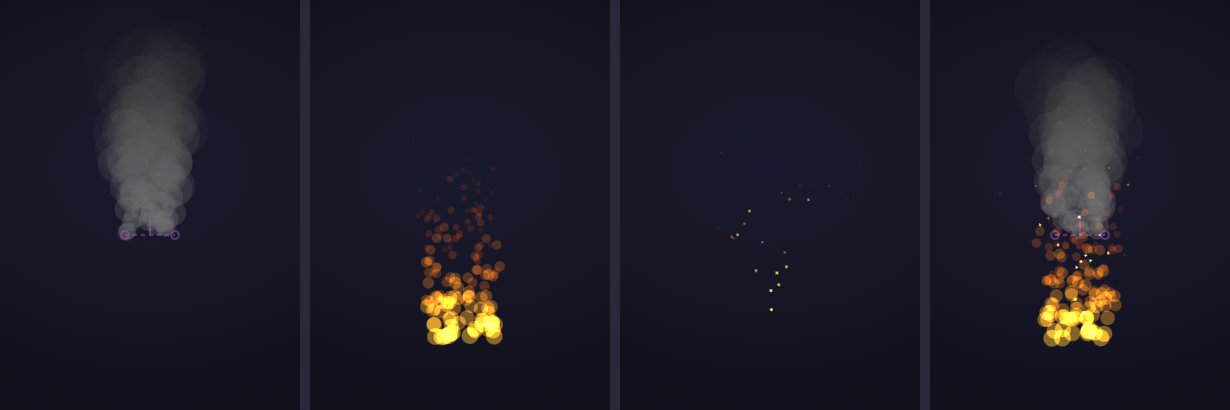
One campfire, taken apart: smoke, flames, sparks, and all three together. Each layer is one emitter with its own rules: how many dots a second, how fast, which way gravity pulls, how big and what color at birth and at death. The flames have gravity pulling up; the sparks have it pulling down, which is why they arc and fall.
What they are learning while they play
Nothing here is presented as a lesson. This is what the activity is made of.
| What the student does | What it is |
|---|---|
| Watches hundreds of dots become a fire | Particle systems. Games and films make fire, smoke and water from many simple objects following the same few rules. |
| Flips gravity on the sparks | Forces. Each frame, gravity changes every particle's speed a little, and the speed changes its position. That is motion, one step at a time. |
| Changes the spread and the angle | Vectors. Every particle leaves in a direction with a speed. Spread is how far that direction is allowed to wander. |
| Turns up the lifetime | Lifecycles. Every particle is born, lives a set time and is removed. How many are alive at once is rate times lifetime. |
| Sets a start and end color | Interpolation. Between birth and death, size, color and opacity slide smoothly from one value to the other. |
| Hides one layer at a time | Composition. Complex effects are stacks of simple ones. Taking them apart is how you learn to build them. |
| Presses Play Once | Events. In a game an effect runs when something happens, as one burst, rather than forever. |
| Adds too many particles | Performance. The count at the top is real work for the computer. Good effects look rich with as few particles as possible. |
How to tell whether it landed
Ask, and let them show you. A student who has understood it can answer these without help.
- What is the fire actually made of?
- Why do the flames go up and the sparks come down?
- The rate is 30 a second and each lives 4 seconds. About how many are on screen?
- Turn this into rain without changing any colors. What did you change?
- Why would a game play this effect once instead of forever?
Practical notes
- AgesAges 8 through high school. Younger students play with presets and sliders; older ones design effects for their own games and reason about the numbers.
- TimeSeconds to the first change. A satisfying session is twenty to forty minutes.
- EquipmentAny computer or Chromebook with a modern browser. Nothing to install.
- CostFree. The app has no paid tier.
- PrepNone. Open the page and go. Reading this page first takes about three minutes.
- In a groupEveryone can start from the same campfire and turn it into something different by changing only numbers.
For co-ops, microschools, and classrooms
Put the campfire on the board, then call out a target, rain, a fountain, a rocket, and let students race to it by changing numbers only. It turns forces, speed and rates into something they can see and argue about.
- Ten presets, from fire and smoke to fireworks and magic.
- Multi-layer effects, each layer with its own emitter.
- Effects are built to be used in GameBuilder games.
- No install, no per-seat license. Student work is private by default.
Common questions
Is ParticleFX free?
Yes. It runs in your browser and there is no paid tier. A free account adds saving and sharing, but nothing on this page is behind a paywall.
Does my child need an account to try it?
No. The demo on this page is the complete designer with a starter campfire. Make a free account and the effect you changed comes with you as your first project.
What ages is it for?
Ages 8 through high school. The sliders work for anyone; reasoning about rates and forces suits older students.
Can they use their effects in a game?
Yes. Effects are designed to play in GameBuilder, the platform's game maker, and Play Once previews exactly how a game trigger will run them.
Does it install anything, and will it work on a Chromebook?
It installs nothing and runs in any modern browser, Chromebooks included.
What subject can I log this as?
Most families log it as computer science or physics. Forces, vectors and rates are physics and math, and particle systems are a core idea in graphics programming. The table above lists specifically what is covered, so you can pick the label your records need and point at the evidence.
Where to go next
Start with ParticleFX
Trying it costs nothing and takes about five minutes. An account is what makes the work last.
ParticleFX is one of the making apps on the platform. It is a place to make things, not a course, and it is not a substitute for a teacher: it is at its best when an adult asks the questions above and takes the answers seriously.
Page last reviewed September 2026.