RedRover
A student programs a rover on Mars: drive to a science target, drill a sample, take a photo. Then they switch to the Mars link, where a signal takes minutes to arrive and live driving is impossible, and send the whole program up as the day's plan. It opens on a program that already works. Blocks or Python, free, in the browser, no account needed to try it.
What a student actually does
They start with a program that works: take a photo, drive to a green science target, drill a sample, take another photo. They run it and watch the rover roll across the Mars Yard and stop on the patch. Then they open Comms and pick Mars. Now they cannot steer at all, because on the real Mars a command takes minutes to arrive. The program goes up as the day's plan, the rover carries it out alone, and a downlink report comes home: how far it drove, what it collected, the photos it took, and how far off its own idea of where it is had drifted.
From there the problems get real. The rover's battery is charged by sunlight, the sun sets, and the heaters have to keep it alive through a cold night. Rocks stop it and steep hills slow it to a crawl. There are nine missions, four landing sites modeled on real ones, a site builder, and a rover builder with solar panels or a nuclear power source. The same program opens as Python when a student is ready for loops, sensors and if statements.
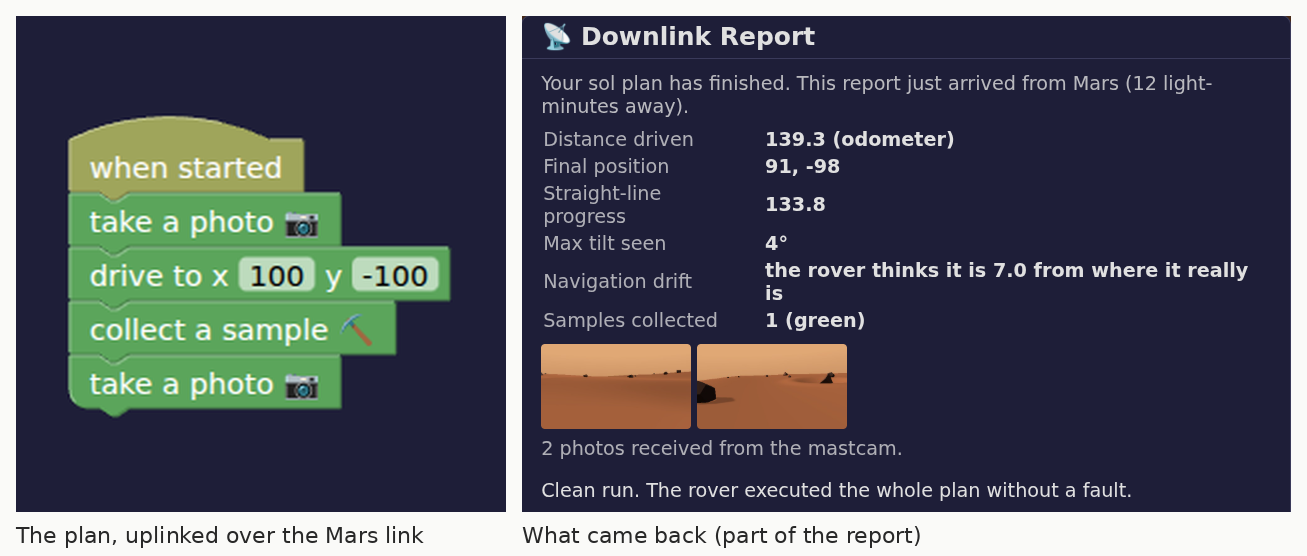
Four blocks go up; this comes back. On the Mars link a student cannot touch the rover once the plan has left, so the report is the only way to find out what happened. The drift line is the interesting one: the rover's own sense of where it is had wandered 7 units from the truth, which is why the plan aims past the center of the target instead of at it.
What they are learning while they play
Nothing here is presented as a lesson. This is what the activity is made of.
| What the student does | What it is |
|---|---|
| Tells the rover where to drive | Coordinates. Every place on the map is two numbers. The program says where to go, not how to steer. |
| Writes the whole day's plan before pressing Run | Planning a program. On the Mars link there is no fixing it halfway. The program has to be right before it leaves. |
| Switches the link from Earth to the Moon to Mars | Signal delay. Radio travels at the speed of light, and Mars is far enough away that a message takes 4 to 24 minutes. |
| Reads that the rover thinks it is somewhere it is not | Measurement error. Wheels slip, so counting turns drifts from the truth. Real rovers correct it by looking at the ground. |
| Keeps the battery alive through the night | Energy budgets. Solar panels charge only in daylight, driving costs more than they make, and the heaters run all night. |
| Picks solar panels or a nuclear power source | Engineering tradeoffs. Real Mars rovers have used both. Each one fails differently, and the choice shapes the whole mission. |
| Drives around rocks and up a hill | Terrain and slope. Steeper ground means a slower crawl and more power spent. Rocks have to be driven around, because the rover cannot climb them. |
| Drills a colored target and photographs it | Collecting evidence. A rover's job is science: samples and pictures, sent home to people who will never stand there. |
How to tell whether it landed
Ask, and let them show you. A student who has understood it can answer these without help.
- Why can you drive the rover with the keyboard on the Earth link but not on the Mars link?
- Your program aims a little past the target. Why? What does the downlink report say about it?
- Send the rover to the blue target instead. What did you change?
- The battery died overnight. What would you change about the plan, or the rover?
- Before you uplink your next plan, say what the report will say. Were you right?
Practical notes
- AgesAges 9 through high school. Younger students run the starter and the early missions; older ones write sol plans in Python and manage power through the Martian night.
- TimeA minute to a first drive. A satisfying session is thirty to forty-five minutes of plan, uplink, read the report.
- EquipmentAny computer or Chromebook with a modern browser. Nothing to install. A keyboard is needed to drive by hand on the Earth link.
- CostFree. The app has no paid tier.
- PrepNone. Open the page and go. Reading this page first takes about four minutes.
- In a groupThe whole class can uplink plans for the same landing site and compare downlink reports.
For co-ops, microschools, and classrooms
Run it like a mission. Give each group a landing site and a goal for the day, have them write and check the plan, uplink it, and read the downlink report out loud. Nobody can rescue a plan once it has gone, so the talk before Run is where the learning happens.
- Nine missions, from a first drive to surviving the night and a three-sample field day.
- Four landing sites based on real ones, plus a builder for sites of your own.
- No install, no lab setup, no per-seat license. Chromebooks are fine.
- A free teacher account covers up to 50 students, and student work is private by default.
Common questions
Is RedRover free?
Yes. It runs in your browser and there is no paid tier. A free account adds saving, but nothing on this page is behind a paywall.
Does my child need an account to try it?
No. The demo on this page is the complete simulator with a starter program. Make a free account and the program you changed comes with you as your first project.
Why can't you drive it live on the Mars link?
Because nobody can drive the real rovers live. Mars is 4 to 24 light-minutes from Earth, so a command sent now arrives minutes later. Real teams write the next day's plan, send it up, and read what happened the next morning. RedRover works the same way, which is the most important thing it teaches.
Blocks or Python?
Both. The program is built from blocks, and the Python tab shows the same program as code. A student can switch to writing Python directly when they are ready.
How realistic is it?
The ideas are real: signal delay, solar power that stops at night, heaters, a position estimate that drifts, rocks and slopes. The numbers are simplified so a mission fits in a class period, and a Martian day here lasts ten minutes instead of a little over twenty-four hours.
Does it install anything, and will it work on a Chromebook?
It installs nothing and runs in any modern browser, Chromebooks included.
What subject can I log this as?
Most families log it as computer science or earth and space science. Signal delay and energy are physical science, coordinates are math, and the programs are computer science. The table above lists specifically what is covered, so you can pick the label your records need and point at the evidence.
Where to go next
Start with RedRover
Trying it costs nothing and takes about five minutes. An account is what makes the work last.
RedRover is one of the making apps on the platform. It is a place to make things, not a course, and it is not a substitute for a teacher: it is at its best when an adult asks the questions above and takes the answers seriously.
Page last reviewed September 2026.