Drone Simulator
A student programs a drone and watches it fly: take off, fly to each ring of a race course, land. It opens on a program that already flies the whole course, so the first thing to do is run it, change a number, and see what the drone does differently. Blocks or Python, free, in the browser, no account needed to try it.
What a student actually does
They start with a program that works. One stack of blocks: arm the motors, take off, fly to six points in the sky, land. They press Run and watch the drone fly the Gate Race, each ring turning green as it passes through. Then they change one number, moving the first point 30 to the side, and run it again. The drone flies right past that ring and it stays orange. Every number is a place in the sky, and that lands in the first minute.
From there the course is theirs. They can move the rings in Build Your Own, fly packages across a town in Delivery Mission, or thread a walled canyon on distance sensors alone. Eight missions set goals, most with a gold time to beat. The same program opens as Python, so a student who has outgrown blocks keeps the flight and writes the next one in code, with loops, sensors and if statements. And the drone can always be flown by hand with the keyboard, which is the fastest way to find out how hard it is to fly well.
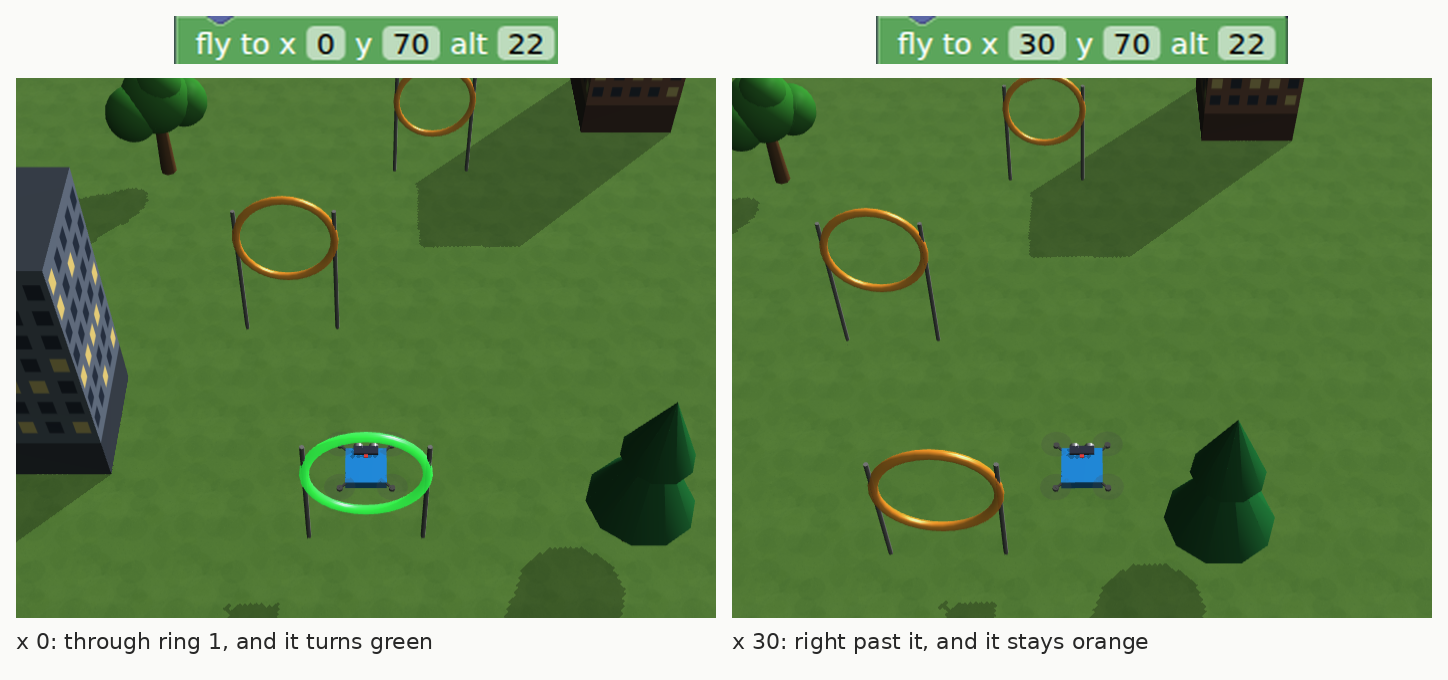
One number, two flights. The block says where the drone flies next: x is left and right, y is forward, alt is height. With x at 0 it flies through the first ring; change it to 30 and the drone flies thirty units to the side, straight past the ring, and the ring stays orange. That is the first minute of the guide, and it is most of the idea of programming it.
What they are learning while they play
Nothing here is presented as a lesson. This is what the activity is made of.
| What the student does | What it is |
|---|---|
| Types where the drone should go next | Coordinates in three dimensions. Left and right, forward and back, and height. Every point in the course is three numbers. |
| Puts the blocks in order and runs them | Sequences. The drone does exactly what the program says, in the order it says it. Swap two blocks and the flight changes. |
| Changes one number and the drone misses a ring | Debugging. Find the line that made the difference. Changing one thing at a time is how you find it. |
| Switches from Blocks to Python | Text programming. The same program, written as code. Blocks and Python are two views of one flight. |
| Flies the canyon on distance sensors | Sensors and conditionals. If something is close ahead, turn toward the open side. The drone reads the world and decides. |
| Adds a camera and a light, and the battery runs out sooner | Weight and power. Every part adds weight, heavier drones need more thrust, and more thrust drains the battery faster. |
| Flies in wind and rain | Forces and disturbance. Wind pushes the drone off course, and rain presses it down and makes landings skid. The program has to cope. |
| Tries manual mode and cannot keep it level | Feedback control. In stabilized mode a controller keeps measuring the tilt and correcting it many times a second. That loop is what makes a drone flyable. |
How to tell whether it landed
Ask, and let them show you. A student who has understood it can answer these without help.
- Point to the block that sends the drone to ring three. What do its three numbers mean?
- You changed one number and the drone missed a ring. Which ring, and why?
- Make the drone skip ring four on purpose, without deleting any blocks.
- Open the Python tab. Which line is the block you just changed?
- Before you run your next change, say which rings will turn green. Were you right?
Practical notes
- AgesAges 9 through high school. Younger students change numbers in the starter and fly by hand; older ones write missions in Python with sensors and loops.
- TimeA minute to a first run. A satisfying session is thirty to forty-five minutes of change, run, change.
- EquipmentAny computer or Chromebook with a modern browser. Nothing to install. A keyboard is needed to fly by hand.
- CostFree. The app has no paid tier.
- PrepNone. Open the page and go. Reading this page first takes about four minutes.
- In a groupEveryone can start from the same program, so the class compares which change made which ring go orange.
For co-ops, microschools, and classrooms
Give everyone the same course and one rule: change one thing, predict, run. The room turns into a flight test center, with students calling which ring the drone will miss before it takes off. When they are ready, the missions set the next goal, and the Python tab is there for the students who want to write it themselves.
- Five ready-made worlds, from open sky to a sensor-only canyon, plus a builder for courses of their own.
- Eight missions, most with a gold time to beat, including a delivery run, a night flight, and a canyon in fog.
- No install, no lab setup, no per-seat license. Chromebooks are fine.
- A free teacher account covers up to 50 students, and student work is private by default.
Common questions
Is the Drone Simulator free?
Yes. It runs in your browser and there is no paid tier. A free account adds saving, but nothing on this page is behind a paywall.
Does my child need an account to try it?
No. The demo on this page is the complete simulator with a starter program. Make a free account and the program you changed comes with you as your first project.
Blocks or Python?
Both. The program is built from blocks, and the Python tab shows the same program as code. A student can switch to writing Python directly when they are ready, and the drone flies the same way.
Do we need a real drone?
No. Everything happens in the simulator, which has the things that make real drones hard: wind, weight, a battery that runs down, and a drone that will not stay level without a controller. It is a good way to learn before anyone flies real hardware.
What ages is it for?
Ages 9 through high school. Younger students work with the blocks and the missions. Older ones write Python with sensors, loops and if statements.
Does it install anything, and will it work on a Chromebook?
It installs nothing and runs in any modern browser, Chromebooks included. The 3D flight view runs in the browser, so an older machine shows fewer frames a second but flies the same course.
What subject can I log this as?
Most families log it as computer science. Coordinates are math, and wind, weight and battery are physical science. The table above lists specifically what is covered, so you can pick the label your records need and point at the evidence.
Where to go next
Start with Drone Simulator
Trying it costs nothing and takes about five minutes. An account is what makes the work last.
The Drone Simulator is one of the making apps on the platform. It is a place to make things, not a course, and it is not a substitute for a teacher: it is at its best when an adult asks the questions above and takes the answers seriously.
Page last reviewed September 2026.