Signal
Most music students learn one part at a time and rarely see how the parts fit together. Signal is a piano roll: every note is a bar on a grid, higher up for a higher note, longer for a longer one. It opens on the start of Pachelbel's Canon, arranged an octave lower for three tracks: a cello playing the same eight notes over and over while two violas take turns with the tune. Press Play and hear all three. Then click the grid with the pencil, and a note appears where you clicked.
Using this with a class? Make a free class and add your students yourself: each gets a username and password, with no email or Google account needed. Or give them one join code. Using Google Classroom? Post the link there; with a free class, the link also puts each student in your class, so you see their work. mytekDev is also available from the Google Workspace Marketplace, so your school's Google admin can install it for everyone.A first lesson: Everyone starts from the same canon, finds the bar where Viola 2 starts copying Viola 1, and then fills the two empty bars at the start of Viola 1 using only notes from the chord each cello note belongs to.
Set up a free class Share to Google ClassroomWhat a student actually does
They press Play and hear the cello start alone, eight notes that repeat for the whole piece. At bar 3 Viola 1 comes in with the tune, and at bar 5 Viola 2 starts playing the same tune from the beginning while Viola 1 moves on. That is what a canon is, and on the grid it shows: Viola 1's notes are blue with their names on them, and the other tracks sit behind as gray notes, so the copy two bars later is easy to spot. Clicking Viola 2 or Cello in the track list on the left brings that part to the front.
Then they write. With the pencil, a click on the grid adds an eighth note on that row, and the 8 at the top right changes the grid to longer or shorter notes, with dotted and triplet options. A note is dragged to move it, dragged by its end to change its length, and deleted with a right-click. The Edit menu copies, pastes and duplicates notes, moves them an octave, transposes them and snaps them to the grid. Add Track makes a new part, the instrument button picks its sound from 16 groups such as Piano, Strings, Brass and Synth Lead, and Rhythm Track turns a track into drums. Each track has its own volume and pan, the lanes under the grid set how hard each note is played, the Arrange tab shows every track across the whole song, and the Tempo tab and the BPM box set the speed.
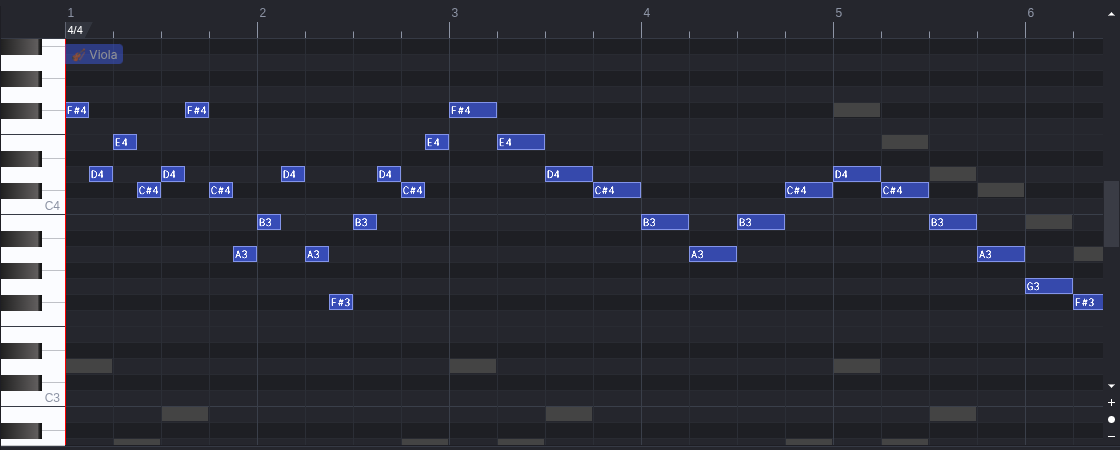
Sixteen clicks with the pencil fill the two empty bars before the tune comes in. Each click makes an eighth note, two for every cello note, and each pair comes from the chord the cello note belongs to: F sharp and D over a D, E and C sharp over an A, D and F sharp over a B. Notes from the chord sound settled against the bass; a note one step away from them rubs, and the student can hear the difference by moving one.
What they are learning while they play
Nothing here is presented as a lesson. This is what the activity is made of.
| What the student does | What it is |
|---|---|
| Reads a note's row against the piano keys down the side | Pitch. Each row is one key on a piano. Higher on the grid is a higher sound, and twelve rows up is the same note an octave higher. |
| Drags a note's end to make it twice as long | Rhythm and note length. How long a note lasts is how long its bar is. In 4/4, a bar between two lines holds four beats, and an eighth note takes half a beat. |
| Hears the cello play the same eight notes again and again | Bass line and ground bass. A short bass pattern repeated under changing music is a ground bass. It sets the chords, so everything above it has to fit those chords. |
| Spots Viola 2 copying Viola 1 two bars later | Canon. In a canon, one part plays a tune and another plays the same tune starting later. Rounds like Row, Row, Row Your Boat work the same way. |
| Picks F sharp and D to sit over a D in the cello | Chords and harmony. A chord is a set of notes that sound well together. D, F sharp and A make a D major chord, so any of them sounds settled over a D in the bass. |
| Gives one track Strings and another Rhythm Track | Arranging and instrumentation. The same notes sound different on different instruments. Arranging is choosing which instrument plays which part. |
| Changes the BPM and plays it again | Tempo. Tempo is the speed of the beat in beats per minute. The notes stay the same; only how fast they come changes. |
How to tell whether it landed
Ask, and let them show you. A student who has understood it can answer these without help.
- Which track starts first, and how many notes does it play before it repeats?
- At which bar does Viola 2 come in, and what is it playing?
- How can you tell from the grid which of two notes is higher, and which is longer?
- You wrote two notes over each cello note. Why did you pick the ones you picked?
- Move one of your notes up a single row and play it. What changed, and why?
Use it in your subject
Not a technology class? Then the app is how students show what they learned in your unit. More projects for every subject.
Music
Take a round the class already sings, enter the tune in one track, copy it into a second track starting later, and find the entry point where the two parts still fit.
Math
The grid is a graph with time across and pitch up. Count how many eighth notes fit in a bar, then work out how many seconds a bar lasts at 76 beats per minute.
Game design and media
Write a short loop for a game or video, export it as an MP3, and use it from the student's Assets in another app on the platform.
Practical notes
- AgesGrades 4 through 12. Younger students add notes by ear and play them back; older ones write harmony against the bass on purpose, arrange parts for different instruments and add drums.
- TimeA minute to hear the canon and add a note. Filling the empty bars with a line that fits takes fifteen to twenty minutes, and a short piece of their own most of a period.
- EquipmentA computer or Chromebook with a modern browser and a mouse or trackpad, and headphones in a room where everyone plays at once. A MIDI keyboard can be plugged in where the browser allows it, but is not needed. Nothing to install.
- CostFree. The app has no paid tier.
- PrepAbout five minutes: play the canon, click Viola 2 to see where it comes in, and add a few notes to the empty bars yourself, so you know what the class will see.
- In a groupEveryone starts from the same three tracks, so students can play each other's new bars and judge which ones fit the bass and which ones rub.
For co-ops, microschools, and classrooms
Hand everyone the same canon and the same job: write a line that fits over the bass. Each student hears their notes against the other parts the moment they play it back, so a note that clashes is found by listening, and the finished piece can go out as a MIDI file or an MP3.
- Every part on one grid, with the other tracks shown behind the one being edited.
- Instruments in 16 groups, plus drums, for each track.
- Saves as a standard MIDI file that other music programs open.
- No install, no per-seat license. Student work is private by default.
Common questions
Is it free?
Yes. It runs in your browser and there is no paid tier. A free account adds saving, but nothing on this page is behind a paywall.
Is this the original Signal?
It is the Signal music editor, made by ryohey and contributors and used under the MIT license. This is not signalmidi.app. What we add is saving each song to a free account, private by default, with a picture of its notes in the student's project list, and a WAV or MP3 export that goes into the student's Assets instead of a downloads folder. The instruments play through the A320U sound set by Milton Paredes, which is released under the GNU GPL.
How is it different from GarageBand or Soundtrap?
GarageBand is Apple's free app for Mac, iPhone and iPad, installed from the App Store rather than run in a browser. Soundtrap for Education does run in a browser, including on Chromebooks, and Soundtrap prices it at $8 to $10 per student a year. Signal does not record sound from a microphone: it writes notes for instruments to play, like a score, and saves them as MIDI. In return it is free, and every note is something a student placed and can see. It is not made by or connected with Apple or Soundtrap.
Does my child need an account to try it?
No. The demo on this page is the whole app with the canon loaded. Saving needs a free account.
Can students keep what they make?
Yes. Download MIDI File in the File menu saves the song as a MIDI file that other music programs open, and Open brings a MIDI file in. Export makes a WAV or an MP3 recording of the song, which goes into the student's Assets on the platform.
Can it use a MIDI keyboard?
Yes, in browsers that support MIDI devices, such as Chrome. A plugged-in keyboard shows up under Settings, MIDI, and R starts and stops recording into the selected track.
Does it run on a Chromebook?
Yes. It installs nothing and runs in the browser. Notes are placed, dragged and deleted with a mouse or trackpad, and deleting a note is a right-click, so a mouse makes it easier.
Is a student's work public?
No. Songs are private by default. A student can choose to share one. In a class the teacher can see students' projects.
What subject can I log this as?
Most families log it as music: pitch, rhythm, harmony and composing in parts. Working out bar lengths from the tempo is math, and exporting a soundtrack for a game counts toward media or game design.
Still have a question? Ask us, and a person will write back.
Where to go next
Start with Signal
Trying it costs nothing and takes about five minutes. An account is what makes the work last.
Signal is one of the making apps on the platform. Every detail on this page was read from the app itself with the Pachelbel's Canon starter. It is a place to make things, not a course, and it is not a substitute for a teacher: it is at its best when an adult asks the questions above and takes the answers seriously.
Signal is by ryohey and contributors, used under the MIT license. Source.
Page last reviewed November 2026.
Google, Google Classroom and Chromebook are trademarks of Google LLC.