Avatar Maker
Game characters are rarely modeled in one piece. They are assembled from parts, hair, heads, eyes, clothes, hats, each its own 3D model built to fit the same body. Avatar Maker hands students that parts bin: more than 500 pieces in 13 categories. It opens on a random character. Press Randomize for another, open any category to choose a part yourself, and spin the result around. Free, in the browser, no account needed to try it.
Using this with a class? Make a free class and add your students yourself: each gets a username and password, with no email or Google account needed. Or give them one join code.A first lesson: Everyone builds a character for the same short story, a detective, a lighthouse keeper, a time traveler, and the room guesses which role each one is before hearing the answer.
Set up a free classWhat a student actually does
They press Randomize and a new character appears, then another, each one strange in a different way. They open Hair, see a grid of styles and a row of colors under it, and choose one on purpose. Then eyes, a mouth, a jacket, a hat. After a few minutes they are no longer taking what the dice give them; they are building someone specific, and turning them around to check the back.
From there it is a character designer. Thirteen categories cover hair, head and skin, eyes, eyebrows, mouth, facial hair, hands, torso, jackets, hats, glasses, earrings and accessories, from a rubber duck float to cat ears. A search box finds parts by name, the camera spins and zooms, and with an account the finished character exports as a 3D model file that can go into a 3D scene in SceneMaker.
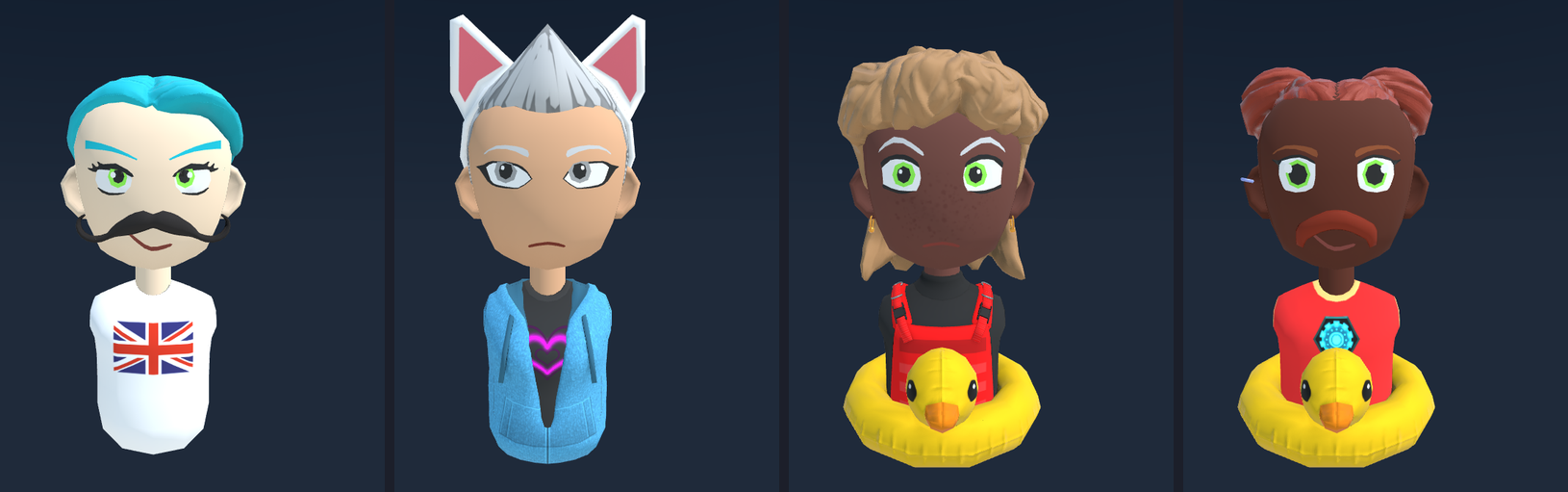
Four presses of Randomize. The app has 514 parts in 13 categories, and any hair fits any head because every part was modeled on the same body. Multiply the choices in each category, counting none as a choice for the optional ones, and there are about 370 quadrillion possible characters, far more than there are people.
What they are learning while they play
Nothing here is presented as a lesson. This is what the activity is made of.
| What the student does | What it is |
|---|---|
| Swaps one part and keeps the rest | Modular design. Build from interchangeable parts and every part works with every other. Games, cars and computers are all made this way. |
| Notices any hair fits any head | Standards and interfaces. Every part was modeled to fit the same body. Agreeing on that shape first is what makes the parts interchangeable. |
| Wonders how many characters are possible | The counting principle. Multiply the number of choices in each category. Thirteen small numbers make hundreds of quadrillions of combinations. |
| Presses Randomize | Random selection. The computer picks one option from each category. Some results are great and some are silly, which is how randomness behaves. |
| Spins the character around | 3D models. Each part is a shape made of triangles with a painted surface, seen from any angle the camera takes. |
| Picks clothes and a hat for a role | Character design. A reader decides who a character is in a glance. Designers choose every detail to say something about them. |
| Searches for a part by name | Organizing information. Five hundred parts are only usable because they are sorted into categories and named consistently. |
| Exports the character | 3D file formats. The parts are merged into one standard model file that other 3D tools, games and virtual worlds can open. |
How to tell whether it landed
Ask, and let them show you. A student who has understood it can answer these without help.
- Why does any hair fit on any head?
- About how many different characters could this make? How would you work it out?
- Build a character for a job without saying the job. Can a partner guess it?
- What would a designer have to do to add a new hat that fits?
- Where else have you seen things built from swappable parts?
Practical notes
- AgesAges 6 through high school. Younger students randomize and dress up characters; older ones design characters with a purpose and think about how the parts fit.
- TimeSeconds to the first character. A designed character for a story takes ten to twenty minutes.
- EquipmentA computer or Chromebook with a modern browser and 3D graphics (WebGL). Nothing to install.
- CostFree. The app has no paid tier.
- PrepNone. Open the page and go. Reading this page first takes about three minutes.
- In a groupEveryone can build a character for the same story, and the room compares who they imagined.
For co-ops, microschools, and classrooms
Read out the start of a story and have everyone build its main character. The characters that come back are all different, and asking each student why they chose the hat or the jacket turns into a conversation about character and description that carries straight back into writing.
- More than 500 parts in 13 categories, with a search box.
- Randomize for inspiration, then choose parts on purpose.
- Characters export as 3D models for SceneMaker and other 3D tools.
- No install, no per-seat license. Student work is private by default.
Common questions
Is Avatar Maker free?
Yes. It runs in your browser and there is no paid tier. A free account adds saving and exporting characters to your files, but nothing on this page is behind a paywall.
Does my child need an account to try it?
No. The demo on this page is the complete avatar maker. Make a free account and the character they built comes with them as their first project.
Does it use photos or a camera?
No. Characters are made only by choosing parts. Nothing is scanned or uploaded.
What ages is it for?
Ages 6 and up. Randomizing and dressing up works for young children; designing a character for a purpose suits older students.
Can they use the character somewhere else?
Yes, with a free account. Export Avatar saves it as a 3D model file, which SceneMaker and other 3D tools can load.
What subject can I log this as?
Most families log it as art or digital design. Character design is art, modular parts and 3D models are design and technology, and working out the number of combinations is math. The table above lists specifically what is covered, so you can pick the label your records need and point at the evidence.
Where to go next
Start with Avatar Maker
Trying it costs nothing and takes about five minutes. An account is what makes the work last.
Avatar Maker is one of the making apps on the platform. It is a place to make things, not a course, and it is not a substitute for a teacher: it is at its best when an adult asks the questions above and takes the answers seriously.
Based on Mozilla's Hubs Avatar Maker (MPL 2.0); the 3D parts are by mozilla.org contributors under CC BY-SA 3.0. Source.
Page last reviewed September 2026.