Face Lab
Games, films and phones build faces the same way: start from an average head and push it along a few dozen directions, one number each. Face Lab puts those numbers in a student's hands. It opens on the average head. Press New face and it becomes someone else, press New expression and they smile, frown or start talking, then drag a slider and watch the part of the face it controls light up. Free, in the browser, no account needed to try it.
Using this with a class? Make a free class and add your students yourself: each gets a username and password, with no email or Google account needed. Or give them one join code.A first lesson: Everyone recreates the same described character, say a worried grandparent or a grinning pirate, using only the sliders, then the room compares which numbers each person reached for.
Set up a free classWhat a student actually does
They press New face and the average head turns into a stranger, then another, then another. They press New expression and the stranger is suddenly mid-sentence, or frowning, or squinting. Then they drag a slider and a patch of the face glows: that is the part that number controls. Before long they are making someone on purpose rather than by luck.
From there it is a character designer. Named sliders shape the head and the expression, from head size and cheekbones to blinks, smiles and an open mouth. Nose, Chin, Brow, Ears and Cheeks each have sliders that move only that part. Six skin tones and six eye colors finish the look, and Export sends the head to SculptGL to sculpt by hand, saves it to their files, or downloads it as a 3D model.
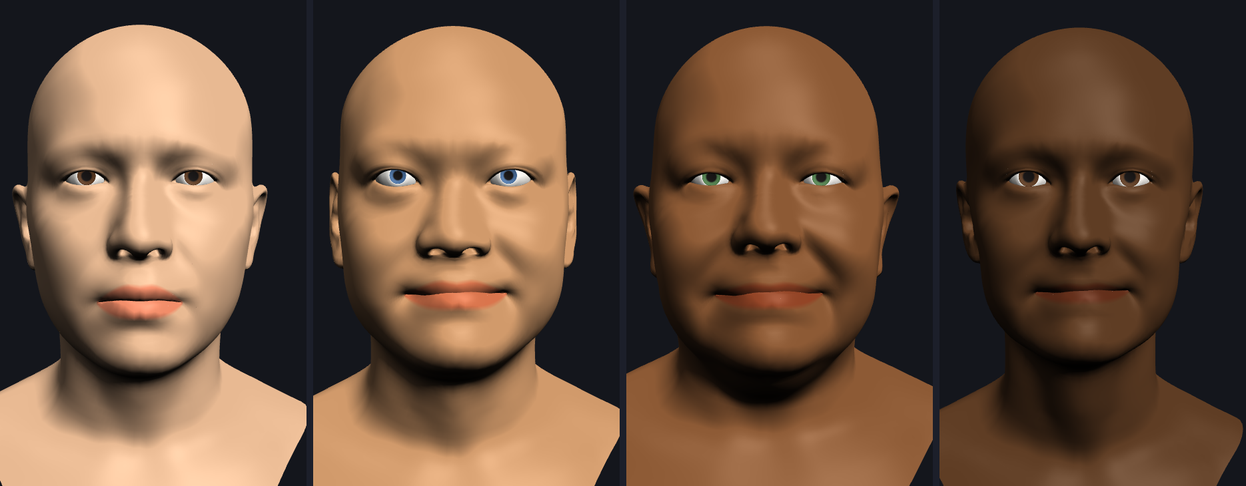
The average head, then three sets of numbers. Nothing was modeled by hand: the first head plus 63 numbers for who they are gives each of the others, and a few of the 106 expression numbers, a smile and smiling eyes, give them the same friendly look. Skin and eye colors come from the swatches. That is how game characters and animated faces are built.
What they are learning while they play
Nothing here is presented as a lesson. This is what the activity is made of.
| What the student does | What it is |
|---|---|
| Starts from the average head | Averages. The starting face is the mean of the model. Every other face is described as a difference from it. |
| Presses New face | Data as numbers. A whole face is stored as a short list of numbers. Change the list and you change the person. |
| Drags one slider and watches a region light up | Parameters. Each number pushes the whole head in one direction. Some move the jaw, some the brow, some everything a little. |
| Keeps the face and changes the expression | Separating concerns. Who someone is and what their face is doing are stored separately, so one can change without the other. |
| Uses the Nose or Ears sliders | Controlled variables. These sliders are built to move only one part, so you can test one change at a time. |
| Turns the head around | 3D meshes. The head is thousands of points joined into triangles. Every slider moves all of those points at once. |
| Picks skin and eye colors | Representation. Characters in games and films can look like anyone. Designers choose who they show. |
| Exports the head | 3D file formats. The face becomes a standard model file that other 3D tools can open, sculpt and print. |
How to tell whether it landed
Ask, and let them show you. A student who has understood it can answer these without help.
- What is actually saved when you save a face?
- Why can you change the expression without changing who the person is?
- Find a slider that changes only the jaw. How did you know?
- Make someone who looks surprised. Which sliders did it?
- Why start from an average face instead of a blank one?
Practical notes
- AgesAges 9 through high school. Younger students shuffle faces and expressions; older ones design a specific character slider by slider.
- TimeSeconds to the first new face once the head has loaded. A designed character takes twenty to forty minutes.
- EquipmentA computer or Chromebook with a modern browser and 3D graphics (WebGL). The head model is a large download the first time. Nothing to install.
- CostFree. The app has no paid tier.
- PrepNone. Open the page and go. Reading this page first takes about three minutes.
- In a groupEveryone can build the same described character, and the room compares the numbers they chose.
For co-ops, microschools, and classrooms
Read out a character, a nervous astronaut or a delighted grandmother, and let everyone build them with sliders only. Put the heads side by side: they will look different, and each student can say which numbers they moved and why.
- Named sliders for face shape and expression, not a wall of numbers.
- Region sliders for nose, chin, brow, ears and cheeks.
- Heads export as 3D models, straight into SculptGL for sculpting.
- No install, no per-seat license. Student work is private by default.
Common questions
Is Face Lab free?
Yes. It runs in your browser and there is no paid tier. A free account adds saving and keeping exports in your files, but nothing on this page is behind a paywall.
Does my child need an account to try it?
No. The demo on this page is the complete designer. Make a free account and the face you made comes with you as your first project.
Does it use a camera or photos?
No. Faces are made only from sliders on a 3D model. Nothing is scanned or uploaded.
What ages is it for?
Ages 9 through high school. Shuffling faces works for anyone; designing a character on purpose suits older students.
Can they use the head somewhere else?
Yes. It exports as a standard 3D model, can go straight into SculptGL to sculpt, and can be saved to their files for other 3D apps.
What subject can I log this as?
Most families log it as art or computer science. Character design and representation are art, and parameters, averages and 3D meshes are computing and math. The table above lists specifically what is covered, so you can pick the label your records need and point at the evidence.
Where to go next
Start with Face Lab
Trying it costs nothing and takes about five minutes. An account is what makes the work last.
Face Lab is one of the making apps on the platform. It is a place to make things, not a course, and it is not a substitute for a teacher: it is at its best when an adult asks the questions above and takes the answers seriously.
The head model is Google's GNM head model, used under the Apache 2.0 license. Source.
Page last reviewed September 2026.