BeepBox
BeepBox is a music maker for chiptune, the bright, buzzy sound of old game consoles. Music is written on a grid: click a square to put a note there, click it again to take it away, and press play to hear the song loop. Each instrument has its own row of short patterns, and a pattern written once can play again in any bar. It opens on an eight-bar loop with a melody, chords, a bass line and drums, and the melody's first bar ends on an empty beat, waiting for a note. Free, in the browser, no account needed to try it.
Using this with a class? Make a free class and add your students yourself: each gets a username and password, with no email or Google account needed. Or give them one join code. Using Google Classroom? Post the link there; with a free class, the link also puts each student in your class, so you see their work. mytekDev is also available from the Google Workspace Marketplace, so your school's Google admin can install it for everyone.A first lesson: Everyone plays the starter, then puts one note in the empty last beat of the melody's first bar. Before pressing play again, they predict which other bar will change too, and say why.
Set up a free class Share to Google ClassroomWhat a student actually does
They press play and hear the starter: a buzzy chiptune melody on top, chords played as a fast ripple of notes, a bass that bounces between low and high, and a drum beat made of noise. Then they start changing it. They click a note into the empty beat at the end of the melody's first bar and hear it come back in bar 5. They drag a note to make it longer, click above or below a note to stack a chord, or click a box in the song rows to open that bar and change what plays there. While the song is stopped, each note sounds as they place it, so they hear a change before they play the whole loop.
From there it is the whole of BeepBox. Song Settings set the scale, key, tempo, reverb and rhythm, triplets included. A melody instrument can be a chip wave, a pulse-width wave, harmonics, a drawn spectrum or FM synthesis, and drum channels use noise, a spectrum or a drum set. There are also presets, from retro sounds to keyboards, guitars, strings, brass and drums, and a Random Preset choice for when nobody can decide. Channel Settings in the Edit menu adds instruments, up to six melody channels and three drum channels, and a song can run to 128 bars. Click the name of any setting and BeepBox explains what it does. With a free account the song saves as a project, and a shared song plays on its project page in BeepBox's own player.
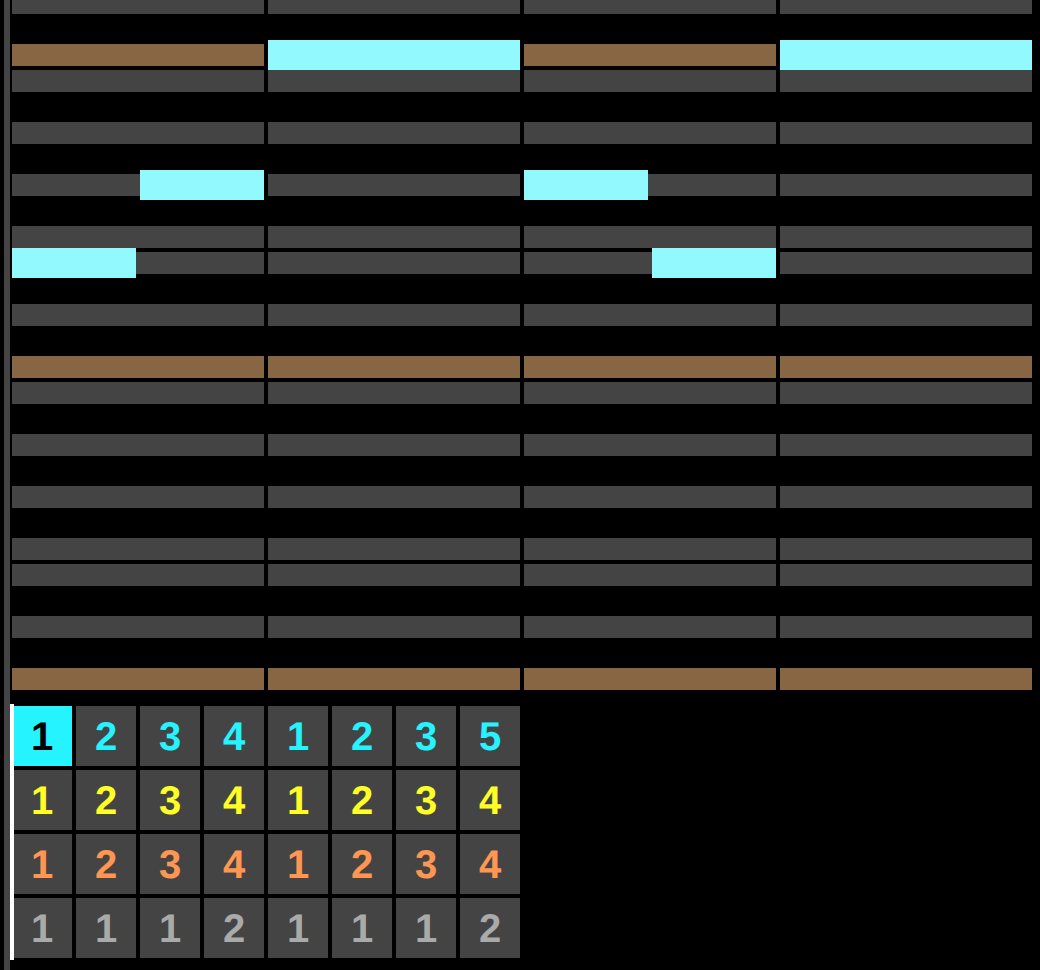
One note added to pattern 1. The melody row plays pattern 1 in bar 1 and again in bar 5, so the new C now sounds in both places. Nothing was copied: a pattern is written once, and the numbers in the song say where it plays. To change bar 5 alone, select it and choose Duplicate Reused Patterns from the Edit menu, which gives that bar its own copy to edit.
What they are learning while they play
Nothing here is presented as a lesson. This is what the activity is made of.
| What the student does | What it is |
|---|---|
| Clicks a note into the empty last beat | Beats and subdivision. In the starter a bar has four beats and each beat is split into four steps. A note two steps long is an eighth note, four steps is a full beat, and the grid makes the counting visible. |
| Adds a note to bar 1 and hears it in bar 5 too | Patterns and repetition. A pattern is written once and placed wherever its number appears. Change the pattern and every bar that uses it changes with it. |
| Reads the melody row: 1 2 3 4 1 2 3 5 | Musical form. Songs repeat with small changes. Bars 5 to 8 repeat bars 1 to 4, and only the last bar is different, so the second time through the melody can settle back on C. |
| Hears the chord row play C, A minor, F and G | Chord progressions. One chord per bar, four chords that loop, is one of the most common shapes in pop music. Clicking two or three notes into the same spot on the grid is how a chord is built. |
| Changes Chords from arpeggio to harmony | Arpeggios. An arpeggio plays a chord's notes one after another, very fast, instead of all at once. Old game consoles had only a few sound channels, so this is how their music fit chords in. |
| Switches the melody's Wave from 1/4 pulse to triangle | Waveforms and timbre. Same notes, different wave shape. Narrow pulse waves sound thin and buzzy, a triangle wave sounds soft and round, which is why the bass in the starter uses one. |
| Notices the grid only offers some notes | Scales and keys. With Scale set to normal :) and Key set to C, the grid shows only the seven notes of C major and hides the rest. Other scales show other notes; expert shows all twelve. |
| Raises Tempo from 120 to 150 | Tempo. Tempo is beats per minute. At 120 that is two beats a second, so eight bars of four beats last 16 seconds. At 150 the same loop takes 12.8. |
How to tell whether it landed
Ask, and let them show you. A student who has understood it can answer these without help.
- You added a note to bar 1. Why did bar 5 change too?
- How would you change bar 5 without changing bar 1?
- The loop is eight bars of four beats at 120 beats per minute. How many seconds is it?
- What would you change in the drum row to make the drums play their fill every other bar?
- The melody's last bar is pattern 5, not pattern 4. What would the end of the loop sound like with pattern 4 there?
Use it in your subject
Not a technology class? Then the app is how students show what they learned in your unit. More projects for every subject.
Music
Build a four-chord loop, then write two melodies over it: one that uses only notes from each bar's chord, one that wanders. Play both and describe the difference.
Math
Time as multiplication and fractions. Four steps to a beat and four beats to a bar: how many steps in eight bars, and how many seconds at 120 beats per minute? Change the tempo and predict the new length before pressing play.
Computer science
Reuse and references. The song row is a list of pattern numbers, and editing a pattern changes every bar that points to it, the way calling the same function twice runs the same code. Duplicate Reused Patterns makes a copy instead, and the difference between the two is the difference between a reference and a copy.
Practical notes
- AgesAges 10 through high school. Younger students add and move notes in the starter; older ones start from a blank song, choose their own instruments and work out chords.
- TimeA minute to the first sound. Turning the starter into something of their own takes about twenty minutes, and a whole song of their own takes a class period or two.
- EquipmentA computer or Chromebook with a mouse or trackpad and a modern browser. Headphones in a classroom, so thirty loops do not play over each other. Every sound is generated in the browser, so there are no sound files to download and nothing to install.
- CostFree. The app has no paid tier.
- PrepNone. Open the page and go. Reading this page first takes about three minutes. Try the demo once yourself so you know where the play button and the song rows are.
- In a groupEveryone starts from the same loop and fills the same empty beat, then swaps headphones with a partner to hear what the other one did.
For co-ops, microschools, and classrooms
Give everyone the same starter and one rule: change one pattern, then predict which bars will sound different before pressing play. The song rows make the prediction easy to check, since the numbers show exactly where each pattern plays. With headphones a whole room can work at once, and playing the songs back for each other at the end turns into a small concert.
- A starter loop with a melody, chords, bass and drums, each on its own colored row.
- Every sound is made in the browser, so there are no sound files to wait for.
- Click the name of any setting for BeepBox's own short explanation of it.
- No install, no per-seat license. Student work is private by default.
Common questions
Is this the original BeepBox?
It is BeepBox, the open-source chiptune editor by John Nesky, used under the MIT license. This is our hosted copy of BeepBox 3.0.9, not the official site at beepbox.co, which runs a newer version. Notes, patterns, instruments and settings work the way they do in BeepBox 3. Our build adds saving each song to a free account as a project, a picture of the song's notes as its thumbnail in the project list, and a project page where a shared song plays in BeepBox's own player.
Do I need to download anything?
No. It runs in the browser on Chromebooks, Windows, Mac and Linux. There is nothing to install, and every sound is generated in the browser rather than loaded from sound files.
Is it only for students?
No. It is BeepBox for anyone. Much of this page is written for teachers and parents because many of the people who use it are students.
Is BeepBox free?
Yes. BeepBox is free and open source, and there is no paid tier for it here. A free account adds saving, but nothing on this page is behind a paywall.
Do I need an account to try it?
No. The demo on this page is BeepBox with the starter song. Make a free account and the song you changed comes with you as your first project.
Why is there no sound?
Browsers only allow sound after a click on the page, so click the play button rather than starting with the space bar. Then check the computer's volume and the BeepBox volume slider next to the play button.
Will a classroom full of this be loud?
Yes, without headphones. A song keeps looping until someone presses pause. Headphones, or a rule that only one song plays out loud at a time, keep it workable.
Do they need to read music?
No. Notes are blocks on a grid: higher on the grid is higher in pitch, longer is longer in time. Students who do read music can turn on Show Piano Keys in the Preferences menu to see the note names beside the grid.
Can students work on one song together?
Yes, with accounts. Once a song has a share link, its owner can use Go Live to build it together with classmates. Everyone hears the same song as it changes, and a name tag on each row of the song shows who is working on which instrument.
What ages is it for?
Ages 10 through high school. Changing the starter works for younger students; writing whole songs and choosing instruments suits older ones.
Is a student's work public?
No. Saved songs are private by default. A student can choose to share one with a link.
What subject can I log this as?
Most families log it as music. Writing melodies over chords, building rhythms and arranging a song are music, and working out bar lengths and tempos is arithmetic. The table above lists specifically what is covered, so you can pick the label your records need and point at the evidence.
Still have a question? Ask us, and a person will write back.
Where to go next
Start with BeepBox
Trying it costs nothing and takes about five minutes. An account is what makes the work last.
BeepBox is one of the making apps on the platform. It is a place to make things, not a course, and it is not a substitute for a teacher: it is at its best when an adult asks the questions above and takes the answers seriously.
BeepBox is by John Nesky and contributors, used under the MIT license. Source.
Page last reviewed October 2026.
Google, Google Classroom and Chromebook are trademarks of Google LLC.