Sound Effect Studio
The coin, the jump and the laser in a retro game are not recordings. They are a couple of simple sound waves with a pitch that slides and a volume that dies away, built in a fraction of a second. Sound Effect Studio is where students build their own. It opens on a laser: play it, drag one slider and it charges up instead of firing, then swap the wave and hear it go soft. Free, in the browser, no account needed to try it.
Using this with a class? Make a free class and add your students yourself: each gets a username and password, with no email or Google account needed. Or give them one join code.A first lesson: Everyone gets one game event, like a door opening, a potion or a missed jump, and builds a sound for it. The room guesses the event from the sound alone.
Set up a free classWhat a student actually does
They press Play Sound and hear a laser. They drag End Pitch in the first layer above the start pitch and play it again, and the same laser now sounds like something charging up. They change the wave from sawtooth to sine and it goes from buzzy to smooth. In a minute they have heard pitch, direction and tone do three different jobs.
From there it is a sound designer. Up to 8 layers of sine, square, sawtooth, triangle and noise, each with its own pitch sweep, delay and envelope: how fast it gets loud, how long it holds and how it fades. Master effects add filter, distortion and reverb, samples can be imported and trimmed, and 23 presets across movement, pickups, combat and more show how classic game sounds are built. A simple mode hides the advanced controls for younger students.
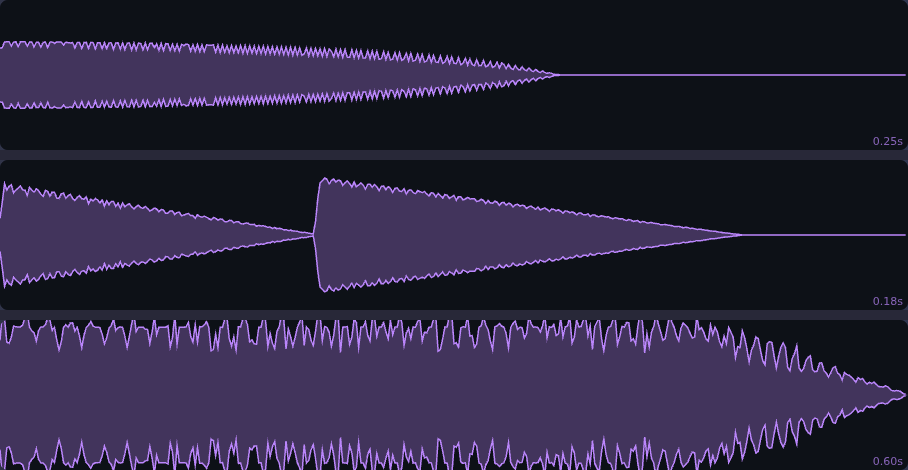
Three game sounds as the studio draws them: a laser, a coin and a power-up. The outline is volume over time. The laser starts loud and dies at once. The coin is two short notes, the second a little higher. The power-up holds its volume while three waves slide up together. The shape alone tells you what kind of moment it is.
What they are learning while they play
Nothing here is presented as a lesson. This is what the activity is made of.
| What the student does | What it is |
|---|---|
| Drags Start Pitch and End Pitch | Frequency. Pitch is how many times a second the wave vibrates, measured in hertz. Higher means more vibrations. |
| Makes the pitch rise instead of fall | Sound and meaning. Rising pitch feels like gaining something; falling feels like losing or firing. Game designers use that on purpose. |
| Switches sawtooth to sine | Waveforms and timbre. The same note sounds different on different instruments because the wave has a different shape. |
| Watches the waveform shrink away | Envelopes. Attack, decay, sustain and release describe how a sound gets loud and dies away. A pluck and a hum can share a pitch. |
| Adds a second layer with a delay | Layering. Most game sounds are two or three simple sounds at once or one after another. |
| Uses noise for an explosion | Noise. Random vibration with no single pitch. It is the basis of hits, wind, rain and explosions. |
| Turns the filter down | Filters. A filter removes high or low frequencies. It is how sounds are made muffled, distant or underwater. |
| Exports a WAV file | Digital audio. The computer stores a sound as tens of thousands of numbers a second, one for each moment of the wave. |
How to tell whether it landed
Ask, and let them show you. A student who has understood it can answer these without help.
- What changes when you raise the pitch, in the wave itself?
- Why does a rising sound feel like a reward and a falling one like a miss?
- The sine and the sawtooth play the same notes. Why do they sound different?
- Look at the waveform before you press Play. Is it a short click or a long tone?
- Build a sound for a door creaking open. Which settings did you reach for first?
Practical notes
- AgesAges 8 through high school. Younger students start from presets in Simple Mode; older ones build sounds layer by layer.
- TimeSeconds to the first sound. A satisfying session is twenty to forty minutes.
- EquipmentAny computer or Chromebook with a modern browser and sound. Headphones help in a classroom. Nothing to install.
- CostFree. The app has no paid tier.
- PrepNone. Open the page and go. Reading this page first takes about three minutes.
- In a groupEveryone can build a sound for the same game moment, and the room compares the choices.
For co-ops, microschools, and classrooms
Hand out game moments, a coin, a trap door, a level up, and let everyone build a sound for theirs. Play them back without saying which is which and let the room guess. It turns frequency and waveforms into something students can hear and argue about.
- 23 presets, from jumps and coins to explosions and power-ups.
- Up to 8 layers of waves, noise and imported samples.
- Simple Mode for younger students, full controls for older ones.
- No install, no per-seat license. Student work is private by default.
Common questions
Is Sound Effect Studio free?
Yes. It runs in your browser and there is no paid tier. A free account adds saving and keeping exported sounds, but nothing on this page is behind a paywall.
Does my child need an account to try it?
No. The demo on this page is the complete studio with a starter laser. Make a free account and the sound you changed comes with you as your first project.
Do they need to know anything about music or audio?
No. Every control is a slider they can hear, and the presets show how real game sounds are put together.
Can they use their sounds in a game?
Yes. With a free account a sound exports as a WAV file into their files, ready to use in GameBuilder or any other game tool.
What ages is it for?
Ages 8 through high school. Presets and Simple Mode suit younger students; layering and envelopes suit older ones.
What subject can I log this as?
Most families log it as music, physics or computer science. Frequency and waveforms are the physics of sound, envelopes and timbre are music, and digital audio is computing. The table above lists specifically what is covered, so you can pick the label your records need and point at the evidence.
Where to go next
Start with Sound Effect Studio
Trying it costs nothing and takes about five minutes. An account is what makes the work last.
Sound Effect Studio is one of the making apps on the platform. It is a place to make things, not a course, and it is not a substitute for a teacher: it is at its best when an adult asks the questions above and takes the answers seriously.
Page last reviewed September 2026.