Bitsy
Bitsy is a tiny game maker. Every game is a few small rooms, a player, some characters to talk to and some things to pick up, all drawn on 8 by 8 pixel grids in three colors per room. That limit is the point: a student can finish a whole game in one sitting. It opens on The Seed Garden, a two-room game where a frog has lost three seeds. Play it, then redraw the frog, change what it says, or add a room of your own. Free, in the browser, no account needed to try it.
Using this with a class? Make a free class and add your students yourself: each gets a username and password, with no email or Google account needed. Or give them one join code. Using Google Classroom? Post the link there; with a free class, the link also puts each student in your class, so you see their work. mytekDev is also available from the Google Workspace Marketplace, so your school's Google admin can install it for everyone.A first lesson: Everyone plays The Seed Garden, then changes one thing a player would notice, such as a drawing, a line of dialog or the ending, and a partner has to play it and find the change.
Set up a free class Share to Google ClassroomWhat a student actually does
They press play and walk the player around the garden with the arrow keys. The frog asks for its three seeds. Each seed they walk over is picked up with a small sound, and when they talk to the frog again its words change. Through the gap in the hedge is a greenhouse, and walking onto the big sunflower ends the game. Then they press play again to stop, and start changing things: redraw the player in the paint panel, recolor the garden in the colors panel, or open the frog's dialog and rewrite what it says.
From there it is the real Bitsy. They draw tiles, sprites and items on 8 by 8 grids, with a second frame to make them move. They paint tiles into rooms and choose which ones are walls, add new rooms and connect them with exits, and place endings. Dialog can branch on what the player is carrying, and each character can have its own blip sound. There is a tune panel for writing room music and a record gif button to capture a short clip. The game panel saves the game as one HTML file that plays in any browser, and its data tab shows the whole game as plain text. With a free account the game saves, and a share link opens a page where anyone can play it.
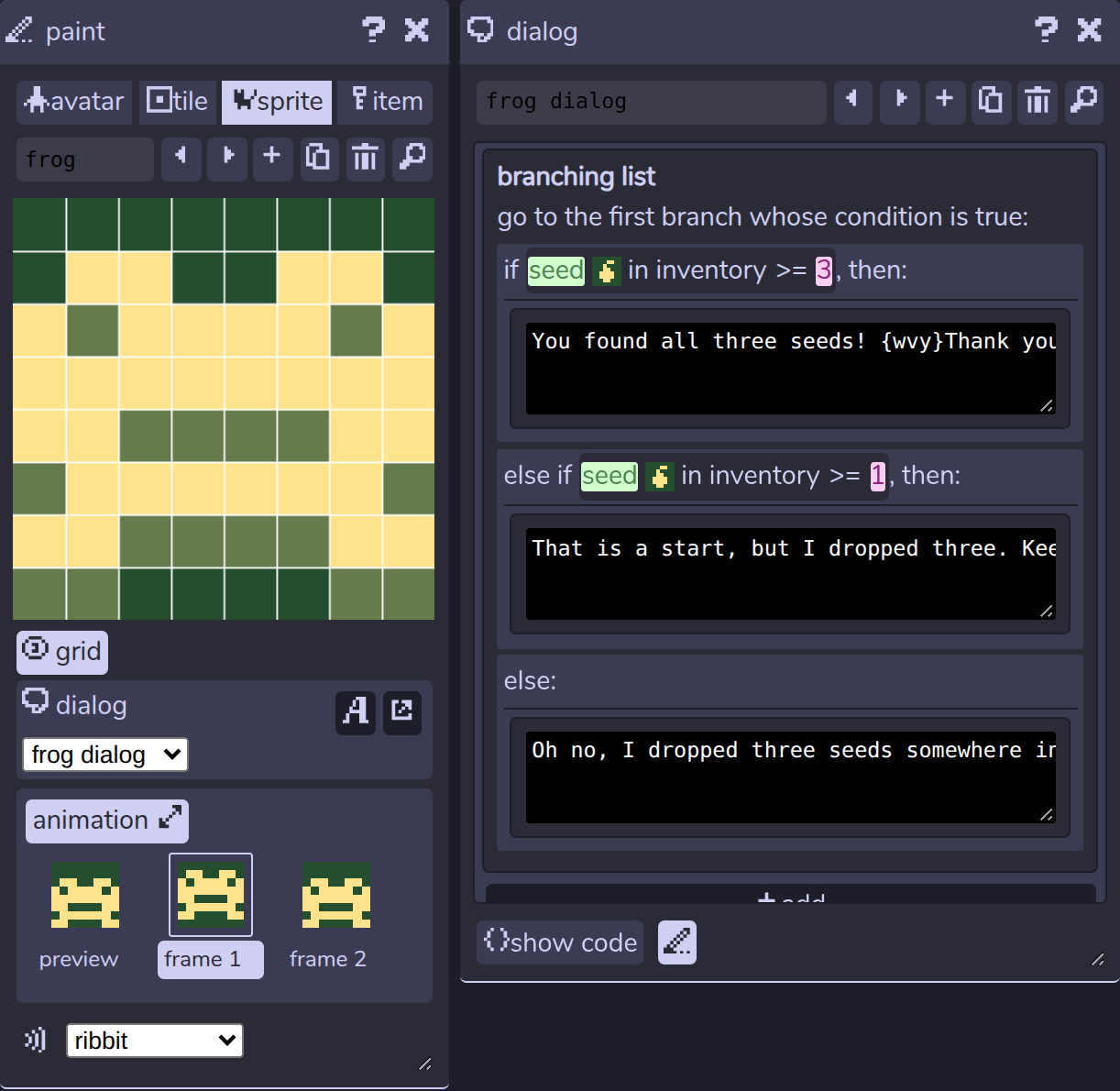
The frog has one dialog with three branches, and Bitsy uses the first one whose condition is true. The checks run from the most seeds down, so a player holding all three gets the thank you, not the keep looking line. Put the at least 1 branch first and the frog never says thank you, because a player with three seeds also has at least one.
What they are learning while they play
Nothing here is presented as a lesson. This is what the activity is made of.
| What the student does | What it is |
|---|---|
| Redraws the player on an 8 by 8 grid | Pixel art and sprites. Every picture in the game is a grid of on and off squares. Fewer pixels means every one has to count. |
| Adds a second frame to the frog | Animation. Two drawings shown one after the other look like movement. That is how every cartoon and sprite works. |
| Marks the hedge tile as a wall | Collision. The game has to know which squares the player can walk through and which ones stop it. A wall is a rule, not a picture. |
| Connects the garden to the greenhouse with an exit | Game world as connected spaces. A room is a 16 by 16 map, and an exit is a link that says which room and which square the player arrives on. |
| Picks up seeds and watches the frog's words change | Conditionals. The frog checks how many seeds the player has and picks the first branch that is true, like an if, else if, else. |
| Changes the 3 in the frog's dialog to 2 | Variables and inventory. The game keeps a count of each item. Code can read that count and compare it to a number. |
| Picks three colors for a room | Limited palettes and contrast. Each room has a background, tile and sprite color. If two are too close, the player cannot see where to go. |
| Opens the data tab and finds the frog | Data as text. The whole game is plain text: rooms as rows of letters, drawings as rows of ones and zeros. Change the text and the game changes. |
How to tell whether it landed
Ask, and let them show you. A student who has understood it can answer these without help.
- Why does the frog say something different after you pick up a seed?
- If you moved the at least 1 branch to the top, what would the frog say to a player with all three seeds?
- Walk to the sunflower without picking up any seeds. Why does the game still say you planted them?
- Which tiles can the player walk through, and how does the game know?
- Where does the player arrive when it goes through the gap in the hedge, and how would you change that?
Use it in your subject
Not a technology class? Then the app is how students show what they learned in your unit. More projects for every subject.
English
Tell a short story through a game: each room is a scene, characters speak in dialog, and the ending is the last line. Write it on paper first, then build it.
Computer science
Branching dialog as if, else if, else. Write the frog's three branches as plain sentences, then add a new item and a branch that checks for it.
Art
Design a character in 64 pixels and three colors, then explain which pixels make it readable at small size.
Practical notes
- AgesAges 9 through high school. Younger students redraw sprites, rewrite dialog and build a room; older ones plan a multi-room story with branching dialog and their own music.
- TimeA minute to the first play. A small game of their own, with two or three rooms and an ending, takes forty-five minutes to an hour.
- EquipmentA computer or Chromebook with a modern browser. A mouse or trackpad for drawing and a keyboard for playing and writing dialog. Nothing to install.
- CostFree. The app has no paid tier.
- PrepNone. Open the page and go. Reading this page first takes about three minutes.
- In a groupEveryone can start from the same two-room game, change one thing, and play each other's versions.
For co-ops, microschools, and classrooms
Give everyone The Seed Garden and one change to make. The games that come back have different players, different frogs and different endings, and swapping seats to play them turns into playtesting. A finished Bitsy game is small enough to build in a class period and complete enough to show a family.
- A starter game with two rooms, a character with branching dialog, items to collect and an ending.
- Pixel drawing, room building, dialog, sound effects and music, all in one editor.
- Saves a finished game as a single HTML file that plays in any browser.
- No install, no per-seat license. Student work is private by default.
Common questions
Is this the original Bitsy?
It is Bitsy, the open-source game maker by Adam Le Doux, used under the MIT license. This is our hosted copy of the Bitsy 8.15 editor, not the official site at bitsy.org. The editor and the games are the same. Our additions: saving games to a free account, a share link where anyone can play the game in the browser, colors that follow the site's light or dark setting, and an editor that shrinks to fit smaller screens. Games are saved in Bitsy's own formats, so a .bitsy data file or HTML game made here can be loaded into Bitsy elsewhere.
Do I need to download anything?
No. It runs in the browser on Chromebooks, Windows, Mac and Linux. There is nothing to install.
Is it only for students?
No. It is the full Bitsy editor for anyone. Much of this page is written for teachers and parents because many of the people who use it are students.
Is Bitsy free?
Yes. It runs in your browser and there is no paid tier. A free account adds saving and sharing, but nothing on this page is behind a paywall.
Does my child need an account to try it?
No. The demo on this page is the complete editor with a starter game. Make a free account and the game you changed comes with you as your first project.
Do they need to know how to code first?
No. Drawing, building rooms and writing dialog are all done with the mouse and plain words. Branching dialog is built from menus, and students who want to can open the dialog's code or the game data and edit the text directly.
What ages is it for?
Ages 9 through high school. Drawing and rewriting dialog works for younger students; planning a story across several rooms with branching dialog suits older ones.
Is a student's work public?
No. Saved games are private by default. A student can choose to share one, and the share link opens a page where anyone with the link can play it.
What subject can I log this as?
Most families log it as computer science or English. Branching dialog and item counts are programming, and building a story in rooms is writing. The table above lists specifically what is covered, so you can pick the label your records need and point at the evidence.
Still have a question? Ask us, and a person will write back.
Where to go next
Start with Bitsy
Trying it costs nothing and takes about five minutes. An account is what makes the work last.
Bitsy is one of the making apps on the platform. It is a place to make things, not a course, and it is not a substitute for a teacher: it is at its best when an adult asks the questions above and takes the answers seriously.
Bitsy is by Adam Le Doux, used under the MIT license. Source.
Page last reviewed October 2026.
Google, Google Classroom and Chromebook are trademarks of Google LLC.