PixelArt
A student draws a character one square at a time, then makes it move by drawing it again, a little different, frame after frame. It opens on a finished walking mushroom, so the first thing to do is change it. Free, in the browser, no account needed to try it.
What a student actually does
They start with a character that already walks. They pick a color from the ones the sprite already uses, draw on it, and watch the preview: the change blinks, because it is only on one frame. That blink is the whole idea of animation, discovered in the first minute. Draw it on every frame and it walks with the character.
From there they make their own. A 32 by 32 grid is small enough to finish and big enough to have a face. They mirror-draw for symmetry, shade with lighten and darken, see the previous frame faintly under the current one with onion skin, stack parts on layers, and set the speed. The finished sprite exports as an animated GIF, a PNG sprite sheet for a game, or a zip of frames, and a picture can be snapped to a pixel grid to start from.
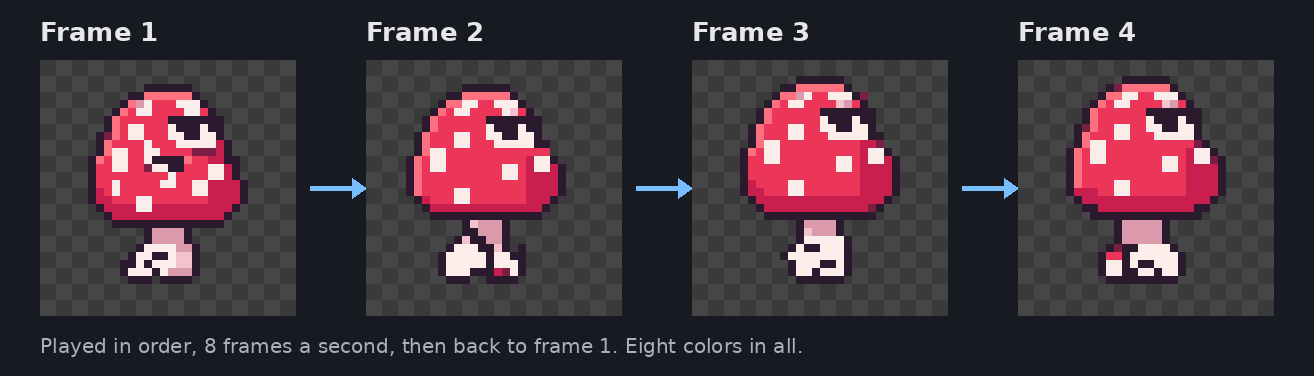
The walk is four drawings. Each one moves the feet and bobs the cap a little, and the preview plays them in order, eight a second, then starts over. Change one frame and the change blinks; change all four and it moves with the character.
What they are learning while they play
Nothing here is presented as a lesson. This is what the activity is made of.
| What the student does | What it is |
|---|---|
| Draws on a 32 by 32 grid | Coordinates and resolution. 1,024 squares, each one color. Every image on a screen is built this way, just with more squares. |
| Works from the sprite's own small palette | Color with limits. A handful of shades per color, light for where light hits and dark for shadow. Constraints make the style. |
| Draws the same character again, slightly different | Animation as a sequence. Movement is a series of still pictures shown fast enough that the eye fills in the rest. |
| Drags the FPS slider | Rate and timing. At 8 frames a second each drawing stays on screen for 125 milliseconds. Double it and the walk doubles its speed. |
| Turns on onion skin | Small changes over time. Seeing the last frame faintly shows how far each part moved, which is where smooth motion comes from. |
| Draws with the mirror pen | Symmetry. One side drawn, the other reflected across a line. Faces, ships and bugs all use it. |
| Puts the eyes on their own layer | Breaking a picture into parts. Parts on separate layers can change without touching the rest, the same way a game keeps a character apart from the level. |
| Exports a sprite sheet | How games store animation. All the frames side by side in one image, which a game cuts back into frames as it plays. |
How to tell whether it landed
Ask, and let them show you. A student who has understood it can answer these without help.
- How many drawings make this walk? What would it look like with only two?
- At 8 frames a second, how long is each drawing on the screen?
- Why does your change blink when you only drew it on one frame?
- Show me the onion skin. What is it telling you?
- Make it walk faster two ways: once with the FPS slider, and once without touching it.
Practical notes
- AgesAges 7 through high school. Younger students recolor and doodle on the starter; older ones animate their own characters and build tilesets for games.
- TimeA minute to a first change. Turning the mushroom into their own creature is a class period; a sprite of their own from scratch is one or two.
- EquipmentAny computer or Chromebook with a browser. Nothing to install. A mouse makes small pixels easier than a trackpad.
- CostFree. The app has no paid tier.
- PrepNone. Open the page and go. Reading this page first takes about three minutes.
- In a groupEvery student can start from the same mushroom, so the class sees how differently one starting point can end up.
For co-ops, microschools, and classrooms
One starting sprite, twenty different creatures by the end of the period. Because everyone begins from the same four frames, the room can put the animations side by side and talk about what each person changed: a new color scheme, a hat that bobs with the walk, a creature that is not a mushroom at all.
- Two or more students can draw on one sprite together, at the same time, from their own computers.
- No install, no lab setup, no per-seat license. Chromebooks are fine.
- A free teacher account covers up to 50 students.
- Student work is private by default. Sharing anything publicly is a separate, deliberate action.
Common questions
Is PixelArt free?
Yes. The app runs in your browser and there is no paid tier of it. A free account adds saving and sharing, but nothing on this page is behind a paywall.
Does my child need an account to try it?
No. The demo on this page is the complete app with a starter sprite, and it keeps your changes inside the browser tab. Make a free account and the sprite you changed comes with you as your first project.
What ages is PixelArt for?
Ages 7 through high school. Younger students recolor and doodle on the starter. Older ones animate their own characters, work in layers, and build tiles for game levels.
What can they do with what they make?
Export it: an animated GIF to share, a PNG sprite sheet to drop into a game, or a zip of separate frames. The sprite sheet is the format game engines expect for animated characters.
Does it install anything, and will it work on a Chromebook?
It installs nothing and runs in any modern browser, Chromebooks included. A mouse is easier than a trackpad for placing single pixels.
What subject can I log this as?
Most families log it as art, and many also count it toward computer science or math. The grid is coordinates and resolution, the frame rate is timing, and exporting a sprite sheet is how games store animation. The table above lists specifically what is covered, so you can pick the label your records need and point at the evidence.
Is my child's work public?
No. Projects are private by default. Publishing to the public gallery is a separate action a student has to take, and public listings mask the display names of younger students.
Where to go next
Start with PixelArt
Trying it costs nothing and takes about five minutes. An account is what makes the work last.
PixelArt is one of the making apps on the platform, built on the open-source Piskel editor. It is a place to make things, not a course, and it is not a substitute for a teacher: it is at its best when an adult asks the questions above and takes the answers seriously.
The editor is Piskel, used under the Apache 2.0 license. Source.
Page last reviewed September 2026.