Capture the flag challenges for students, in a browser terminal
In a capture the flag challenge, a student gets a small computer where something went wrong, and a question about it. Somewhere in its files is the answer, a line that looks like FLAG{...}. Finding it takes the same work a security analyst does: read the logs, search them with grep, decode what looks like nonsense, notice the one file whose date does not fit. These challenges run inside the platform's Linux terminal, so there is nothing to install and nothing a student types can break a real machine. Each one has a briefing, hints that cost points, and a score. After students have solved a few, they can write their own.
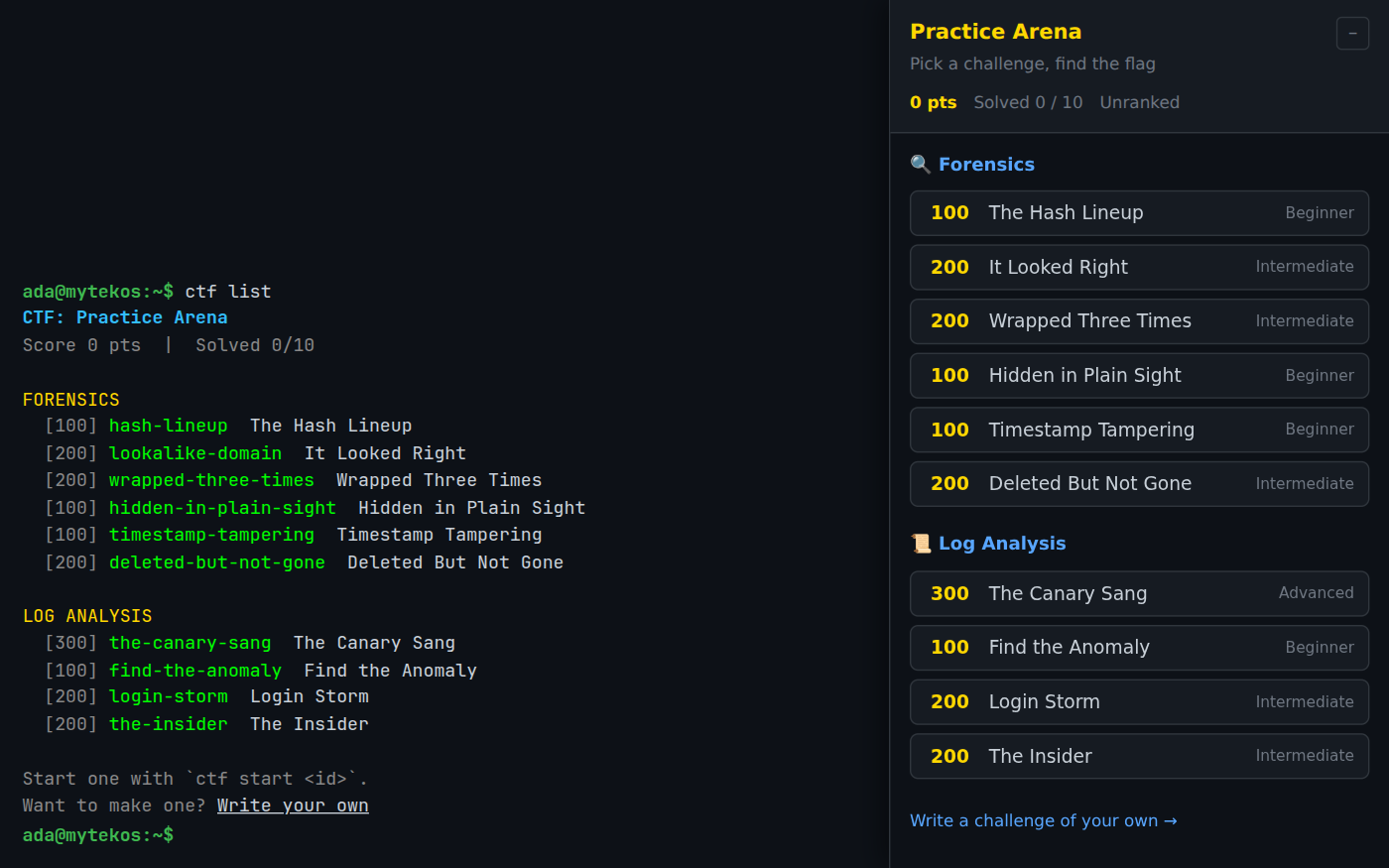
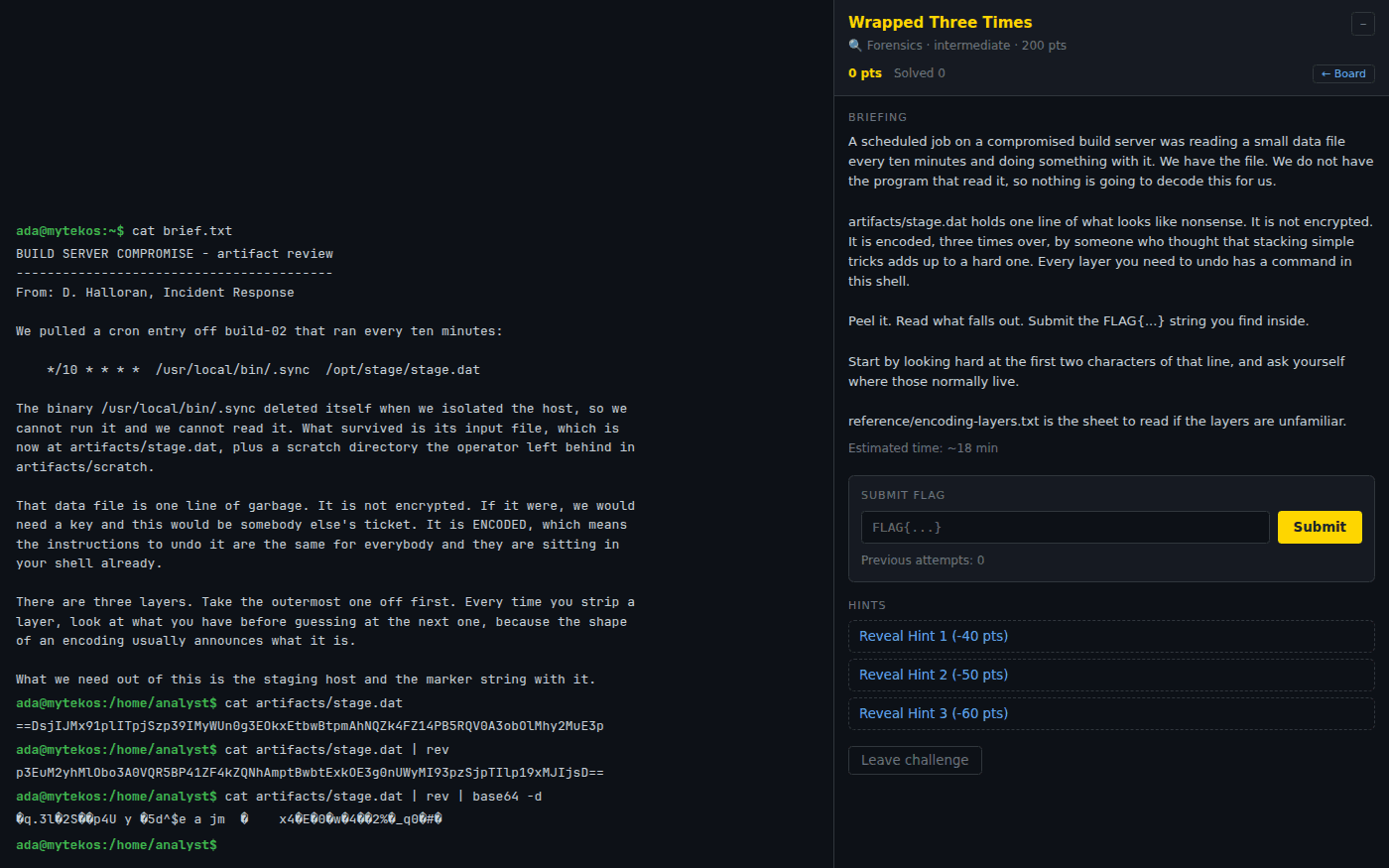
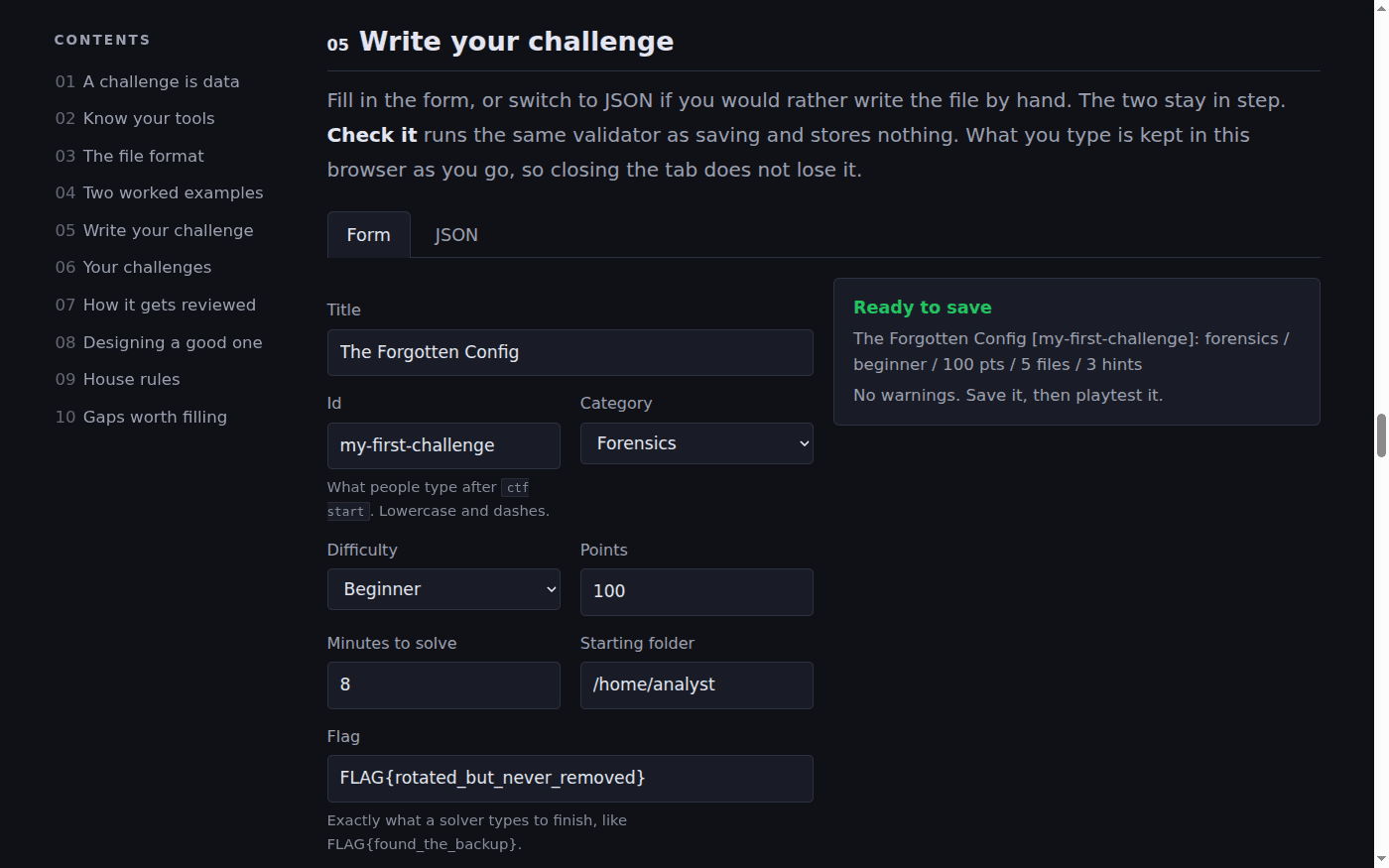
Screenshots from a showcase account. Click any picture to see it full size.
Using this with a class? Make a free class and add your students yourself: each gets a username and password, with no email or Google account needed. Or give them one join code.A first lesson: Start the whole class on Find the Anomaly, a beginner challenge of about eight minutes. Then ask the first three students who solve it to explain, without saying the flag, which line gave it away.
Set up a free classWhat a student actually does
They type ctf list, choose a challenge and type ctf start with its name. The terminal moves them into that challenge's machine, with its own files, logs and home folder, and a panel opens with the briefing. From there it is investigation with ordinary Linux commands: ls and cat to look around, grep to search, find and stat to see what changed and when, base64 and rev to undo an encoding, and pipes like grep Failed auth.log | wc -l to count. When they find the flag they type submit and the flag.
A wrong guess costs nothing. A hint costs points, and a solve always earns at least a quarter of the points, so a student who is stuck can keep going. Every challenge is written so the answer comes from reasoning rather than luck: one login in a busy SSH log that comes from outside the network, a file whose date is older than the folder it sits in, a vendor domain with one letter from a different alphabet, a shell history that shows what someone tried to delete.
The challenges
Ten challenges are on the board now, worth 1,700 points in all. Each shows its difficulty and an estimated time. They are fictional incidents at invented companies, and every file in them is made up.
Forensics
- Hidden in Plain Sight (beginner): a line added to a log file that does not belong
- Timestamp Tampering (beginner): a planted file with a backdated modification time
- The Hash Lineup (beginner): the one stored password that is not salted, and which hash it used
- It Looked Right (intermediate): a vendor domain with a letter from another alphabet
- Wrapped Three Times (intermediate): one line encoded three times over
- Deleted But Not Gone (intermediate): a shell history, and the backup that survived
Log analysis
- Find the Anomaly (beginner): the one SSH login that does not fit the pattern
- Login Storm (intermediate): a brute force attack, and the attempt that got in
- The Insider (intermediate): a 2 a.m. data export, matched against the staff list
- The Canary Sang (advanced): decoy documents that report when someone opens them
Around the challenges
- A score, and a leaderboard with ctf leaderboard
- Up to five hints per challenge, each with a point cost
- Leave a challenge and come back to it later with ctf start
- A short guided introduction for students who have never seen a CTF
- The same terminal students use all year, so what they learn carries over
Students can write their own challenges
Writing a challenge is harder than solving one, and that is the point. To hide a flag well, a student has to know exactly which command finds it and which ones do not. They have to know what a real log looks like, so the planted line blends in. And they have to decide how much a hint can say to get a stuck classmate moving without giving the answer away. It is the security version of writing the test instead of taking it.
Any student with an account can do this. There is no code to write: a challenge is a briefing, a small set of made-up files, one hidden flag and a few hints, entered in a form.
- Solve a few first. Three or four challenges from the board show the shapes a good one can take.
- Open the author's manual. Type ctf write in the terminal, or use the link under the board. The manual has two worked examples and the form.
- Write the story and the files. A briefing that says what happened and where to look, the files that make up the machine, the flag hidden in one of them, and up to five hints.
- Check it. The checker runs the same rules as saving. It warns about commands the terminal does not have, a flag that appears in no file, a hint that names a missing file, and hints that cost more than the challenge is worth.
- Save it and play it. A saved draft can be played right away from the student's own account, with ctf start and its id. Nobody else can see it yet.
- Send it for review. Our staff read every submission, and may send it back with a note. An approved challenge goes on the board for every student on the platform.
What they are learning
Most of this is in the first unit of any cybersecurity course, and in the Cisco CCST Cybersecurity exam objectives.
| What the student does | What it is |
|---|---|
| Decodes a line with base64 -d | Encoding is not encryption. Encoding changes how data looks, and anyone can undo it with no key. Encryption needs a key. Attackers use encoding to hide things from a quick look, not to protect them. |
| Counts failed logins with grep, cut, sort and uniq -c | Log analysis. Logs record what happened. A brute force attack shows up as many failures from one address, and the success that follows is the line that matters. |
| Compares file dates with ls -l and stat | Timestamps as evidence. Every file has a modification time, and attackers sometimes backdate a planted file so it blends in. A date that does not fit its folder is a clue. |
| Checks how each password is stored | Password hashing. Passwords should be stored as salted, deliberately slow hashes such as bcrypt or Argon2id. A bare, unsalted hash is a weakness, and its length tells you which algorithm made it. |
| Finds the domain with one wrong letter | Lookalike domains. A letter from another alphabet can look exactly like a Latin one. Phishing and invoice fraud use this to make a fake sender look approved. |
| Reads a shell history, then finds the backup | Artifacts. Deleting a file rarely removes every trace of it. Histories, backups and logs remember what a user did. |
| Matches a web log against a staff list | Correlating evidence. One source says what happened; a second says who. Putting them side by side is most of an investigation. |
| Works out who opened a decoy document | Canary tokens. A decoy file that nobody has a reason to open, and that reports when it is opened. Any touch at all is a signal. |
How to tell whether it landed
Ask these after a challenge. The flag proves they finished; the answers show they understood.
- Which line or file gave it away, and what made it stand out from the rest?
- Which command would have found it fastest, and why that one?
- Is base64 a way to protect a secret? What is the difference?
- If you were the attacker, what would you have done to hide better? If you were the defender, what would catch that?
Practical notes
- AgesAges 12 through high school, and adults. The beginner challenges need only cd, ls, cat and grep. The intermediate and advanced ones suit high school cybersecurity and IT classes.
- Time8 to 25 minutes per challenge, with the estimate shown on each. All ten together take about three class periods.
- EquipmentAny computer or Chromebook with a current browser. Nothing to install, and no lab network to build or reset.
- CostFree with an account. A free class holds up to 50 students with no email needed.
- PrepSolve one beginner challenge yourself first, about ten minutes. You do not need a security background: the briefing and hints carry the student.
- In a groupSolo, or in pairs with one keyboard. Pairs talk through each step, which is where the learning is.
For cybersecurity, IT and computer science classes
A capture the flag event usually means a lab, a network to reset and someone to run it. Here each student already has the terminal, the challenges are on the board, and the score keeps itself. It fits between lessons as a warm-up, as a review before a test, or as the unit's final challenge.
- Ten challenges now, with more added from reviewed student submissions.
- Mapped to the Cisco CCST Cybersecurity domains, with 410 practice questions in the same terminal.
- Students write and submit their own challenges, with no code.
- No install, no per-seat license. Student work is private by default.
Common questions
What is a capture the flag challenge?
A puzzle about a computer where something happened. The student investigates its files and logs to find a hidden string called the flag, which looks like FLAG{some_words}, and submits it for points. Security teams and competitions use the same format to practice real skills.
Is this suitable for beginners?
Yes. Four challenges are marked beginner and need only a few basic commands. There is also a short guided introduction for students who have never seen a CTF. The advanced challenge is there for students who finish early.
Does it teach students to hack?
It teaches them to investigate. Every challenge takes the defender's side: find the planted file, the bad login, the fake domain. Nothing touches a real system, every file is invented, and challenges written by students are reviewed before anyone else can play them.
Can students really write their own challenges?
Yes, with no programming. They fill in a form with a briefing, some made-up files, a flag and hints, check it, play it themselves, and send it in. Our staff review each one before it goes on the board for everyone.
Can I see how my students are doing?
Not yet from your class page. Each student can show their points, how many challenges they have solved and their rank with ctf score, and ctf leaderboard lists the top scorers by display name. A quick check at the end of a lesson is to ask everyone to run ctf score.
Do I need to know Linux or cybersecurity?
It helps, but it is not required. Solve one beginner challenge yourself before class. The briefings say where to look, and the hints walk a stuck student forward one step at a time.
Still have a question? Ask us, and a person will write back.
Where to go next
Start with Capture the Flag
Everything on this page comes with a free account. A free class adds your students, each with a username and password and no email needed.
Capture the Flag is part of the platform's Linux Terminal, not a separate product. All companies, people, addresses and files in the challenges are invented.
Page last reviewed September 2026.