Comic Maker
A comic strip is a story cut down to its bones: a setup, a beat, a punchline, and only as many words as fit in a bubble. Comic Maker opens on a finished three-panel comic. A student asks a robot for help with math homework, the robot says math is what it does best, and then the third panel lands the joke. Double-click the words in any bubble to rewrite them, drag a character to a new spot, or start a comic of your own with a new layout.
Using this with a class? Make a free class and add your students yourself: each gets a username and password, with no email or Google account needed. Or give them one join code. Using Google Classroom? Post the link there; with a free class, the link also puts each student in your class, so you see their work. mytekDev is also available from the Google Workspace Marketplace, so your school's Google admin can install it for everyone.A first lesson: Everyone starts from the same robot comic, keeps the first two panels, and rewrites only the robot's last line. Then the class reads the new punchlines aloud and talks about which ones still pay off the setup in panel one.
Set up a free class Share to Google ClassroomEarning a Girl Scout badge? 5 step-by-step kits use Comic Maker, for scout badges and for homeschool families, and end with a certificate. See the kits
What a student actually does
They read the comic first, left to right, and get the joke: the robot brags in panel one, stalls in panel two, and gives itself away in panel three. Then they double-click the last bubble and write a punchline of their own. Most first tries are too long for the bubble, which is the lesson arriving early: a comic line has to be short enough to read at a glance.
From there they make their own. A comic is one, two, three, four or six panels, plus a four-panel layout with a wide panel at the top left and the bottom right. Twelve characters (people, a superhero, a villain, a wizard, a robot, a ghost, an alien, a dog and a cat) and eight effects (a bang, a star, a heart, a question mark, an exclamation mark, an anger mark, sleep marks and sparkles) drop into the panel that is picked, and can be dragged and resized by the corner handle. Speech, thought and shout bubbles hold the words. Each panel gets one of twelve colors or six scene backgrounds: outdoor, night, sunset, indoor, dark and nature. Undo goes back up to fifty steps, and Export Image saves the comic as a picture in the student's files.
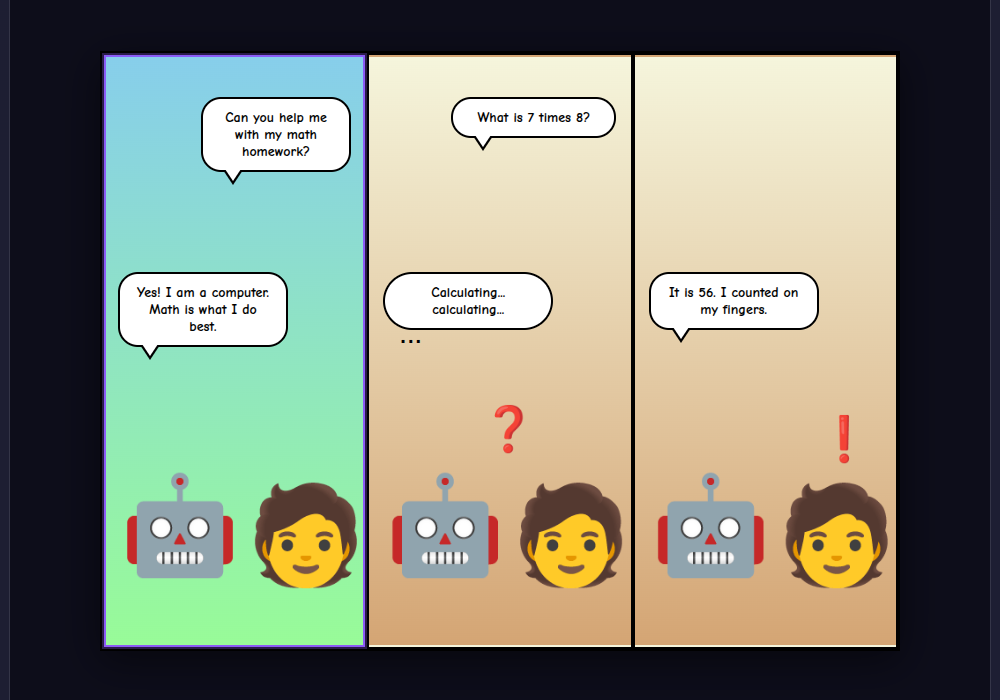
One bubble rewritten, and it is a different joke. Panels one and two still set it up the same way, the robot sure that math is what it does best, then stuck on 7 times 8. The new last line gets the right answer and still lands the joke, because a robot counting on its fingers is as unlikely as one asking for a calculator.
What they are learning while they play
Nothing here is presented as a lesson. This is what the activity is made of.
| What the student does | What it is |
|---|---|
| Reads the three panels in order and finds the joke in the last one | Sequence. A comic is read left to right, one panel at a time. Each panel is one moment, and the order is the story: beginning, middle, end. |
| Keeps panels one and two and changes only the last line | Setup and payoff. A joke or a twist works because the earlier panels set up an expectation. The last panel either meets it in a surprising way or breaks it. |
| Cuts a long punchline until it fits the bubble | Concise writing. A bubble has room for a sentence or two. Choosing the fewest words that still carry the meaning is the same skill as writing a strong topic sentence. |
| Picks a thought bubble for what the robot is thinking and a speech bubble for what it says | Dialogue and inner thought. Comics show the difference between what a character says out loud and what it keeps to itself. Writers do the same with quotation marks and narration. |
| Uses a shout bubble only for the loudest line | Emphasis. Used once, a jagged bubble tells the reader to hear that line louder. Used on every line, it stops meaning anything, like an essay in all capitals. |
| Changes a panel's background from day to night | Setting. Where and when a scene happens changes how it reads. A background color can show time passing between panels without a word. |
How to tell whether it landed
Ask, and let them show you. A student who has understood it can answer these without help.
- What does panel one tell you about the robot that makes panel three funny?
- Why is the robot's line in panel two in a thought bubble and not a speech bubble?
- Read your new last line. Does it still need panels one and two to make sense?
- Your first punchline did not fit. What did you cut, and did the joke survive?
- If you added a fourth panel, what would happen in it, and would it make the joke better or worse?
Use it in your subject
Not a technology class? Then the app is how students show what they learned in your unit. More projects for every subject.
English language arts
Retell one scene from a class novel in three panels: the moment before, the turning point, and what changed. Only the characters' own words may go in the bubbles.
Science
Show a process in three steps, such as a seed sprouting or water evaporating and coming back as rain, with a character explaining each step in one sentence.
World languages
Write a three-panel conversation in the language the class is learning: a greeting, a question and an answer. Partners swap comics and read the other's aloud.
Practical notes
- AgesGrades 3 through 12. Younger students rewrite a bubble and add a character; older ones plan a strip with a setup and a payoff, or retell a scene from something they are reading.
- TimeA minute to rewrite the last bubble. A three-panel comic of their own takes fifteen to twenty minutes, and reading each other's aloud takes ten more.
- EquipmentA computer or Chromebook with a modern browser and a screen at least 900 pixels wide: below that the panels of tools are hidden. A mouse or trackpad is easiest for dragging, and characters and bubbles can also be dragged by touch. Nothing to install.
- CostFree. The app has no paid tier.
- PrepAbout five minutes: rewrite the starter's last bubble yourself, and decide whether students will keep the starter's first two panels or start from a blank layout.
- In a groupEveryone starts from the same robot comic, so the class can hear how many different endings one setup can carry.
For co-ops, microschools, and classrooms
Hand everyone the same two panels and ask for the third. The bubbles are small, so every student has to decide what matters most in a line, and the finished strips are short enough for the whole class to read in a few minutes.
- Six panel layouts, three kinds of bubble, and characters ready to drag in.
- Exports a finished comic as a picture to the student's files.
- Everyone can start from the same comic and change one thing.
- No install, no per-seat license. Student work is private by default.
Common questions
Is it free?
Yes. It runs in your browser and there is no paid tier. A free account adds saving, but nothing on this page is behind a paywall.
Is it a free alternative to Pixton or Storyboard That?
For a short comic strip with characters and speech bubbles, yes. Pixton lists a teacher subscription at $25 a month or $144 a year, with a free Starter Plan that lasts 30 days and holds up to 40 projects. Storyboard That has a free teacher plan with a limited art library and limited cells, and its paid plans list more than 5,000 art assets. Both have far more art than Comic Maker: Pixton advertises backgrounds, characters, outfits, facial expressions and actions. Comic Maker's characters are twelve emoji with no poses or outfits to change, and its backgrounds are colors, not drawn scenes. It is free with no project limit. It is not made by or connected with Pixton or Storyboard That.
Does my child need an account to try it?
No. The demo on this page is the whole app with the robot comic loaded. Saving and Export Image need a free account, because the exported picture goes into the student's files on the site.
Where do the characters and pictures come from?
The characters and effects are emoji, so they look a little different on a Chromebook, a Mac and a Windows computer, the way emoji do in a text message. There is no way to add a photo or drawing to a comic, and no web image search, so everything in a comic is one of the app's own characters, effects, bubbles and backgrounds.
Are the words students type checked?
Yes. Swear words and slurs in a bubble are masked when the comic is saved, so they are masked for anyone who opens it, and the project's title and description are checked too. The filter catches clear profanity and slurs, not every unkind joke, so a shared comic reaches the public gallery only after a moderator approves it. In a class the teacher can see students' projects.
Does it run on a Chromebook?
Yes. It installs nothing and runs in the browser. Characters and bubbles can be dragged with a mouse, a trackpad or a finger on a touch screen. On a screen narrower than 900 pixels, such as a phone, the tool panels are hidden, so it is not usable there.
Is a student's work public?
No. Comics are private by default. A student can choose to share one. In a class the teacher can see students' projects.
What subject can I log this as?
Most families log it as English language arts: sequence, dialogue and concise writing. A comic that retells a book, a historical event or a science process counts toward that subject too.
Still have a question? Ask us, and a person will write back.
Where to go next
Badge kits and learning kits
Step-by-step projects in Comic Maker that end with a certificate: for a scout badge, or for homeschool families and classes.
- Kind and smart online: Girl Scouts Brownie Digital Leadership badge, or the learning kit for grades 2-3
- Make a four-panel comic: Girl Scouts Cadette Comic Artist badge, or the learning kit for grades 6-8
- Make the internet better: Girl Scouts Cadette Digital Leadership badge, or the learning kit for grades 6-8
- Kind in real life and online: Girl Scouts Daisy Digital Leadership badge, or the learning kit for grades K-1
- Lead online: a community for good: Girl Scouts Junior Digital Leadership badge, or the learning kit for grades 4-5
Start with Comic Maker
Trying it costs nothing and takes about five minutes. An account is what makes the work last.
Comic Maker is one of the making apps on the platform. Every detail on this page was read from the app itself with the robot comic starter. It is a place to make things, not a course, and it is not a substitute for a teacher: it is at its best when an adult asks the questions above and takes the answers seriously.
Page last reviewed November 2026.
Google, Google Classroom and Chromebook are trademarks of Google LLC.