Corn Maze Lab
A real corn maze is planned in winter, planted in June, cut when the corn is a foot tall, and walked in October when it is nine feet. Corn Maze Lab is that whole year on one screen. Students pick a field, choose a picture or write a word, grow the paths round it, and read the checker's one line: can a walker get out, how far is the shortest way, how many dead ends, and how far a walker who keeps one hand on the wall has to go. Then they add what a farm adds, checkpoints to punch, a bridge to see over the corn, a lookout tower, signs with clues, a scarecrow or two, and watch the season plant, cut and grow it from the air. Then they walk in. The corn is taller than they are, every row looks like the last, and the design that looked easy from above is suddenly a very different problem. A shared maze is walked by classmates against the clock, and the maker sees where people got lost.
Using this with a class? Make a free class and add your students yourself: each gets a username and password, with no email or Google account needed. Or give them one join code. Using Google Classroom? Post the link there; with a free class, the link also puts each student in your class, so you see their work. mytekDev is also available from the Google Workspace Marketplace, so your school's Google admin can install it for everyone.A first lesson: Pairs trade mazes. Each student walks the other's maze once with no map and once with the map at the gate, and writes two sentences: where they got lost, and what one change to the design would have fixed it. Then the maker makes that one change and the partner walks it again.
Set up a free class Share to Google ClassroomWhat a student actually does
They open the lab on a one-acre field with a heart cut into the corn and the paths already grown. New asks three questions: how big (a backyard patch, half an acre, one acre, two, or a real farm's five), what picture (a shelf of shapes, a word or two in block letters, or a picture of their own from their files), and how hard (easy, tricky or hard, which sets how winding the paths are and how many loops there are). Grow paths carves the maze round the picture and keeps the gates where they put them. The Mower cuts a path by hand, Plant puts corn back, and the Entrance and Exit tools move the gates along the edge.
The checker's card at the top of the panel never stops talking: walkers can get out, the shortest way is 640 feet, about a minute and a half, 53 dead ends, 8 loops, and how far a walker who keeps one hand on the wall has to go to get out. The rule always gets out when the gates are on the edge, at a price in feet, and it never touches the island inside a loop, which is where a farm puts the punches. The Stations put down what a farm puts down: checkpoints with a punch card, each with a clue the walker reads, a bridge and a lookout tower that lift the walker over the corn, signs, a map box, a scarecrow, hay bales, pumpkins, a wagon. The maker decides whether there is a map at the gate, only at the map boxes, or none at all, and whether the map shows where the walker is.
Grow the season plays the year from the air in twenty seconds: the planter puts a seed in every cell in June, the mower cuts the picture and the paths out of foot-high corn in July, the corn rises over everyone's head and takes the month's color, the maze opens, and the combine takes it back down to stubble. The month and the time of day are the maker's: a green August road or a November dusk with a lantern.
Then Walk. The camera flies in to the gate and drops to eye level. The corn stops them, the path turns, the clue at checkpoint 2 says to keep the sun on their left. The bell at the exit ends the walk with the time, the distance, the punches, and the map with their trail on it next to the shortest way. A shared maze is walked by classmates on the project page; the server replays every walk through the same engine, so the time on the board is the time it took, and the maker gets a map of where everyone stood longest and where the flags were waved.
Two of the maze's rules can be written as a program. The grower is a few lines read at each room of the carve: go straight, go toward the exit, if the exit is ahead then turn, and the maze changes as the program does. The robot walks a finished maze on a program of its own: the right hand rule as nested ifs, then Tremaux's rule with marks, which gets out of any maze. Both open as blocks and as text, and the text is the program.
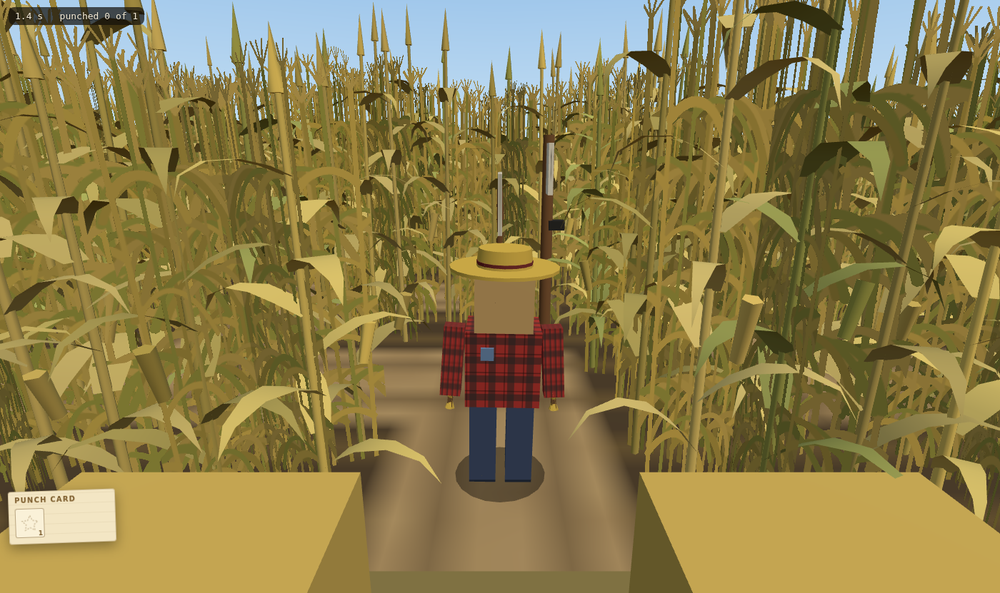
The walk. The camera stays under the tassels, so a student sees exactly what a visitor to a real maze sees: corn, a path, and a choice. The map from the air is on paper at the gate, or not at all, as the maker decides.
What they are learning while they play
Nothing here is presented as a lesson. This is what the activity is made of.
| What the student does | What it is |
|---|---|
| Reads that the maze has 8 loops and one hand on the wall walks 27,000 feet to get out | Graphs, cycles and an algorithm's limit. A maze is a graph of rooms and doors. Wall following walks the one wall the hand is on: with the gates on the outer wall it always reaches the exit, and it never touches an island inside a loop. The checker is a graph search, and the card is its result in plain words. |
| Grows the same picture three times and gets three different mazes | Randomness with a seed. The carve rolls dice at every room. The dice have a seed, so the same seed grows the same maze, which is how a shared maze is the same for everyone who walks it. |
| Picks five acres and reads 93 by 93 cells, five feet each | Area, scale and units. An acre is 43,560 square feet. A five foot path makes a cell 25 square feet, and the arithmetic to a field size is theirs to check. Every number the lab says is in feet. |
| Walks their own maze and gets lost in it | Perspective and representation. The map from above and the corridor from inside are two representations of one thing. Moving between them, and knowing which one a visitor has, is the design problem a real farm solves with clues and a bridge. |
| Writes a clue at checkpoint 3 that leads to the exit | Writing for a reader who cannot see what you see. A clue has to be true from the walker's spot, not the maker's. The lab's map shows where walkers got lost, which is the reader talking back. |
| Changes goStraight to goTowardExit in the grower and sees the paths change | A program is a rule, and the output shows it. The grower's lines are read at each room; the robot's lines are read at each step. Each is a small language with no JavaScript in it, and the blocks and the text are the same program. |
How to tell whether it landed
Ask, and let them show you. A student who has understood it can answer these without help.
- Why does one hand on the wall always get out of a maze whose gates are on the edge, and what does it never find? Show the island.
- Your field is two acres with five foot paths. How many cells is that, and how did you work it out?
- A visitor got lost at checkpoint 4 every time. Read the heat map: what would you change, the clue, the path or the map?
- The same picture, the same size, Grow paths twice: why are the two mazes different, and how could you get the same one back?
- What does Tremaux's rule do at a junction that the right hand rule does not, and why does that get it out of a maze with loops?
Use it in your subject
Not a technology class? Then the app is how students show what they learned in your unit. More projects for every subject.
Math
Design a maze, then work out its area in square feet and acres from the cell count and the path width, and check against the lab's own line. Then do the shortest way in feet and minutes at a walking pace.
Computer science
Walk a maze by the right hand rule and count the dead ends, then put a checkpoint on an island inside a loop and show the rule never touches it. Then send the robot with the right hand rule, count its steps against the shortest way, and read what Tremaux's marks change.
Science
Play the season and keep a timeline: when corn is planted, when it is cut and why it does not grow back when cut below the growing point, when it tassels, and what the farm does with the field after Halloween.
Writing
Write five clues that lead a walker from the gate to the bell without a map, trade mazes, and revise each clue the partner found false from where they stood.
Art and design
Cut a picture that reads from the air and still leaves a fair maze round it. The best corn mazes are drawings you can walk through; the worst are drawings with no maze left.
Practical notes
- AgesAges 8 through high school. Younger students grow a maze from the three questions, place a few checkpoints and walk it; older ones design for a walker, read the heat map, and write the grower and the robot as programs.
- TimeA minute to a maze of their own and a first walk. A satisfying session is thirty to forty-five minutes; a shared maze keeps a class coming back for the board.
- EquipmentA computer or Chromebook with a modern browser. The walk is 3D with a few thousand plants in view, so a very old or very slow computer may struggle; a five-acre field is the heaviest. Nothing to install. Keys or touch both work: on a tablet, a stick and tap to walk.
- CostFree. The app has no paid tier.
- In a groupEveryone can start from the same picture and size and compare the mazes that come out; with a free account the mazes are saved and shared, walked by classmates against the clock, and the maker sees where people got lost.
For co-ops, microschools, and classrooms
Give the room one picture and one size and let the mazes differ in everything else. With free accounts the mazes go on the project page with a board of verified times, the Follow button walks beside any finished walk as a ghost, and the teacher view lists every student's maze with the checker's word on each and how walkers fared.
Where to go next
Start with Corn Maze Lab
Trying it costs nothing and takes about five minutes. An account is what makes the work last.
Corn Maze Lab is one of the making apps on the platform. It is a place to make things, not a course, and it is not a substitute for a teacher: it is at its best when an adult asks the questions above and takes the answers seriously.
Page last reviewed November 2026.
Google, Google Classroom and Chromebook are trademarks of Google LLC.