Fireworks Designer
A real fireworks show is a script: which shell, from which launcher, at which second, in time with the music. Fireworks Designer lets students write one. It opens on a one-minute show over a city lake, built in five movements from a quiet opening to a 42-shell finale. Play it, then click the sky where you want a burst, pick a shell and a color, and your firework joins the show. Free, in the browser, no account needed to try it.
Using this with a class? Make a free class and add your students yourself: each gets a username and password, with no email or Google account needed. Or give them one join code.A first lesson: Everyone designs a 30-second show with an opening, a quiet middle and a finale, then the room watches them back to back and decides which one built up best, and why.
Set up a free classWhat a student actually does
They press Play and watch a whole show: a few shells to open, a rhythm, bursts that echo each other, a pause, then a finale that fills the sky, with sound. Then they click the sky where they want a firework, pick a shell type and colors, press Test Fire to see just that one, and add it. It appears on the timeline as a marker they can drag to a different second.
From there it is a show designer. There are over a dozen shell types, from chrysanthemums and willows to comets, rings and text that spells a word, plus a Shell Studio for painting your own burst pattern. Up to ten launchers can be moved along the shore, wind and smoke change the look, and a city, mountains, forest or rooftops sit on the horizon with a lake that reflects the sky. Shows can be timed to public-domain Sousa marches and orchestral finales, snapped to the beat, and exported as a video.
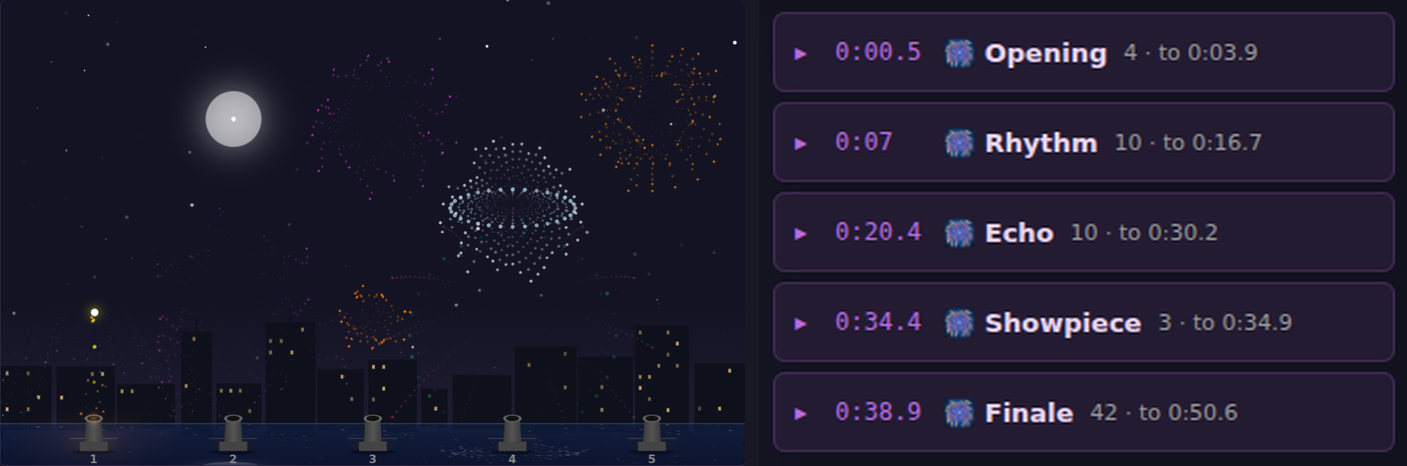
A show is a schedule. This one has five movements: a small opening, a steady rhythm, an echo that answers itself, a quiet showpiece, then 42 shells in twelve seconds for the finale. The picture on the left is second 41, three seconds into that finale. Pacing is the whole art: the finale only lands because the showpiece before it was quiet.
What they are learning while they play
Nothing here is presented as a lesson. This is what the activity is made of.
| What the student does | What it is |
|---|---|
| Places bursts on a timeline | Sequencing. A show is an ordered list of events with times. Moving one changes everything around it. |
| Builds to a finale | Pacing and structure. Big moments need quiet ones before them. Designers plan the rise and fall, the same way a story does. |
| Times shells to the march | Rhythm and tempo. Bursts on the beat feel right. Snap to beat lines launches up with the music's pulse. |
| Picks launch height and size | Trajectories. A shell rises, slows under gravity and bursts at its peak. Height and size decide where it fills the sky. |
| Turns on wind | Forces. Wind pushes every spark sideways as it falls, so the same shell drifts differently on a breezy night. |
| Chooses primary and secondary colors | Color and contrast. Bright colors on a dark sky, and a second color that changes as the stars burn out, make a burst readable. |
| Paints a shell in the Shell Studio | Pattern design. A burst is a pattern of stars thrown out from a center. Drawing one on a grid shows how shapes like hearts work. |
| Exports the show as a video | Media production. The show, its sound and its music become one file anyone can watch. |
How to tell whether it landed
Ask, and let them show you. A student who has understood it can answer these without help.
- What is actually saved when you save a show?
- Why does the finale feel bigger than the same shells spread out would?
- Your firework bursts too low. What do you change?
- How would you make two launchers answer each other?
- Where in your show would you put a quiet moment, and why?
Practical notes
- AgesAges 7 through high school. Younger students click the sky and press Play; older ones plan movements and time a whole show to music.
- TimeSeconds to the first show. A planned show of their own takes thirty to sixty minutes.
- EquipmentAny computer or Chromebook with a modern browser and sound. Headphones help in a classroom. Nothing to install.
- CostFree. The app has no paid tier.
- PrepNone. Open the page and go. Reading this page first takes about three minutes.
- In a groupEveryone can design a show to the same piece of music, and the room watches them back to back.
For co-ops, microschools, and classrooms
Pick one march and give everyone thirty seconds of it. The shows that come back are completely different, and talking about why one lands better than another is a conversation about structure, rhythm and contrast that carries straight over to writing and music.
- Over a dozen shell types, text that spells words, and a Shell Studio for custom bursts.
- Public-domain marches and finales to time a show to, with beat snapping.
- Surprise Me composes a whole show in one click to learn from.
- No install, no per-seat license. Student work is private by default.
Common questions
Is Fireworks Designer free?
Yes. It runs in your browser and there is no paid tier. A free account adds saving and keeping exported videos, but nothing on this page is behind a paywall.
Does my child need an account to try it?
No. The demo on this page is the complete designer with a starter show. Make a free account and the show you changed comes with you as your first project.
Where does the music come from?
The bundled tracks are public-domain recordings: Sousa marches played by the United States Marine Band, and orchestral finales. Students cannot upload their own audio.
Can they keep the show?
Yes, with a free account. A show can be exported as a video with its sound and music, and shared as a page where it plays.
What ages is it for?
Ages 7 through high school. Clicking the sky and pressing Play works for anyone; planning a show to music suits older students.
What subject can I log this as?
Most families log it as art or music. Pacing, color and pattern are art, timing to a beat is music, and trajectories and wind are physics. The table above lists specifically what is covered, so you can pick the label your records need and point at the evidence.
Where to go next
Start with Fireworks Designer
Trying it costs nothing and takes about five minutes. An account is what makes the work last.
Fireworks Designer is one of the making apps on the platform. It is a place to make things, not a course, and it is not a substitute for a teacher: it is at its best when an adult asks the questions above and takes the answers seriously.
Page last reviewed September 2026.