Fluid Paint
Most drawing apps lay down flat color. Fluid Paint simulates the paint itself: a brush made of bristles, wet paint that flows, and colors that smear and blend when one is dragged through another. It opens on a clean canvas, because the fun is in the first stroke. Paint one, pick a new color, and drag it back through the first while it is still wet. Free, in the browser, no account needed to try it.
Using this with a class? Make a free class and add your students yourself: each gets a username and password, with no email or Google account needed. Or give them one join code.A first lesson: Everyone paints the same simple subject, a sunset or a single fruit, first in Natural mode and then in Digital, and the room talks about which looks more like paint and why.
Set up a free classWhat a student actually does
They hold the mouse down and drag, and a thick, streaky stroke appears, ragged at the edges where the bristles ran out of paint. They pick a new color and drag it back through the first one. Instead of covering it, the brush picks up the wet paint and smears it along, and the two colors blend where they meet. It feels surprisingly like the real thing.
From there it is a painting studio. Paint Fluidity makes the paint runnier or stiffer, Bristle Count changes the brush from smooth to scratchy, and scrolling changes the brush size. Natural mode mixes color the way pigments do; Digital mode mixes it like light on a screen. The canvas can be resized by dragging its edges and panned with the space bar, and a finished painting exports as a picture, with a white or a transparent background.
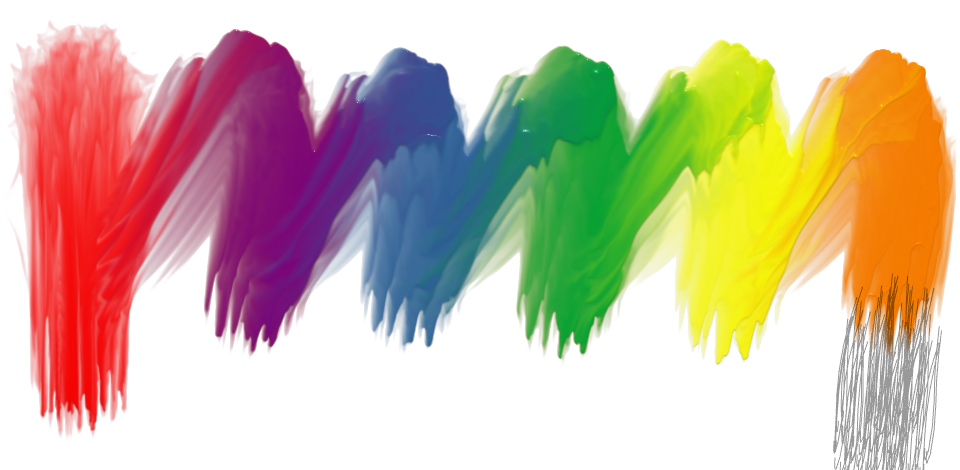
Six strokes, one after another, without cleaning the brush. Each one carried some of the last color with it, so the strokes are joined by smeared, blended trails, and every bristle left its own ridge. None of that is a filter: the app is simulating how wet paint flows and how a brush picks it up and puts it down.
What they are learning while they play
Nothing here is presented as a lesson. This is what the activity is made of.
| What the student does | What it is |
|---|---|
| Drags one color through another | Wet-on-wet technique. Painting into paint that has not dried blends the two. Real painters use it for skies, water and soft edges. |
| Switches between Natural and Digital | Two kinds of color mixing. Paint mixes by absorbing light, a screen mixes by adding it, so the same colors combine differently. |
| Uses the red, yellow and blue wheel | Color theory. Painters traditionally treat red, yellow and blue as primaries. The wheel is laid out the way a painter thinks about color. |
| Turns Paint Fluidity up | Viscosity. Runny paint flows and spreads; stiff paint holds its shape. The same property decides how honey or water pours. |
| Drops the Bristle Count | Texture. Fewer bristles leave separate scratches; more leave a smooth, full stroke. Texture is part of how a painting reads. |
| Watches the paint move after the stroke | Simulation. The computer is solving how a fluid flows, many times a second. That is the same kind of math behind weather and smoke in films. |
| Paints light over dark | Layering and opacity. Wet paint over wet paint blends; how much of the color underneath shows through changes the result. |
| Exports with a transparent background | Image formats. A PNG can keep empty areas see-through, so a painted shape can be placed on top of something else. |
How to tell whether it landed
Ask, and let them show you. A student who has understood it can answer these without help.
- What happened when you painted through a wet stroke, and why is that different from other drawing apps?
- What changes when you turn Paint Fluidity up?
- Why does the same pair of colors look different in Natural and Digital mode?
- How would you paint a soft sunset sky? Show it.
- Where have you seen a computer simulate something flowing?
Practical notes
- AgesAges 6 through high school. Young children just enjoy the paint; older students work on technique and color.
- TimeSeconds to the first stroke. A finished painting takes twenty to forty minutes.
- EquipmentA computer or Chromebook with a modern browser and 3D graphics (WebGL). A mouse or a drawing tablet works best. Nothing to install.
- CostFree. The app has no paid tier.
- PrepNone. Open the page and go. Reading this page first takes about three minutes.
- In a groupEveryone can paint the same subject, and the room compares techniques.
For co-ops, microschools, and classrooms
Pick one subject, a sunset, a pear, a stormy sea, and give everyone fifteen minutes. The paintings come back looking like paintings, and the conversation about how each effect was made, wet into wet, dry brush, layering, is the same one an art teacher has in a real studio, without the mess.
- Simulated wet paint with a bristle brush.
- Natural pigment mixing and Digital light mixing.
- Paintings export as pictures, with a white or transparent background.
- No install, no per-seat license. Student work is private by default.
Common questions
Is Fluid Paint free?
Yes. It runs in your browser and there is no paid tier. A free account adds saving and keeping exported pictures, but nothing on this page is behind a paywall.
Does my child need an account to try it?
No. The demo on this page is the complete app. Make a free account and the painting comes with you as your first project.
Can they keep painting a saved picture later?
Yes. A saved painting reopens as the canvas, and new strokes go on top. The paint underneath has dried by then, so it no longer smears.
Will it work on our computer?
On most. It needs a browser with 3D graphics, which almost every computer from the last several years has. The Quality setting can be turned down on slower machines.
What ages is it for?
Ages 6 and up. Young children enjoy the paint straight away; older students can work on real painting technique.
What subject can I log this as?
Most families log it as art. Technique, color and texture are art, and viscosity and the difference between pigment and light are science. The table above lists specifically what is covered, so you can pick the label your records need and point at the evidence.
Where to go next
Start with Fluid Paint
Trying it costs nothing and takes about five minutes. An account is what makes the work last.
Fluid Paint is one of the making apps on the platform. It is a place to make things, not a course, and it is not a substitute for a teacher: it is at its best when an adult asks the questions above and takes the answers seriously.
Based on Fluid Paint by David Li. Source.
Page last reviewed September 2026.