Light Show Lab
Every December some houses do more than glow: the lights chase along the roof, the windows flash on the beat, and the tree goes off like a firework in the chorus. Light Show Lab lets students build one. It opens on a two-story house at night with its lights already up and a show already written for Jingle Bells. Press Play the show and it runs. Then the house is theirs: they pick a home, hang lights along the roof and round the windows, stand things in the yard, and write the show on a timeline, where each block tells one part of the house what to do for a few bars of the song. A List tab adds up the feet, the sets, the watts and the season's electric bill. A Box tab shows the controller and power supply a real show runs on, and lets older students wire it and fix it.
Using this with a class? Make a free class and add your students yourself: each gets a username and password, with no email or Google account needed. Or give them one join code. Using Google Classroom? Post the link there; with a free class, the link also puts each student in your class, so you see their work. mytekDev is also available from the Google Workspace Marketplace, so your school's Google admin can install it for everyone.A first lesson: Which costs more? Before anyone opens the List tab, ask the class to guess what it costs to run this house's lights for a whole season, six hours a night for thirty nights. Then open List, read the cost in LED, and press Old bulbs.
Set up a free class Share to Google ClassroomWhat a student actually does
They press Play the show and watch the starter show run: 34 bars of Jingle Bells, about 49 seconds, with the roofline, the windows, the porch, the tree and the bushes each doing something different, and more of it in the chorus. The music is played from notes by the page, so the lights and the tune cannot drift apart.
House has seven homes: a two-story house, a ranch, a cabin, a row house, an apartment balcony, a mobile home and a school. In Lights they pick big bulbs, mini lights or icicles and one of six color sets, then tap a dashed line on the house to hang them, bulb by bulb at the spacing real strings have. Bushes take nets and trees take tree lights. Yard adds arches, candy canes, little trees, a tall cone tree, stars and a wire deer to the lawn.
Show is the timeline. Each row is one part of the house, and each block is something that part does for a few bars: on, twinkle, chase, wave, swap, pulse, pop, sparkle, rainbow, fade in or fade out. Students drag a block's edge to make it longer, click an empty spot for a new one, and stack blocks so the roof chases while the tree pops. Sentences shows the same show as lines of words, such as "every 2 bars from bar 9 to bar 16: the bushes, pop", and typing a line changes the blocks. Holding a number key lights a part of the house live, and Record keeps what was played.
List turns the house into a shopping list: feet of lights, sets, plugs, watts, and the cost of a season at a price per kilowatt-hour the student can change. Switching from LED to old glass bulbs takes the starter house from 208 watts to 1,394, and the page says when that is more plugs than the house has outlets, or more than one circuit should carry. Print the list makes a two-page sheet.
Box shows how a show like this is really run: a controller that sends every bulb its color through a wire, and a power supply. It opens wired. At I will wire it, students unplug a run and watch it go dark, feed one from its far end and watch the chase run backwards, and chain runs onto one port until it has more bulbs than it can reach. Real, for grade 7 and up, adds volts, amps and fuses, and six fix-it houses that each have one fault to find.
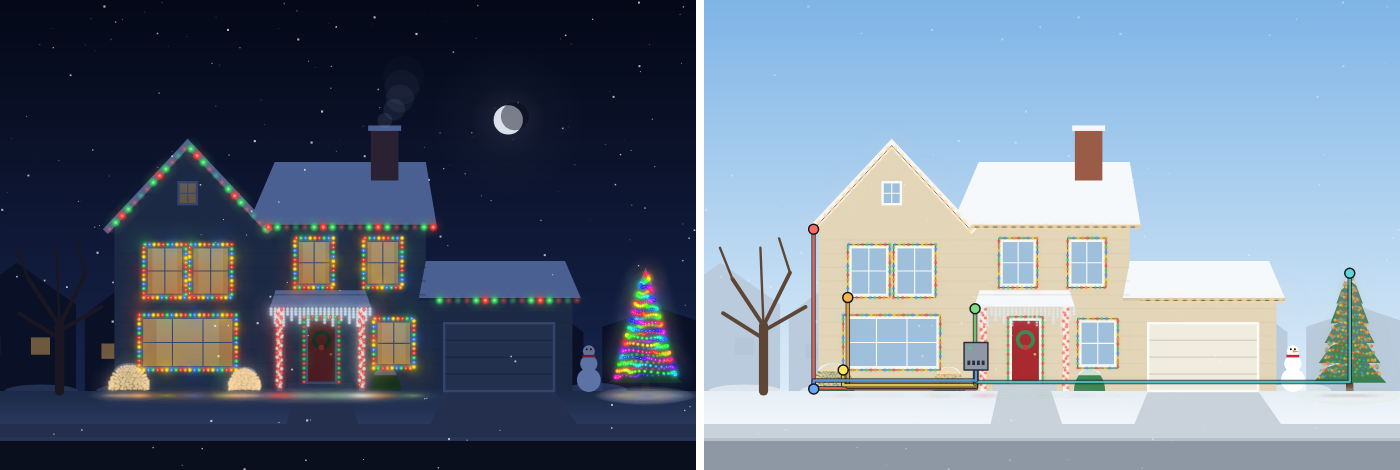
The show at night, and what runs it. In the Box tab every part of the house is a chain of lights plugged into one port of a controller, and the wire's color says which port.
What they are learning while they make it
Nothing here is presented as a lesson. This is what the activity is made of.
| What the student does | What it is |
|---|---|
| Lays blocks along a row so the roofline chases in the verse and pops in the chorus | Sequence. A show is a list of instructions carried out in order, each with a start and a length. Change the order and the show changes. |
| Starts a block on bar 19 because that is where the chorus starts | Events. Each block is tied to a moment in the music. Something happens because a bar arrived, the way a program responds to an event. |
| Types "every 2 bars from bar 9 to bar 16" and gets four blocks | Loops. One line that repeats does the work of many. Students see the repeat written as a sentence and laid out as blocks, side by side. |
| Gives the roofline, the windows, the tree and the bushes each their own row | Decomposition. A whole house is too much to direct at once. Breaking it into named parts, each with a simple job, is how the big show gets written. |
| Switches to Old bulbs and reads that the house now needs 13 plugs and has 2 outlets | Watts, circuits and cost. Every set of lights draws power, power adds up, and a circuit and a wallet both have limits. The season's cost is shown as arithmetic a student can check. |
| Feeds the roofline from its other end and sees the chase run the other way | Addresses and data. In a real show each bulb's place along the wire is its address. The controller sends colors down the chain in order, so which end the wire goes into matters. |
| Opens a fix-it house, reads the amps on each port, and adds a wire to bring the lights back | Troubleshooting. Something is wrong and the page gives evidence, not the answer. Students form a guess, change one thing, and test it. |
How to tell whether it landed
Ask, and let them show you. A student who has understood it can answer these without help.
- Point to one block. What does it tell the lights to do, when does it start, and how long does it last?
- You want the bushes to pop on every other bar for the whole chorus. How could you write that as one line?
- Why does the same house cost so much more to run with old bulbs than with LED?
- In the Box tab, what would you see on the house if the tree's wire came unplugged? What if it were plugged in at the wrong end?
- Your show looks wrong at bar 12. How do you find out which block is doing it?
Use it in your subject
Not a technology class? Then the app is how students show what they learned in your unit. More projects for every subject.
Computer science
Addresses CSTA 1B-AP-10 for sequences, events and loops (the show has no conditionals, and the page does not claim them), 1B-AP-11 and 2-AP-13 (the house broken into named runs), 1B-AP-12 (a starter show remixed) and 1B-AP-15 (scrubbing to the bar that looks wrong). The Box tab addresses 1B-CS-01 and 1B-CS-02 (a controller, a power supply and lights working as a system), and its fix-it houses 1B-CS-03 and 2-CS-03 (finding and fixing a hardware problem step by step). A good Hour of Code activity for December.
Math
Supports Common Core 4.MD.A.2 and 4.OA.A.3 (feet of lights, sets of a fixed length, and a remainder that means one more set), 6.RP.A.3.b (cost per night as a unit rate) and 7.RP.A.2.c (cost equals price times kilowatt-hours). Every number on the List tab is shown with the arithmetic behind it.
Engineering and science
Addresses NGSS MS-ETS1-1 and MS-ETS1-2: the outlets, the circuit and the season's cost are constraints, and two designs can be compared against them. Supports 4-PS3-4 as a context for electric current carrying energy to lights. It is not a circuits simulation: it adds up watts and does not model how current flows in a loop.
Music
Bars, beats, verse and chorus, heard and seen at once. Students place changes on the beat and save the busiest looks for the chorus.
Practical notes
- AgesGrades 4 to 9. Hanging lights and building a show suit grade 4 and up. The Box tab's first two levels suit grades 6 and up, and its Real level is made for grade 7 and up, or younger students with a teacher.
- TimeOne period of forty-five minutes is enough to hang lights and change the starter show. A show written from an empty timeline, or the Box tab, is a second period.
- EquipmentA computer or Chromebook with a modern browser. Headphones or one set of classroom speakers help, and the Sound button turns the music off. A printer only if students print the list.
- CostFree. The app has no paid tier and no AI.
- PrepNone to try it. A free account adds saving and a share link that plays the show for anyone. Save a video keeps the show as a video file with its music.
- In a groupOne student per computer works best. Pairs work for the Box tab's fix-it houses, one reading the numbers and one changing the wiring.
For co-ops, microschools, and classrooms
A December showcase. Everyone builds a show for the same song on a home of their choice, then the class watches them one after another on the projector with Big screen. For a family night, students save a video or share a link, and anyone can press Play and watch. A mixed-age group can split the work: younger students hang the lights and write the show, older ones wire the box and work out the bill.
Common questions
Is Light Show Lab free?
Yes. It runs in your browser and there is no paid tier. A free account adds saving and a share link. Building and playing a show works without one.
Does it control real Christmas lights?
No. It is a design and planning tool, and nothing in it plugs into real lights. The Box tab and the help page explain what a real show uses: lights called pixels, where every bulb can be told its own color, a controller, a power supply, and free software such as xLights. The app names the xLights words for the things students have just made.
How accurate are the watts and the cost?
They are typical numbers for store-bought sets, not any one brand, so read the tag on a real box. The house is a drawing, so measure a real roofline before buying. The cost uses the hours, nights and price per kilowatt-hour the student sets.
How real is the Real level?
Its parts are real: 5 and 12 volt pixels, ports with 5 amp fuses, a limit on how many pixels a port can reach at 40 frames a second, color order, channels and universes, and injection wires for long chains. The way voltage drops along a chain is a simple model with typical numbers, close on how many pixels a chain can carry and harsher than real life in the worst cases. Anything wired to wall power is an adult's job, and the page says so.
Can flashing lights be a problem for some students?
The app limits flashing. No part of the house, and not the house as a whole, can flash more than three times in a second, which is the limit web accessibility guidelines set. That holds for the written show and for keys played live. The Sound button turns the music off.
Can students use their own music?
Not in this version. There are three tunes, Jingle Bells, Deck the Hall and Jolly Old Saint Nicholas, all old enough to belong to everyone and played from notes by the page. Because the app knows every bar and beat, blocks snap to the music.
Does it work for classes that do not celebrate Christmas?
The lights, the timeline, the List and the Box are not tied to a holiday, and the homes include an apartment balcony and a school. The three tunes are winter and Christmas songs, and the yard things include candy canes and a deer. A second theme is planned and not built yet.
Still have a question? Ask us, and a person will write back.
Where to go next
Lesson plans
4 ready-to-teach class periods with a teacher plan, a student worksheet, an exit ticket with answers, and the standards it meets.
Start with Light Show Lab
Trying it costs nothing and takes about five minutes. An account is what makes the work last.
Light Show Lab is one of the making apps on the platform. It is a place to make things, not a course, and it is not a substitute for a teacher: it is at its best when an adult asks the questions above while the show is being built.
Page last reviewed November 2026.
Google, Google Classroom and Chromebook are trademarks of Google LLC.