Lure Lab
A student designs a fishing lure the way a lure maker does: shape the body, rig the bill and hooks, paint it, then cast it into a test tank and watch it dive, wobble and float while a fish decides whether to bite. It opens on a finished crankbait, so the first thing to do is change it and cast. Free, in the browser, no account needed to try it.
What a student actually does
They start with a crankbait that already works. They drag the handles on its side and top outlines to make it fatter or longer, and the numbers on the right change as they do: its weight, whether it floats, how deep it runs, how fast it wobbles. A bigger bill digs deeper. A heavier body sinks. Every choice shows up in the tank.
Then they fish it. A challenge card sets the water, the light, the season and the fish, and the student casts, reels, twitches, and watches the fish notice, follow, and either strike or turn away. The card explains why. From there they can paint the lure with layers and check how its colors look at depth, write the retrieve as a short program, tie flies, print a tag for it, or export it as a 3D model to open in OpenSCAD or send to a printer.
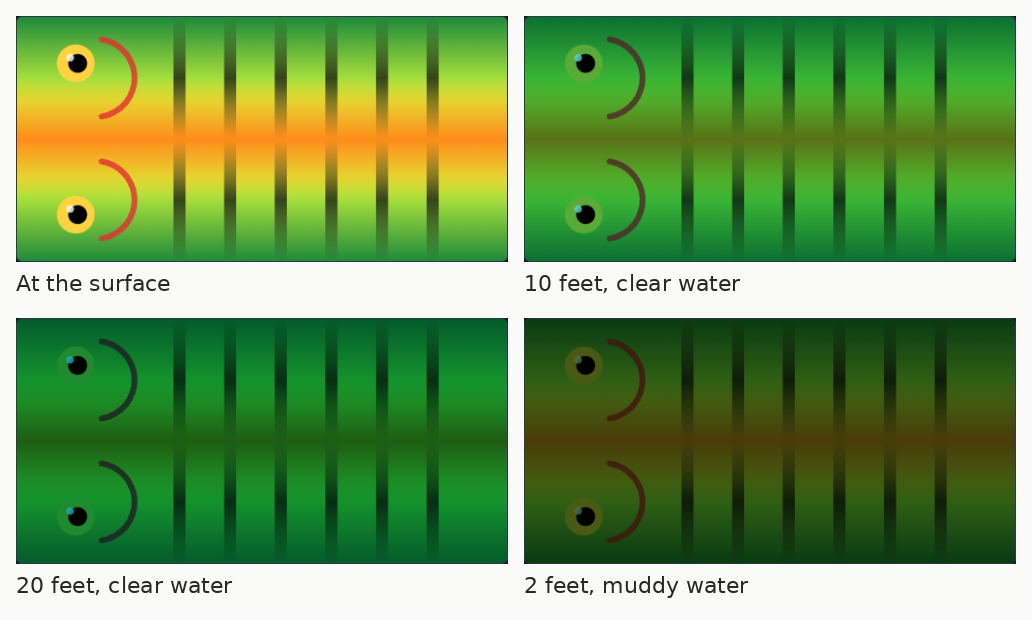
The same lure as a fish sees it. Water takes red out of light first, so the red gill marks are gone by 20 feet in clear water, and muddy water does the same in 2. The Paint bench shows this for any lure at any depth, which is why the dark bars and the chartreuse stay visible after everything else has faded.
What they are learning while they play
Nothing here is presented as a lesson. This is what the activity is made of.
| What the student does | What it is |
|---|---|
| Makes the body fatter and watches it float | Buoyancy and density. The lure floats if it weighs less than the water it pushes aside. The panel shows both numbers side by side. |
| Drags two flat outlines and gets a 3D body | Volume from cross-sections. A side view and a top view are lofted into a solid, and its volume is measured from them. |
| Tilts the bill or makes it longer | Forces on a moving object. Water pushing on the bill drives the lure down as it is pulled forward. More bill, or more speed, means deeper. |
| Moves the ballast forward or back | Center of mass. Where the weight sits decides whether the lure rests nose down, level, or tail down, and how it wobbles. |
| Reels faster and sees the wobble change | Frequency. The wobble is a rhythm, measured in beats per second. Speed and shape both change it, and fish notice the difference. |
| Checks how the paint looks at 20 feet | Light in water. Water absorbs red first, then orange and yellow. Dirty water scatters light sooner. Color choices follow from that. |
| Reads why the fish turned away | Animal behavior. Each species has a depth it holds at, a season, and things it will and will not chase. The cards are built on that. |
| Writes "reel 2 seconds, pause 1 second, repeat" | Sequences and loops. A retrieve written as a program runs the same way every time, so a change to it can be tested fairly. |
How to tell whether it landed
Ask, and let them show you. A student who has understood it can answer these without help.
- Does your lure float or sink when it sits still? How do the numbers on the right tell you?
- Make it run deeper. Which two different changes both do that?
- Why does a red lure stop looking red deep down?
- The fish followed and turned away. What did the card say, and what will you change?
- Before you cast your next version, say how deep it will run. Were you right?
Practical notes
- AgesAges 9 through high school, and adults who fish. Younger students change the starters and work the challenge cards; older ones design from scratch, program the retrieve, and export a model to print.
- TimeA minute to a first cast. A satisfying session is thirty to forty-five minutes of change, cast, change.
- EquipmentAny computer or Chromebook with a modern browser and a mouse or trackpad. Nothing to install. A 3D printer is optional, for students who want to hold what they made.
- CostFree. The app has no paid tier.
- PrepNone. Open the page and go. Nobody needs to know anything about fishing first. Reading this page takes about four minutes.
- In a groupEvery student can take the same challenge card, so the class compares very different lures that solved the same problem.
For co-ops, microschools, and families who fish
Hand out one challenge card, say muddy water after rain with a bass holding by a dock, and the room turns into a design lab. Everyone predicts, casts, and argues about why their lure worked or did not. For a family that fishes, it is the thing to do on the day it rains: design the lure, then take the ideas to the water.
- Twenty-four challenge cards across twelve species, from bluegill under the dock to redfish on the flat.
- Twenty-four starters to begin from: crankbaits, jerkbaits, poppers, spinnerbaits, spoons, soft plastics, jigs and flies.
- No install, no lab setup, no per-seat license. Chromebooks are fine.
- A free teacher account covers up to 50 students, and student work is private by default.
Common questions
Is Lure Lab free?
Yes. The app runs in your browser and there is no paid tier. A free account adds saving and your own tackle box of designs, but nothing on this page is behind a paywall.
Does my child need an account to try it?
No. The demo on this page is the complete app with a starter crankbait. Make a free account and the lure you changed comes with you as your first project.
Do you need to know anything about fishing?
No. The challenge cards explain the water, the fish and what it wants, and the tank shows what the lure is doing. Students who fish will recognize a lot of it, and students who do not usually want to try it afterward.
How realistic is the tank?
The floating, sinking and weight come from real densities and real volumes. How deep a lure dives, how it wobbles, and what a fish does are rules of thumb fitted to how real lures behave, and the app says so where it applies. It is close enough to learn from, not a replacement for the lake.
Can they tie flies too?
Yes. Fly is one of the lure kinds, with twelve traditional patterns, a hatch chart, and cards for trout in moving water.
Can they make a real lure from it?
They can export the body as an STL file for a 3D printer, or open it in OpenSCAD to keep working on it as code. A printed body still needs hooks, a split ring and a clear coat before it goes in the water.
What subject can I log this as?
Most families log it as physical science or engineering. Buoyancy, forces, center of mass and light in water are physics, the fish behavior is life science, and the retrieve programs are computer science. The table above lists specifically what is covered, so you can pick the label your records need and point at the evidence.
Where to go next
Start with Lure Lab
Trying it costs nothing and takes about five minutes. An account is what makes the work last.
Lure Lab is one of the making apps on the platform. It is a place to make things, not a course, and it is not a substitute for a teacher or a day on the water: it is at its best when an adult asks the questions above and takes the answers seriously.
Page last reviewed September 2026.