PC Workshop
A student builds a real computer: picks the parts to a budget, puts them together by hand on a 3D bench, presses the power button, and finds out whether it boots. The demo starts with every part picked, so the building starts right away. Free, in the browser, no account needed to try it.
What a student actually does
They start with a job and a budget: a gaming PC for $800, a creator workstation, a home server. Then they choose about eight parts from roughly a hundred real, named products. Every pick changes the money left, the watts drawn, and the estimated score, and a part that cannot work with what is already chosen explains the problem instead of just refusing.
Then they build it, by hand, on a 3D bench: seat the CPU, spread the thermal paste, tighten the cooler, click in the memory, fit the drive and the graphics card, route the power cables, plug in the monitor, and flip the switch. The machine either boots or it does not, and if it does not, the beeps and four debug lights say where to look. A machine that boots gets benchmarked, heat and all, and a cooler that cannot keep up costs real performance.
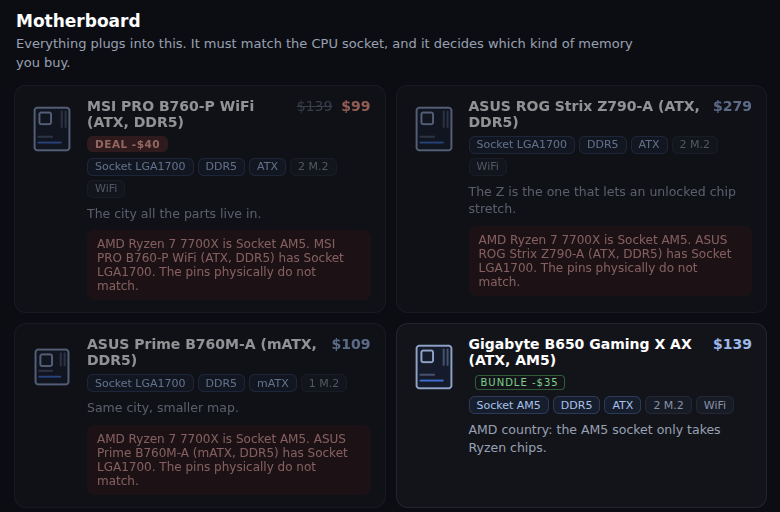
Pick a CPU and the parts that cannot work with it say so, and say why. Here it is the socket: the pins on an AMD chip do not fit an Intel board. Further down the list, the app flags a board with the right socket but the wrong generation of memory, a mistake real builders make.
What they are learning while they play
Nothing here is presented as a lesson. This is what the activity is made of.
| What the student does | What it is |
|---|---|
| Matches a motherboard to the CPU | Compatibility and standards. Sockets, board sizes, memory generations. Parts only fit together because companies agreed on the same shapes. |
| Adds up the watts and picks a power supply | Power budgets. Every part draws power under load. A supply running past 95 percent of its rating shuts off, so it needs headroom. |
| Spends a fixed budget across eight parts | Tradeoffs. Money on the graphics card is money not spent on the processor. The score shows which choice paid off. |
| Puts two memory sticks in the wrong slots | Following a procedure. It still boots, but in single channel, and the benchmark shows the memory slowing everything down. |
| Tightens the cooler and watches the temperatures | Heat and throttling. A chip that gets too hot slows itself down to survive. Cooling is part of performance, not an extra. |
| Presses power and gets three beeps | Diagnosing faults. Three beeps and the DRAM light mean the memory. The CPU, DRAM, VGA and BOOT lights narrow a problem down the way a technician's checklist does. |
| Finds the part holding the score back | Bottlenecks. A system is only as fast as its slowest part for the job at hand, and the job changes which part that is. |
| Notices memory prices jumped this week | Supply and demand. Prices move with a market that changes over time, and the app explains why a price went up. |
How to tell whether it landed
Ask, and let them show you. A student who has understood it can answer these without help.
- Why will that motherboard not work with your CPU?
- How many watts does your build draw under load, and why is your power supply rated higher than that?
- Which two slots should two sticks of memory go in, and what happens if they go in the wrong ones?
- Your benchmark says it throttled. What would you change?
- You get another $200. Where do you spend it for the biggest jump in score, and why there?
Practical notes
- AgesAges 10 through high school. Younger students enjoy the building; older ones chase benchmark scores on a budget and can explain every part.
- TimeA first build takes thirty to forty-five minutes, parts to benchmark. Later builds go much faster.
- EquipmentAny computer or Chromebook with a modern browser and a mouse or trackpad. Nothing to install.
- CostFree. The app has no paid tier, and nothing is bought with real money.
- PrepNone. Open the page and go. Reading this page first takes about four minutes.
- In a groupBuilds are compared on leaderboards grouped by what they cost, so an $800 machine competes with other $800 machines.
For co-ops, microschools, and classrooms
Give the whole room the same job and the same budget, and the argument starts on its own. Two students spend $800 and get very different scores, and the build reports show exactly where the money went. The leaderboard groups builds by what they cost, so the question is never who spent the most, it is who spent it best.
- Class leaderboards by budget bracket: under $600, $800, $1200, $2000, and open.
- No install, no lab setup, no per-seat license. Chromebooks are fine.
- A free teacher account covers up to 50 students.
- Student work is private by default. Sharing anything publicly is a separate, deliberate action.
Common questions
Is PC Workshop free?
Yes. The app runs in your browser and there is no paid tier of it. A free account adds saving, the leaderboards, and sharing, but nothing on this page is behind a paywall.
Does my child need an account to try it?
No. The demo on this page is the complete app, and it keeps your build inside the browser tab. Make a free account and the parts you picked come with you as your first project.
How realistic is it?
The parts are real products with real names, and the build steps follow how the work is really done, down to which memory slots to use and tightening cooler screws corner to corner. The specs and prices are simplified for teaching, so treat it as a place to learn how a computer fits together, not as a shopping guide.
What ages is PC Workshop for?
Ages 10 through high school. Younger students enjoy the hands-on building. Older ones work to a budget, read the benchmark, and can explain why each part was chosen.
Does it install anything, and will it work on a Chromebook?
It installs nothing and runs in any modern browser, Chromebooks included. The build bench is 3D and works with a mouse or a trackpad.
What subject can I log this as?
Most families log it as computer science or technology. Picking parts to a budget is also consumer math, and heat and power are physical science. The table above lists specifically what is covered, so you can pick the label your records need and point at the evidence.
Is my child's work public?
No. Projects are private by default. Publishing to the public gallery is a separate action a student has to take, and public listings mask the display names of younger students.
Where to go next
Start with PC Workshop
Trying it costs nothing and takes about five minutes. An account is what makes the work last.
PC Workshop is one of the making apps on the platform. It uses real product names with specs simplified for teaching. It is a place to make things, not a course, and it is not a substitute for a teacher: it is at its best when an adult asks the questions above and takes the answers seriously.
Page last reviewed September 2026.