PC Design Lab
Some students want to know what is inside a computer. Others want to build the one that looks best on the desk. PC Design Lab is for the second kind: a student picks a kind of machine, from a tower to a cyberdeck to an arcade cabinet, shapes it, decides what shows through the glass, lays light along its edges, adds cooling you can see, and writes the program its lights run when the power comes on. Then it goes into a room, the room goes dark, and the machine lights it. It is a design lab, not a builder: nothing here has to boot. That is PC Workshop's job, and this page says below how the two fit together.
Using this with a class? Make a free class and add your students yourself: each gets a username and password, with no email or Google account needed. Or give them one join code. Using Google Classroom? Post the link there; with a free class, the link also puts each student in your class, so you see their work.A first lesson: Give the class one brief: a machine for an esports stage that has to read from the back of the room. Everyone starts from a tower. Each student picks a look, changes the shape, and writes one light program with a power-on moment. Then put the machines on the Esports stage, turn the room dark, and have the class pick the one they can read from farthest away, and say why.
Set up a free class Share to Google ClassroomWhat a student actually does
They open the lab on a tower and pick a kind: a tower, an open frame, a cyberdeck, a retro box, a handheld, a wall piece, an arcade cabinet, a rack blade, a desk PC or a fish tank PC. Each kind is built from panels, and each panel can be solid, glass, mesh, vents or left open. On the Shape bench sliders change the height, width and depth, the size of the window, and how many fans sit in front. A look sets the colors in one tap (Stealth, Snow, Lounge, Candy, Night market, Lab), and the Paint bench changes any part by hand.
The Inside bench decides what shows through the glass: the board, the graphics card, a shroud, the cables. The Cooling bench adds cooling a person can see, from fans to a sealed cooler to a custom loop with tubes, a reservoir with bubbles, a fin stack, or a pot of liquid nitrogen with vapor coming off it. On the Lights bench light goes along any edge of the shell with a tap, and every light belongs to a named zone: the fans, the strips, the logo, the inside, the glow underneath, the memory, the coolant and more.
The Program bench is where the machine gets its behavior. A program is a list of events, each with steps: when power comes on, sweep the strips white over 1.2 seconds; always, run a rainbow along the strips every 6 seconds; when the room goes dark, breathe the fans. It can be written three ways: as sentences with the numbers editable in place, as blocks in a Glassbox drawer, or as text. The same program can be read in any of the three, so a student can start in sentences and look at what it is in code. A second kind of code builds the machine itself, one command a line (pc.kind, pc.look, pc.fan, pc.cooling), and turns any design back into the commands that make it.
On the Room bench the machine goes on a desk, a LAN table, an esports stage, in a shop window, a retro basement, a server aisle, on a ship's bridge or in a museum, by day or by night. Power on and the fans spin up, the lights run their program, and the screen boots; the sound changes with the kind, so a handheld does not hum like a tower. Room dark turns the room's own lights out and the machine is all that is left to see by. The Export bench makes a picture, a design sheet with four sides on one page, an .stl file for a desk model on a 3D printer, and a .glb that glows as a prop in SceneMaker and the platform's other 3D apps.
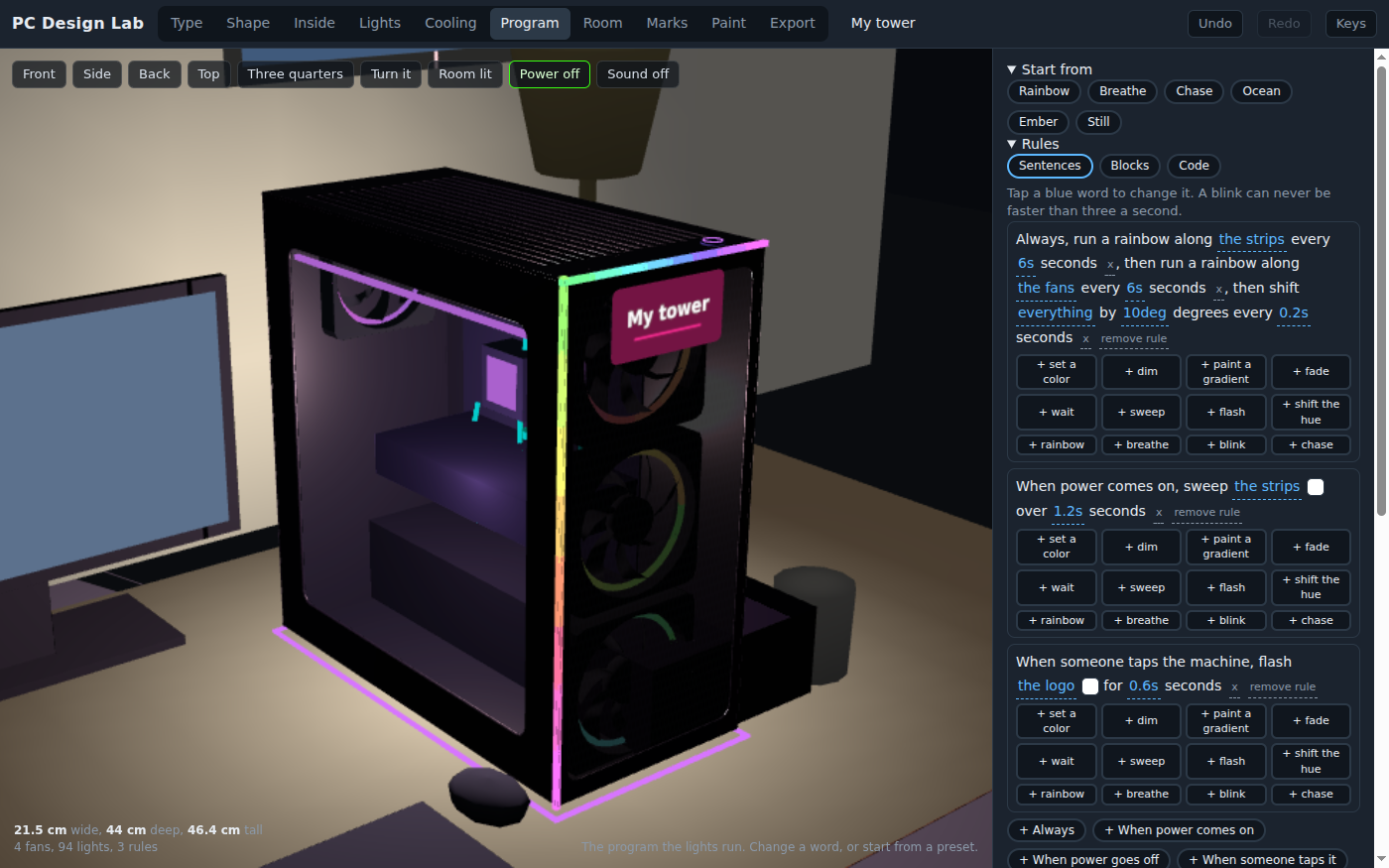
The Rainbow preset, as sentences. Every blue word is a value the student can tap and change, and the same three rules can be opened as blocks or as code.
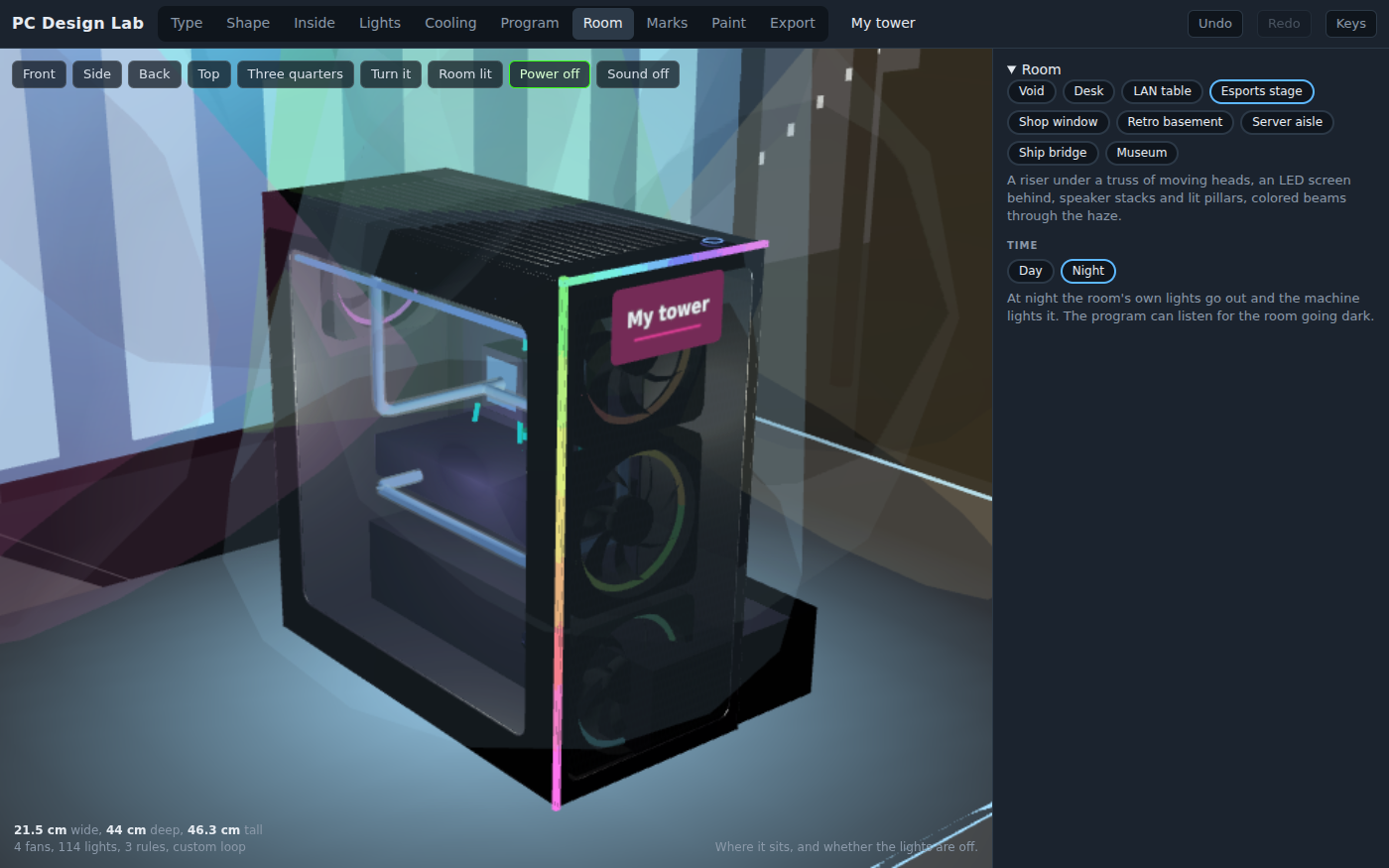
On the Esports stage at night, with a custom loop added on the Cooling bench. A program can listen for the room going dark, so a machine can change what it does when the lights go down.
PC Design Lab and PC Workshop
The platform has two computer apps, and they answer different questions. PC Workshop asks whether it works. A student picks real kinds of parts to a budget, seats each one on a 3D bench, connects the power, and presses the button to find out whether it boots. If it does not, the beep code says why. It is about compatibility, power and troubleshooting, and it has right and wrong answers.
PC Design Lab asks how it looks and what it does when someone walks up to it. There are no prices, no wattages, no temperatures and no brand names, and nothing has to boot. The parts inside are there to be seen through the glass. What a student is graded on, if anything, is a design brief: does it read from the back of the room, does the power-on moment land, does the light program do what the student said it would.
They work well in that order for a computer class: build one that boots in PC Workshop, then design the one they would want on their own desk here. They also work alone. A design or art class can use PC Design Lab without ever opening PC Workshop, and an IT class can use PC Workshop without this. The two do not share projects, so a machine built in one does not open in the other.
What they are learning while they play
Nothing here is presented as a lesson. This is what the activity is made of.
| What the student does | What it is |
|---|---|
| Picks glass for the side and decides what shows through it | Design for an audience. A window is a decision about what the viewer sees and what stays hidden. Cables, a shroud and a lit board are all choices, and the student makes them on purpose. |
| Gives the machine a look and changes one part by hand | Color schemes and contrast. A look is a palette with a light color in it. Changing one part against the rest shows what a palette is for, and what breaks it. |
| Writes when power comes on, sweep the strips white, then always, a rainbow | Events and sequences. A program is events, and each event runs its steps in order. When power comes on happens once; always keeps going; when someone taps the machine waits for a person. |
| Tries to make a light blink faster than three times a second and is held to three | Accessibility rules. Fast flashing can trigger seizures, and the web's accessibility guidelines set the limit at three flashes a second. The lab holds every program to it, and says so, which is how a real design rule feels from the inside. |
| Writes the same program as sentences, as blocks, then reads it as code | One program, three notations. The sentences, the blocks and the text are the same program. Seeing one change in all three at once is how a student learns that code is a way of writing a decision down, not a different decision. |
| Builds a machine with pc.kind, pc.look and pc.fan, then asks the lab for the code of a machine they made by hand | Code that builds things. A design is data, and a short list of commands can make it. Going the other way, from a finished design to its commands, shows what those commands were describing all along. |
| Puts the same machine in a bright shop window and a dark basement | Light and context. A light that disappears by day can be the whole room at night. Designers judge a thing where it will be seen, and the Room bench is that test. |
| Exports an .stl and prints a desk model | From screen to object. The shell is panels with real thickness, so it prints. The student finds out which details survive at a small size and which do not. |
How to tell whether it landed
Ask, and let them show you. A student who has understood it can answer these without help.
- What did you put behind the glass, and what did you hide? Why?
- Read me your power-on program. What happens first, and how long until the lights settle?
- Your program has an always event and a when power comes on event. Which one runs first, and why does that matter?
- Why will the lab not let a light blink five times a second?
- How is your machine different from the one you built in PC Workshop? What did that one have to do that this one does not?
Use it in your subject
Not a technology class? Then the app is how students show what they learned in your unit. More projects for every subject.
Computer science
Write one light program three ways, as sentences, as blocks and as code, and explain one change in all three. Then rebuild a classmate's machine from its pc.* commands.
Art and design
Set a brief (a machine for a museum, a LAN party or a ship's bridge), sketch it on paper first, then build it and present it in its room with a design sheet.
Engineering and CTE
Build a working machine in PC Workshop, then design its case here, and write a paragraph on what the case designer has to know about what goes inside.
Science
Compare air, a sealed cooler, a custom loop and liquid nitrogen on the Cooling bench, then research what each one really does to carry heat away. The lab shows them; it does not measure them.
Practical notes
- AgesAges 8 through high school. Younger students pick a kind, a look and a room and press the power button; middle schoolers write light programs as sentences or blocks; high schoolers write them as code and build machines by command.
- TimeA minute to a machine of their own. A good session is thirty to forty-five minutes: a design, a light program, and a room to show it in.
- EquipmentA computer or Chromebook with a modern browser. The machine is 3D and the rooms are lit, so a very old or very slow computer may struggle. Nothing to install. A 3D printer only if you want a desk model.
- CostFree. The app has no paid tier.
- PrepNone. Open the page and go. Reading this page first takes about three minutes.
- In a groupEveryone can design to the same brief and show the results in the same room with the room dark. The lab has no scores, so the class decides what worked.
For co-ops, microschools, and classrooms
Give a brief, show the machines one after another in the same room, and let the group say what reads and what does not. With a free account the designs are saved and shared, and the share page plays each machine's light program the way its designer wrote it.
Common questions
Is PC Design Lab free?
Yes. It runs in your browser and there is no paid tier. A free account adds saving and sharing, but nothing on this page is behind a paywall.
Does my child need an account to try it?
No. The demo on this page is the complete lab with a tower loaded. Make a free account to save a design, share it, and use it in the other 3D apps.
How is this different from PC Workshop?
PC Workshop is about whether a computer works: real kinds of parts, a budget, assembly by hand, and a power button that either boots it or beeps. PC Design Lab is about how a computer looks and what its lights do: no prices, no wattages, no temperatures, and nothing has to boot. Build in PC Workshop to learn what goes inside; design here to make it yours. The two do not share projects.
Will it teach my child to build a real computer?
Not by itself. The parts inside are there to be seen, not chosen for compatibility. PC Workshop is the app for building one, and it is free as well.
Are there brand names?
No. There are kinds of machine, kinds of cooling and kinds of light, but no makers, models or prices, on purpose.
Are the lights safe for students with photosensitive epilepsy?
The lab holds every light program to three flashes a second or fewer, the limit in the web's accessibility guidelines, in every way of writing it: sentences, blocks and code. That is a safeguard, not a medical guarantee; a student who is sensitive to flashing light should still use it with care.
What does "program the lights" mean?
Events and steps. An event is when something happens: always, when power comes on, when power goes off, when someone taps the machine, on the beat, when the room goes dark, when a key is pressed, or every few seconds. Its steps say what each zone of light does: set, fade, sweep, flash, breathe, blink, run a rainbow. A program can be written as sentences, as blocks, or as text, and it is the same program in all three.
Does it make sound?
Yes, quietly: fans, a hum and a boot sound that change with the kind of machine. Nothing plays until the student presses something.
Can the design go into a game or a 3D printer?
Yes. The Export bench saves a .glb that glows as a prop in SceneMaker and the platform's other 3D apps, and an .stl for a 3D printer at the size you pick.
What subject can I log this as?
Most families log it as art and design, or as computer science when the light programs are the point. The table above lists specifically what is covered, so you can pick the label your records need and point at the evidence.
Still have a question? Ask us, and a person will write back.
Where to go next
Start with PC Design Lab
Trying it costs nothing and takes about five minutes. An account is what makes the work last.
PC Design Lab is one of the making apps on the platform. It is a place to make things, not a course, and it is not a substitute for a teacher: it is at its best when an adult sets a brief and asks the questions above.
Page last reviewed October 2026.