Pumpkin Lab
A pumpkin is a hollow shell with a light inside, and every cut changes what gets out. Pumpkin Lab lets students carve one on screen as many times as they like: with shapes and letters placed by a tap, with a saw and a scoop dragged across the skin, or with a few lines of code. Then they put a candle inside, turn the lights off, and see the face glow and land on the wall behind it. The face prints as a stencil at its real size for a real pumpkin, the pumpkin prints as a hollow mini for a tea light, and a pumpkin with a hole in the bottom goes on a game character's head.
Using this with a class? Make a free class and add your students yourself: each gets a username and password, with no email or Google account needed. Or give them one join code. Using Google Classroom? Post the link there; with a free class, the link also puts each student in your class, so you see their work.A first lesson: Everyone carves a face, prints the stencil, and tapes it to a real pumpkin or a paper bag. Before the cutting, each student says which cuts would fall apart on a real pumpkin and why, and fixes those in the lab first.
Set up a free class Share to Google ClassroomWhat a student actually does
They open the lab on a carving pumpkin 30 centimeters across with the classic face already cut. The readout under it says 30 cm across, 26 cm tall, about what it weighs, 4 cut through. They drag it round, pick a tall pumpkin, a white one, a blue one, a turnip or a gourd instead, slide the ribs deeper and the warts on, bend the stem by its knots, and slide the days since carving up to watch the cuts go soft and the mold come in.
On the Carve bench every mark is a cut. A shape, a word or a drawing is placed with a tap and dragged into place, and each one is cut through, shaved (the skin off, the flesh left, so it glows without a hole) or only painted on. Or they pick up the saw and drag it across the pumpkin: the cut follows the pointer, Shift holds it straight, and a line brought back to where it started drops the piece out. The scoop shaves, and a poke drills a round hole. A box on the bench says what else would fall out of a real pumpkin before any cutting happens.
The Light bench puts a candle, a tea light or a colored bulb inside and turns the lights off. The face glows, the candle flickers, and the wall in front of the pumpkin shows the face as light, on a porch step, by a fence or in a window if they like. Rules written as sentences make the light breathe, blink, fade between colors, or go dark when someone taps the pumpkin; the same rules can be snapped together as blocks.
Then the pumpkin leaves the lab. A stencil prints at the face's real size on Letter or A4 paper, black where it cuts through and gray where it shaves, mirrored if it is going on the inside of a bag or a window. An .svg goes to a vinyl or laser cutter. An .stl file prints a hollow mini eight centimeters across that takes an LED tea light, and another prints the face's shapes as cookie cutters. A 3D model goes to the student's Files for SceneMaker and the other 3D apps, and a pumpkin carved with a hole in the bottom goes over the Obby Maker runner's head.
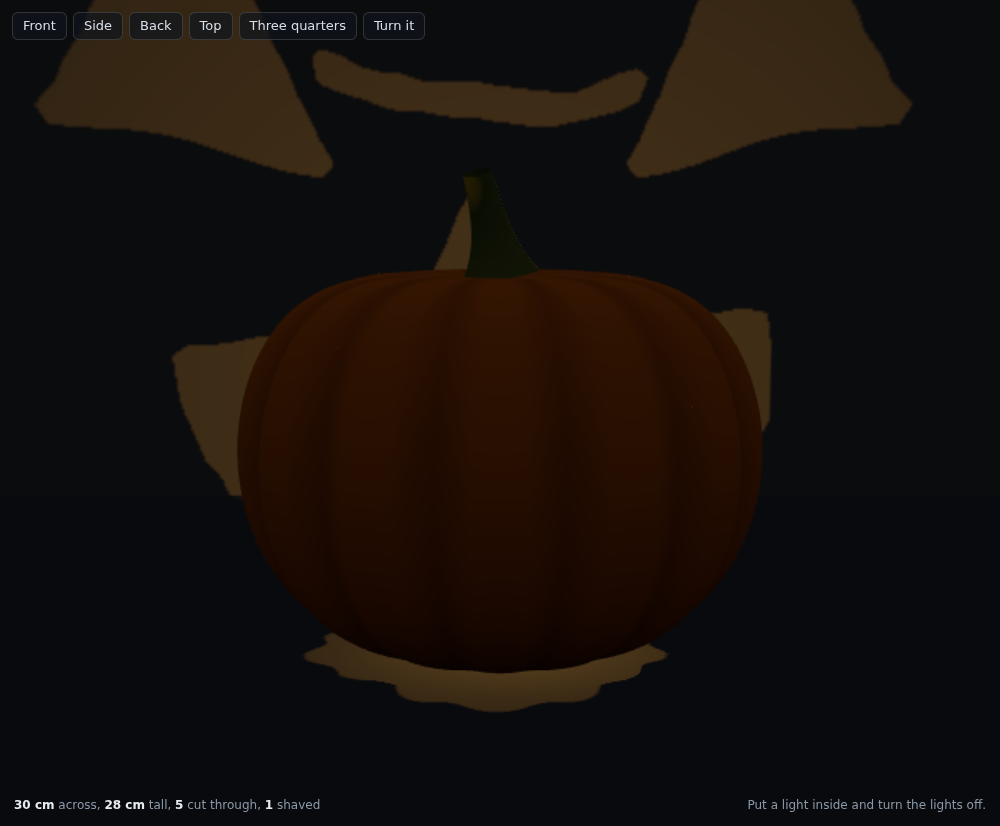
Night, on the Light bench, seen from the Back view. The light leaves only through the cuts, so the wall in front of the pumpkin shows the face, bigger. Shaved skin glows without a hole, which is how real carvers do detail.
What they are learning while they play
Nothing here is presented as a lesson. This is what the activity is made of.
| What the student does | What it is |
|---|---|
| Cuts a letter O through and sees the middle fall out on the stencil | Closed shapes and bridges. A cut all the way round a region takes the region out. Real stencils leave bridges, and the lab says so when a word is cut through. |
| Puts an eye at 40 degrees to the right, 60 percent up, 50 mm | Polar coordinates. A place on a round thing is an angle round it and a height up it. The code commands use exactly those two numbers, without calling them that. |
| Types mirror and gets the other eye | Symmetry. A face is symmetric about the middle. A mirror maps 40 degrees to the right onto 40 degrees to the left, and a turn of 15 degrees onto a turn of minus 15. |
| Shaves the skin instead of cutting through and sees it glow | Translucency and thickness. Light gets through thin flesh and not through thick. The shaved patch is set in by a share of the wall, so it glows without a hole. |
| Turns the lights off and finds the face on the wall | Light travels in straight lines. Light leaves the pumpkin only where there is a hole, and lands on the wall in the same shape, bigger: the shadow is the face cast by a point of light. |
| Writes a rule that fades the light from orange to purple every six seconds | Events and time in a program. A rule is a sentence with numbers in it that runs as time passes. Several stack, and the later one has the last word. |
| Prints the stencil and tapes it to a real pumpkin | Scale and true size. The stencil is printed at the millimeters the lab used, so a 60 mm eye is 60 mm on paper. A bigger face takes more pages, never a smaller print. |
| Prints a mini and puts a tea light in it | Scale models and hollow solids. The mini is the same shape at a quarter of the size, with a wall thick enough to print and the lid off so a light goes in. |
How to tell whether it landed
Ask, and let them show you. A student who has understood it can answer these without help.
- Which of your cuts would fall out of a real pumpkin, and how would you fix them on the stencil?
- Where does the light that lands on the wall come from, and why does it make the face bigger than the pumpkin?
- Why does a shaved patch glow but not a painted one?
- Write one command that puts a star to the left of the nose, then one line that makes the other side match.
- What size would you print the pumpkin at for a tea light, and why not full size?
Use it in your subject
Not a technology class? Then the app is how students show what they learned in your unit. More projects for every subject.
Math
Carve the whole face by code, using angles and heights only, then use mirror and repeat to finish it. Talk about what a mirror does to an angle and to a turn.
Science
Turn the lights off and move the candle's brightness. Where does the face land, and why is it bigger on the wall than on the pumpkin? Draw the rays.
Art and design
Design a face in the lab, print the stencil, and carve a real pumpkin or a paper-bag lantern from it. The night picture is the design, the lantern is the work.
Computer science
Write rules for the light that react to a tap, then explain in order what the light does in the first ten seconds and after a tap at second five.
Practical notes
- AgesAges 7 through high school. Younger students pick a pumpkin, tap faces onto it and turn the lights off; older ones carve by hand or by code, print the stencil, and prepare a mini for a 3D printer.
- TimeA minute to a pumpkin of their own. A satisfying session is thirty to forty-five minutes, plus the carving if a real pumpkin is involved.
- EquipmentA computer or Chromebook with a modern browser. The pumpkin is 3D and the night view draws shadows, so a very old or very slow computer may struggle. Nothing to install. A printer for the stencil, and a real pumpkin, a paper bag or a 3D printer if you want to make it real.
- CostFree. The app has no paid tier.
- PrepNone. Open the page and go. Reading this page first takes about three minutes. If real pumpkins are being cut, an adult does the cutting.
- In a groupEveryone can start from the same pumpkin and the same face, then compare what each student changed, or carve for a partner from a face the partner drew on paper.
For co-ops, microschools, and classrooms
Pair students up. Each draws a face on paper for the other, each carves the partner's face in the lab, and the stencils go home. With a free account the pumpkins can be saved and shared, printed as minis for tea lights, or worn as heads in Obby Maker.
Common questions
Is Pumpkin Lab free?
Yes. It runs in your browser and there is no paid tier. A free account adds saving and sharing, but nothing on this page is behind a paywall.
Does my child need an account to try it?
No. The demo on this page is the complete lab with a starter pumpkin. Make a free account to save a pumpkin, share it, and use it in the other 3D apps.
How does the carving work?
Three ways. Tap a shape, a word, a drawing or a picture onto the pumpkin and say whether it cuts through, shaves the skin or only paints. Pick up the saw, the scoop or the poke and drag on the pumpkin itself. Or type commands, or snap the same commands together as blocks: a shape at an angle and a height, mirror, repeat round, repeat with a count.
Can we carve a real pumpkin from it?
Yes. The Export bench prints the face as a stencil at its real size on Letter or A4 paper, black where it cuts through, gray where it shaves. Tape it on, poke along the lines with a pin, take the paper off and cut. An adult does the cutting. A mirrored stencil tapes to the inside of a paper bag or a window.
Can students 3D print it?
Yes. The Export bench makes an STL file of the hollow pumpkin at mini size (8 centimeters across), half size or full size, with the lid off so an LED tea light goes in. It gives the size in millimeters and says when a print is bigger than most school printers. A second STL prints the face's shapes as cookie cutters.
What is the pumpkin head?
A pumpkin carved with a hole in the bottom, saved as a 3D model, goes over the head of the runner in Obby Maker, our obstacle-course game. Any other 3D app on the platform can open the same file as a prop.
Is it a Halloween app?
It is a lantern app that starts with pumpkins. The starters are named pumpkins, not holiday names, and the stencil works just as well on a paper bag.
What ages is it for?
Ages 7 through high school. Picking a pumpkin and tapping a face on works for anyone; carving by hand, by code, and preparing a print suit older students.
What subject can I log this as?
Most families log it as art and design, or as math when the face is carved by code. The table above lists specifically what is covered, so you can pick the label your records need and point at the evidence.
Still have a question? Ask us, and a person will write back.
Where to go next
Lesson plans
2 ready-to-teach class periods with a teacher plan, a student worksheet, an exit ticket with answers, and the standards it meets.
Start with Pumpkin Lab
Trying it costs nothing and takes about five minutes. An account is what makes the work last.
Pumpkin Lab is one of the making apps on the platform. It is a place to make things, not a course, and it is not a substitute for a teacher: it is at its best when an adult asks the questions above and takes the answers seriously.
Page last reviewed October 2026.