A network cabling simulator: make, test and repair Ethernet cable
Making a network cable is the first hands-on lab of most networking units, and it uses up plugs, cable and jacks with every attempt. Here a student does the whole job in a browser tab: strips the jacket, puts the eight wires in T568A or T568B order, trims them, pushes them into an RJ45 plug and crimps it. Then the cable goes into a tester, and the tester gives the verdict: eight green lights in a row, or the exact pins that are open, shorted, reversed, crossed or split. The demo starts with one end already made, so a first cable can be finished and tested in about a minute. Free, and no account is needed to try it.
Using this with a class? Make a free class and add your students yourself: each gets a username and password, with no email or Google account needed. Or give them one join code. Using Google Classroom? Post the link there; with a free class, the link also puts each student in your class, so you see their work.A first lesson: Everyone makes one cable to T568B and tests it. Then each student takes a faulty cable from the shelf, finds the fault, repairs it, and fills in one row of the lab sheet.
Set up a free class Share to Google ClassroomWhat a student actually does
They make an end, in the order a person does it at a bench. They drag a stripper along the cable and let go, and the jacket comes off from there. They untwist the four pairs, drag each of the eight wires into a lane in the order on the wiring card, cut them to length, choose which way up the plug goes, push it on, look at the tip to see whether every wire reached the end, and crimp. Nothing says a step was done wrong while the end is being made. A crimped end cannot be changed. The only way to correct it is to cut it off, and the cable gets a little shorter.
Then they test it. The basic tester runs its lights from pin 1 to pin 8 and the student reads them. The wiremap tester names what it found: an open pin, a short, a reversed pair, crossed pairs, a wire in the wrong place, or a split pair. A split pair is the fault a basic tester cannot see, because every light still comes on. The certifier adds what neither of them checks: the length of the run, how much wire was untwisted, and whether the jacket is held by the plug.
After the first cable there is more of the real job. A student can punch down a wall jack or a patch panel port, plug the cable between a computer and a switch and read the link speed, repair ten faulty cables that somebody else made, and plan the cable runs for one floor of a school.
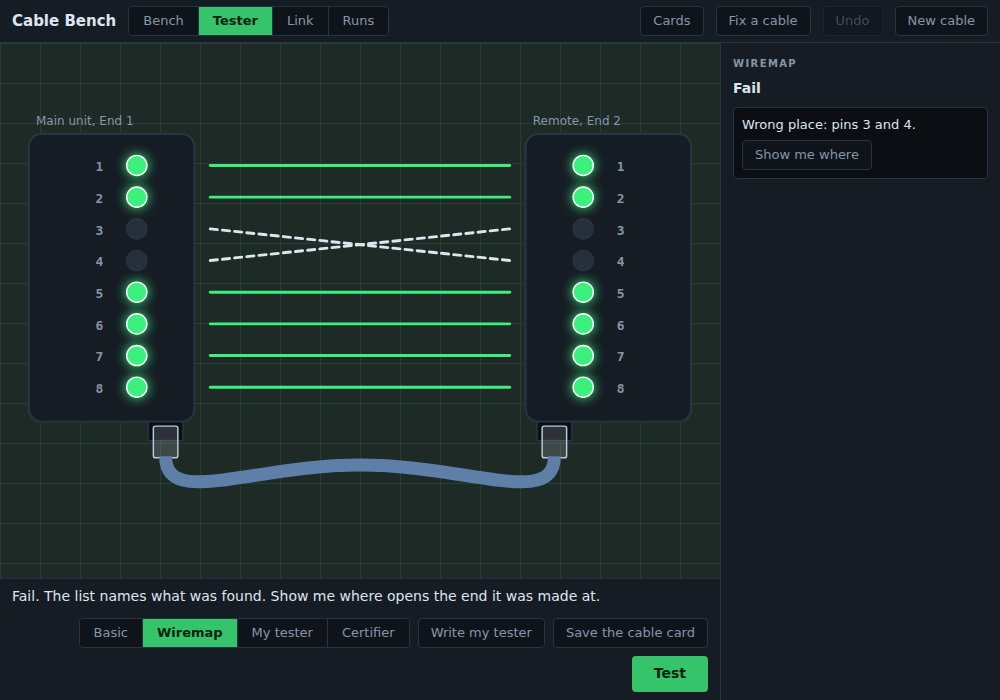
Two wires were swapped at one end. The basic tester only shows which lights come on, and reading them is the student's job. The wiremap tester names the pins, and Show me where opens the end the mistake was made at, with those two wires marked.
Everything in it
The first cable uses a small part of this. The rest is there for a second lesson, or for a student who finishes early.
Making a plug end
- Six steps by hand: strip, fan, order, trim, insert, crimp
- T568A or T568B on the wiring card, or match the other end. The card can be hidden
- A cut drawn by hand can be slanted, and that leaves some wires short of the tip of the plug
- The plug can go on upside down, and the tester shows what that does
- A view from the tip of the plug shows which wires reached the end
- A pull test: a plug with no jacket under its strain relief comes off
Jacks and panels
- A wall jack with four slots on each side, wired by its A or B color labels
- A patch panel port with eight slots in one row
- The punch tool has a blade side. Facing the wrong way, it cuts the wire before the contact
- What is stripped at a jack is what ends up untwisted, and too little will not reach the far slots
Testers
- A basic tester: lights only, pin 1 to pin 8
- A wiremap tester that names open, short, reversed pair, crossed pairs, wrong place and split pair
- A certifier: the 100 m channel limit, the 13 mm untwist limit, the strain relief
- Show me where puts the faulty end back on the bench with the wires marked
Fix a cable
- Ten cables somebody else made, each with one fault
- Each card gives where the cable came from and what somebody noticed, never the fault
- Faults at a plug, at a jack and along the run, including a crushed cable and a run that is too long
- No points, timers or unlocks. A repaired cable passes the tester, and that is the reward
The link and the floor
- The cable between a computer and a switch: a link at 1000 Mbps, at 100, or none, and why
- Auto MDI-X can be turned off, to see when a crossover cable still matters
- One floor of a school to cable: eight jacks, a tray above two corridors, a patch panel in a closet
- Each run gets a category, patch cables and a label, and one check judges the whole floor
Programming
- Students write the rules a wiremap tester follows, and a table compares their tester with the real one on eleven cables
- A label program with loops names every port on the floor
- Both can be written as text or as blocks
- The tester rules save as a JavaScript file that runs in any browser console
For the teacher
- A printable lab sheet for the ten repairs, with no answers on it
- A cable card: a picture of both ends and the tester's result, to hand in
- Six short reference cards on the two wiring orders, pairs, testers, categories and distance
- Every pair of wires has its own mark as well as its color, for students who are color-blind
What they are learning while they play
Nothing here is presented as a lesson. This is what the activity is made of.
| What the student does | What it is |
|---|---|
| Puts eight wires in the order on the card | T568A and T568B. Two standard orders for the same eight wires. They differ only in the orange and green pairs. A straight cable uses the same order at both ends. |
| Reads the tester's lights from pin 1 to pin 8 | Continuity. Each pin at one end has to reach the pin with the same number at the other end. |
| Leaves a wire short of the tip of the plug | Open. A wire that the contact never reached. That pin stays dark on the tester. |
| Swaps the two wires of a pair, or two whole pairs | Reversed and crossed pairs. Every wire is connected, but to the wrong pin. The wiremap shows which pins trade places. |
| Passes the basic tester and fails the wiremap | Split pair. Every pin goes straight through, but two pins that should share one twisted pair hold wires from two pairs. The twist is what protects the signal. |
| Trims the wires before pushing them into the plug | Untwist limit. No more than 13 mm of a pair may be untwisted at an end, and the jacket has to reach the strain relief. |
| Chooses the blade side and punches down a jack | Punch down. Jacks and patch panels are punched down, not crimped. The cutting side of the tool faces the loose end of the wire. |
| Plugs a cable with one broken pair between two devices | Link speed. 10 and 100 Mbps use two pairs, on pins 1, 2, 3 and 6. Gigabit uses all four, so a cable with one pair broken can link at 100 and not at 1000. |
| Turns auto MDI-X off on two computers | Straight and crossover. Older ports needed a crossover cable between two devices of the same kind. Ports made today swap the pairs by themselves. |
| Routes a run to the far end of the building | Channel and permanent link. A channel may be 100 m: at most 90 m of cable in the wall, plus the patch cables at both ends. |
| Picks the cable for a room that needs 10 Gbps | Cable categories. Cat5e carries 1 Gbps to 100 m. Cat6 carries 10 Gbps to about 55 m. Cat6a carries 10 Gbps to 100 m. |
| Puts the tester's rules in the right order | Order of checks. A program that checks for pass first will call a split pair good. The order of the rules is part of the program. |
How to tell whether it landed
Ask, and let them show you. A student who has understood it can answer these without help.
- Which two pairs trade places between T568A and T568B?
- Pin 5 stayed dark on the tester. What happened at the plug?
- Every light came on, and the wiremap tester still failed the cable. How can that be?
- Why did the cable you repaired get shorter?
- The computer links at 100 and never at 1000. Which wires would you check?
- Why is a run of 95 m in the wall a problem, when the limit is 100 m?
Use it in your subject
Not a technology class? Then the app is how students show what they learned in your unit. More projects for every subject.
Math
A run is 81 m in the wall and the patch cables are 2 m and 3 m. Students find the channel length, check it against 100 m, and work out the longest patch cable the room could use.
Practical notes
- AgesGrades 7 through 12, and introductory networking and IT courses in college. Younger students can make and test a cable. Older ones take the repairs, the link and the floor plan.
- TimeThe first cable takes about five minutes. A 45-minute lesson fits one cable made from bare ends, a jack, and two or three repairs.
- EquipmentAny computer or Chromebook with a modern browser and a mouse or trackpad. Wires can be dragged, or tapped and then placed with a second tap, and every step also works from the keyboard. Nothing to install, and no cable, plugs, jacks or tools.
- CostFree. No account is needed to try it.
- PrepNone. Open the page and go. The lab sheet for the ten repairs prints from inside the app.
- In a groupStudents work alone or in pairs. Two who repaired the same cable compare what the tester showed them.
For co-ops, microschools, and classrooms
A cabling lab usually needs a crimper and a tester for every pair of students, and a box of plugs that only work once. Here every student has a bench, a tester and as many tries as they need, on the Chromebooks you already have. Use it before the hands-on lab, so the real plugs are spent on students who already know the order and what the tester is telling them. It does not replace crimping a real cable where a course or a certification asks for one.
- Ten faulty cables, each checked to have exactly one fault.
- No install, no lab setup, no supplies. Chromebooks are fine.
- A printable lab sheet with space for what the student found and how they fixed it.
- A free teacher account covers up to 50 students, and student work is private by default.
Common questions
Is it free, and do students need an account?
It is free, and no account is needed to try it on this page. With a free account students keep their cables, their repairs and their floor plan.
Does it replace crimping a real cable?
No. It teaches the order of the wires, the steps, what each fault looks like on a tester and why it happens. It does not teach the feel of the tools. Where a course or a certification exam requires a hands-on crimp, students still need one. It works well before that lab, so fewer plugs are wasted.
Does it teach T568A or T568B?
Both. The wiring card can be set to either one, and the app never calls one of them wrong. It starts on T568B. What matters for a straight cable is that both ends use the same order.
Will it run on our school Chromebooks?
Yes. It runs in a browser tab with nothing to install. It is drawn in two dimensions, so it does not need a fast graphics chip.
Is there an answer key for the faulty cables?
The wiremap tester names each fault, and Show me where opens the end it was made at and says what happened there. The shelf and the lab sheet give only what somebody noticed about each cable, because finding the fault is the lesson.
Can color-blind students use it?
Yes. Each pair of wires has its own mark as well as its color: one band, two bands, dots or a long dash. The name of a wire shows when it is pointed at, and the order can be read aloud.
How accurate is it?
The wiring orders, the limits on length and untwisted wire, and the speeds of each cable category were checked against published sources before they went into the app. The sizes of the plug and the jack are simplified for teaching. No tool or tester brand is named.
What subject can I log this as?
Networking or information technology: Ethernet cabling, wiring standards, cable testing and structured cabling. The table above lists what is covered.
Still have a question? Ask us, and a person will write back.
Where to go next
Start with Cable Bench
Trying it costs nothing and takes about five minutes. An account is what makes the work last.
Cable Bench is one of the making apps on the platform. This is low-voltage data cable: nothing here is about the wiring that carries mains power. It is at its best with a teacher who asks the questions above and reads the lab sheets.
Page last reviewed October 2026.