A fiber optic simulator: splice, test and fix optical fiber
Fiber is in every networking course, and the gear to practice on costs thousands: a fusion splicer, a cleaver, a meter, an OTDR. Here a student does the job in a browser tab. They strip the fiber to bare glass, wipe it, cleave it, lay it in a fusion splicer and watch the arc join two fibers, then read the splicer's loss estimate and shrink a sleeve over the joint. They can also put a connector on by hand, and land a 12-fiber cable on a patch panel by its color code. Then the run goes on a test bench: a power meter against the loss budget, a red light that glows where light escapes, a scope for dirty connectors, and an OTDR trace. The demo starts with one fiber already in the splicer, so a first splice is done in about a minute. Free, and no account is needed to try it.
Using this with a class? Make a free class and add your students yourself: each gets a username and password, with no email or Google account needed. Or give them one join code. Using Google Classroom? Post the link there; with a free class, the link also puts each student in your class, so you see their work.A first lesson: Everyone makes one fusion splice and tests the run with the meter. Then each student takes a broken link from the shelf, finds the fault with the tools, fixes it, and fills in one row of the lab sheet.
Set up a free class Share to Google ClassroomWhat a student actually does
They splice, in the order a technician does it at a bench. They slide a protection sleeve onto one fiber first, because it cannot go on once the glass is bare. They drag a stripper back along the fiber to take the coating off, wipe the bare glass with alcohol, slide the fiber in the cleaver to the mark and cleave it, and put the scrap of glass in the bin. When both fibers are in the splicer, it checks the two ends for dirt and for how square the cleave is, and refuses an end that fails. Then it fires the arc and shows its estimate of the loss. The student slides the sleeve over the joint, heats it, and checks that both ends of the sleeve hold coating.
Nothing says a step was done wrong while it is being done. The splicer's end check and estimate, the meter and the port lights are the only judges. A student who forgets the sleeve finds out after the splice is made, when nothing can protect it, and has to cut it out and start again.
They put connectors on the same way. They strip and cleave a fiber, push it into a mechanical connector until it bows against the short fiber already inside, and close the clamp. Pushed too little, or cleaved too short or too long, it leaves an air gap that the meter and the red light both find. Pushed too far, the glass snaps.
Then they test the run. The power meter is referenced with one jumper and measures the loss from one panel to the other, next to the budget the standard allows for that many connectors, splices and meters of fiber. The red light shows where light escapes. The scope shows the end face of a connector, dirt and all. The OTDR draws the run, event by event, at either wavelength. Last, two switches with optical modules either link, link with errors, or do not link, and the student works out why.
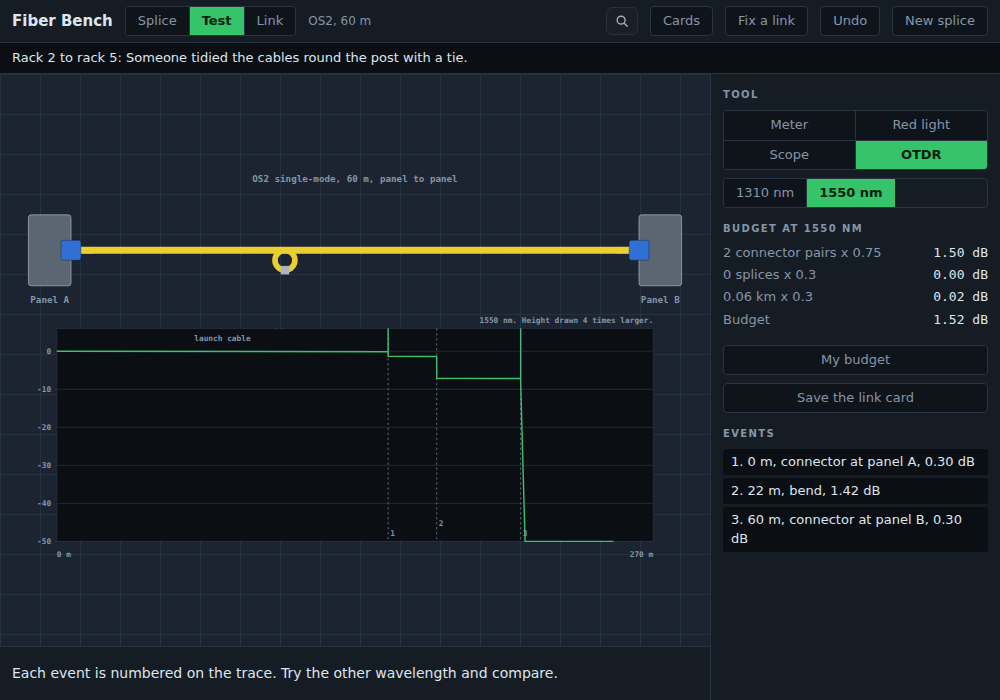
The same run at 1310 nm shows a much smaller step at the bend. 1550 nm is more sensitive to bends, so testing single-mode at both wavelengths is how a technician tells a bend from a bad splice.
Everything in it
The first splice uses a small part of this. The rest is there for a second lesson, or for a student who finishes early.
The fusion splice
- Sleeve, strip, wipe, cleave, load, splice, heat, check, each done by hand
- The cleaver's blade wears out, and a worn blade cleaves at an angle
- The splicer refuses a dirty end, a crooked cleave, an end cleaved too long or too short, or one that was touched after cleaving
- A thin line in the joint can be arced again, at most twice. A bubble means cut it out
Putting a connector on
- LC, SC or ST, with a blue UPC or green APC end
- Strip, wipe, cleave, push in until the fiber bows, close the clamp
- An air gap from a bad cleave or too little push costs loss and glows under the red light
- A connector that fails the scope is replaced here, by hand
Strand colors and the patch panel
- A 12-fiber cable between two fiber distribution panels, the far one already landed in color order
- Students land each strand on its port by the standard colors, blue to aqua
- A red light into any port at one panel shows which port it comes out of at the other, or a sweep maps all twelve
- Three repair jobs: a swapped pair, a panel landed backwards, and a strand broken in the splice tray that has to be spliced
Testing
- A light source and power meter, referenced with one jumper, at both wavelengths
- The loss budget worked out beside the reading: connectors, splices and cable
- A red fault light that glows at a break, a tight bend, a bad splice or a scratched connector
- An inspection scope with cleaning and connector replacement
- An OTDR trace with every event numbered and measured
The link
- Two switches with 1000BASE-SX, 10GBASE-SR or 10GBASE-LR modules
- Cords and cable of any type: OM1 to OM4 multimode, or OS2 single-mode
- Modules that do not match, a multimode cord on single-mode cable, and transmit and receive swapped
- Reach and channel loss for each module, and a counter that climbs when the link has errors
Fix a link
- Ten fiber links somebody else built, each with one fault
- Each card says where the link runs and what somebody noticed, never the fault
- Dirty and scratched connectors, mixed polishes, a tight bend, a break, a bad splice, swapped fibers, mismatched modules, a run too long
- No points, timers or unlocks. A fixed link passes the meter and the switches link, and that is the reward
Programming
- Students write the loss budget as one formula, and a table checks it on every link at every wavelength
- They write the rules a technician follows, like: if 1550 worse: ease the bend
- A table runs their rules on all ten broken links and shows where they pick the right fix
- Both save as JavaScript functions
For the teacher
- A printable lab sheet for the ten links, with no answers on it
- A link card: a picture of the run and its readings, to hand in
- Eight short reference cards, from fiber types and connectors to the loss budget and safety
- Fiber safety is part of the work: glass scraps go in the bin, and nobody looks into a fiber
What they are learning while they play
Nothing here is presented as a lesson. This is what the activity is made of.
| What the student does | What it is |
|---|---|
| Picks a yellow cable or an aqua one | Single-mode and multimode. Multimode has a wide core and is used over shorter runs with 850 and 1300 nm light. Single-mode has a core of about 9 micrometers and carries 1310 and 1550 nm much farther. |
| Slides the fiber to the 16 mm mark and cleaves it | The cleave. A fusion splice needs a flat, square end. A poor cleave always gives a poor splice, which is why the splicer checks the angle first. |
| Forgets the sleeve and has to cut the splice out | Splice protection. The sleeve goes on before stripping. After the arc it is heated over the joint, with coating inside both of its ends. |
| Reads the splicer's estimate | Splice loss. A good fusion splice loses a few hundredths of a dB. The standard allows at most 0.3 dB per splice. |
| Adds up connectors, splices and meters of cable | Loss budget. At most 0.75 dB for each mated connector pair, 0.3 dB for each splice, and the cable's loss per kilometer times its length. |
| Sets a reference before measuring | Insertion loss. A meter reads power. Loss is the drop from a reference, here taken with one jumper so both end connectors are counted. |
| Looks at a failed connector with the scope | Inspect before you connect. Dirt on an end face adds loss. Every connector is inspected, and cleaned if it needs it, before it is plugged in. |
| Finds a red glow at a cable tie | Bend radius. Installed cable should bend no tighter than 10 times its diameter. A tight bend leaks light, more at 1550 nm than at 1310. |
| Plugs a green connector into a blue port | UPC and APC. On single-mode, blue is a flat polish and green an angled one. The two must never be mated. |
| Fixes a link where both port lights stay dark | TX/RX transposed. Each module's transmit fiber has to reach the other module's receive side. Swapping the pair at one end fixes it. |
| Upgrades a long multimode run to 10 Gb/s | Reach. 10GBASE-SR reaches 82 m on OM2 and 300 m on OM3. Past its reach a link comes up and fills with errors. |
| Pushes the fiber into a connector until it bows | Mechanical connector. The end face was polished at the factory. The cleaved fiber has to touch the short fiber inside, and the bow shows that it does. Like any mated pair it may lose at most 0.75 dB. |
| Lands twelve strands on a patch panel | Fiber color code. Each fiber has its own color in a fixed order: blue, orange, green, brown, slate, white, red, black, yellow, violet, rose, aqua. Both ends of a cable are landed in that order. |
| Shines a red light into a port and finds where it comes out | Tracing a fiber. The red light shows which port at the far panel a strand reaches, and glows where a strand is broken. |
| Writes rules that go from what the tools show to a fix | Troubleshooting as a program. Each rule reads signs off the meter, the red light, the scope and the port lights. The order matters: the first rule that fits wins. |
| Writes the budget formula and compares it on every link | A formula as a program. The same three terms work for any link. A formula that agrees on one run and not another is missing one of them. |
How to tell whether it landed
Ask, and let them show you. A student who has understood it can answer these without help.
- Why does the sleeve go on before the fiber is stripped?
- The splicer refused the right fiber. What could have been wrong with it?
- Work out the loss budget for a 400 m single-mode run with two connectors and one splice at 1310 nm.
- The run passes at 1310 nm and fails at 1550 nm. What would you look for, and where?
- Both port lights stay dark, and the meter passes. What is the likely fault?
- Why is a reading under the budget not enough to call a link good if the red light glows somewhere?
Use it in your subject
Not a technology class? Then the app is how students show what they learned in your unit. More projects for every subject.
Math
Students compute loss budgets for runs of different lengths and fiber types, then find the longest run a budget allows. The arithmetic is multiplication and addition with decimals and units.
Physics
Light stays in a fiber by total internal reflection. Students explain why a tight bend lets it escape, and why the red light shows them where.
Practical notes
- AgesGrades 9 through 12, and introductory networking and IT courses in college. Younger students can make a splice and use the red light. Older ones take the budget, the OTDR, the link and the repairs.
- TimeA splice from two bare fibers takes about five minutes (the demo, with one fiber already in the splicer, takes about one). A 45-minute lesson fits a splice, a meter test with the budget worked out, and two or three repairs.
- EquipmentAny computer or Chromebook with a modern browser and a mouse or trackpad. The stripper, the fiber in the cleaver and the sleeve are dragged, and every step also works from the keyboard. Nothing to install, and no splicer, cleaver, fiber or meter.
- CostFree. No account is needed to try it.
- PrepNone. Open the page and go. The lab sheet for the ten links prints from inside the app.
- In a groupStudents work alone or in pairs. Two who fixed the same link compare what each tool showed them.
For co-ops, microschools, and classrooms
A fiber lab usually means one splicer for a whole class, a box of fiber and sleeves that are used up, and students who watch more than they do. Here every student has a splicer, a cleaver, a meter, a scope and an OTDR, on the Chromebooks you already have. Use it before the hands-on lab, so time at the real splicer goes to students who already know the steps and what the readings mean. It does not replace a real splice where a course or a certification asks for one.
- Ten broken links, each checked to have exactly one fault, and each with a fix that passes.
- No install, no lab setup, no consumables. Chromebooks are fine.
- A printable lab sheet with space for what the student found and how they fixed it.
- A free teacher account covers up to 50 students, and student work is private by default.
Common questions
Is it free, and do students need an account?
It is free, and no account is needed to try it on this page. With a free account students keep their splices, their repairs, their budget formula and their troubleshooting rules.
Does it replace splicing real fiber?
No. It teaches the steps, the order they go in, what the splicer checks, and what each fault looks like on a meter, a red light, a scope and an OTDR. It does not teach the feel of handling bare glass. Where a course or a certification requires a hands-on splice, students still need one. It works well before that lab.
Which parts of a networking course does it cover?
Single-mode and multimode fiber, the LC, SC, ST and MPO connectors, optical modules, fiber troubleshooting (wrong cable type, attenuation, poor termination, transmit and receive swapped, mismatched modules, errors on the interface) and the visual fault locator. These are named in common networking course objectives, including CompTIA Network+.
Will it run on our school Chromebooks?
Yes. It runs in a browser tab with nothing to install. It is drawn in two dimensions, so it does not need a fast graphics chip.
Is there an answer key for the broken links?
The tools show each fault: the meter, the red light, the scope, the OTDR and the switches' port lights. The shelf and the lab sheet give only where each link runs and what somebody noticed, because finding the fault is the lesson.
How accurate is it?
The loss allowances, the attenuation of each fiber type, module reach and channel loss, the splicing steps and the safety rules were checked against published sources, including the Fiber Optic Association's guides, before they went into the app. Some figures are the bench's own, such as how much loss a speck of dirt adds or the angle this splicer refuses, and the app says so where it uses them. No tool brand is named.
Does it teach fiber safety?
As part of the work. Glass scraps are picked up and put in the bin, the scope is used only with the light source off, and the safety card covers glasses, food and drink, alcohol and never looking into a fiber.
What subject can I log this as?
Networking or information technology: fiber optic cabling, splicing, loss budgets and fiber testing. The table above lists what is covered.
Still have a question? Ask us, and a person will write back.
Where to go next
Start with Fiber Bench
Trying it costs nothing, and the demo splice takes about a minute. An account is what makes the work last.
Fiber Bench is one of the making apps on the platform. It is at its best with a teacher who asks the questions above and reads the lab sheets.
Page last reviewed October 2026.