A PC troubleshooting simulator: fourteen broken computers to repair
Troubleshooting is the part of hardware that jobs ask for and classrooms can rarely practice, because it needs broken computers and nobody wants to break one. Here every student gets fourteen. Each machine arrives with one fault and a note from its owner, like “It turns on, but the screen stays black.” The student presses power, reads the lights, fans and beeps, opens the case, reseats, swaps and reconnects parts, and runs the benchmark when the fault only shows up in the numbers. When it starts cleanly, a card explains what was wrong and why it looked the way it did. Free, and no account is needed to try it.
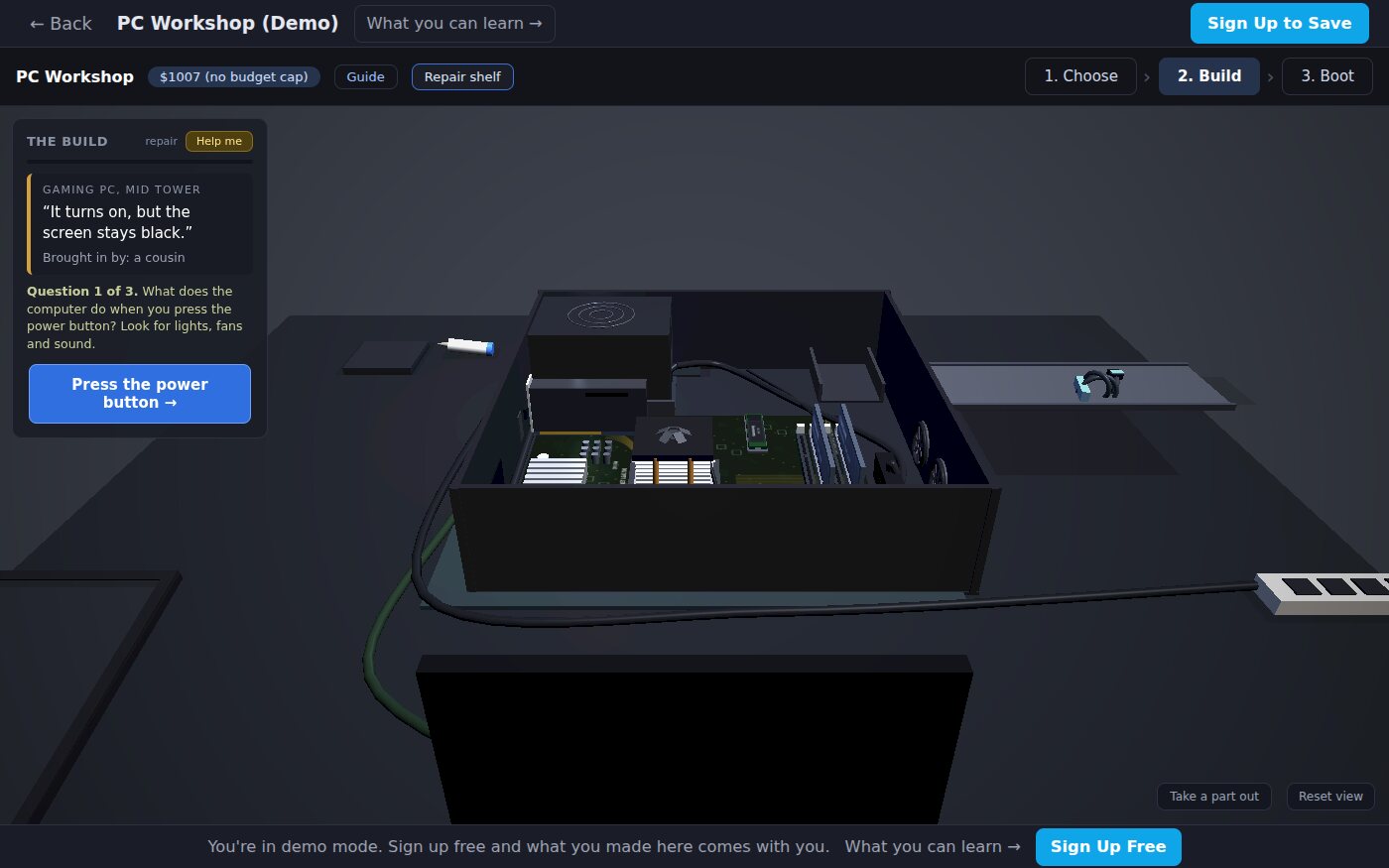
Screenshots from the demo on this page, taken with no account.
Using this with a class? Make a free class and add your students yourself: each gets a username and password, with no email or Google account needed. Or give them one join code.A first lesson: Each student repairs one machine and writes a four-line repair note: what the owner reported, the evidence, the cause, and the repair. Two students who fixed the same machine compare their evidence.
Set up a free classWhat a student actually does
They choose a computer from the shelf. Its tag says what kind of PC it is, what the owner says is wrong, and who brought it in. The machine sits on the same 3D bench students use to build a PC, in its case, with the side panel off. They press the power button first and watch: do the fans turn, which light on the board stays on, how many times does it beep, what does the screen say?
Then they test an idea. They reseat memory, take a part out, reconnect a cable, fit a different part from the parts shelf, or run the benchmark when the owner's complaint is about speed rather than a failure. Nothing tells them whether they are right until the machine starts cleanly and, for the slow ones, the benchmark is back where its parts say it should be. Then a card turns over with what was wrong and why it looked the way it did. If they are stuck, Help me asks the question a technician would ask next: three questions that start broad and end by saying where to look.
The fourteen machines
One fault each, grouped here by the kind of problem. The owner's complaint is all a student sees; the faults are not named on the shelf.
It will not start
- “Nothing happens at all. No lights, no fans.”
- “I built it from new parts. The fans turn, and the screen stays black.”
- “I got a new graphics card. Now it turns off when a game loads.”
No picture
- “It turns on, but the screen stays black.”
- “The screen is black, but I can hear it running.”
Beeps and messages
- “It beeps three times, again and again.”
- “It shows some text, then says it cannot find a drive.”
- “It stops at a message about the CPU fan.”
Heat
- “It starts, and a few seconds later it turns off.”
- “It gets slow after ten minutes of a game.”
It works, but not as it should
- “Games are slower than on my friend's PC. We have the same parts.”
- “It says 8 GB. I paid for 16 GB.”
- “The box says 6000. The computer says 4800.”
- “It needs one minute to start. I put in a fast drive, and nothing changed.”
What they are learning while they play
Nothing here is presented as a lesson. This is what the activity is made of.
| What the student does | What it is |
|---|---|
| Presses power before touching anything | Observe first. A technician gathers evidence before changing anything, so the first change is a test and not a guess. |
| Reads which light on the board stays on, and counts the beeps | POST. The power-on self test checks the processor, memory and graphics before anything loads, and reports what failed. |
| Changes one thing, then presses power again | One change at a time. Change two things at once and you cannot tell which one mattered. |
| Runs the benchmark on a machine that works but feels slow | Measure, do not guess. Some faults do not stop a computer; they only show in the numbers. |
| Fixes a machine that shuts off under load | Power and heat. A part can work when idle and fail when a game asks for full power or makes full heat. |
| Writes the repair note | Documentation. The owner's words, the evidence, the cause and the repair: the record every help desk keeps. |
How to tell whether it landed
Ask, and let them show you. A student who has understood it can answer these without help.
- What did the computer do when you first pressed power, and what did that rule out?
- Which clue made you look at the part you repaired?
- What did you change that did not fix it, and what did that tell you?
- The owner said it was slow, not broken. How did you prove there was a problem?
- If the same complaint came in tomorrow, what would you check first, and why?
Practical notes
- AgesAges 10 through high school, and intro IT and hardware courses in college. Younger students follow the lights and the Help me questions; older ones take the slow machines, which need the benchmark.
- TimeAbout five to ten minutes for a repair. A 20-minute lesson fits one repair and the repair note.
- EquipmentAny computer or Chromebook with a modern browser and a mouse or trackpad. Nothing to install, and no computer parts.
- CostFree. No account is needed to try it.
- PrepNone. Open the page and go. The teaching notes have a 20-minute plan for repairs.
- In a groupStudents choose their own machine. Two who repaired the same one compare their evidence; they may have fixed it in different ways.
For co-ops, microschools, and classrooms
Use repairs when you have 20 minutes, or when students have finished a build. Each student repairs a computer someone else built and writes a repair note. The note is the evidence of learning: a student who writes the evidence before the cause is working like a technician.
- Fourteen machines, each with one fault, checked to break in exactly one way.
- No points and no leaderboard for repairs, on purpose: the machine working is the reward.
- Any repair that makes the machine work is accepted, so two correct repairs can differ.
- A free teacher account covers up to 50 students, and student work is private by default.
Common questions
Is it free, and do students need an account?
It is free, and no account is needed to try a repair on this page. With a free account, students keep their work and can build their own PC in the same app.
Is there an answer key?
Each repair ends with a card that says what was wrong and why it looked the way it did, so a student who fixed it can explain it. The shelf and this page name only the owners' complaints, because the diagnosis is the lesson.
What if a student is stuck?
Help me asks the question a technician would ask next. There are three for each computer: the first asks what the machine does, the second which clue matters, and the third says where to look. Help stays off the page until a student asks for it.
How realistic is it?
The machines use the same parts, lights, beeps and startup checks as PC Workshop's builds, and each fault behaves the way that fault does on a real PC. It is a simulation, so nothing can be damaged and nothing needs to be bought.
Will it run on our school Chromebooks?
Yes. It runs in a browser tab with nothing to install. A mouse or a trackpad works best for turning the 3D view.
How does it connect to building a PC?
The repair bench is part of PC Workshop, where students pick parts to a budget, build the computer and benchmark it. Building one first shows what every part does; repairing one shows why every build step matters. Either order works.
What subject can I log this as?
Information technology or computer hardware: troubleshooting, the startup process, memory, storage, power and cooling. The table above lists what is covered.
Still have a question? Ask us, and a person will write back.
Where to go next
Start with PC Troubleshooting Simulator
Everything on this page comes with a free account. A free class adds your students, each with a username and password and no email needed.
The repair bench is part of PC Workshop, one of the making apps on the platform. It is at its best with a teacher who asks the questions above and reads the repair notes.
Page last reviewed September 2026.