Melody Maker
Most students can hum a tune long before they can say what it is made of. Melody Maker turns a tune into something they can see: a grid where each row is a note and each column is a moment in time. It opens on the first line of Twinkle, Twinkle, Little Star, seven notes played on a bell sound. Press Play and the grid loops, a column lighting up as each step sounds. Then click a square to add a note or take one away, and hear the change on the next pass.
Using this with a class? Make a free class and add your students yourself: each gets a username and password, with no email or Google account needed. Or give them one join code. Using Google Classroom? Post the link there; with a free class, the link also puts each student in your class, so you see their work. mytekDev is also available from the Google Workspace Marketplace, so your school's Google admin can install it for everyone.A first lesson: Everyone starts from the first line of Twinkle, Twinkle, Little Star, moves its seven notes to write the second line ("How I wonder what you are"), and explains why that line walks down step by step and lands on C.
Set up a free class Share to Google ClassroomWhat a student actually does
They press Play and hear Twinkle, Twinkle, Little Star, the first line, looping on a bell sound while a yellow outline moves across the columns. They see the tune's shape at once: two Cs at the bottom, a jump up to two Gs, two As one row higher, then back to G. Clicking a lit square turns that note off and clicking an empty one turns a note on, and each new note sounds as it goes in. To write the next line they move each note down, play it, and listen for the tune to come home.
From there they write their own. The grid has 16 steps across and 13 notes up, from the C below middle C up to middle C, sharps included. Eight instruments (Piano, Synth, Bass, Organ, Bell, Flute, Strings and Pluck) and a BPM slider from 60 to 180 change the whole tune. The Scale Helper highlights the notes of a scale, such as C major. Randomize rewrites the grid in one of six modes, from a fresh pattern to filling the gaps, and a checkbox on any row or column locks it so a part they like survives. A preset menu, Clear All, and Undo and Redo round it out, and melodies save to the student's account.
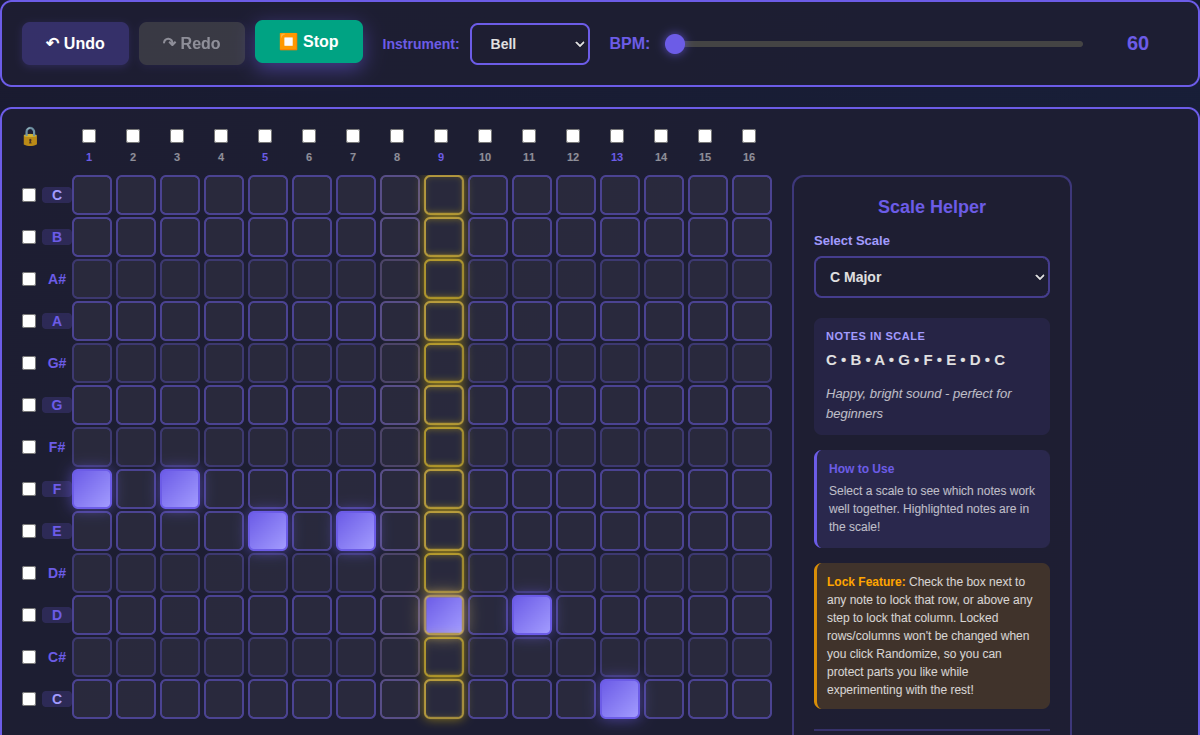
The second line, "How I wonder what you are": the same rhythm, with the notes moved to F, F, E, E, D, D, C. Each pair steps one row of the C major scale lower until the tune lands on C, the note the first line started on, which is why it sounds finished.
What they are learning while they play
Nothing here is presented as a lesson. This is what the activity is made of.
| What the student does | What it is |
|---|---|
| Clicks a square higher on the grid and hears a higher note | Pitch. Each row is one note. Higher on the grid is higher in sound, and the labels down the side are the note names. |
| Moves C, C, G, G down to F, F, E, E | Steps and leaps. A melody moves by steps (to the next note of the scale) or by leaps (skipping over notes). Twinkle's first line leaps up from C to G; its second line walks down in steps. |
| Leaves an empty square after a note and hears it ring longer | Rhythm. Rhythm is when each note starts. Notes close together feel quick, and space after a note makes it feel long, like the G on "star". |
| Picks C Major and sees the five sharp rows left unhighlighted | Scales and keys. A scale is the set of notes a tune is built from. C major uses only the plain letter notes, so the sharps sound out of place in it. |
| Ends a line on C, then tries ending it on G | The home note. Tunes in C major feel finished when they land on C. Ending anywhere else sounds like a question waiting for an answer. |
| Drags the BPM slider and hears the same tune faster | Tempo. BPM means beats per minute. Changing it changes the speed, not the notes. At 60 a step lasts a quarter of a second, so the 16 steps loop every four seconds. |
| Locks the rows they like, then presses Randomize | Variation. Composers keep part of an idea and change the rest. Locking a row or a column keeps it while everything else is tried again. |
How to tell whether it landed
Ask, and let them show you. A student who has understood it can answer these without help.
- Point to the highest note in the first line. How can you tell it is the highest without playing it?
- Where does the first line leap, and where does the second line move in steps?
- The G on "star" has three empty squares after it. What would it sound like with a note in each one?
- Why does the second line sound finished when the first line does not?
- You move the BPM slider from 60 to 120. What changes, and what stays the same?
Use it in your subject
Not a technology class? Then the app is how students show what they learned in your unit. More projects for every subject.
Music
Copy the first line of a song the class sings into the grid by ear, play it back, and fix it square by square until it matches.
Math
At 60 BPM a step is a quarter of a second. Work out how long the 16-step loop lasts at 60, 90 and 120 BPM, then time it to check.
Computer science
The grid is a table of on and off values, 13 rows by 16 columns. Write the Twinkle starter as rows of 1s and 0s, and trade them with a partner to rebuild each other's tunes.
Practical notes
- AgesGrades 2 through 8. Younger students click notes by ear and listen; older ones write in a scale on purpose, plan where a line ends, and use the locks and Randomize to try variations.
- TimeA minute to hear the demo and change a note. Writing the second line takes ten minutes, and a tune of their own most of a period.
- EquipmentA computer or Chromebook with a modern browser, and headphones in a room where everyone plays at once. Everything is a click, so a mouse, a trackpad or touch all work. Nothing to install.
- CostFree. The app has no paid tier.
- PrepAbout five minutes: play the demo, write the second line yourself, and try a different instrument, so you know what the class will see.
- In a groupEveryone starts from the same line of Twinkle, so the class can play their second lines in turn and hear whose one sounds finished.
For co-ops, microschools, and classrooms
Hand everyone the same seven notes and the same job: write the line that comes next. Each student hears their own answer the moment they press Play, so a wrong note is found by listening rather than by being told.
- A grid that shows a tune's shape: higher rows, higher notes.
- Eight instruments and a tempo slider for the whole melody.
- A scale helper and a randomizer with locks for trying ideas.
- No install, no per-seat license. Student work is private by default.
Common questions
Is it free?
Yes. It runs in your browser and there is no paid tier. A free account adds saving, but nothing on this page is behind a paywall.
Is it a free alternative to Chrome Music Lab's Song Maker?
They are close cousins. Both are free, run in the browser, and build a tune by clicking notes onto a grid. Song Maker needs no login and keeps a song as a link to save or share, and its settings change the scale, the length of the song, the range of notes and the time signature; it can also take notes from a microphone. Melody Maker has none of those settings: it is always 16 steps and one octave, with no microphone. What it adds is that a melody saves to the student's account, where a teacher running a class can see it, plus eight instruments, a scale helper, and Randomize with row and column locks. It is not made by or connected with Google or Chrome Music Lab.
Does my child need an account to try it?
No. The demo on this page is the whole app with Twinkle, Twinkle, Little Star loaded. Saving needs a free account, and signing up from the demo brings what was made along.
How long can a melody be?
One grid: 16 steps, looping, over 13 notes from the C below middle C up to middle C. It is made for short tunes and ideas. For a whole song with bars, chords and lyrics, Sheet Music Maker is the next step.
How do I make a note last longer?
Each square sounds its note once and lets it ring out, so a long note is a note with empty squares after it. Some sounds ring longer than others: Bell rings the longest, a little over a second, and Synth the shortest.
Does it run on a Chromebook?
Yes. It installs nothing and runs in the browser. Every control is a click or a tap, and a keyboard is only needed for the Ctrl+Z and Ctrl+Y shortcuts, which the Undo and Redo buttons also do.
Is a student's work public?
No. Melodies are private by default. A student can choose to share one. In a class the teacher can see students' projects.
What subject can I log this as?
Most families log it as music: pitch, rhythm, scales and tempo. Working out how long a loop lasts at a given BPM is math too.
Still have a question? Ask us, and a person will write back.
Where to go next
Start with Melody Maker
Trying it costs nothing and takes about five minutes. An account is what makes the work last.
Melody Maker is one of the making apps on the platform. Every detail on this page was read from the app itself with the Twinkle starter. It is a place to make things, not a course, and it is not a substitute for a teacher: it is at its best when an adult asks the questions above and takes the answers seriously.
Page last reviewed November 2026.
Google, Google Classroom and Chromebook are trademarks of Google LLC.