OpenSCAD
Most 3D design tools have you drag shapes around with a mouse. OpenSCAD has you write them: a few lines of code say how big each shape is, where it goes, and what gets cut out of what, and the program builds the model from those instructions. It opens on a name keychain with every size written as a named number at the top. Change the name or the length, press Render, and the tag rebuilds. Free, in the browser, no account needed to try it.
Using this with a class? Make a free class and add your students yourself: each gets a username and password, with no email or Google account needed. Or give them one join code. Using Google Classroom? Post the link there; with a free class, the link also puts each student in your class, so you see their work. mytekDev is also available from the Google Workspace Marketplace, so your school's Google admin can install it for everyone.A first lesson: Everyone gets the same keychain code and has fifteen minutes to make it fit a real key ring, measured with a ruler, then explains which numbers they changed and why.
Set up a free class Share to Google ClassroomWhat a student actually does
They press Render and a green keychain appears with MAKER across it. They find the line name = "MAKER", type their own name, press Render again, and the letters change. Then they try a bigger letter_size and the name runs off the edge of the tag, so they go back and make plate_length longer. Ctrl+Z in the editor takes back any edit, and the Customize button turns the numbers at the top into sliders that rebuild the model when they let go.
From there it is real OpenSCAD. Cubes, spheres, cylinders and polygons, moved with translate and rotate, combined with union, difference and intersection, stretched up from 2D shapes with linear_extrude, and wrapped up in modules that can be used again. The Docs button lists the commands with examples, and libraries such as BOSL2 and MCAD are ready to include. A rendered model exports as an STL file, the format 3D printers and slicers read, and saves into the student's files on the platform.
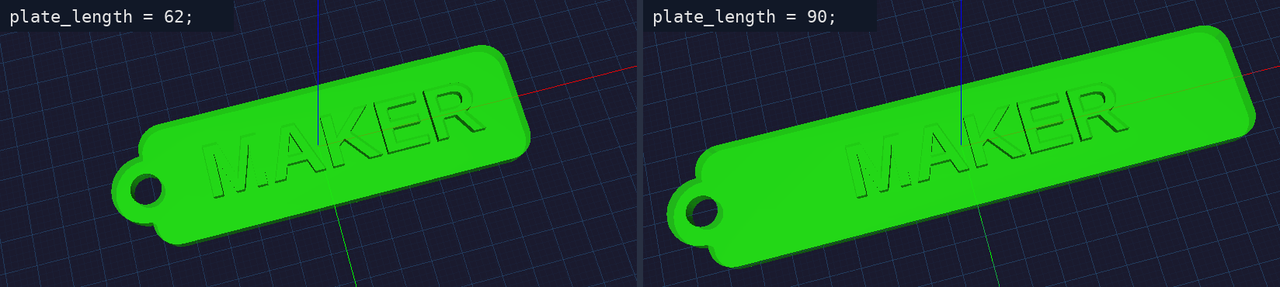
One number changed. plate_length went from 62 to 90, and nothing else had to be touched: the corners are built from plate_length, so they moved with it, and the name is centered using plate_length, so it stayed in the middle. That is the point of parametric design. The model is a recipe written in measurements, not a shape someone dragged into place.
What they are learning while they play
Nothing here is presented as a lesson. This is what the activity is made of.
| What the student does | What it is |
|---|---|
| Changes plate_length and renders again | Variables. A name stands for a number. Change it once at the top and every line that uses it changes too. |
| Drags a slider in Customize | Parameters. The design is a recipe with inputs. The same code makes a short tag, a long tag, or one for a different name. |
| Cuts the key ring hole with difference() | Constructive solid geometry. Real parts are made by adding shapes together and subtracting one shape from another. union() adds, difference() cuts. |
| Moves a cylinder with translate([0, 10, 0]) | 3D coordinates. Every position is three numbers: x across, y back, z up. The model is built on the same axes as a graph. |
| Reads that every size is in millimeters | Measurement. A 3D printer builds exactly the numbers it is given. A 5 mm hole is 5 mm, so it has to fit the real key ring. |
| Uses rounded_plate() with different sizes | Modules. A module is a named piece of code that can be used again with new values, like a function that makes a shape. |
| Makes the hole a little taller than the plate | Designing for the printer. A cut that stops exactly at a surface can leave a paper-thin skin. Small overlaps and clearances make parts that work. |
| Exports an STL | 3D printing. The code becomes a file of triangles that a slicer turns into the layers a printer builds. |
How to tell whether it landed
Ask, and let them show you. A student who has understood it can answer these without help.
- Why did the corners stay round when you made the tag longer?
- Which line makes the key ring hole, and what would happen if you deleted it?
- Your name does not fit on the tag. Name two different numbers you could change.
- What do the three numbers inside translate([ ]) mean?
- Why is the hole cylinder taller than the plate it cuts through?
Use it in your subject
Not a technology class? Then the app is how students show what they learned in your unit. More projects for every subject.
Math
Use x, y and z coordinates to place shapes, then work out the volume of a design and check it against the size of the printed part.
Engineering
Design a part that has to fit something real, such as a pencil, a key ring or a cable, measure it with a ruler, and adjust the numbers until it fits.
Computer science
Turn a repeated shape into a module, then use a for loop to place a row of them, such as the teeth on a comb or the battlements on a tower.
Practical notes
- AgesAges 11 through high school. Younger students change the numbers and the name; older ones write their own models and modules from scratch.
- TimeA minute to the first change. A first design of their own, such as a keychain or a pencil cup, takes forty-five to ninety minutes.
- EquipmentA computer or Chromebook with a modern browser and 3D graphics (WebGL). A keyboard matters more than a mouse here, since the model is typed. Nothing to install. A ruler helps when a design has to fit something real.
- CostFree. The app has no paid tier.
- PrepNone. Open the page and go. Reading this page first takes about three minutes.
- In a groupEveryone can start from the same keychain code, so a whole class works from one shared starting point and compares what each change did.
For co-ops, microschools, and classrooms
Hand everyone the same keychain code and the same measuring task. The tags that come back differ in length, letter size and hole size, and each student can point at the exact line that made the difference, which makes the thinking easy to see and easy to check.
- Real OpenSCAD code, with a Docs panel of commands and examples.
- Customize turns the numbers at the top of a design into sliders.
- Exports STL for 3D printing, saved into the student's files.
- No install, no per-seat license. Student work is private by default.
Common questions
Is this the original OpenSCAD?
It is OpenSCAD, the free and open-source program by Marius Kintel and its contributors, compiled to run in the browser by Olivier Chafik's OpenSCAD Playground, both under the GNU GPL. This is our hosted copy of that browser version, not the official OpenSCAD site. Our build adds saving to a free account, exported STL and .scad files kept in your files, a Customize panel with sliders, a Docs panel, and a 3D preview of shared designs that viewers can resize with the same sliders.
Do I need to download OpenSCAD?
No. It runs in the browser on Chromebooks, Windows, Mac and Linux, with nothing to install. If you already use the desktop version, the .scad code is the same language, so a design can move between the two.
Is it only for students?
No. It is a full code-based 3D modeling tool for anyone. Much of this page is written for teachers and parents because many of the people who use it are students.
Is it free?
Yes. It runs in your browser and there is no paid tier. A free account adds saving and keeping exported files, but nothing on this page is behind a paywall.
Does my child need an account to try it?
No. The demo on this page is the complete app with the keychain loaded. Saving and exporting the STL need a free account, and the design you changed comes with you as your first project.
Can they 3D print what they make?
Yes. Render the model and export it as STL. The file lands in their files on the platform, ready to download for a 3D printer or printing service. No printer? Add the STL to the platform's 3D printer simulator and watch it print layer by layer.
Do they need to know how to code first?
No. The starter teaches by changing one number at a time. Students who have typed code before will move faster, and every change shows up as a shape, so they can see what each line does.
What ages is it for?
Ages 11 through high school. Changing the numbers in a design works for younger students; writing models from scratch with modules and loops suits older ones.
Is their work public?
No. Projects are private by default. A student can choose to share a design, and in a class the teacher can see students' projects.
What subject can I log this as?
Most families log it as engineering or computer science. Measurement and designing parts to fit are engineering, variables and modules are programming, and coordinates and volume are math. The table above lists specifically what is covered, so you can pick the label your records need and point at the evidence.
Still have a question? Ask us, and a person will write back.
Where to go next
Start with OpenSCAD
Trying it costs nothing and takes about five minutes. An account is what makes the work last.
OpenSCAD is one of the making apps on the platform. It is a place to make things, not a course, and it is not a substitute for a teacher: it is at its best when an adult asks the questions above and takes the answers seriously.
OpenSCAD is by Marius Kintel and contributors, used under the GNU General Public License. The browser version is based on Olivier Chafik's OpenSCAD Playground. Source.
Page last reviewed October 2026.
Google, Google Classroom and Chromebook are trademarks of Google LLC.