PLC Lab
Almost every machine in a factory is run by a PLC, a small rugged computer, and most PLCs are still programmed in ladder logic: rungs between two rails, with contacts that read buttons and sensors and coils that drive motors and valves. PLC Lab gives each student a training station on screen, a conveyor with a panel, photoeyes, a labeler, a pusher, a filler and more, and a ladder editor wired to it. They write the program, turn the line on, and watch boxes move. Then a shift runs, a crew works the panel, and every box is counted.
Using this with a class? Make a free class and add your students yourself: each gets a username and password, with no email or Google account needed. Or give them one join code. Using Google Classroom? Post the link there; with a free class, the link also puts each student in your class, so you see their work. mytekDev is also available from the Google Workspace Marketplace, so your school's Google admin can install it for everyone.A first lesson: Open Job 1 on the projector and turn the line on. Hold Start: the belt runs. Let go: it stops. Ask the class why, and what the program needs so the belt keeps running after a person lets go of the button. Then look at the Stop button's lamp in the wiring list: it is lit before anyone touches it. Ask why a stop button would be wired that way.
Set up a free class Share to Google ClassroomWhat a student actually does
Each job opens on a story and a wiring list: what each input and output is, where it is wired on the PLC, and whether it is wired normally open or normally closed. A tag has to exist before a rung can use it, so the I/O map comes first, the way technicians start.
The ladder editor has the instructions a first PLC course teaches: normally open and normally closed contacts, coils, latch and unlatch, on-delay, off-delay, pulse and retentive timers, up and down counters, one-shots, compare and limit tests, move and math, shift registers, and routines called with a JSR. A program check under the ladder names each problem in one plain line before anything runs.
Turn the line on and the program scans: inputs are read, rungs run top to bottom, outputs are written. Powered rungs turn green, timers count, and the station moves. Slow scan shows one scan at a time. Changes made while the line runs take effect on the next scan, the way an online edit does on a real PLC.
Run the shift and a crew works the panel: Start, a jam, an E-stop, a selector switched to Manual. Every box, can and bottle is counted, and the result says what went wrong in plain words. A job passes after three clean shifts, each one a little different. Fix the line hands the student a program that used to work, with a fault to find.
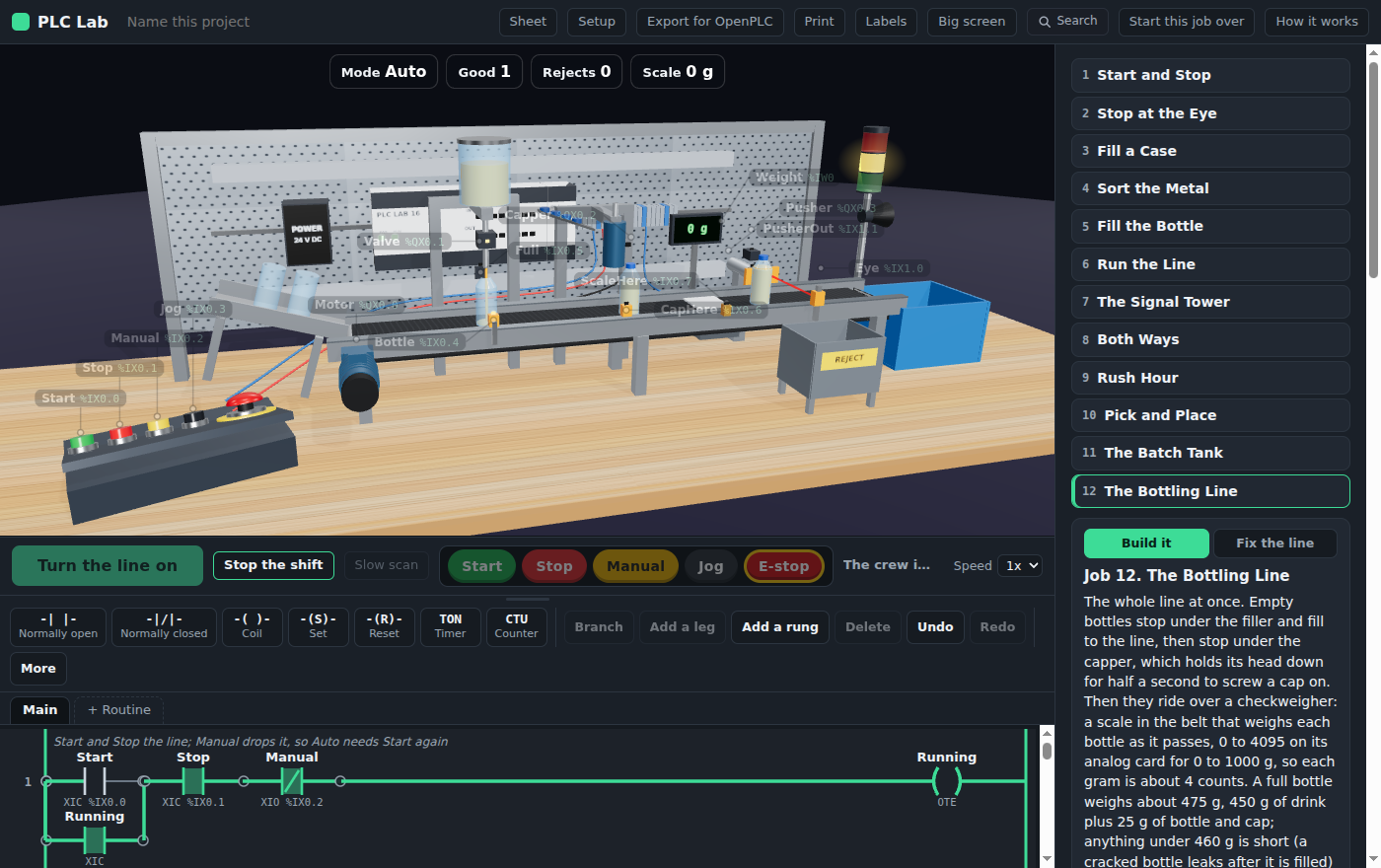
Job 12, the capstone: fill, cap and weigh every bottle, push the short ones into the reject bin, and obey the Auto/Manual switch when the crew jogs the belt.
What they are learning while they work
Nothing here is presented as a lesson. This is what the twelve jobs are made of.
| What the student does | What it is |
|---|---|
| Puts a normally closed contact for a normally closed Stop button, and the belt never starts | Field wiring and program logic. A contact in the program reads the input, not the button. A stop button is wired normally closed so a broken wire stops the line, so its input is ON until pressed, and the program reads it with a normally open contact. |
| Branches Motor around Start so the belt keeps running | Seal-in. A coil's own contact holds the rung true after the button is let go. It is the oldest circuit in motor control, and it drops out on Stop or a power loss. |
| Holds each box at the eye for 3 seconds, then sends it on | Timers. An on-delay timer counts while its rung is true and sets its done bit at the preset. Off-delay, pulse and retentive timers each answer a different question. |
| Counts six boxes into a case and waits for Reset | Counters and reset. A counter counts rising edges, not how long a sensor is on, and holds its count until a reset rung clears it. |
| Tracks each part from the metal sensor to the pusher | Shift registers. A word of 16 bits moves one place each time the encoder pulses, so the program remembers which parts on the belt are cans. |
| Runs the pick-and-place arm one step at a time | Sequences. A step number moves forward only when the sensor for that step answers, so the arm never swings while it is down. |
| Fills the tank to 80% from a number between 0 and 4095 | Analog inputs. A level or a weight reaches the PLC as counts from an analog card. The program compares counts, and the student works out what 80% or 460 g is in counts. |
| Watches a routine stop being called and the motor keep running | Scan cycle and routines. A routine runs only while its JSR rung is true. When it stops being called, its outputs keep what they had. It catches real technicians too. |
How to tell whether it landed
Ask, and let them show you on the station. A student who has understood it can answer these without help.
- The Stop button is wired normally closed. Why does the program read it with a normally open contact?
- What happens to the seal-in rung if the wire to Stop breaks? Why is that the safe way round?
- Why does a counter need a one-shot or an edge, and what would it count without one?
- On Job 8, what stops both motor starters from pulling in at once? Why is there also a hardware interlock on a real machine?
- On Job 11, the tank reads 3276. What percent is that, and why is a broken wire reading 0 dangerous?
- A routine that ran the belt stops being called. What does the belt do, and how would you make it stop?
Use it in your subject
Not a technology class? Then the app is how students show what they learned in your unit. More projects for every subject.
Texas Programmable Logic Controller I and II
Relay logic instructions (XIC, XIO, OTE, OTL, OTU), normally open and normally closed field devices, AND and OR logic, on-delay and off-delay timers, counters, and troubleshooting a conveyor that uses sensors. The jobs follow these courses closely.
Massachusetts Robotics and Automation Engineering Technology
Standard 9, Fundamentals of Programming and Programmable Logic Controllers: relays and normally open and normally closed contacts, timers, counters and data comparison.
PMMI Mechatronics PLC 1, SACA C-207, NIMS
Seal-in and latch, TON, TOF and RTO, counters, interlocks, jog, the force function and a filler machine program, as these credentials list them. PLC Lab is practice for these skills, not a substitute for a real bench.
CTE mechatronics, advanced manufacturing and industrial maintenance
The controls unit of these programs: reading I/O lists, writing and troubleshooting ladder logic, and the safety ideas behind stop circuits and E-stops.
Practical notes
- AgesHigh school CTE, grades 10 to 12, is the home ground: PLC, mechatronics, robotics and automation, industrial maintenance and engineering classes. Jobs 1 and 2 work in grade 8 as how factory machines decide.
- TimeJob 1 fits in a class period with time to talk. Jobs 1 to 6 make a first PLC unit; Jobs 7 to 12 a second. Each job has a Fix the line exercise for troubleshooting days.
- EquipmentA computer or Chromebook with a modern browser. Nothing to install. A projector for Big screen. A school with an OpenPLC trainer can export a program as Structured Text and load it on the bench.
- CostFree. The app has no paid tier and no AI.
- PrepPlay Job 1 yourself: hold Start and let go, then press Show me how and build the seal-in. Run the shift. Then open Setup to choose the jobs, the hints and whether each student's shifts differ.
- In a groupLabels switch the whole app between Allen-Bradley (XIC, XIO, OTE and I:0/0 addresses), Siemens and IEC 61131-3 names, and AutomationDirect CLICK addresses, to match the trainer a school owns.
For classrooms and programs with one trainer
A class can program in PLC Lab while the school's one trainer waits for the best program. Setup lets the teacher choose which jobs and tabs students see, turn hints on or off, vary each student's shifts so no two runs match, and pick the fault for Fix the line. The Sheet gives each job written questions to hand in or print, and Print hands over the program the way a technician would.
Common questions
Is it free?
Yes. PLC Lab has no paid tier, and it can be tried right on this page without an account. Saving needs a free account.
Does it work on a Chromebook?
Yes. It runs in the browser with nothing to install, which is the point: most PLC simulators run only on Windows.
Is it Allen-Bradley or Siemens?
Either, or neither. The program is the same ladder; Labels change the instruction names and addresses to Allen-Bradley MicroLogix, Siemens, IEC 61131-3 or AutomationDirect CLICK. It does not open or save a vendor's project files.
Will the program run on a real PLC?
Export for OpenPLC writes the program as IEC 61131-3 Structured Text for OpenPLC or CODESYS. Every job's program has been exported, compiled in OpenPLC's compiler and in a second one, and checked against the app scan by scan. Load it only on a trainer you are allowed to use, with your instructor there. For an Allen-Bradley or CLICK bench, the printed program is the bridge.
What does it simplify?
The station is a trainer, not a plant: one conveyor and its devices, at training-bench speeds. The scan time is 10, 50 or 100 ms, picked under More at the bottom of the side panel. Routines are one level deep, without parameters. There are no networks, HMIs, safety PLCs or PID loops yet, and the E-stop is a safety relay status input, as on a real machine, not a program instruction.
Is it safe to learn safety from?
It teaches the ideas a first course names: a stop button wired normally closed, an E-stop that drops out a safety relay, an interlock, and that a Manual selector is not a lockout. Real machine safety is done in hardware and by trained people, and the app says so where it comes up.
Can students see each other's work?
Only if they share a project. A shared PLC Lab project shows the station and the program, and typed words in it pass the platform's filter.
Still have a question? Ask us, and a person will write back.
Where to go next
Start with PLC Lab
Trying it costs nothing and takes about five minutes. An account is what makes the work last.
PLC Lab is one of the making apps on the platform. The ladder, the station and the export all come from one model of the scan, so what a student sees on screen is what the exported program does.
Page last reviewed November 2026.
Google, Google Classroom and Chromebook are trademarks of Google LLC.