Robotic Arm Simulator
Factory robots mostly do one thing: pick something up, move it, put it down, over and over, exactly. This simulator puts a six-joint industrial arm on a table in front of a student. It opens on the first task, a red cube to move onto a green square. Click the cube and the arm works out how to bend every joint to reach it; grip, click the square, let go. Then teach it the moves, or write them as code. Free, in the browser, no account needed to try it.
Using this with a class? Make a free class and add your students yourself: each gets a username and password, with no email or Google account needed. Or give them one join code.A first lesson: Everyone solves the same task twice, once by clicking and once as a program, then counts how many moves each took and explains which they would trust on a real factory line.
Set up a free classWhat a student actually does
They click the top of the red cube and the arm swings round, dips its shoulder, bends its elbow and wrist, and lands the gripper on it. They press Grip and the fingers close. They click the green square and the arm carries the cube across, then Release sets it down and the task is marked complete, with the time, the number of moves and any collisions counted.
From there it gets harder and more automatic. Fourteen tasks run from stacking and sorting shapes to an assembly line and a master challenge. The tool on the end can be a gripper, a suction cup, a magnet or a hook, each good at different objects. Challenge mode makes the student steer the joints by hand to reach a target. Teach records moves as a list of steps to play back, Program runs the same job as code with commands like moveTo, grip and release, and Parts lets them look at how the arm is built.
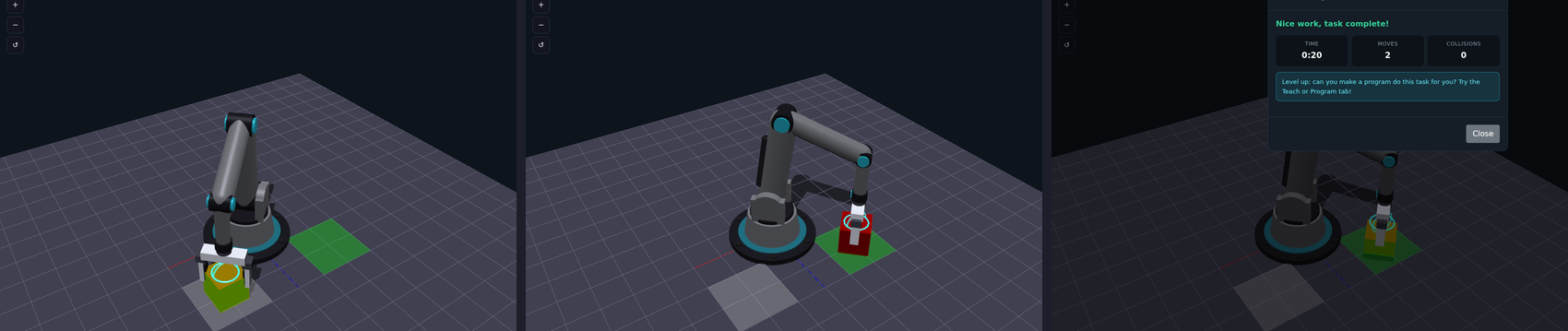
Two clicks and two presses of Grip. The student never set an angle: for each click the simulator solved which base, shoulder, elbow and wrist angles put the gripper there, a calculation called inverse kinematics. Real factory robots do the same sum before every move.
What they are learning while they play
Nothing here is presented as a lesson. This is what the activity is made of.
| What the student does | What it is |
|---|---|
| Clicks a spot and the arm reaches it | Inverse kinematics. Working backwards from where the hand should be to what every joint's angle must be. It is how real robot arms are aimed. |
| Moves one joint slider at a time | Forward kinematics. Each joint's angle adds to the ones before it, so a small turn at the shoulder moves the gripper a long way. |
| Watches the joint angles on the right | Degrees of freedom. Base, shoulder, elbow, wrist pitch and wrist roll: each joint is one way the arm can move. More joints, more ways to reach a point. |
| Tries to reach the far corner | Workspace. Every arm has a limit to where it can reach. Clicking outside it gets a clear no. |
| Switches the gripper for a magnet | End effectors. The tool on the end decides what the robot can handle. Factories swap them for different jobs. |
| Records moves in Teach | Programming by demonstration. Real factory robots are often taught by moving them through a job once and saving the steps. |
| Writes moveTo, grip, release | Sequencing and code. A program is the job written as exact steps. It does the task the same way every time. |
| Keeps collisions at zero | Safety and precision. The task counts every bump. In a real factory a collision can break the robot or the product. |
How to tell whether it landed
Ask, and let them show you. A student who has understood it can answer these without help.
- You clicked a spot. Who decided the joint angles?
- Move only the shoulder. Why does the gripper move so far?
- Why can the arm not reach the far corner of the table?
- Which tool would you pick for a steel sphere, and why?
- Why would a factory write the job as a program instead of clicking?
Practical notes
- AgesAges 9 through high school. Younger students click and grip; older ones steer joints by hand and write programs.
- TimeAbout a minute for the first task. Working through several tasks and a program takes thirty to sixty minutes.
- EquipmentA computer or Chromebook with a modern browser and 3D graphics (WebGL). A mouse helps. Nothing to install, and no robot needed.
- CostFree. The app has no paid tier.
- PrepNone. Open the page and go. Reading this page first takes about three minutes.
- In a groupEveryone can race the same task, counting moves and collisions, then compare programs.
For co-ops, microschools, and classrooms
Put one task on the board and have everyone solve it by clicking, then by programming. The move counts and collision counts give an honest scoreboard, and the conversation about why the program version is what factories use comes out of the numbers.
- Fourteen tasks, from a single pick-and-place to an assembly line.
- Gripper, suction cup, magnet and hook tools.
- Teach mode records moves; Program mode runs them as code.
- No install, no per-seat license. Student work is private by default.
Common questions
Is the Robotic Arm Simulator free?
Yes. It runs in your browser and there is no paid tier. A free account adds saving, but nothing on this page is behind a paywall.
Does my child need an account to try it?
No. The demo on this page is the complete simulator on its first task. Make a free account and their progress comes with them as their first project.
Do they need to code?
Not to start. Clicking and gripping solves the early tasks. Teach mode turns clicks into steps, and Program mode is there when they are ready to write the job as code.
Is it like a real robot arm?
It is laid out like a small industrial arm, with a rotating base, shoulder, elbow and a two-way wrist, and it solves its joint angles the same way real ones do. It is a simulation, so nothing can break.
What ages is it for?
Ages 9 through high school. Clicking and gripping works for anyone; steering joints and programming suit older students.
What subject can I log this as?
Most families log it as engineering or robotics. Kinematics and angles are math and physics, tools and workspaces are engineering, and the Program tab is computer science. The table above lists specifically what is covered, so you can pick the label your records need and point at the evidence.
Where to go next
Start with Robotic Arm Simulator
Trying it costs nothing and takes about five minutes. An account is what makes the work last.
The Robotic Arm Simulator is one of the making apps on the platform. It is a place to make things, not a course, and it is not a substitute for a teacher: it is at its best when an adult asks the questions above and takes the answers seriously.
Page last reviewed September 2026.