Robotics
A student programs a robot and watches physics decide whether it works. It opens on a line follower: a robot with one light sensor that turns one way on dark and the other on white, and follows a curvy black line to the end. Change one number and it misses the first curve. Blocks or Python, free, in the browser, no robot kit and no account needed to try it.
What a student actually does
They start with a robot that works. It has one light sensor pointed at the floor, and the program is a handful of blocks: while it has not reached the end, if the floor is dark turn one way, otherwise turn the other. They press Run and it zigzags along a curvy black line all the way to the end. Then they change one number, how hard it turns, and the robot sails straight off the first curve. That is feedback, and they found it in the first minute.
From there the worlds get harder: sharper curves, gaps in the line, obstacles, mazes, a gyro course, sumo, paintball, fire rescue, and practice mats laid out like the ones robotics competitions use. They can change the robot too, adding sensors or building their own. The same program opens as Python, written with the ev3dev2 or Pybricks libraries that real classroom robots run, so the code carries over when there is a physical robot on the table.
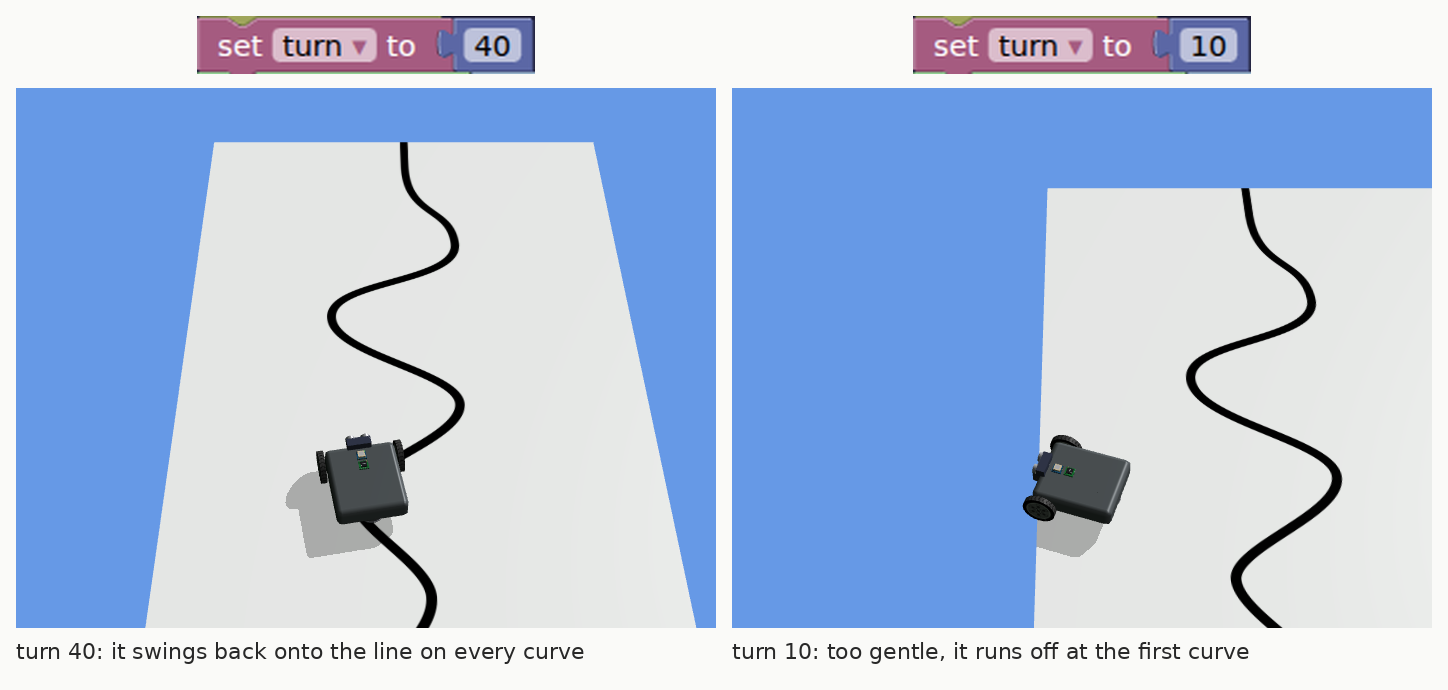
One number, two robots. With turn at 40, every time the sensor crosses from white to black the robot swings hard enough to catch the curve. At 10 the swings are too gentle, and it runs off the mat at the first bend. Somewhere between is the smoothest follower, and finding it is the first thing students do.
What they are learning while they play
Nothing here is presented as a lesson. This is what the activity is made of.
| What the student does | What it is |
|---|---|
| Turns one way on dark and the other on white | Sensing and deciding. A sensor reads the world, the program compares the reading to a threshold, and the robot acts. Every robot runs that loop. |
| Watches the robot zigzag along the edge of the line | Feedback control. It never drives straight. It keeps checking and correcting, many times a second, which is how it stays on a line it cannot see ahead of. |
| Changes how hard it turns and it misses the curve | Tuning. Too gentle and it cannot follow a bend; too hard and it shakes. The best number is found by testing, the same way engineers tune real machines. |
| Keeps the turn in a variable called turn | Variables. One named value used in two places. Change it once and both turns change. |
| Stops when the GPS says it is past the end | Loops with conditions. Repeat while something is true, then move on. The robot knows when it is done. |
| Picks a threshold between the dark and light readings | Measurement. The line reads about 16 and the mat about 100. The cut-off sits between them, and a bad one breaks the robot. |
| Opens the same program in Python | Text programming. The blocks become real Python, using libraries that physical classroom robots run. |
| Tries the program on the sharper map | Testing against new conditions. A program that works on one course can fail on the next. Changing the course is how you find out what it really handles. |
How to tell whether it landed
Ask, and let them show you. A student who has understood it can answer these without help.
- The robot has one sensor. How does it know which way to turn?
- Why does it zigzag instead of driving straight along the line?
- Turn set to 10 missed the curve. What happens at 80? Predict it, then try it.
- Where does the number 58 come from, and what would happen at 90?
- Your robot works on the simple map. Before you try the sharp one, say what will go wrong. Were you right?
Practical notes
- AgesAges 9 through high school. Younger students tune the starter and work through the line and maze maps; older ones write their own programs in Python and take on the competition-style mats.
- TimeA minute to a first run. A satisfying session is thirty to forty-five minutes of change, run, change.
- EquipmentAny computer or Chromebook with a modern browser. Nothing to install and no robot kit needed.
- CostFree. The app has no paid tier.
- PrepNone. Open the page and go. Reading this page first takes about four minutes.
- In a groupEveryone can start from the same line follower, so the class compares which turn values worked and why.
For co-ops, microschools, and classrooms
A robotics class without the robots. Everyone starts from the same line follower and the same rule, change one thing and predict before you run, and the room argues about the best turn value. When a physical robot does arrive, the Python they wrote here uses the same libraries it runs.
- Line following, mazes, sumo, paintball, fire rescue, a gyro course and competition-style practice mats.
- Robots with one or two line sensors, a maze robot, a crane, and a builder for robots of your own.
- No install, no lab setup, no kits, no per-seat license. Chromebooks are fine.
- A free teacher account covers up to 50 students, and student work is private by default.
Common questions
Is Robotics free?
Yes. It runs in your browser and there is no paid tier. A free account adds saving, but nothing on this page is behind a paywall.
Does my child need an account to try it?
No. The demo on this page is the complete simulator with a starter program. Make a free account and the program you changed comes with you as your first project.
Do we need a robot kit?
No. Everything happens in the simulator. If you do have a classroom robot, the Python this writes uses the ev3dev2 and Pybricks libraries those robots run, so the ideas and much of the code carry straight over.
Blocks or Python?
Both. The program is built from blocks, and the Python tab shows the same program as code. A student can switch to writing Python directly when they are ready.
What ages is it for?
Ages 9 through high school. Younger students tune the starter and work the line and maze maps; older ones write Python and take on the harder worlds.
Does it install anything, and will it work on a Chromebook?
It installs nothing and runs in any modern browser, Chromebooks included. On a slower machine the robot's corrections come less often, so it wobbles more on tight curves, which is itself worth talking about.
What subject can I log this as?
Most families log it as computer science or engineering. Sensors and thresholds are measurement, the turning and tuning are physical science, and the programs are computer science. The table above lists specifically what is covered, so you can pick the label your records need and point at the evidence.
Where to go next
Start with Robotics
Trying it costs nothing and takes about five minutes. An account is what makes the work last.
Robotics is one of the making apps on the platform, built on the open-source GearsBot simulator by QuirkyCort. It is a place to make things, not a course, and it is not a substitute for a teacher: it is at its best when an adult asks the questions above and takes the answers seriously.
The simulator is based on GearsBot, an open-source project by QuirkyCort. Source.
Page last reviewed September 2026.