Free programming and coding activities for your class
Students learn to program by writing programs that do something they can see. Here they start with a first line of code, meet nine languages in five-minute introductions, then write and run real programs in a Linux terminal with nothing installed on the computer. For students who want to see code move something, there are robots, drones and battle bots to program in blocks, and then in Python or JavaScript when they are ready. It is grouped the way a course runs, and each activity has a line on what it is good for in class.
Click any picture to see it full size.
First steps
What a program is, before students pick a language.
Hello world, variables, if and else, and a loop that draws a pattern, all in one sitting.
Write and run hello world, explore variables and math, make if/else decisions, and see loops create patterns.
Guided walkthrough · 3-5 min The Logic of CodeVariables, conditions and loops as the three ideas every program is built from.
Variables, conditions, and loops - the building blocks of every program.
Guided walkthrough · 8 min Drawing with Code: When Robots Hold PensTurtle graphics: students see every line of code as a line on the screen.
Learn turtle graphics programming through visual exploration.
Interactive Coding a Bot BrainChange a few lines and watch a bot fight differently. Good for students who ask what code is for.
Your bot can run your code. Learn the brain commands, then play with ready-made snippets for chasing, kiting, circling, firing, and self-righting. Edit the code, press Run, and watch your bot fight a live opponent on the arena's real physics.
Real languages, from the terminal
A five-minute introduction to each, then write and run it for real.
Start here: how to write, save and run a program from the command line, in any of nine languages.
Learn to write and run code in Python, JavaScript, Lua, C++, Ruby, TypeScript, PHP, Scheme, and BASIC right from the terminal.
Guided walkthrough · 5-7 min Intro to PythonVariables, loops and functions in the most common first language.
Learn the basics of Python: variables, loops, functions, and what makes it the #1 language for beginners and data science.
Guided walkthrough · 5-7 min Intro to JavaScriptThe language of the web, and a good second language after Python.
Learn JavaScript fundamentals: variables, arrays, functions, and why every website runs on JS.
Guided walkthrough · 5-7 min Intro to TypeScriptTypes that catch bugs before the program runs. For students who already know JavaScript.
Learn TypeScript: type annotations, interfaces, and why types catch bugs before your code runs.
Guided walkthrough · 5-7 min Intro to C++Types and control flow in the language of game engines and operating systems.
Learn C++ fundamentals: types, control flow, and what makes it the language of game engines and operating systems.
Guided walkthrough · 5-7 min Intro to LuaThe small language inside many games. A gentle start for game-minded students.
Learn Lua basics: tables, functions, and why game engines love this tiny language from Brazil.
Guided walkthrough · 5-7 min Intro to RubyEverything is an object: a friendly way into object-oriented ideas.
Learn Ruby: objects everywhere, blocks, iterators, and the language behind GitHub and Shopify.
Guided walkthrough · 5-7 min Intro to PHPThe server-side language behind WordPress, and behind this site.
Learn PHP: variables, arrays, functions, and the language that powers WordPress and this platform.
Guided walkthrough · 5-7 min Intro to SchemeLists, recursion and lambda: a different way to think, for advanced students.
Learn Scheme: lists, recursion, lambda, and the language that taught generations of CS students.
Guided walkthrough · 5-7 min Intro to BASICLine numbers and GOTO: a history lesson students can run.
Learn BASIC: line numbers, GOTO, and the language that launched Microsoft and taught millions to code.
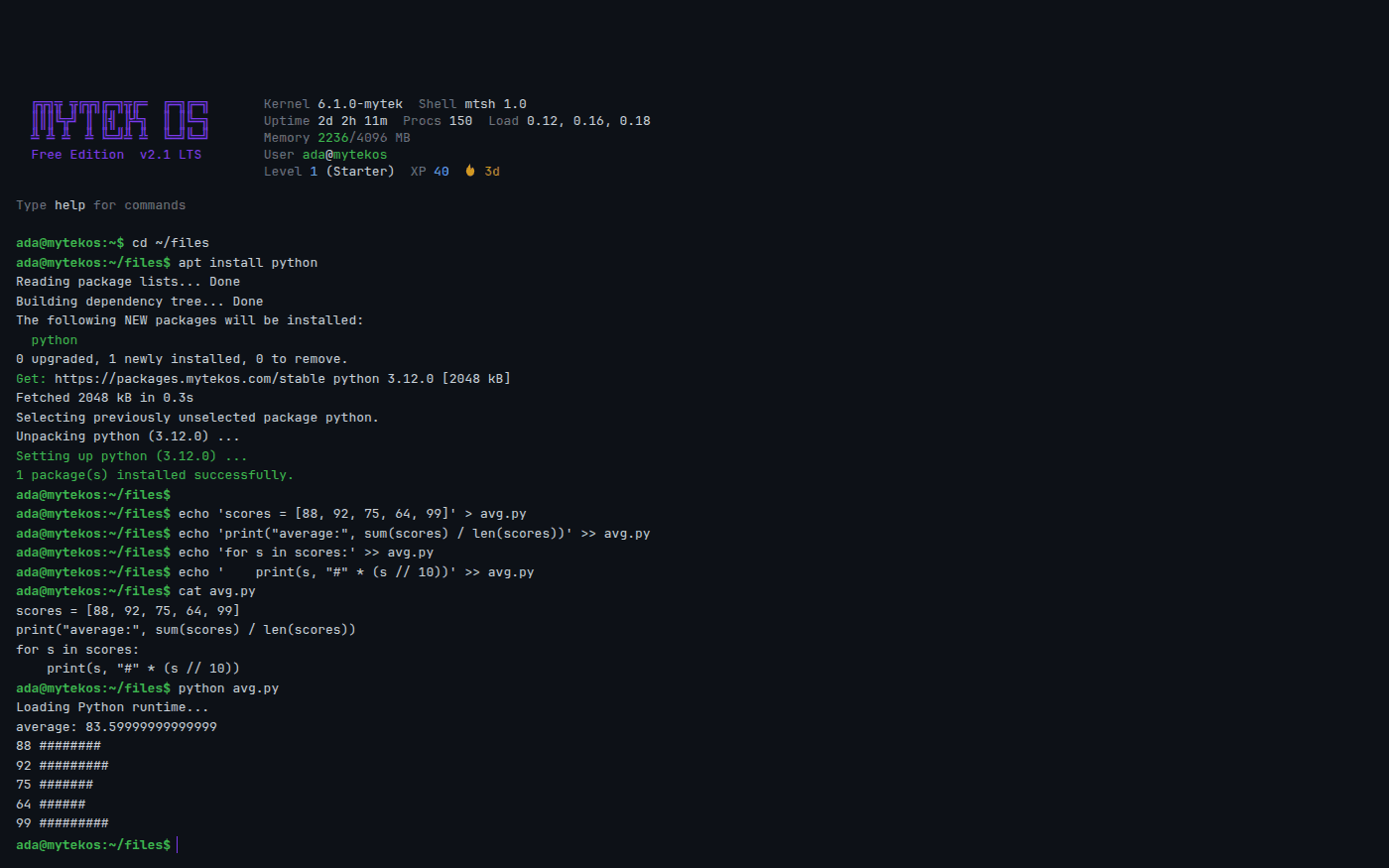
Free account Linux TerminalWhere the real programs are written and run: install a language with apt, edit in nano or vim, keep the files.
A real command line, with a filesystem and logs, in a browser tab.
Code that makes things
The same ideas, pointed at web pages, music and 3D objects.
HTML, CSS and JavaScript as layers, with live JavaScript to edit.
Toggle HTML, CSS, and JS layers on and off, restyle the same page with 4 CSS themes, and write interactive JavaScript with live preview.
Guided walkthrough · 5-7 min Music as CodeRhythm and patterns written as short lines of code, layered into a song.
How live coders make music by writing short text patterns that loop and layer: rhythm as code, pattern transforms, and stacking layers into a song. Then jam in Strudel.
Guided walkthrough · 5-8 min Code Your Objects: Programming 3D ShapesShapes, union and difference, and parametric designs written as code.
Explore primitive shapes, learn CSG operations (union, difference, intersection), and build parametric designs with live code preview.
Guided walkthrough · 5-8 min Programming in 3D: How Block Code Becomes ObjectsHow block code turns into 3D objects, before students write the code themselves.
Discover how visual block code turns into 3D objects through parametric modeling, boolean operations, and transforms.
Code that moves things
Programs that read sensors and drive motors, in blocks first and real code after.
Sensors to actions: toggle if-then rules and watch a robot's behavior change.
Watch an autonomous robot navigate with sensors, toggle if-then rules to change behavior, and learn about sensor types.
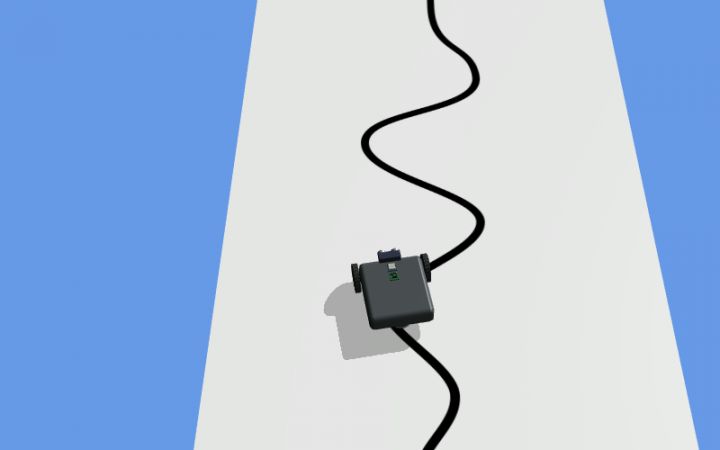
Free app, no account RoboticsProgram a robot in blocks or Python to follow a line, solve a maze or win at sumo. The Python matches real classroom robots.
Free, no account. Start from a robot that follows a black line with one light sensor, change one number, and watch it miss the curve.
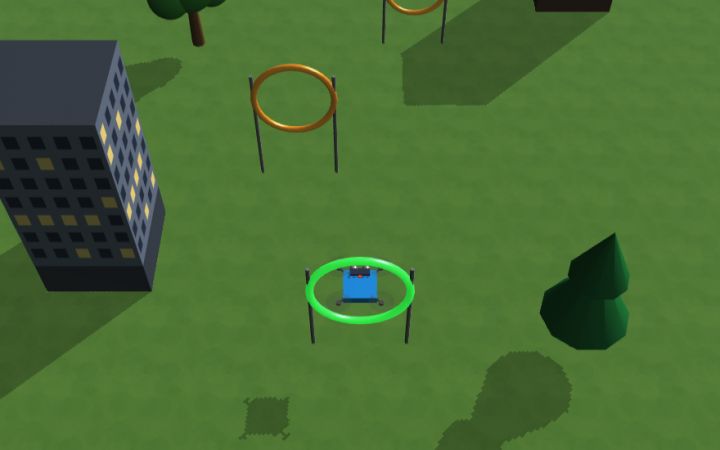
Free app, no account Drone SimulatorFly a drone through rings with a program in blocks or Python, and debug the number that sends it wide.
Free, no account. Start from a program that flies six rings, change one number, and watch the drone miss.
Free app, no account BotForgeDesign a battle bot and write the rules it fights by, as blocks and then as JavaScript.
Free, no account. Start from a spinner bot, change the weapon, write the rules it fights by, and take it into the arena.
Using it with a class
The introductions take about five minutes each and open with no account, so a class can compare two languages in one period. The Linux terminal needs a free account, and a free class gives every student one without an email address. Languages install inside the student's own terminal with apt, the way they do on a real Linux machine, and the student's files stay in their account.
- Same problem, two languages: have students solve one small task in Python and in JavaScript, and list what changed and what did not.
- Explain the surprise: run a program whose answer is not what students expect, like an average that prints as 83.59999999999999, and have them find out why.
- Blocks first, then code: in Robotics or the Drone Simulator, build the program in blocks, then open it as Python and change one line.
In short
These are free programming activities for middle school through introductory college: a first line of code with variables, conditions and loops, five-minute introductions to Python, JavaScript, TypeScript, C++, Lua, Ruby, PHP, Scheme and BASIC, a Linux terminal where students install a language with apt and write and run real programs, code that draws, makes music and builds 3D shapes, and robots, drones and battle bots programmed in blocks, Python or JavaScript. It all runs in the browser with no install.
Common questions
Do students need an account?
Not for the introductions, the Robotics and Drone simulators or BotForge; those open in the browser with no sign-up. The Linux terminal, where students write and keep their own programs, needs a free account, and a free class of up to 50 students needs no student email addresses.
Which languages can students actually run?
Python, JavaScript, TypeScript, C and C++, Lua, Ruby, PHP, Scheme and BASIC run in the terminal after installing them with apt. They run in the browser, so a few things are missing: Python has the standard modules students use most, but not numpy or pandas.
What grade levels is this for?
The first steps, turtle graphics and block programming work from middle school. The language introductions and the terminal suit high school and introductory college courses.
Will it run on school Chromebooks?
Yes. Everything runs in a browser tab with nothing to install.
Still have a question? Ask us, and a person will write back.
Start with a free class
Everything above opens with no account. A free class adds your students, each with a username and password and no email needed, so their progress and the terminal work are kept.
Page last reviewed September 2026.