Python Lab
Installing Python is often not an option on school computers, especially Chromebooks. Python Lab is Python in a browser tab. A student types a program, presses Run, and reads the output or watches the turtle draw it, on a Chromebook as well as anywhere else. It opens on a short program that draws a spiral, so the first thing to do is change a number and run it again. Free, and no account needed to try it.
Using this with a class? Make a free class and add your students yourself: each gets a username and password, with no email or Google account needed. Or give them one join code.A first lesson: Everyone runs the spiral with sides = 5, writes down a prediction for sides = 8, and then runs it. Anyone whose prediction was wrong explains which line they misread.
Set up a free classWhat a student actually does
They press Run and the Turtle tab opens as the drawing appears: seventy lines, each a little longer than the last, in six colors that repeat. They change sides = 5 on line 7 to another number and run it again, and the shape has that many corners. The Output tab shows what the two print lines at the bottom wrote: the number of sides and the angle of each turn.
From there it is an ordinary Python editor. They write programs with print and input, loops, functions, lists, dictionaries and classes, and use the math, random and time modules. input() opens a small box where they type an answer. A mistake shows an error with the line number it happened on. Ctrl+Enter runs the program, Stop ends it, and a program that runs too long is stopped for them. With a free account the program saves, and its turtle drawing becomes the project's picture.
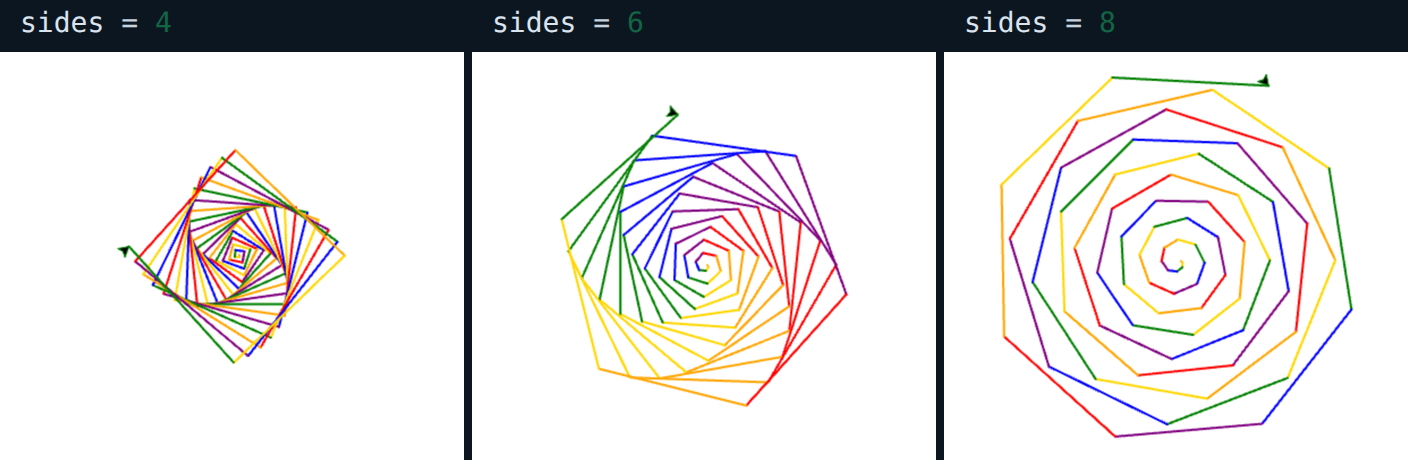
The same program three times, with one number changed. The turtle turns 360 divided by sides, plus 2, after every line it draws. The 360 divided by sides is what makes a shape with that many corners, and the extra 2 degrees is why each lap sits a little further around than the last. A student who can say which part of line 15 does which has understood the program.
What they are learning while they play
Nothing here is presented as a lesson. This is what the activity is made of.
| What the student does | What it is |
|---|---|
| Changes sides = 5 and runs it again | Variables. A name that holds a value. Change it in one place, and every line that uses it changes with it. |
| Watches seventy lines appear from four lines of code | Loops. for i in range(70) runs the lines under it seventy times, with i counting 0, 1, 2 and up to 69. |
| Sees the lines grow longer each time | Using the loop counter. forward(i * 2) is different on every pass because i is. Most useful loops use their counter somehow. |
| Notices the colors repeat in order | Lists and the remainder operator. colors[i % len(colors)] picks item 0 to 5, then starts again at 0. The % gives the remainder after dividing. |
| Reads 360 / sides + 2 on line 15 | Expressions and angles. Turning 360 divided by the number of sides at each corner walks all the way around a shape. The extra 2 degrees makes it spiral. |
| Reads the two print lines in Output | Output. print writes text and numbers for a person to read. It is how a program shows what it worked out. |
| Asks for a name with input() and uses the answer | Input. A program can stop, ask a question, and use the answer, as a string, in the lines after it. |
| Misspells a word and reads the error | Debugging. The error names what went wrong and the line it happened on. Reading it is the first step in fixing it. |
How to tell whether it landed
Ask, and let them show you. A student who has understood it can answer these without help.
- Which line decides how many corners the shape has? Point to it.
- When i reaches 6, which color does colors[i % len(colors)] pick, and why?
- Predict the drawing before you run it: sides = 3. Were you right?
- Delete the + 2 on line 15 and run it. What changed, and why?
- Make the spiral twice as big without changing range(70). Which line did you change?
Use it in your subject
Not a technology class? Then the app is how students show what they learned in your unit. More projects for every subject.
Math
Exterior angles: a shape with n sides turns 360 divided by n at each corner. Students predict the angle for 3, 4, 6 and 10 sides, then check it with print and with the drawing.
Art
Generative art: a small program with one or two numbers to change. Students look for the settings they like best and explain in words which line made the difference.
Practical notes
- AgesAges 10 through high school, and adults starting to program. Younger students change numbers in the turtle program; older ones write their own programs with functions, lists and classes.
- TimeUnder a minute to the first run. A first lesson on loops with the turtle fills a class period.
- EquipmentAny computer or Chromebook with a modern browser and a keyboard. Nothing to install.
- CostFree. The app has no paid tier.
- PrepNone. Open the page and go. Reading this page first takes about three minutes.
- In a groupEveryone starts from the same program, changes one thing, and the class compares drawings.
For co-ops, microschools, and classrooms
Put the spiral on the board and ask what sides = 8 will look like before anyone runs it. Then let them run it. The argument about why it came out that way is the lesson on loops, and the programs they write next start from something they already understand.
- Python 3 in the browser: print, input, loops, functions, lists, dictionaries, classes and exceptions.
- Turtle graphics in its own tab, with color, fill, circles and text.
- The math, random and time modules.
- No install and no per-seat license. Chromebooks are fine.
- A free teacher account covers up to 50 students with no student email needed, and student work is private by default.
Common questions
Is Python Lab free?
Yes. It runs in your browser and there is no paid tier. A free account adds saving, but nothing on this page is behind a paywall.
Will it run on our school Chromebooks?
Yes. It installs nothing and runs in any modern browser, Chromebooks included, with no extension and no Linux setup.
Do students need an email address?
Not to try it: the demo on this page needs no account at all. To save their programs they need a free account, and a teacher can create a whole class of student accounts with no email addresses. A free class holds up to 50 students.
Is it real Python?
It is Python 3, run in the browser by Skulpt, a version of Python written for web pages. print, input, loops, functions, lists, dictionaries, classes, exceptions and f-strings all work, and so do the math, random, time and turtle modules. It cannot install extra packages such as numpy or pandas, and programs cannot write files.
What happens if a student writes a loop that never ends?
A program that runs for about 20 seconds is stopped with a TimeoutError, so the tab does not freeze. The Stop button ends a program sooner. A slow turtle drawing counts toward the same limit, so large drawings should start with t.speed(0).
How does input() work?
input() opens a small box in the browser. The student types an answer and presses OK, and the program continues with what they typed, as a string.
What ages is it for?
Ages 10 and up. Changing numbers in the turtle program works for younger students; writing programs from a blank editor suits middle school, high school and adults starting out.
What subject can I log this as?
Most families log it as computer science. The turtle programs also count as geometry practice, with angles and shapes. The table above lists specifically what is covered, so you can pick the label your records need and point at the evidence.
Still have a question? Ask us, and a person will write back.
Where to go next
Start with Python Lab
Trying it costs nothing and takes about five minutes. An account is what makes the work last.
Python Lab is one of the tools on the platform. It is a place to make things, not a course, and it is not a substitute for a teacher: it is at its best when an adult asks the questions above and takes the answers seriously.
Runs Python with Skulpt and edits code with CodeMirror, both open source. Source.
Page last reviewed September 2026.