Rollercoaster Simulator
A roller coaster has no engine. A chain drags the train up once, and every drop, loop and turn after that runs on the energy of that first climb. This simulator lets students build one piece by piece and then ride it with real physics, so a loop without enough speed really does fail. It opens on a finished coaster with a lift, a loop, a double hill and two big turns: test it, ride it in first person, then change it. Free, in the browser, no account needed to try it.
Using this with a class? Make a free class and add your students yourself: each gets a username and password, with no email or Google account needed. Or give them one join code.A first lesson: Everyone starts from the same coaster and adds one more loop or hill without changing the lift, then predicts whether the train will make it before pressing Play.
Set up a free classWhat a student actually does
They press Test and Play, and the train clanks up the chain lift, drops, goes through the loop upside down, swings round the long turn and bounces over the double hill back to the station, with speed, height and G-forces updating as it goes. Then they switch to POV and ride it from the front seat. The question that comes next is always the same: what happens if I make it bigger?
From there it is a design problem with physics as the judge. Pieces come in groups: hills, airtime humps, drops up to vertical, loops, corkscrews, zero-G rolls and Immelmanns, helixes, launches and brakes, plus adjustable straights and curves. Check Track warns when a loop will not get enough speed and shows whether the circuit closes back at the station. Realism mode limits G-forces the way a real ride has to, friction and train length can be changed, and the finished coaster can be ridden from three cameras.
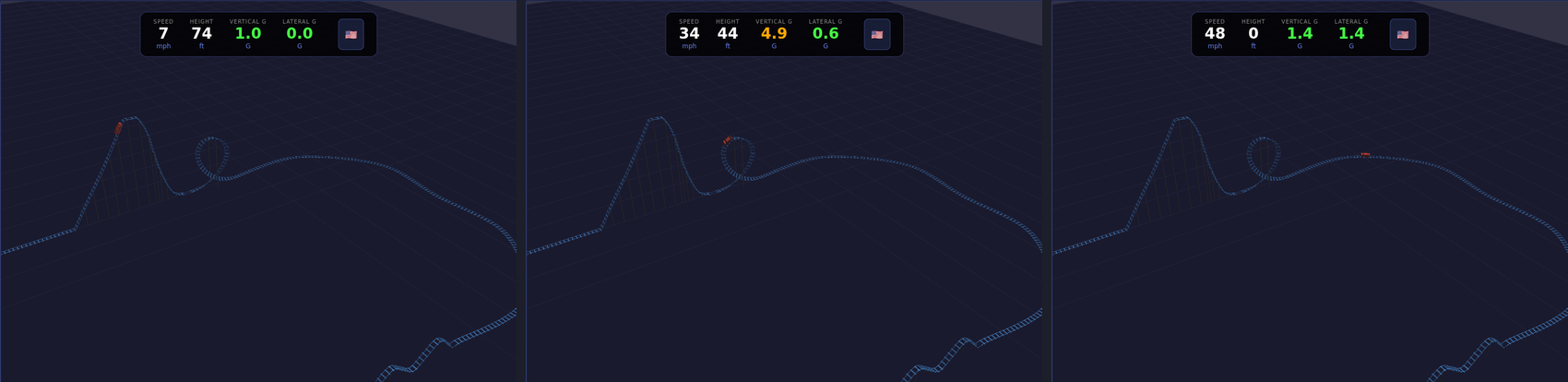
One ride, three readings. Crawling up the lift at 7 mph, 74 feet up. Upside down at the top of the loop, 44 feet up and down to 34 mph, yet pressed into the seat, because the track curves under the train faster than gravity can pull it away. At ground level in the turn, 48 mph. The speed comes from the height and goes back into it; the train only needs the chain once. Friction and air take a little every second, which is why the loop has to be lower than the lift.
What they are learning while they play
Nothing here is presented as a lesson. This is what the activity is made of.
| What the student does | What it is |
|---|---|
| Watches the train speed up down the drop | Energy conversion. Height is stored energy. On the way down it turns into speed, and on the way up it turns back into height. |
| Sees the loop warning | Speed and circular motion. To stay on the track upside down, the train needs a minimum speed at the top of the loop. Check Track works it out before you ride. |
| Turns up the friction | Energy loss. Every meter costs a little energy, so each hill has to be lower than the one before, and eventually the train needs another lift. |
| Watches the G readout in a tight turn | G-forces. Turning fast pushes riders sideways and into their seats. Realism mode derails a ride that would hurt people. |
| Widens a curve to make it safe | Radius and acceleration. The same speed in a wider curve means less sideways force. Real coaster designers trade space for comfort. |
| Closes the circuit at the station | Geometry. The last piece has to land exactly where the first began, at the same height and pointing the same way. |
| Adds a launch instead of a chain lift | Work and power. A launch puts energy in fast with motors; a chain puts it in slowly. Either way, that energy is all the ride gets. |
| Rides it in POV | Designing for people. A ride that works on paper can still be too fast, too slow or too rough. Riding it is how you find out. |
How to tell whether it landed
Ask, and let them show you. A student who has understood it can answer these without help.
- Where does the train get its speed from, if there is no engine?
- Why is the loop lower than the lift hill?
- Your train does not make it over the last hill. What are two ways to fix it?
- Why does a wider turn feel gentler at the same speed?
- Before you press Play: will a second loop work? Why do you think so?
Practical notes
- AgesAges 9 through high school. Younger students snap pieces together and ride; older ones design around speed, G-forces and energy loss.
- TimeA minute to the first ride. A coaster of their own that works takes thirty to sixty minutes.
- EquipmentA computer or Chromebook with a modern browser and 3D graphics (WebGL). A mouse helps. Nothing to install.
- CostFree. The app has no paid tier.
- PrepNone. Open the page and go. Reading this page first takes about three minutes.
- In a groupEveryone can change the same coaster in one way and predict whether it survives before riding.
For co-ops, microschools, and classrooms
Give everyone the same lift height and one goal, the most inversions, the longest airtime, the gentlest ride that still loops, and let them build. Every design gets tested by the same physics, so arguments get settled by pressing Play, and the reasons some rides fail are exactly the ideas in the energy chapter of a physics book.
- Loops, corkscrews, zero-G rolls, helixes, drops, launches and brakes.
- Check Track warns about loops without enough speed before the ride.
- Realism mode with G-force limits, friction and train length settings.
- No install, no per-seat license. Student work is private by default.
Common questions
Is the Rollercoaster Simulator free?
Yes. It runs in your browser and there is no paid tier. A free account adds saving and sharing, but nothing on this page is behind a paywall.
Does my child need an account to try it?
No. The demo on this page is the complete simulator with a starter coaster. Make a free account and the coaster they changed comes with them as their first project.
Is the physics real?
It uses gravity, friction and the speed a loop needs, and measures G-forces as the train moves. It is simplified compared with engineering software, but a coaster that fails here fails for the same reasons a real one would.
What ages is it for?
Ages 9 through high school. Building and riding works for anyone; designing around energy and G-forces suits older students.
Will it run on our computer?
On most. It needs a browser with 3D graphics, which almost every computer from the last several years has.
What subject can I log this as?
Most families log it as physics or engineering. Energy, friction, speed and G-forces are physics, and designing a ride that closes, stays safe and is fun is engineering. The table above lists specifically what is covered, so you can pick the label your records need and point at the evidence.
Where to go next
Start with Rollercoaster Simulator
Trying it costs nothing and takes about five minutes. An account is what makes the work last.
The Rollercoaster Simulator is one of the making apps on the platform. It is a place to make things, not a course, and it is not a substitute for a teacher: it is at its best when an adult asks the questions above and takes the answers seriously.
Page last reviewed September 2026.