Apogee
A student builds a rocket and flies it to space: stack engines and fuel tanks into stages, watch a live budget say whether it has enough to reach orbit, then launch it and pitch over into a gravity turn. It opens on a rocket and a flight program that already make orbit, so the first thing to do is watch it fly, then add fuel and find out why more is not always better. Free, in the browser, no account needed to try it.
What a student actually does
They start with a rocket that works and a program that flies it. They press Run Program and watch it lift off slowly, tip over as it climbs, drop its first stage, and coast to the top of its arc before a last burn rounds it into orbit. Then they open Build and fill the upper stage with fuel. Delta-v, the total change in speed the rocket can make, goes up by a few percent, but thrust-to-weight drops below 1: the engines now push less than the rocket weighs. They fly it anyway, and it sits on the pad with its engines roaring.
From there it is their rocket. Four engines, fuel tanks, fins, a nose cone, stages to drop, a satellite or a science instrument to carry, and a parachute for the trip home. Six missions run from clearing the tower to deploying a satellite and landing again. The flight program opens as blocks or as Python, so a student who wants to fly more precisely than their thumbs allow writes the ascent, the orbit and the return themselves.
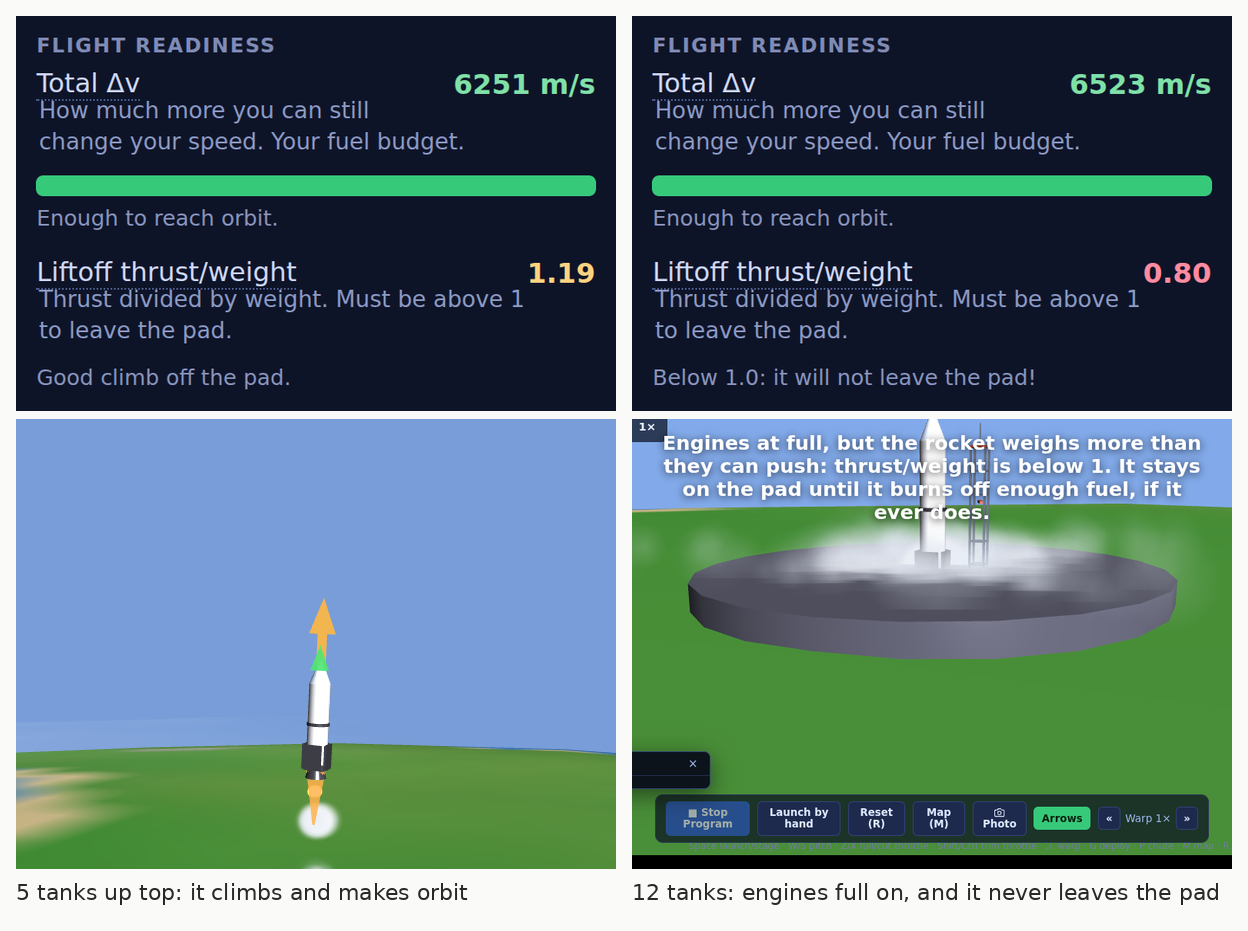
More fuel, less rocket. Filling the upper stage from 5 tanks to 12 adds only 4 percent to delta-v, because every tank also has to be carried, and it pushes thrust-to-weight below 1. The engines run flat out and the rocket never leaves the pad. That is the rocket equation, found by a student in the first two minutes.
What they are learning while they play
Nothing here is presented as a lesson. This is what the activity is made of.
| What the student does | What it is |
|---|---|
| Fills a stage with fuel and it will not leave the pad | The rocket equation. More fuel means more speed to spend, but it is also more weight to lift, so each tank adds less than the one before, and too many keep the rocket on the ground. |
| Keeps thrust-to-weight above 1 | Forces. The engines have to push harder than gravity pulls, or the rocket sits on the pad burning fuel. |
| Drops a spent stage | Staging. Empty tanks are dead weight. Throwing them away is why real rockets come in stages. |
| Tips over as it climbs | Orbit is sideways. Space is only 70 km up, but staying there means going sideways fast enough to keep missing the ground. |
| Reads apoapsis and periapsis on the map | Orbital shape. The highest and lowest points of the path. A burn at the top raises the bottom until the whole orbit clears the air. |
| Burns backwards to come home | Changing an orbit. To come down you slow down, pointing against your motion, not at the ground. It surprises almost everyone. |
| Writes the flight as a program | Automation. Wait until the altitude says so, then pitch over. A program can fly the same ascent perfectly every time. |
| Speeds up time on the long climb | Scale. A real ascent takes minutes and an orbit takes over an hour. Time warp is how you see the whole thing. |
How to tell whether it landed
Ask, and let them show you. A student who has understood it can answer these without help.
- Why does the rocket tip over instead of going straight up?
- You filled the upper stage and delta-v barely went up, but the rocket would not leave the pad. Why?
- Why do real rockets drop their stages?
- You are in orbit and want to come home. Which way do you point, and why not at the ground?
- Before you fly your next design, say whether it will make orbit. Were you right?
Practical notes
- AgesAges 10 through high school. Younger students fly the starter and the presets and chase the early missions; older ones design their own rockets and write the flight in Python.
- TimeA minute to a first launch. A satisfying session is thirty to forty-five minutes of build, fly, change.
- EquipmentAny computer or Chromebook with a modern browser. Nothing to install. A keyboard helps for flying by hand.
- CostFree. The app has no paid tier.
- PrepNone. Open the page and go. Reading this page first takes about four minutes.
- In a groupEveryone can start from the same rocket, so the class compares how much fuel each design really needed.
For co-ops, microschools, and classrooms
Set a challenge, reach orbit with the lightest rocket, or put a satellite up and bring the crew home, and the room turns into a launch contest. Students predict from the delta-v budget, fly, and explain the gap. The glossary in the app defines every term on the screen, so nobody is stuck on a word.
- Six missions, from clearing the tower to deploying a satellite and landing again.
- Four starting rockets, from a sounding rocket to a heavy lifter, and a builder for anything else.
- No install, no lab setup, no per-seat license. Chromebooks are fine.
- A free teacher account covers up to 50 students, and student work is private by default.
Common questions
Is Apogee free?
Yes. It runs in your browser and there is no paid tier. A free account adds saving, but nothing on this page is behind a paywall.
Does my child need an account to try it?
No. The demo on this page is the complete app with a starter rocket and program. Make a free account and the rocket you changed comes with you as your first project.
How realistic is the physics?
The flight follows real orbital mechanics: gravity, thrust, a thinning atmosphere, and orbits calculated from the rocket's actual position and speed. The planet is smaller than Earth so a flight fits in a class period, which is why orbit needs about 3,400 m/s here instead of Earth's 9,400.
Blocks or Python?
Both. The flight program can be written as blocks or as Python, and there is a library of example flights to start from. Students can also fly entirely by hand.
What ages is it for?
Ages 10 through high school. Younger students fly the presets and the early missions; older ones design rockets from scratch and program the flight.
Does it install anything, and will it work on a Chromebook?
It installs nothing and runs in any modern browser, Chromebooks included.
What subject can I log this as?
Most families log it as physical science or earth and space science. Forces, mass and the rocket equation are physics, orbits are space science, and the flight programs are computer science. The table above lists specifically what is covered, so you can pick the label your records need and point at the evidence.
Where to go next
Start with Apogee
Trying it costs nothing and takes about five minutes. An account is what makes the work last.
Apogee is one of the making apps on the platform. It is a place to make things, not a course, and it is not a substitute for a teacher: it is at its best when an adult asks the questions above and takes the answers seriously.
Page last reviewed September 2026.