SculptGL
Film creatures, game characters and 3D-printed figures usually start as a lump of digital clay that an artist pushes and pulls into shape. SculptGL is that lump. It opens on a finished owl: drag across it and the surface swells under the brush, both sides at once, then switch to Inflate and puff up an eye. Free, in the browser, no account needed to try it.
Using this with a class? Make a free class and add your students yourself: each gets a username and password, with no email or Google account needed. Or give them one join code.A first lesson: Everyone starts from the same plain ball and has twenty minutes to turn it into an animal, then the room guesses each animal before its sculptor says what it is.
Set up a free classWhat a student actually does
They drag across the owl's chest and the clay swells under the brush, on both sides at once, because Symmetry mirrors every stroke. They switch the tool to Inflate and puff up an eye until it bulges, then drag the background to spin the owl round and see what they did from the side. Ctrl+Z takes back anything they regret.
From there it is a real sculpting tool. Brush, Inflate, Twist, Smooth, Flatten, Pinch, Crease, Drag, Paint, Move, Masking and more, each with its own radius and strength. Start from a sphere, cube, cylinder or torus, add detail by subdividing, change the material and lighting, and export the result as OBJ, STL for 3D printing, or GLB for games and 3D scenes. Face Lab heads can be sent straight here to sculpt.
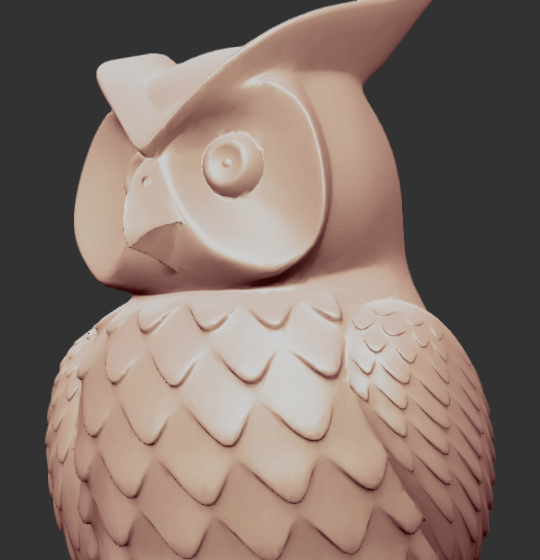
Every edge here is the same surface pushed in different ways. The owl is 23,413 points joined into 46,894 triangles, and the brushes move those points: Brush and Inflate push them out, Crease and Pinch pull them into sharp lines like the beak and the feathers, and Smooth relaxes them. Nothing was drawn; all of it was sculpted.
What they are learning while they play
Nothing here is presented as a lesson. This is what the activity is made of.
| What the student does | What it is |
|---|---|
| Drags the brush across the owl | 3D meshes. The owl is tens of thousands of points joined into triangles. Every stroke moves the points under the brush. |
| Watches the other side change too | Symmetry. Mirroring doubles the work you do and keeps faces and bodies balanced, which is why sculptors turn it on first. |
| Switches between Inflate and Crease | Tools and techniques. Real sculptors use different tools for mass and for detail. Big soft shapes first, sharp lines last. |
| Turns the model around | Form in three dimensions. A shape that looks right from the front can be wrong from the side. Sculpting means checking every angle. |
| Changes the brush radius | Scale. The same tool at a different size does a different job, from blocking out a head to scratching a feather. |
| Subdivides the mesh | Resolution. More triangles allow finer detail, at the cost of a heavier model. Artists add detail only where it is needed. |
| Changes the material | Surface and light. The same shape reads differently in clay, skin or metal, because materials decide how light bounces. |
| Exports an STL | 3D printing. A sculpture becomes a file a printer can build, or a model a game can use. |
How to tell whether it landed
Ask, and let them show you. A student who has understood it can answer these without help.
- What is the owl actually made of?
- Why did the other side change when you only touched one side?
- Which tool would you use for a sharp beak, and which for a round belly?
- Your sculpture looks great from the front and odd from the side. What do you do?
- Why might a game want fewer triangles than a 3D print?
Practical notes
- AgesAges 9 through high school. Younger students push and puff up shapes; older ones sculpt creatures from a ball and export them.
- TimeSeconds to the first stroke. A creature from a ball of clay takes thirty to sixty minutes.
- EquipmentA computer or Chromebook with a modern browser and 3D graphics (WebGL). A mouse works; a drawing tablet with pressure is even better. Nothing to install.
- CostFree. The app has no paid tier.
- PrepNone. Open the page and go. Reading this page first takes about three minutes.
- In a groupEveryone can start from the same ball and sculpt a different animal, then guess each other's.
For co-ops, microschools, and classrooms
Give everyone the same ball of clay and the same twenty minutes. The animals that come out are wildly different, and students quickly learn to block out big shapes before details, the same order working sculptors use.
- Starter sculptures to explore, from an owl to a rabbit and a human face.
- Brush, Inflate, Crease, Smooth and a dozen more tools, all with symmetry.
- Exports OBJ, STL for 3D printing, and GLB for games.
- No install, no per-seat license. Student work is private by default.
Common questions
Is SculptGL free?
Yes. It runs in your browser and there is no paid tier. A free account adds saving, but nothing on this page is behind a paywall.
Does my child need an account to try it?
No. The demo on this page is the complete app with a finished owl. Make a free account and the sculpture you changed comes with you as your first project.
Can they 3D print what they make?
Yes. Export as STL and the file goes to any 3D printer or printing service. It can also be tried first in the platform's 3D printer simulator.
Do they need a drawing tablet?
No. A mouse works well. A tablet with pressure makes strokes feel more like real clay, and SculptGL supports it.
What ages is it for?
Ages 9 through high school. Pushing clay around works for anyone; sculpting a creature from a ball suits older students.
What subject can I log this as?
Most families log it as art. Sculpting form, symmetry and surface is art, and meshes, resolution and file formats are computing. The table above lists specifically what is covered, so you can pick the label your records need and point at the evidence.
Where to go next
Start with SculptGL
Trying it costs nothing and takes about five minutes. An account is what makes the work last.
SculptGL is one of the making apps on the platform. It is a place to make things, not a course, and it is not a substitute for a teacher: it is at its best when an adult asks the questions above and takes the answers seriously.
SculptGL is by Stéphane Ginier, used under the MIT license. Source.
Page last reviewed September 2026.