SongArranger
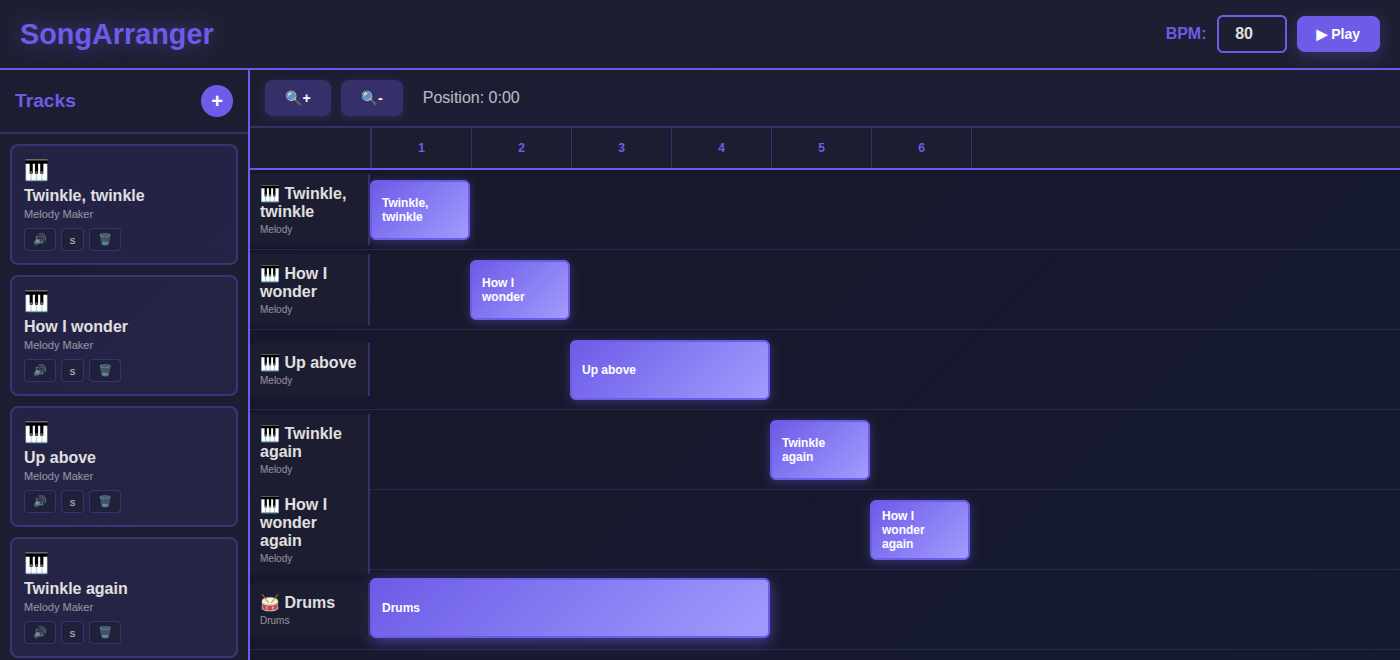
A song is more than a tune: it is the order the parts come in, what repeats, and when the drums start. SongArranger lays those parts out as blocks on a timeline, one row per track. It opens on Twinkle, Twinkle, Little Star cut into five melody blocks that play one after another, with a drum beat that comes in at the middle line. Press Play to hear it, then drag a block left or right and play it again to hear what moved.
Using this with a class? Make a free class and add your students yourself: each gets a username and password, with no email or Google account needed. Or give them one join code. Using Google Classroom? Post the link there; with a free class, the link also puts each student in your class, so you see their work. mytekDev is also available from the Google Workspace Marketplace, so your school's Google admin can install it for everyone.A first lesson: Everyone starts from the same Twinkle arrangement, drags the drums to a new place, and explains in one sentence what the change does to how the song feels at the start and at the end.
Set up a free class Share to Google ClassroomWhat a student actually does
They press Play and hear Twinkle, Twinkle, Little Star on a bell sound, one line per block, the blocks stepping down the timeline in the order they sound. Halfway through, the drums come in under Up above the world so high and stay to the end. Then they read the picture as a plan of the song: the first two blocks and the last two are the same tune, the long block in the middle is a different part played twice, and the drums block shows exactly where the beat starts and stops. They drag the drums to the left, play it again, and hear the song start full and end quiet.
From there they arrange their own. With a free account, the + button adds a track from a beat they saved in BeatMaker or a melody they saved in Melody Maker. Each one arrives as a block four measures long at the start of the song, and its one-measure pattern repeats for the length of the block. They drag blocks into place, stack them so a melody plays over a beat, mute or solo a track to hear it alone, and set the speed from 60 to 200 BPM. Melodies keep the instrument they were written with. A block can be moved but not stretched, so a part that needs to happen twice in different places goes in as two tracks, the way Twinkle's opening line does here.
The drums dragged to the start. They keep their length of four measures, so now they play under the first three lines and stop, and the last two lines of the song are bells alone. In the starter it was the other way round: a quiet opening and a full ending. Same blocks, a different song.
What they are learning while they play
Nothing here is presented as a lesson. This is what the activity is made of.
| What the student does | What it is |
|---|---|
| Sees that the first two blocks and the last two hold the same tune | Song form. Songs are built from sections that come back. Twinkle is A, B, A: an opening, a middle part, and the opening again, which is why the end sounds like coming home. |
| Counts the blocks across the top and finds the song is six measures long | Measures. Music is counted in measures, here four beats each. Every block starts on a measure and lasts a whole number of them, so the timeline is a ruler for the song. |
| Hears the one-measure drum pattern play four times in a four-measure block | Loops and repetition. A short pattern played again and again is a loop. Most songs repeat their beat for a long time and change what goes on top of it. |
| Drags the drums so they start with the song instead of the middle | Arrangement and texture. The same parts can be ordered and layered in different ways. Adding a part makes the sound thicker, taking one away makes it thinner, and when that happens shapes how the song builds. |
| Mutes the drums, then solos them | Layers. A recording is several parts sounding at once. Hearing one part alone, then all together, shows what each one adds. |
| Changes the BPM from 80 to 120 and plays it again | Tempo. BPM is beats per minute. Raising it plays every part faster together, so the order stays the same and the song gets shorter. |
How to tell whether it landed
Ask, and let them show you. A student who has understood it can answer these without help.
- Which blocks hold the same tune, and how could you tell before pressing Play?
- Why is Up above two measures long when the other lines are one?
- After you moved the drums, why did they stop before the end of the song?
- If you wanted the drums under the whole song, what would you have to add?
- Where would you put a block to make an ending that sounds finished?
Use it in your subject
Not a technology class? Then the app is how students show what they learned in your unit. More projects for every subject.
Music
Map a song the class knows into sections (verse, chorus, bridge), then arrange beats and melodies they made into the same order and compare the two.
Math
At 80 BPM a beat is three quarters of a second and a measure of four beats is three seconds. Work out how long the six-measure song lasts, then check it against the Position counter.
Writing
Arrangement is structure, like an essay's opening, middle and close. Plan a song as a written outline first, then build it on the timeline and say where it changed.
Practical notes
- AgesGrades 3 through 9. Younger students move blocks and listen for what changed; older ones plan a song's form, build its parts in BeatMaker and Melody Maker, and arrange them on purpose.
- TimeA minute to hear the demo and move the drums. A song of their own takes most of a period, since its beats and melodies are made in BeatMaker and Melody Maker first.
- EquipmentA computer or Chromebook with a modern browser, and headphones in a room where everyone plays at once. Blocks drag with a mouse, a trackpad or touch. Nothing to install.
- CostFree. The app has no paid tier.
- PrepAbout five minutes: play the demo, drag the drums, and save a beat in BeatMaker and a melody in Melody Maker from a test account, so you have seen how a new track is added.
- In a groupEveryone starts from the same Twinkle arrangement, so the class can play their versions in turn and hear how one change to the drums changes the whole song.
For co-ops, microschools, and classrooms
Make it the last step of a short music unit: students write a beat in BeatMaker and a melody in Melody Maker, then bring both into SongArranger and decide the order. Every student hears their own arrangement played back, so a song that starts too busy or ends too suddenly is found by listening.
- A song laid out as blocks on a timeline, one row per track.
- Beats and melodies students made themselves, in the order they choose.
- Mute and solo to hear one part, or all of them together.
- No install, no per-seat license. Student work is private by default.
Common questions
Is it free?
Yes. It runs in your browser and there is no paid tier. A free account adds saving and adding your own tracks, but nothing on this page is behind a paywall.
Is it a free alternative to Soundtrap or GarageBand?
Only for one part of what they do. Soundtrap and GarageBand both arrange parts on a timeline, and both also record voices and instruments, offer large libraries of ready-made loops, and edit audio. SongArranger does none of that: it arranges beats and melodies the student made in BeatMaker and Melody Maker. Soundtrap for Education is a school subscription that Soundtrap prices at $8 to $10 per student a year, and it runs on Chromebooks. GarageBand is free from Apple, but its Mac App Store listing says it is only for Mac. SongArranger is free, runs on a Chromebook, and is small enough to learn in a minute. It is not made by or connected with Soundtrap, Spotify or Apple.
Does my child need an account to try it?
No. The demo on this page is the whole app with the Twinkle arrangement loaded, and blocks can be moved, muted and played without one. Adding a new track needs a free account, because tracks come from that account's saved BeatMaker and Melody Maker projects.
Where do the tracks come from?
From the student's own work. The + button lists the beats they have saved in BeatMaker and the melodies they have saved in Melody Maker, and adds the one they pick. The song keeps its own copy, so changing the original project later does not change the arrangement.
Can a block be made longer or shorter?
No. A new track arrives four measures long, and a block can be moved but not resized. To play a part in two places, add it twice as two tracks.
Does it run on a Chromebook?
Yes. It installs nothing and runs in the browser. Blocks drag with a mouse, a trackpad or touch, and the space bar plays and pauses.
Is a student's work public?
No. Songs are private by default. A student can choose to share one. In a class the teacher can see students' projects.
What subject can I log this as?
Most families log it as music: song form, measures, tempo and layering parts. Working out how long a song lasts from its BPM and measures counts toward math too.
Still have a question? Ask us, and a person will write back.
Where to go next
Start with SongArranger
Trying it costs nothing and takes about five minutes. An account is what makes the work last.
SongArranger is one of the making apps on the platform. Every detail on this page was read from the app itself with the Twinkle starter. It is a place to make things, not a course, and it is not a substitute for a teacher: it is at its best when an adult asks the questions above and takes the answers seriously.
Page last reviewed November 2026.
Google, Google Classroom and Chromebook are trademarks of Google LLC.