Spin Art
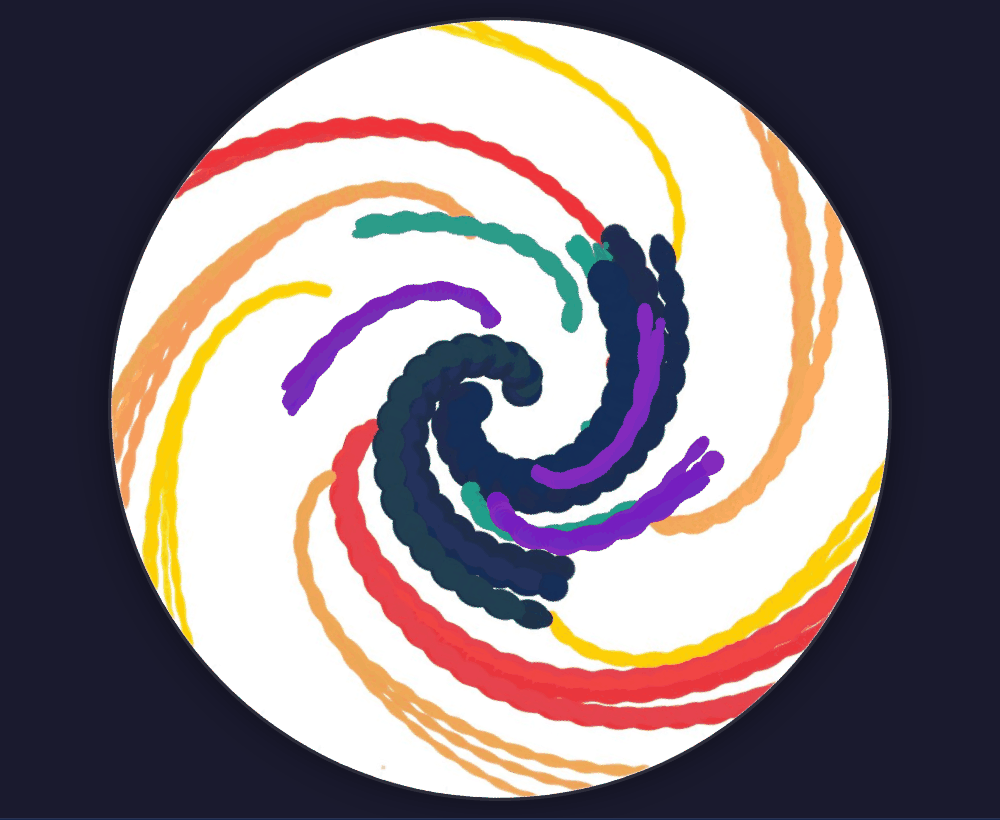
A spin art machine is a fair-day favorite and a lot of paint to clean up. Spin Art does it on screen. It opens on a finished piece: navy, red, orange, yellow and teal paint flung into a spiral on a white disc, with purple picked as the next color. Press play to start the disc turning and click anywhere on it. The drop splits into streaks that race toward the edge and curve as they go, the ones near the rim fastest of all.
Using this with a class? Make a free class and add your students yourself: each gets a username and password, with no email or Google account needed. Or give them one join code. Using Google Classroom? Post the link there; with a free class, the link also puts each student in your class, so you see their work. mytekDev is also available from the Google Workspace Marketplace, so your school's Google admin can install it for everyone.A first lesson: Everyone clears the disc, drops three drips on it while it is still, one near the center and two farther out, then presses play and explains why the drip near the center hardly moved while the outer ones streaked to the edge.
Set up a free class Share to Google ClassroomWhat a student actually does
They press play and the finished piece starts to turn, a faint dot near the rim showing which way it goes. They click the disc and a purple drip lands, splits into a few streaks and runs outward in curves, tapering as its paint runs out, and anything that reaches the rim is flung off. A drip near the center barely moves, because the push there is small. They drop another near the edge and it is gone in a moment.
Then they make their own. The trash can clears the disc and Background sets its color, which is best picked first, since changing it paints over the picture. A drip splits into three to five streaks, Pour lays down a stream as they hold the button and drag, and Splatter throws a burst of small drops in every direction. Size runs from a fine line to a fat puddle, and a bigger drop carries more paint, so it streaks farther. Speed slows the disc to a crawl or speeds it up, and paint dropped on a still disc sits in a puddle until the spin starts, then it flies. Each streak varies a little from the picked color, so a single color still looks like paint. Undo steps back, and the picture saves to the student's account.
Three purple drips dropped on the turning disc. Each drip splits into a few streaks, and each streak curves as it moves out instead of running straight to the edge. The app works out the paint's motion as seen from the disc itself: an outward push that grows the farther the paint is from the center, and a sideways push that bends it back against the direction of the spin.
What they are learning while they play
Nothing here is presented as a lesson. This is what the activity is made of.
| What the student does | What it is |
|---|---|
| Drops paint near the center and near the rim and compares | Distance from the center. On a spinning disc, the outward push on the paint grows the farther it is from the center. Paint at the middle hardly moves, and paint near the edge is flung off. |
| Drags the Speed slider up and drops paint again | Speed of rotation. Spinning faster pushes harder, and not just a little: twice the speed gives four times the outward push, because the push grows with the square of the spin rate. |
| Watches a streak curve instead of running straight out | Frames of reference. Seen from above, moving paint tends to keep going straight while the disc turns under it. On the disc, that shows up as a sideways push that bends each streak back against the spin. |
| Drops paint on a still disc, then presses play | Force and motion. Paint at rest stays at rest until something pushes it. The spin is the push, which is why the puddles only move once the disc turns. |
| Makes the drop bigger and sees it streak farther | Friction and drag. Thick paint drags on the surface and slows down. A bigger drop has more paint to spend, so it keeps going longer before it thins out to nothing. |
| Picks colors that sit well together on the disc | Color and composition. A few colors chosen on purpose read better than many at random. Dark colors near the center and bright ones toward the rim give a picture a middle to look at. |
How to tell whether it landed
Ask, and let them show you. A student who has understood it can answer these without help.
- Before you press play: which of your drops will move first and fastest, and why?
- Why did the paint near the center make a thick blob while the paint near the edge made thin streaks?
- What happened to the paint you dropped while the disc was still, and what made it move?
- If you double the speed, how much harder is the paint pushed outward?
- Why does each streak curve instead of going straight to the edge?
Use it in your subject
Not a technology class? Then the app is how students show what they learned in your unit. More projects for every subject.
Art
Make three pieces with the same three colors: one at a slow speed, one fast, and one dropped on a still disc and then spun. Put them side by side and describe how speed changes the lines.
Physical science
Clear the disc, drop a drip at the center, halfway out and near the rim while it is still, then spin. Rank how far each one traveled and connect it to distance from the center.
Math
The outward push grows with the square of the spin rate. Make a table of speed against push for speeds 1, 2, 3 and 4, and graph it to see the curve bend upward.
Practical notes
- AgesAny age that can click a mouse enjoys it. The questions about distance, speed and curving streaks suit grades 4 through 12.
- TimeA few seconds to the first streak. A finished piece takes five to ten minutes, and the drop-and-compare experiment about twenty.
- EquipmentA computer, Chromebook or tablet with a modern browser. Paint drops with a mouse, a trackpad or a finger. No sound, so no headphones. Nothing to install.
- CostFree. The app has no paid tier.
- PrepAbout two minutes: press play, drop a few colors, and try the still-disc-then-spin trick yourself.
- In a groupEveryone can run the same three-drop experiment at once and compare where their paint ended up, with no paint, cards or cleanup.
For co-ops, microschools, and classrooms
Hand everyone a cleared disc and the same question: where will the paint go? Each student predicts, drops and spins, and the picture on the screen is the answer, so a wrong guess is easy to see and easy to try again.
- Drip, pour and splatter, at any speed.
- Paint moves by a simple model of a turning disc, not by a canned animation.
- No paint, no cards, no cleanup, and every student gets a turn at once.
- No install, no per-seat license. Student work is private by default.
Common questions
Is it free?
Yes. It runs in your browser and there is no paid tier. A free account adds saving, but nothing on this page is behind a paywall.
Does it replace a real spin art machine?
For seeing how a spin moves paint, mostly yes, and with no mess: no paint to buy, no cards, no splashes, every student gets a turn at the same time, and Undo and the trash can make a bad drop free to try again. What the real thing has that this lacks: paint that soaks into the card and wet colors that run into each other and blend. Here each streak is laid over the others and colors do not mix. And at the end of a real spin there is a card to hold and hang; here it is a picture on the screen.
Does my child need an account to try it?
No. The demo on this page is the whole app with the finished piece loaded. Saving needs a free account, and it keeps the picture and the settings, such as the color, size, speed and mode.
Why does the paint curve instead of going straight out?
The app works out each drop's motion as seen from the turning disc. There, two pushes act on it: one outward, which grows with distance from the center and with the square of the spin rate, and one sideways, which bends moving paint back against the direction of the spin. Drag slows the paint as it goes, so it curves, thins and stops, or flies off the edge.
Does it make symmetrical patterns?
Not by itself. Nothing in the app copies or mirrors the paint. Every streak follows the same rule, so the streaks share a family of spiral shapes, and a student who drops the same color at evenly spaced points around the center gets a pattern close to symmetrical. For a tool that repeats every stroke around the center, try Art Maker.
How realistic is it?
The pushes have the right shape: stronger farther out, much stronger at higher speed, a sideways bend against the spin, and drag. Their strengths are tuned to look good rather than measured from real paint, each drop gets a small random wobble so its path looks natural, and the paint does not soak in or mix. The speed slider goes from a stop up to 120 turns a minute.
Does it run on a Chromebook or tablet?
Yes. It installs nothing and runs in the browser. Paint drops with a mouse, a trackpad or a finger, and dragging a finger in Pour mode pours a stream.
Is a student's work public?
No. Pictures are private by default. A student can choose to share one. In a class the teacher can see students' projects.
What subject can I log this as?
Most families log it as art: color, line and composition. The experiments with distance and speed are physical science: rotation, force and motion.
Still have a question? Ask us, and a person will write back.
Where to go next
Start with Spin Art
Trying it costs nothing and takes about five minutes. An account is what makes the work last.
Spin Art is one of the making apps on the platform. Every detail on this page was read from the app itself with the finished-piece starter. It is a place to make things, not a course, and it is not a substitute for a teacher: it is at its best when an adult asks the questions above and takes the answers seriously.
Page last reviewed November 2026.
Google, Google Classroom and Chromebook are trademarks of Google LLC.