Chili3D
Engineers design parts in CAD: solid shapes with exact sizes, joined, cut and rounded until they match a drawing. Chili3D is a CAD program that runs in the browser, built on the same OpenCascade geometry kernel used by FreeCAD. It opens on a desk stand with a slot for a phone and three orange cylinders standing where the pen holes will go. Type a new radius into a cylinder so it fits a real pen, run Cut, and the cylinders become holes. Free, in the browser, no account needed to try it.
Using this with a class? Make a free class and add your students yourself: each gets a username and password, with no email or Google account needed. Or give them one join code. Using Google Classroom? Post the link there; with a free class, the link also puts each student in your class, so you see their work. mytekDev is also available from the Google Workspace Marketplace, so your school's Google admin can install it for everyone.A first lesson: Everyone measures one pen, marker and glue stick with a ruler, sets the three hole sizes to fit with a little room to spare, cuts the holes, and explains why the hole has to be bigger than the pen.
Set up a free class Share to Google ClassroomWhat a student actually does
They click the thinnest orange cylinder, Pencil hole, and the Properties panel shows its Radius: 4.5. They hold a pencil against a ruler, decide it needs a 5, type it in, and the cylinder grows. They do the same for the marker and the glue stick, then pick Cut from the Boolean group, click the stand, click the three cylinders and press Enter. The cylinders vanish and leave three holes. If one is too tight, Ctrl+Z takes the cut back so they can fix the size and cut again.
From there it is real CAD. Boxes, cylinders, cones, spheres and pyramids, drawn by clicking or with keys such as B for a box and Y for a cylinder. Rectangles, circles and lines sketched flat and pulled up into solids with Extrude, or spun with Revolve. Join, Cut and Intersect for combining shapes, Fillet and Chamfer for rounding and beveling edges, Move, Rotate, Mirror and Array for placing copies, and Measure for checking a length or an angle. Export writes STEP, IGES, BREP, STL, PLY or OBJ files, which save into the student's files on the platform.
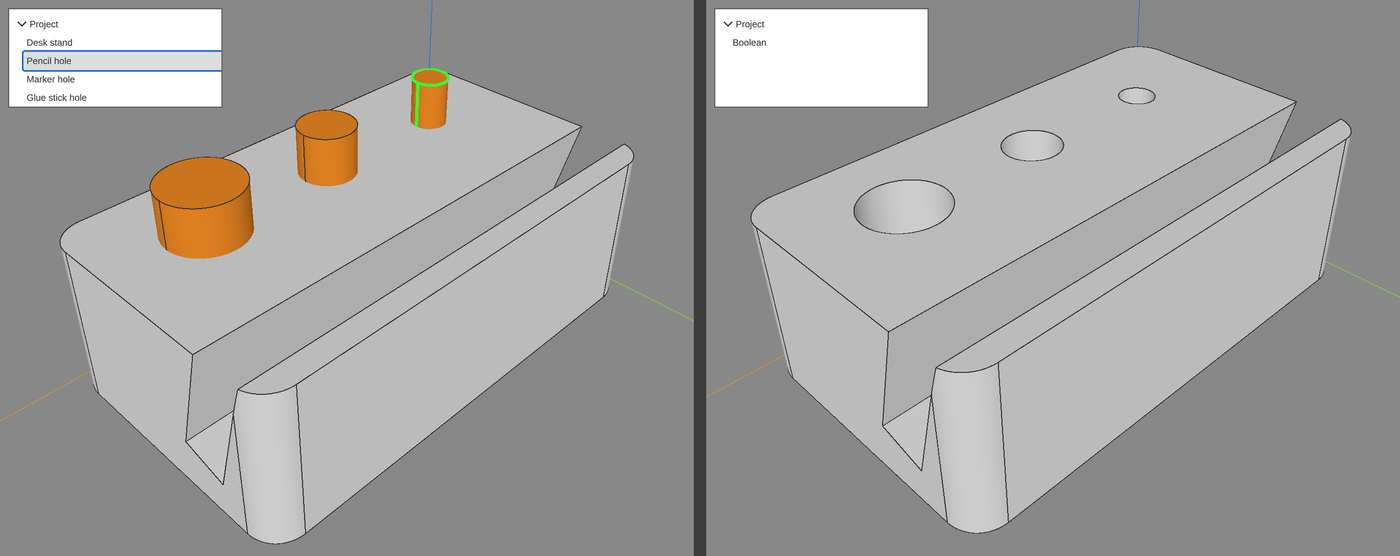
One command, and four items became one. Cut subtracted the three cylinders from the stand and replaced all four with a single new solid called Boolean. The cylinders are gone, not hidden, so their radius can no longer be changed. To try a different hole size, a student presses Ctrl+Z to step back, changes the cylinder, and cuts again. That is why the sizes get checked with a ruler before the cut, not after.
What they are learning while they play
Nothing here is presented as a lesson. This is what the activity is made of.
| What the student does | What it is |
|---|---|
| Types a new Radius for Pencil hole | Dimensions. A CAD part is defined by numbers, not by eye. The hole is exactly the size typed in, so it has to come from a real measurement. |
| Makes the hole a little wider than the pen | Clearance. Parts that must slide together need a gap. A hole the same size as the pen will grip it or not fit at all once printed. |
| Cuts the three cylinders out of the stand | Boolean operations. Solids are combined by adding one to another (Join), subtracting one from another (Cut), or keeping only the overlap (Intersect). |
| Rounds the corners of a new block with Fillet | Fillets and chamfers. A fillet rounds an edge and a chamfer bevels it. Real parts use them to remove sharp corners and make them stronger and easier to hold. |
| Draws a rectangle and pulls it up with Extrude | Sketch and extrude. Many parts start as a flat 2D outline that is pushed into a third dimension. Most CAD programs build parts this way. |
| Changes the x, y and z of a cylinder's Center | 3D coordinates. Every point in the model is three numbers along three axes, the same idea as a graph with a third direction added for height. |
| Exports the finished stand as STEP and as STL | File formats. STEP keeps the exact curved surfaces so other CAD programs can edit the part. STL turns it into triangles, which is what 3D printer software reads. |
| Presses Ctrl+Z to undo a cut and resize a hole | Design history. In this program a cut is final until it is undone. Some CAD programs keep every step editable, and knowing which kind you are using changes how you plan. |
How to tell whether it landed
Ask, and let them show you. A student who has understood it can answer these without help.
- Your pen measures 9 mm across. What radius did you give its hole, and why not exactly 4.5?
- What happened to the orange cylinders when you ran Cut?
- After the cut, how would you make one hole bigger?
- Which file would you send to a 3D printer, and which to someone who wants to keep editing the part in CAD?
- Why do the holes stop short of the bottom of the stand?
Use it in your subject
Not a technology class? Then the app is how students show what they learned in your unit. More projects for every subject.
Engineering
Design a part that has to fit something real, such as a pen, a phone or a charging cable. Measure it with a ruler, model it, and write down the clearance you chose and why.
Math
Work out the volume of a hole from its radius and depth, then use Measure to check a length in the model against the number you calculated.
Technology
Export the same part as STEP and as STL, then compare what each one keeps: exact curves for editing, or triangles for printing.
Practical notes
- AgesAges 11 through high school. Younger students change the hole sizes and run the cut; older ones build their own parts from sketches and shapes.
- TimeA few minutes to the first cut. A first part of their own, such as a nameplate or a pencil cup, takes forty-five to ninety minutes.
- EquipmentA computer with a modern browser and 3D graphics (WebGL), and a mouse with a scroll wheel. The view is panned and turned by holding the scroll wheel down, so a laptop touchpad alone cannot turn the model. Nothing to install. A ruler helps when a part has to fit something real.
- CostFree. The app has no paid tier.
- PrepPlug in mice if the class uses laptops. Then open the page and go. Reading this page first takes about three minutes.
- In a groupEveryone can start from the same desk stand, so a whole class works from one shared starting point and compares the sizes each student chose.
For co-ops, microschools, and classrooms
Hand everyone the same desk stand and a different pen to fit. The stands that come back have different hole sizes, and each student can say what they measured and how much room they left, which makes the thinking easy to see and easy to check.
- Real solid-modeling CAD built on the OpenCascade kernel.
- Booleans, fillets, chamfers, extrude, revolve, sweep and loft.
- Exports STEP, IGES and STL, saved into the student's files.
- No install, no per-seat license. Student work is private by default.
Common questions
Is this the original Chili3D?
It is Chili3D, the free and open-source browser CAD program by xiangechen and its contributors, released under the GNU Affero General Public License, version 3. Its source code is on GitHub. This is our hosted copy of the 0.6.1 release, not the official Chili3D site. Our build adds saving to a free account, keeps exported files in your files on the platform, and hides the app's own home screen and its Save and Save To File buttons, since projects are saved through the platform instead.
Do I need to download anything?
No. It runs in the browser on Windows, Mac, Linux and Chromebooks, with nothing to install. It does need 3D graphics (WebGL), which nearly every current computer has, and a mouse with a scroll wheel to move the view.
Is it only for students?
No. It is a full solid-modeling CAD program for anyone. Much of this page is written for teachers and parents because many of the people who use it are students.
Is it free?
Yes. It runs in your browser and there is no paid tier. A free account adds saving and keeping exported files, but nothing on this page is behind a paywall.
Does my child need an account to try it?
No. The demo on this page is the complete app with the desk stand loaded. Saving and keeping exported files need a free account, and the stand you changed comes with you as your first project.
Can it make files for a 3D printer?
Yes. Select the part, choose Export, and pick STL. The file lands in the student's files on the platform, ready to download for a 3D printer or a printing service. Chili3D does not label its units, so students treat every number as millimeters, which is what most printer software assumes when it opens an STL.
What ages is it for?
Ages 11 through high school. Changing sizes and running a cut works for younger students; building parts from sketches suits older ones.
Is their work public?
No. Projects are private by default. A student can choose to share a design, and in a class the teacher can see students' projects.
What subject can I log this as?
Most families log it as engineering or technology. Measuring, clearances and designing a part to fit are engineering, coordinates and volume are math, and file formats are technology. The table above lists specifically what is covered, so you can pick the label your records need and point at the evidence.
Still have a question? Ask us, and a person will write back.
Where to go next
Start with Chili3D
Trying it costs nothing and takes about five minutes. An account is what makes the work last.
Chili3D is one of the making apps on the platform. It is a place to make things, not a course, and it is not a substitute for a teacher: it is at its best when an adult asks the questions above and takes the answers seriously.
Chili3D is by xiangechen and contributors, used under the GNU Affero General Public License v3. It is built on the OpenCascade geometry kernel and three.js. Source.
Page last reviewed October 2026.
Google, Google Classroom and Chromebook are trademarks of Google LLC.