CircuitVerse
CircuitVerse is an open-source digital logic simulator. Students place gates on a canvas, wire them to switches and lights, and the circuit runs while they build it. It opens on a staircase light with two switches, one at the bottom of the stairs and one at the top, wired next to an AND gate and an OR gate for comparison. Flip the switches and work out which light behaves like the real one. Free, in the browser, no account needed to try it.
Using this with a class? Make a free class and add your students yourself: each gets a username and password, with no email or Google account needed. Or give them one join code. Using Google Classroom? Post the link there; with a free class, the link also puts each student in your class, so you see their work. mytekDev is also available from the Google Workspace Marketplace, so your school's Google admin can install it for everyone.A first lesson: Everyone gets the same hallway circuit and fifteen minutes to make the light work from a third switch, then proves it with a truth table of all eight switch positions.
Set up a free class Share to Google ClassroomWhat a student actually does
They click the Downstairs switch and the hall light goes out, then click the Upstairs switch and it comes back on. The AND light and the OR light react to the same two switches, so after four clicks they have seen every combination and can say which gate matches a real staircase. Then they take the challenge in the note and add a third switch: an Input from the Circuit Elements panel, the XOR gate's Input Size set to 3 in the Properties panel, and the gate's wires dragged on again, since changing the size gives it fresh connections. Ctrl+Z takes back a step.
From there it is the full simulator. AND, OR, NOT, XOR, NAND, NOR and XNOR gates, multiplexers and decoders, flip-flops, a clock, counters, seven-segment displays and an ALU. A finished circuit can be placed inside another as a subcircuit, and Combinational Analysis under Tools builds a circuit from a truth table or a Boolean expression. Circuits save to the student's account with all their tabs, Download Image under Tools saves a picture of the circuit for a report, and Export as File downloads a .cv file that Import Project opens again.
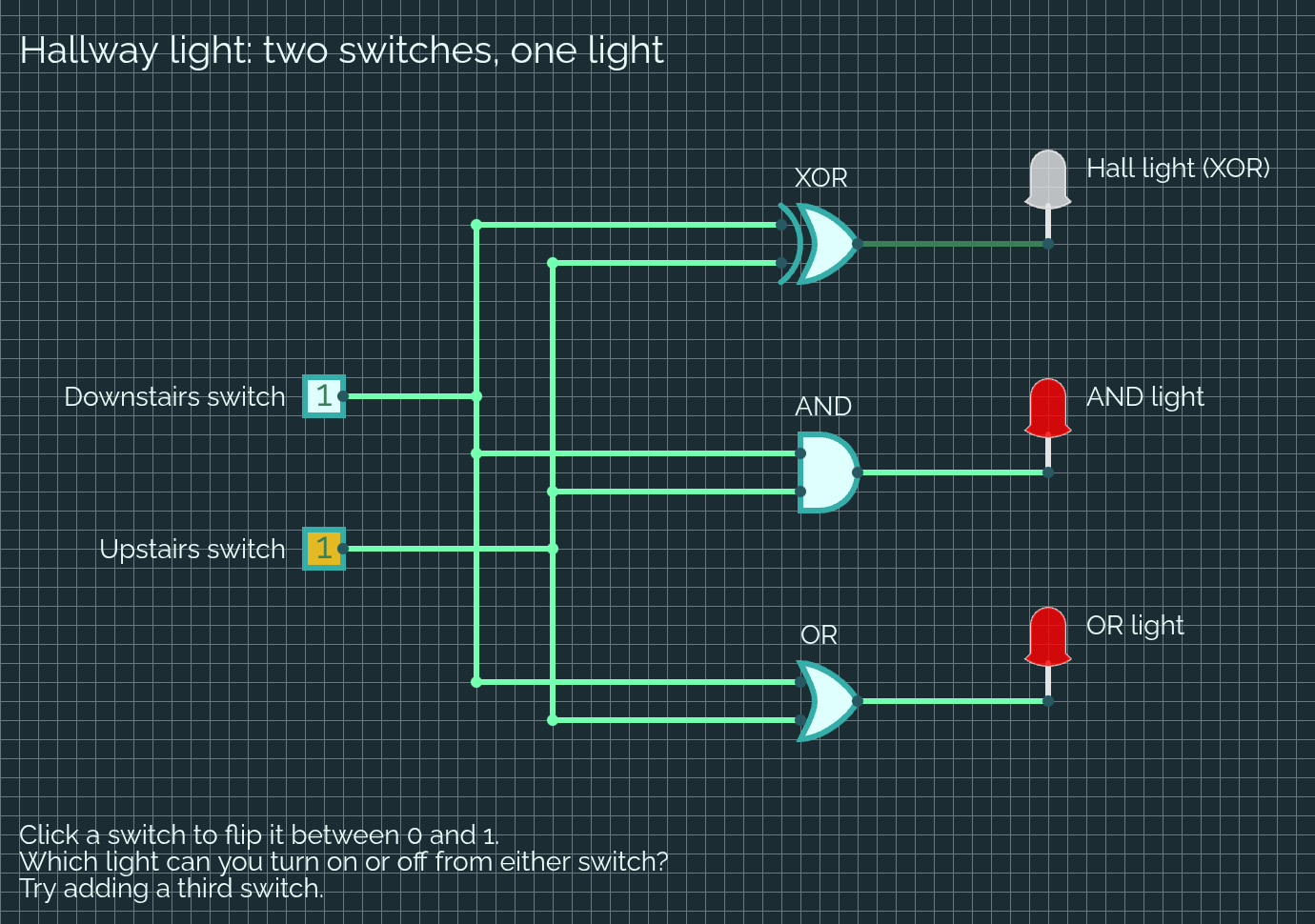
Both switches up, and the hall light is off while AND and OR are on. An XOR gate is on only when its two inputs disagree, so flipping either switch always changes the light, whichever position the other one is in. A real staircase light with a switch at each end is wired to behave exactly this way. OR fails the test: with one switch already up, the other one can no longer turn the light off.
What they are learning while they play
Nothing here is presented as a lesson. This is what the activity is made of.
| What the student does | What it is |
|---|---|
| Clicks a switch from 0 to 1 and watches an LED light up | Binary signals. In a digital circuit every wire carries one of two values, 0 or 1, off or on. Everything a computer does is built from that. |
| Compares the AND light with the OR light | Logic gates. AND is on only when every input is on. OR is on when any input is on. A gate is a small rule that turns inputs into an output. |
| Finds that the hall light is off when both switches agree | Exclusive or (XOR). XOR is on when its two inputs are different. That is why flipping either switch always changes the light. |
| Writes down all four switch positions and what each light did | Truth tables. A table that lists every possible input and the output for each one. Two switches make four rows, three switches make eight. |
| Gives the XOR gate a third input for a third switch | Parity. An XOR with more inputs is on when an odd number of them are on, so any one switch still flips the light. |
| Runs one switch's wire to three different gates | Fan-out. One signal can feed many gates at once. The dot where a wire splits is a junction, and every branch carries the same value. |
| Reads the XOR and AND lights as the answer to 1 + 1 | Half adder. XOR gives the sum digit and AND gives the carry. Adders built from gates like these are how a processor does arithmetic. |
| Types a Boolean expression into Combinational Analysis | Boolean algebra. A circuit and a written expression made of AND, OR and NOT can describe the same rule, and one can be turned into the other. |
How to tell whether it landed
Ask, and let them show you. A student who has understood it can answer these without help.
- Before you click anything: what will each light do when both switches are 0?
- The OR light and the hall light agree three times out of four. Which switch position is different, and why does it matter on a staircase?
- Which light would make a good alarm that needs two keys turned at once?
- You added a third switch. How many rows does the truth table have now, and how did you check them all?
- Treat the two switches as the numbers in 1 + 1. Which light shows the carry, and which shows the sum?
Use it in your subject
Not a technology class? Then the app is how students show what they learned in your unit. More projects for every subject.
Computer science
Build a half adder from one XOR and one AND gate, then chain two of them with an OR gate into a full adder that adds three bits, the same building block a processor uses.
Math
Write the truth table for a circuit by hand, predict the outputs, then check every row in the simulator. Count in binary on the switches and read the answer on a display.
Engineering
Design a control from a real situation, such as a garage door that opens only when the button is pressed and nothing is in the way, and test every case before calling it safe.
Practical notes
- AgesAges 11 through high school. Younger students flip switches, compare the gates and add a third switch; older ones build adders, counters and circuits with flip-flops and a clock.
- TimeA minute to the first flipped switch. The third switch takes fifteen to thirty minutes, and a half adder built from scratch about forty-five.
- EquipmentA computer or Chromebook with a modern browser. A mouse makes placing parts and drawing wires easier than a trackpad. Nothing to install.
- CostFree. The app has no paid tier.
- PrepNone. Open the page and go. Reading this page first takes about three minutes.
- In a groupEveryone can start from the same hallway circuit, so a whole class works from one shared starting point and compares how each student added the third switch.
For co-ops, microschools, and classrooms
Hand everyone the same two-switch circuit and the same goal: a third switch that still works. The circuits that come back look different, and a truth table settles whether each one is right, so the checking is done by the student's own evidence rather than by the teacher's say-so.
- The CircuitVerse simulator: gates, flip-flops, clocks, displays and subcircuits.
- Combinational Analysis turns a truth table or a Boolean expression into a circuit.
- A shared circuit opens in a view where anyone with the link can flip the inputs but not edit.
- No install, no per-seat license. Student work is private by default.
Common questions
Is this the original CircuitVerse?
It is CircuitVerse, the open-source digital logic simulator started by Satvik Ramaprasad and built by the CircuitVerse contributors, used under the MIT license. This is our hosted copy of its simulator, not circuitverse.org. Our build adds saving circuits to a free account, a project picture that shows the whole circuit, a shared-link view where anyone can flip the inputs without editing, and colors that follow the site's light or dark setting. The circuitverse.org account features, such as saving there, groups and the forum, are not part of what we host.
Do I need to download anything?
No. It runs in the browser on Chromebooks, Windows, Mac and Linux, with nothing to install. Export as File under the Project menu downloads a .cv file, the format CircuitVerse uses, and Import Project opens it again.
Is it only for students?
No. It is a full digital logic simulator for anyone. Much of this page is written for teachers and parents because many of the people who use it are students.
Is it free?
Yes. It runs in your browser and there is no paid tier. A free account adds saving, but nothing on this page is behind a paywall.
Does my child need an account to try it?
No. The demo on this page is the complete simulator with the hallway circuit loaded. Saving needs a free account, and the circuit you changed comes with you as your first project.
Does it simulate real electronics?
No. It simulates digital logic: every wire is 0 or 1, or a group of bits. It does not model voltage, current, resistors or batteries, so it teaches how a circuit decides, not how electricity flows through it.
What ages is it for?
Ages 11 through high school. Flipping switches and comparing gates works for younger students; adders, flip-flops and clocked circuits suit older ones.
Is a student's work public?
No. Circuits are private by default. A student can choose to share one, and the share link opens a view where anyone with the link can flip the inputs but cannot change the circuit. In a class the teacher can see students' projects.
What subject can I log this as?
Most families log it as computer science. Logic gates, binary and adders are how computers work inside, truth tables and Boolean expressions are math, and designing a control that has to handle every case is engineering. The table above lists specifically what is covered, so you can pick the label your records need and point at the evidence.
Still have a question? Ask us, and a person will write back.
Where to go next
Start with CircuitVerse
Trying it costs nothing and takes about five minutes. An account is what makes the work last.
CircuitVerse is one of the making apps on the platform. It is a place to make things, not a course, and it is not a substitute for a teacher: it is at its best when an adult asks the questions above and takes the answers seriously.
CircuitVerse is by Satvik Ramaprasad and the CircuitVerse contributors, used under the MIT license. Source.
Page last reviewed October 2026.
Google, Google Classroom and Chromebook are trademarks of Google LLC.