CryptoLab
Every student has been told to use a strong password. Very few have seen why. CryptoLab shows it: a student types a password many people use, presses one button, and watches a list of common passwords find it, not by undoing the hash, but by hashing each guess and comparing. Around that are the ideas a first cybersecurity unit needs: a Caesar cipher on a wheel, hashes drawn as colored grids, the avalanche effect, XOR, and why public keys exist. It runs in a browser tab, Chromebooks included. Free, and no account needed to try it.
Using this with a class? Make a free class and add your students yourself: each gets a username and password, with no email or Google account needed. Or give them one join code.A first lesson: Everyone types the password they think is strongest into the Password Checker, without saying it out loud. The class counts how many the common list found, then argues about what made the others safe.
Set up a free classWhat a student actually does
They start on a cipher wheel with HELLO WORLD already encrypted to KHOOR ZRUOG. Dragging the shift slider turns the inner ring, and the output and a chip for every letter change as it moves. Substitution scrambles the whole alphabet instead of turning it, and Reverse shows the simplest change there is. Then they open Hashing and type anything: each byte of the hash becomes a colored square, the same input always gives the same grid, and the Avalanche Demo puts two inputs side by side so one changed letter can be seen changing every square.
In Password Checker they type a password and see the hash a website would store instead. Try Common Passwords hashes a list of ten well-known passwords and marks any that match. Under Encryption, they lock a message with a secret key and unlock it with the same key, line up two binary numbers in the XOR Visualizer, and step through a mailbox picture of public and private keys. The Challenges tab has ten puzzles, from cracking KHOOR ZRUOG to finding a shift, decoding ROT13 and working out an XOR, each checked when they answer.
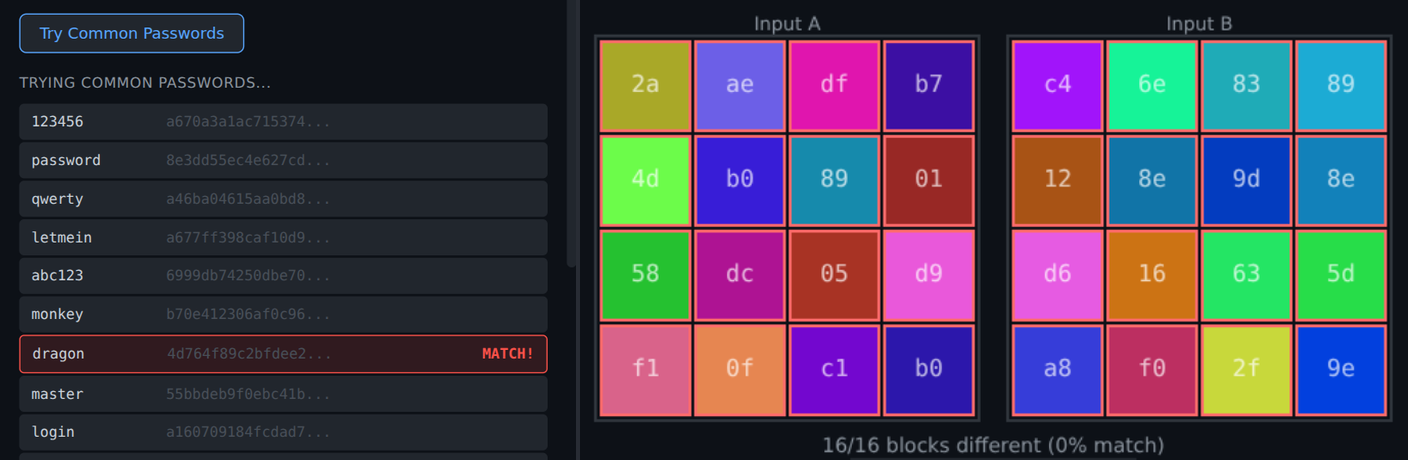
Two ideas behind every login. Left, the password dragon was found on the seventh guess: the checker never reversed the hash, it hashed ten common passwords and compared. Right, hello and hellp differ by one letter, and not one of the sixteen blocks of their hashes is the same. Together they explain why a site can store only the hash, and why a common password is still found in seconds.
What they are learning while they play
Nothing here is presented as a lesson. This is what the activity is made of.
| What the student does | What it is |
|---|---|
| Drags the shift slider on the wheel | Encryption and keys. The method is public: move every letter the same distance. The shift is the key, and the message is only as secret as the key. |
| Cracks KHOOR ZRUOG in Challenges | Brute force. A Caesar cipher has only 25 useful keys, so trying every one takes a minute. A good cipher has too many keys to try. |
| Shuffles the alphabet in Substitution | Key space and patterns. Far more possible keys than Caesar, but word lengths and common letters still show through, and that is how substitution ciphers are broken. |
| Types into the Hash Explorer | Hash functions. Any input becomes a fingerprint of the same size. The same input always gives the same fingerprint, and the fingerprint cannot be turned back into the input. |
| Changes hello to hellp in the Avalanche Demo | The avalanche effect. One small change in the input changes the whole output, so similar passwords do not have similar hashes. |
| Watches the stored hash appear under a password | Password storage. A website keeps the hash, not the password. When someone logs in, it hashes what they typed and compares the two. |
| Presses Try Common Passwords | Dictionary attacks. Attackers do not reverse hashes. They hash lists of likely passwords and look for a match, so a common password falls first. |
| Encrypts and decrypts with the same key | Symmetric encryption. One key locks and unlocks. It is fast, but both sides need the key, and sending it safely is its own problem. |
| Lines up two binary numbers in the XOR Visualizer | XOR. A bit is 1 where the two inputs differ. XOR with the same key twice gives the original back, which is why so many ciphers use it. |
| Steps through the mailbox | Public key encryption. Anyone can drop a message in the slot, but only the owner's private key opens the box. The padlock in a browser rests on this idea. |
How to tell whether it landed
Ask, and let them show you. A student who has understood it can answer these without help.
- The checker found dragon without ever reversing the hash. How did it find it?
- Why does a website store the hash of your password and not the password itself?
- hello and hellp are one letter apart. Why is it a good thing that their hashes share nothing?
- A Caesar cipher has 25 useful keys. Why is that a problem, and how would you fix it?
- If both sides need the same secret key, how do they share it without someone else reading it?
Use it in your subject
Not a technology class? Then the app is how students show what they learned in your unit. More projects for every subject.
History
Julius Caesar shifted letters to protect military messages. Students encrypt a short order with a shift, trade it, and time how long another group takes to break it without the key.
Math
A shift of 3 turns X into A: counting past Z starts again at A, which is arithmetic on a clock of 26. Students predict the output for large shifts, like 29 or 52, before checking on the wheel.
English
Substitution ciphers break because some letters are far more common than others. Students count the letters in a paragraph they wrote and use the counts to break a short substitution message by hand.
Practical notes
- AgesAges 10 through high school. Younger students work the cipher wheel and the challenges; older ones take on hashing, dictionary attacks and the key exchange problem, as a first week of a cybersecurity unit.
- TimeAbout a minute to crack the first password. The ten challenges take most of a class period.
- EquipmentAny computer or Chromebook with a modern browser. Nothing to install.
- CostFree. The app has no paid tier.
- PrepNone. Open the page and go. Reading this page first takes about four minutes.
- In a groupPairs work well: one student encrypts a message with a secret shift, the other breaks it, then they swap.
For co-ops, microschools, and classrooms
Start with the password activity above: it gets a room talking faster than any slide about password rules. Then give pairs the cipher wheel and the challenges, and finish with the one question the lab leaves open: if both sides need the same key, how do they share it safely? That question leads straight into how HTTPS works.
- Caesar, substitution and reverse ciphers, each with a visual.
- Hashes as colored grids, the avalanche effect, and a password checker with a common-password list.
- Symmetric keys, XOR, and a public and private key walkthrough.
- Ten challenges with hints, checked automatically. Student work is private by default.
Common questions
Is CryptoLab free?
Yes. It runs in your browser and there is no paid tier. A free account adds saving, but nothing on this page is behind a paywall.
Will it run on our school Chromebooks?
Yes. It installs nothing and runs in any modern browser, Chromebooks included, with no extension and no student email needed to try it.
Do students need an account to try it?
No. The demo on this page is the complete lab. Make a free account and the challenges a student has solved come with them as their first project.
Is the hash a real one like SHA-256?
No. CryptoLab uses a small teaching hash with a 16-byte output, so every hash fits on a four-by-four grid a student can compare by eye. It behaves the way a real hash does for these lessons: the same input gives the same output, and one changed letter changes almost everything. It is not meant to protect real passwords.
Does it teach the math behind public keys?
No. Public and private keys are shown as a mailbox: anyone can post a message, only the owner can open it. That is the idea students need first. The number theory behind RSA is not covered.
Does it fit a cybersecurity unit or a capture the flag event?
Yes, as the first week: encryption, hashing and password attacks are the ideas the rest of a unit assumes. Students who finish the ten challenges can go on to the capture the flag challenges in the platform's Linux terminal, where decoding base64 and checking hashes are part of the game.
What ages is it for?
Ages 10 and up. The cipher wheel and the first challenges work for upper elementary and middle school, and hashing and password attacks suit middle and high school.
What subject can I log this as?
Most families log it as computer science or cybersecurity. The Caesar cipher also fits history, and the shift arithmetic fits math. The table above lists specifically what is covered, so you can pick the label your records need and point at the evidence.
Still have a question? Ask us, and a person will write back.
Where to go next
Start with CryptoLab
Trying it costs nothing and takes about five minutes. An account is what makes the work last.
CryptoLab is one of the making apps on the platform. It is a place to make things, not a course, and it is not a substitute for a teacher: it is at its best when an adult asks the questions above and takes the answers seriously.
Page last reviewed September 2026.