Database Designer
Every app a student uses keeps its data in tables: one for users, one for posts, one for who follows whom, joined by keys. Database Designer lets them draw that structure instead of imagining it. It opens on the database behind a school's clubs: students, clubs, the memberships that link them, and each club's meetings. Drag a table, add one of your own, and export the SQL a real database server would run to build it. Free, in the browser, no account needed to try it.
Using this with a class? Make a free class and add your students yourself: each gets a username and password, with no email or Google account needed. Or give them one join code.A first lesson: Everyone designs the database for something the class knows well, a school library, a sports league or a video game's inventory, then two groups swap diagrams and try to answer three questions from the other group's tables alone.
Set up a free classWhat a student actually does
They drag the memberships table and the lines stay attached to it, because the lines belong to columns, not to the picture. They notice that memberships has a student_id and a club_id, and that the line from each one ends in an n at one side and a 1 at the other: one student, many memberships. Then they press Add table, name it, add columns, pick a type for each, and mark one as the primary key.
To connect it, they drag from the dot beside one column onto a column in another table, and a relationship appears. Opening it shows the cardinality and what happens to the rows when the row they point at is deleted. Code shows the whole diagram written out as text, and File, Export SQL writes the CREATE TABLE statements for MySQL, PostgreSQL, SQLite, MariaDB, SQL Server or Oracle. The diagram can also be saved as a picture for a report or a slide.
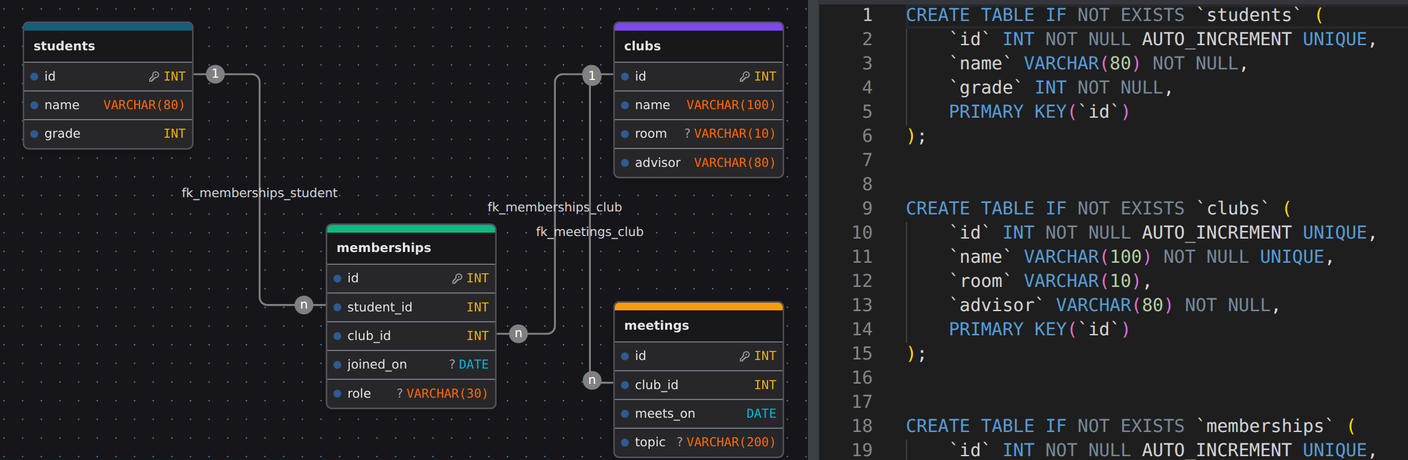
The diagram and the code the designer wrote from it. Each box became a CREATE TABLE, each column a line with its type, and the key symbol a PRIMARY KEY. The lines between boxes become FOREIGN KEY rules further down. A student who can read one side can predict the other, and that is most of what a first database course is asking.
What they are learning while they play
Nothing here is presented as a lesson. This is what the activity is made of.
| What the student does | What it is |
|---|---|
| Adds a table and gives it columns | Tables, rows and columns. A table holds one kind of thing, a column is one fact about it, and every row is one of those things. Spreadsheets look similar, but a database enforces the shape. |
| Picks INT, VARCHAR or DATE for a column | Data types. The type decides what a column can hold and how it is stored. A date stored as text cannot be sorted by date. |
| Marks id with the key symbol | Primary keys. Every row needs something that is never repeated, so the database can find it and other tables can point at it. |
| Drags a line from club_id to clubs.id | Foreign keys. A column that holds another table's key is a reference. The database refuses a membership in a club that does not exist. |
| Reads the 1 and n at the ends of a line | One-to-many relationships. One club has many meetings, but each meeting belongs to one club. The n goes on the side that repeats. |
| Builds memberships between students and clubs | Many-to-many and join tables. A student joins many clubs and a club has many students. Neither table can hold that, so a third table holds one row per pairing. |
| Ticks Not null and Unique | Constraints. Rules the database checks on every save: a club must have a name, and no two clubs can share one. |
| Sets a relationship to Cascade | Referential integrity. Deciding what happens to memberships when a club is deleted: delete them too, block the delete, or leave them pointing nowhere. |
| Exports for MySQL, then for PostgreSQL | SQL and its dialects. SQL is one language with several accents. The same design comes out a little differently for each database, and seeing both shows which parts are standard. |
How to tell whether it landed
Ask, and let them show you. A student who has understood it can answer these without help.
- Why does memberships exist? What would go wrong if clubs had a student_id column instead?
- Which column in each table is the primary key, and why that one?
- A club is deleted. What happens to its meetings, and where in the design did you decide that?
- Point to the line in the SQL that came from the line between meetings and clubs.
- Your favorite app keeps users and posts. Sketch the two tables and the column that links them.
Use it in your subject
Not a technology class? Then the app is how students show what they learned in your unit. More projects for every subject.
Social studies
What does a census need to record? Students design the tables for people, households and places, and discover what a household actually is while they do.
English
The school library's catalog: books, authors, borrowers and loans. An author with three books is one author, and the design has to say so.
Practical notes
- AgesAges 12 through high school. Middle school students design a database for something they know; high school and AP students work through normalization, constraints and the SQL.
- TimeA minute to the first change. Designing a four-table database of their own takes a class period.
- EquipmentAny computer or Chromebook with a modern browser. A mouse makes dragging relationships easier. Nothing to install.
- CostFree. The app has no paid tier.
- PrepNone. Open the page and go. Reading this page first takes about three minutes.
- In a groupGroups design the same system separately, then compare where they put each fact.
For co-ops, microschools, and classrooms
Give every group the same brief, a school library, a sports league, a pet shelter, and fifteen minutes. The diagrams come back different, and the argument about which one is right is the lesson: where a fact should live, what should be its own table, and what the database should refuse to store.
- Tables, columns, types, primary and foreign keys, and constraints.
- Relationships drawn on the diagram, with cardinality and delete rules.
- SQL export for MySQL, PostgreSQL, SQLite, MariaDB, SQL Server and Oracle.
- No install, no per-seat license. Student work is private by default.
Common questions
Is Database Designer free?
Yes. It runs in your browser and there is no paid tier. A free account adds saving, but nothing on this page is behind a paywall.
Does my child need an account to try it?
No. The demo on this page is the complete designer. Make a free account and the school clubs database comes with you as your first project.
Does it run the database?
No. It designs the database and writes the SQL. The exported file is what a database server such as MySQL, PostgreSQL or SQLite runs to create the tables.
Do students need to know SQL first?
No. The diagram comes first and the SQL is written from it, so students can read the SQL as a translation of something they already understand.
What ages is it for?
Ages 12 and up. It fits a middle school computer science unit, and it covers what high school and AP courses expect about relational data.
What subject can I log this as?
Most families log it as computer science. Organizing information into tables and relationships is also data literacy. The table above lists specifically what is covered, so you can pick the label your records need and point at the evidence.
Where to go next
Start with Database Designer
Trying it costs nothing and takes about five minutes. An account is what makes the work last.
Database Designer is one of the tools on the platform. It is a place to make things, not a course, and it is not a substitute for a teacher: it is at its best when an adult asks the questions above and takes the answers seriously.
Based on drawDB, used under the AGPL-3.0 license. Source.
Page last reviewed September 2026.